
Deploy Temporal | Open Source AWS Step Functions Alternative
Self-host Temporal. Durable Workflow Engine for workflow Orchestration
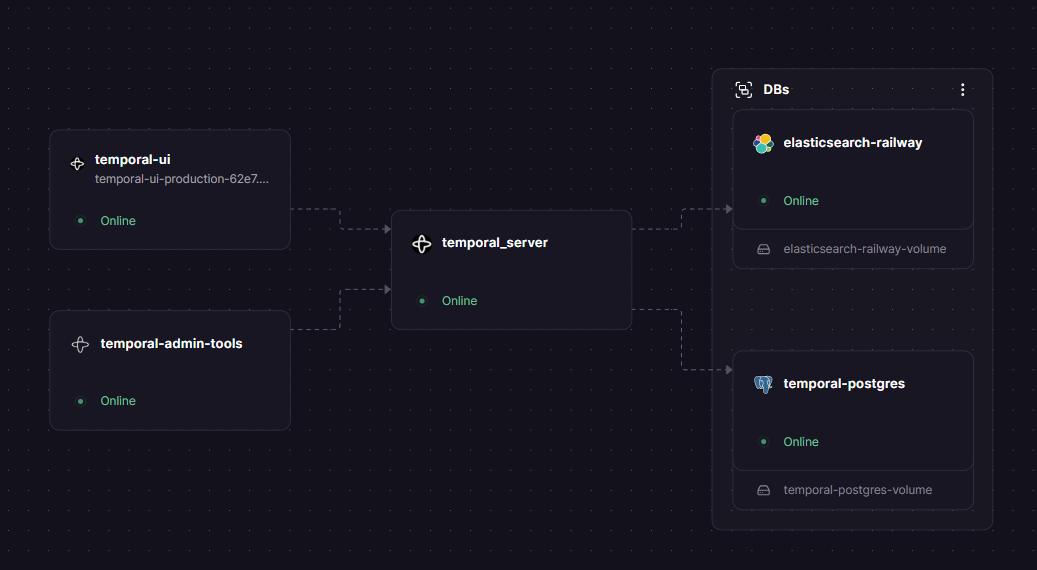
DBs

temporal-postgres
Just deployed
/var/lib/postgresql/data

elasticsearch-railway
Just deployed
/esdata

temporal-admin-tools
Just deployed
temporal_server
Just deployed
temporal-ui
Just deployed
Deploy and Host Temporal on Railway
Self-host Temporal — the open-source durable execution platform used in production by Stripe, Netflix, Datadog, and Snap — on Railway with a one-click deploy. Temporal guarantees workflows run to completion through infrastructure failures and outages, eliminating hand-rolled retry logic, state machines, and scheduler glue code.
Deploy Temporal with the full five-service stack:
Getting Started with Temporal on Railway
After deploying, open the public domain assigned to the Temporal UI service — this is the web dashboard where you'll monitor all workflow executions.
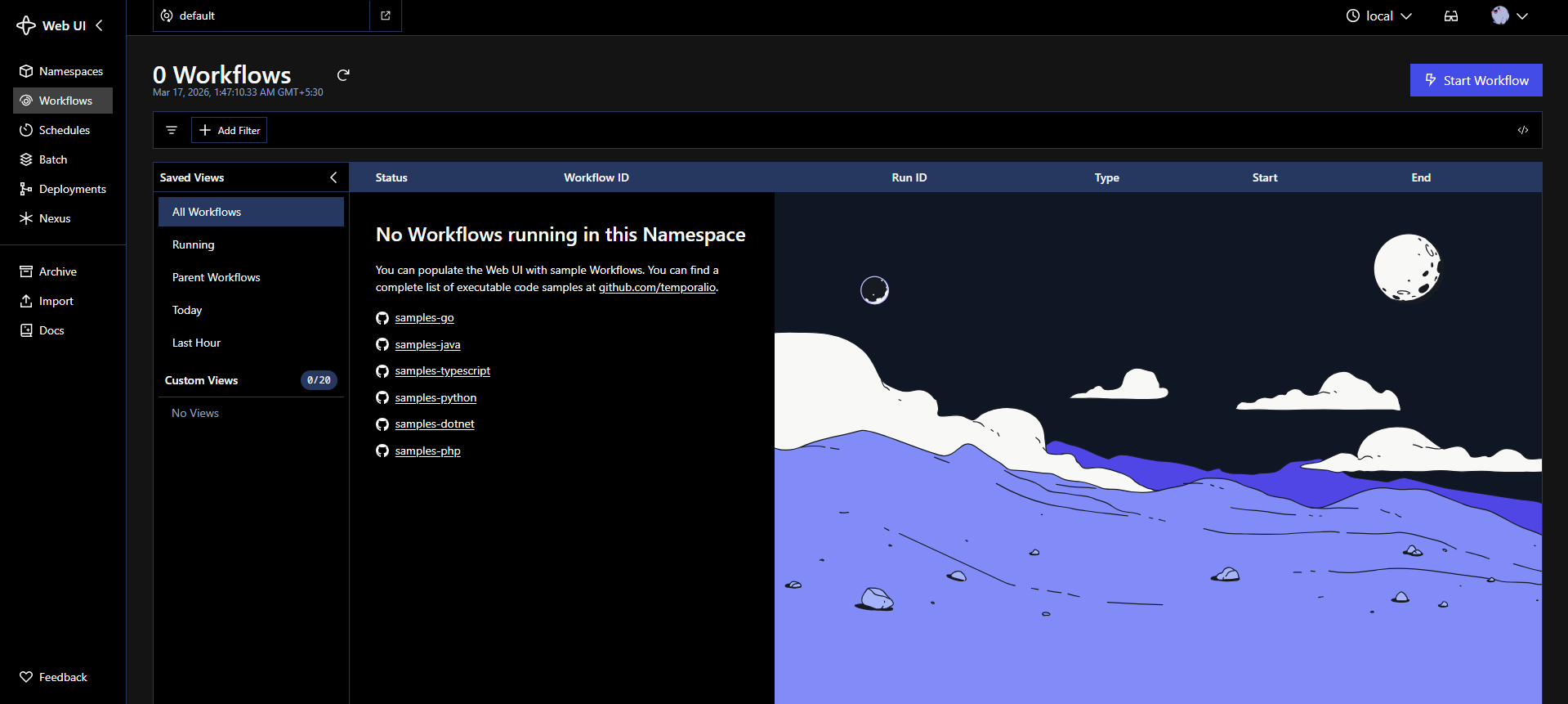
You'll land on the default namespace, which is created automatically on first boot. The Workflows list will be empty until you connect a worker. To run your first workflow, add a worker service to your Railway project and set its TEMPORAL_ADDRESS environment variable to ${{Temporal Auto Setup.RAILWAY_PRIVATE_DOMAIN}}:7233 — the server's private gRPC endpoint. Workers are your application code, built with any of the official Temporal SDKs (Go, Python, TypeScript, Java, .NET), and they connect to this cluster to execute workflow and activity logic.
About Hosting Temporal
Temporal is MIT-licensed, originally forked from Uber's Cadence project. Where Airflow schedules DAGs and Step Functions chain Lambda invocations, Temporal treats each workflow as a stateful function that can sleep for months, handle signals from external systems, and resume exactly where it left off after any failure — without losing state.
Key features:
- Durable execution — workflow state is checkpointed at every step; crashes are transparent to your code
- Automatic retries — configurable retry policies on activities with backoff, jitter, and timeout controls
- Long-running workflows — natively supports workflows spanning seconds, days, or years
- Signals and queries — send external events into running workflows; inspect live workflow state programmatically
- Schedules — cron-style triggers for recurring workflows, replacing fragile cron jobs
- Multi-language SDKs — Go, Python, TypeScript, Java, .NET, Ruby
Why Deploy Temporal on Railway
- Private networking between all five services out of the box — no manual service discovery
- Volumes pre-configured for Postgres (
/var/lib/postgresql/data) and Elasticsearch (/esdata) - Auto-setup image handles DB schema creation and namespace registration on first deploy
- Managed TLS and custom domains — expose only the UI and gRPC frontend, nothing else
Common Use Cases
- Microservice orchestration — coordinate multi-step transactions across services (charge payment → reserve inventory → send confirmation → trigger shipping) with built-in compensation on failure
- Long-running business processes — user onboarding flows, subscription billing cycles, KYC verification, and document processing pipelines that span hours or days without polling or cron hacks
- AI agent infrastructure — durable orchestration for LLM agent loops, multi-agent systems with human-in-the-loop handoffs, and prompt chaining pipelines that must survive timeouts and rate limits
- Scheduled job replacement — replace fragile cron + message queue setups with Temporal Schedules; each job run is a full workflow execution with retries, history, and alerting on failure
Dependencies for Temporal
- PostgreSQL —
ghcr.io/railwayapp-templates/postgres-ssl:17— workflow execution state, task queues, namespace config, and basic visibility data - Elasticsearch —
protemplate/elasticsearch-railway— advanced visibility layer; required for TQL search and custom search attributes in the UI - Temporal Auto Setup —
temporalio/auto-setup:1.29.3— core Temporal server; auto-creates DB schemas and thedefaultnamespace on boot - Temporal UI —
temporalio/ui:2.45.3— web dashboard for inspecting workflow executions and history - Temporal Admin Tools —
temporalio/admin-tools:1.29— CLI utilities for namespace management, retention policy updates, and cluster debugging
Deployment Dependencies
- Docker Hub — Auto Setup: https://hub.docker.com/r/temporalio/auto-setup
- Docker Hub — UI: https://hub.docker.com/r/temporalio/ui
- Official Docs: https://docs.temporal.io/self-hosted-guide
- SDKs: Go, Python, TypeScript, Java, .NET — https://docs.temporal.io/develop
Temporal vs Apache Airflow vs AWS Step Functions
| Feature | Temporal | Apache Airflow | AWS Step Functions |
|---|---|---|---|
| Open-source | Yes (MIT) | Yes (Apache 2.0) | No |
| Self-hostable | Yes | Yes | No (AWS-only) |
| Workflow model | Stateful code (any language) | Python DAGs (scheduled) | JSON state machine definitions |
| Long-running workflows | Yes — days, months, years | Limited (scheduler-bound) | Yes, up to 1 year |
| Event-driven / signals | Yes | Limited | Yes (via EventBridge) |
| Advanced visibility | Yes (Elasticsearch) | Basic | CloudWatch |
| Best for | Business logic, microservice orchestration, AI agents | ETL pipelines, batch analytics | AWS-native serverless workflows |
| Managed cloud | Temporal Cloud from $100/mo | Astronomer | Pay-per-state-transition |
Temporal wins when workflows require guaranteed completion, long lifetimes, or complex retry/signal semantics. Airflow is the better choice for Python-centric batch pipelines on a fixed schedule. Step Functions fits tightly integrated AWS-native serverless architectures.
Minimum Hardware Requirements for Self-Hosting Temporal
| Component | Minimum | Recommended |
|---|---|---|
| Temporal Server CPU | 1 vCPU | 2+ vCPU |
| Temporal Server RAM | 512 MB | 2 GB |
| Elasticsearch RAM | 1 GB | 2–4 GB |
| PostgreSQL RAM | 256 MB | 1 GB |
| Postgres Storage | 5 GB | 20 GB+ (scales with workflow history volume) |
| Elasticsearch Storage | 5 GB | 20 GB+ (scales with visibility index size) |
Elasticsearch is the most memory-hungry service in the stack. The JVM heap set via ES_JAVA_OPTS must fit within the available container RAM with overhead — running -Xmx4g on a 4 GB container will OOM-kill. For development, -Xms512m -Xmx512m is sufficient. The Temporal server itself is lightweight; resource pressure grows with workflow history volume and number of concurrent executions.
Self-Hosting Temporal
With Docker Compose (minimal Postgres-only stack):
git clone https://github.com/temporalio/docker-compose.git
cd docker-compose
docker compose up
This starts Temporal with PostgreSQL, Elasticsearch, and the Web UI. Access the UI at http://localhost:8080.
Connect a worker (Python example):
import asyncio
from temporalio.client import Client
from temporalio.worker import Worker
from your_workflows import MyWorkflow

async def main():
    client = await Client.connect("localhost:7233")
    worker = Worker(client, task_queue="my-task-queue", workflows=[MyWorkflow])
    await worker.run()

asyncio.run(main())
For production self-hosting on a VPS without Railway, use the temporalio/server image (not auto-setup) behind an nginx reverse proxy for TLS termination. Run schema migrations manually with temporalio/admin-tools before starting the server.
Is Temporal Free?
The Temporal server is fully open-source under the MIT License — free to self-host with no licensing cost. On Railway, you pay only for the compute and storage your five services consume.
Temporal Technologies also offers Temporal Cloud, a managed version starting at $100/month with usage-based action billing on top. The Business plan starts at $500/month. For most teams processing fewer than 40 million actions per month, self-hosting on Railway is significantly cheaper than Temporal Cloud, at the cost of managing the infrastructure yourself.
FAQ
What is Temporal? Temporal is an open-source durable execution platform that lets you write fault-tolerant business logic as regular code. It handles retries, state persistence, timeouts, and failure recovery automatically, so workflows resume exactly where they left off after any crash or outage.
Why does this template include Elasticsearch?
Elasticsearch powers Temporal's Advanced Visibility layer — the feature that lets you search, filter, and query workflow executions by custom attributes using Temporal Query Language (TQL) in the UI. Without it, you're limited to basic status filtering. The protemplate/elasticsearch-railway image is a Railway-adapted wrapper that handles permission issues affecting plain Elasticsearch images on Railway.
Do I need to do anything after deploying to run workflows?
Yes. This template deploys the Temporal cluster — the server-side infrastructure. To actually execute workflows, you need to build and deploy worker services using the Temporal SDK in your language of choice (Go, Python, TypeScript, Java, .NET). Workers connect to the cluster at ${{Temporal Auto Setup.RAILWAY_PRIVATE_DOMAIN}}:7233.
How do I change the workflow history retention period?
The default retention on the default namespace is 72 hours. To change it, exec into the Admin Tools container and run: temporal operator namespace update --namespace default --retention 720h. You can also create additional namespaces with independent retention policies using the same tool.
Template Content
temporal-admin-tools
temporalio/admin-toolstemporal_server
temporalio/auto-setuptemporal-postgres
ghcr.io/railwayapp-templates/postgres-ssl:17temporal-ui
temporalio/uielasticsearch-railway
praveen-ks-2001/elasticsearch-railway