Deploy Tooljet
Retool alternative. Open-source low-code platform for internal tools
Just deployed

Just deployed
/var/lib/postgresql/data
tooljet-worker
Just deployed

Redis
Just deployed
/data
postgrest
Just deployed
/entrackr/media/post_attachments/wp-content/uploads/2023/07/ToolJet.jpg)
Deploy and Host ToolJet on Railway
ToolJet is an open-source low-code platform for building internal tools — admin panels, CRUD dashboards, support consoles and back-office screens. You assemble a UI from around 50 drag-and-drop components, wire each one to a query against your own Postgres, MySQL, MongoDB, REST API, S3 bucket or one of 50+ other connectors, and ship it behind your team's login. Teams self-host ToolJet, the leading open-source Retool alternative, because those screens touch customer records, payments and PII that should not leave their own infrastructure.
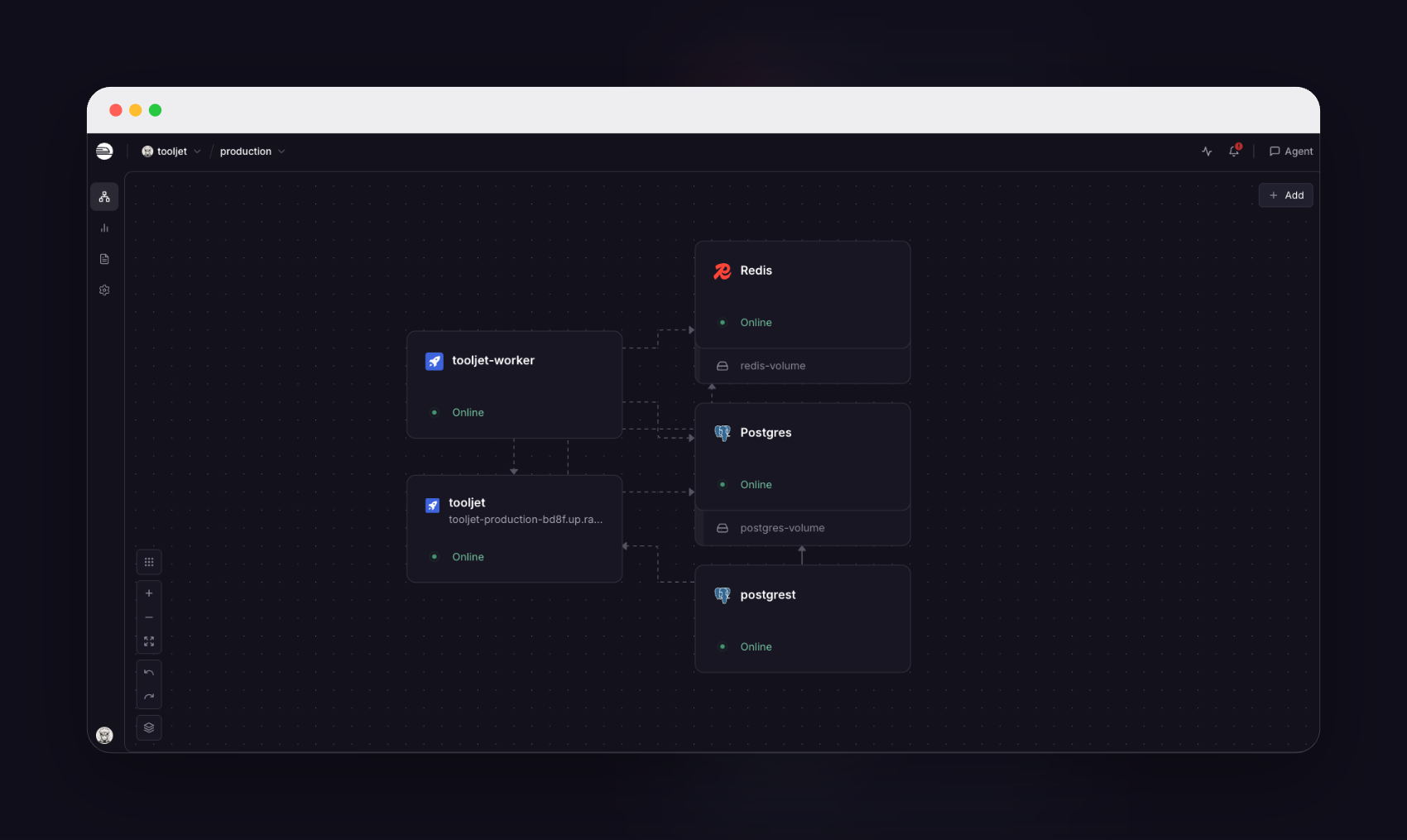
This template runs ToolJet as five services rather than one container, the shape the project documents for production. The tooljet service serves the React client and the API and is the only one with a public URL. A separate tooljet-worker runs the same image with WORKER=true and consumes the BullMQ job queues. PostgreSQL holds two databases — tooljet_production for app definitions, users and query metadata, and tooljet_db for tables you create in ToolJet Database. A postgrest service exposes tooljet_db over REST, which is how ToolJet Database reads and writes rows, and Redis backs the queues and the domain cache. Everything except the app stays on Railway's private network.
Getting Started with ToolJet on Railway
Open the deployed URL and you land on /setup, the one-time screen creating the first super admin. There are no default credentials: supply a name, email and password, and that account owns the instance. Name your first workspace and you drop into the app builder with a starter app created. Public sign-up is off, so nobody can register themselves — add teammates from Settings → Workspace → Users, which needs SMTP credentials first. The setup screen works only while the instance has zero users; once your admin exists it returns HTTP 403 permanently.
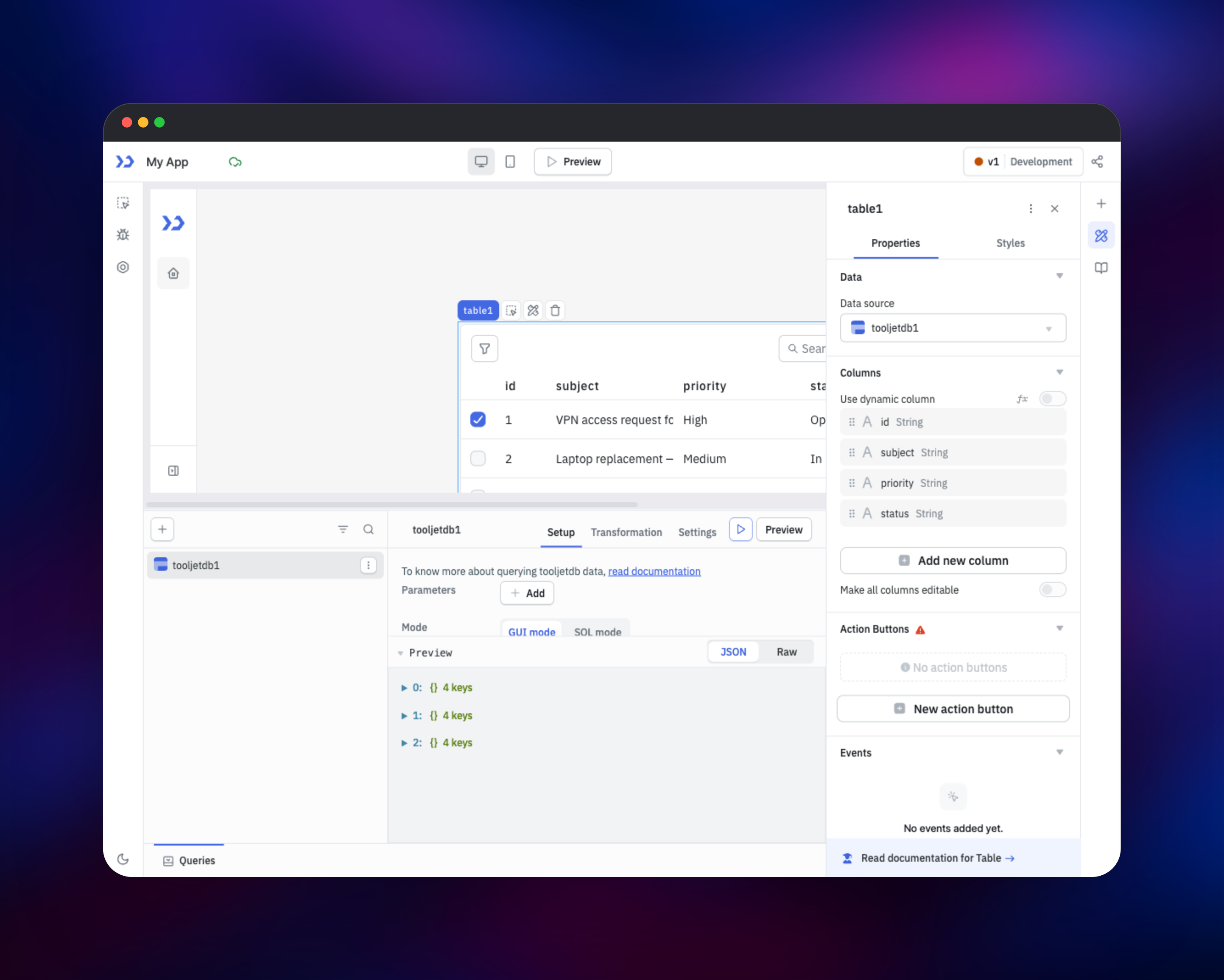
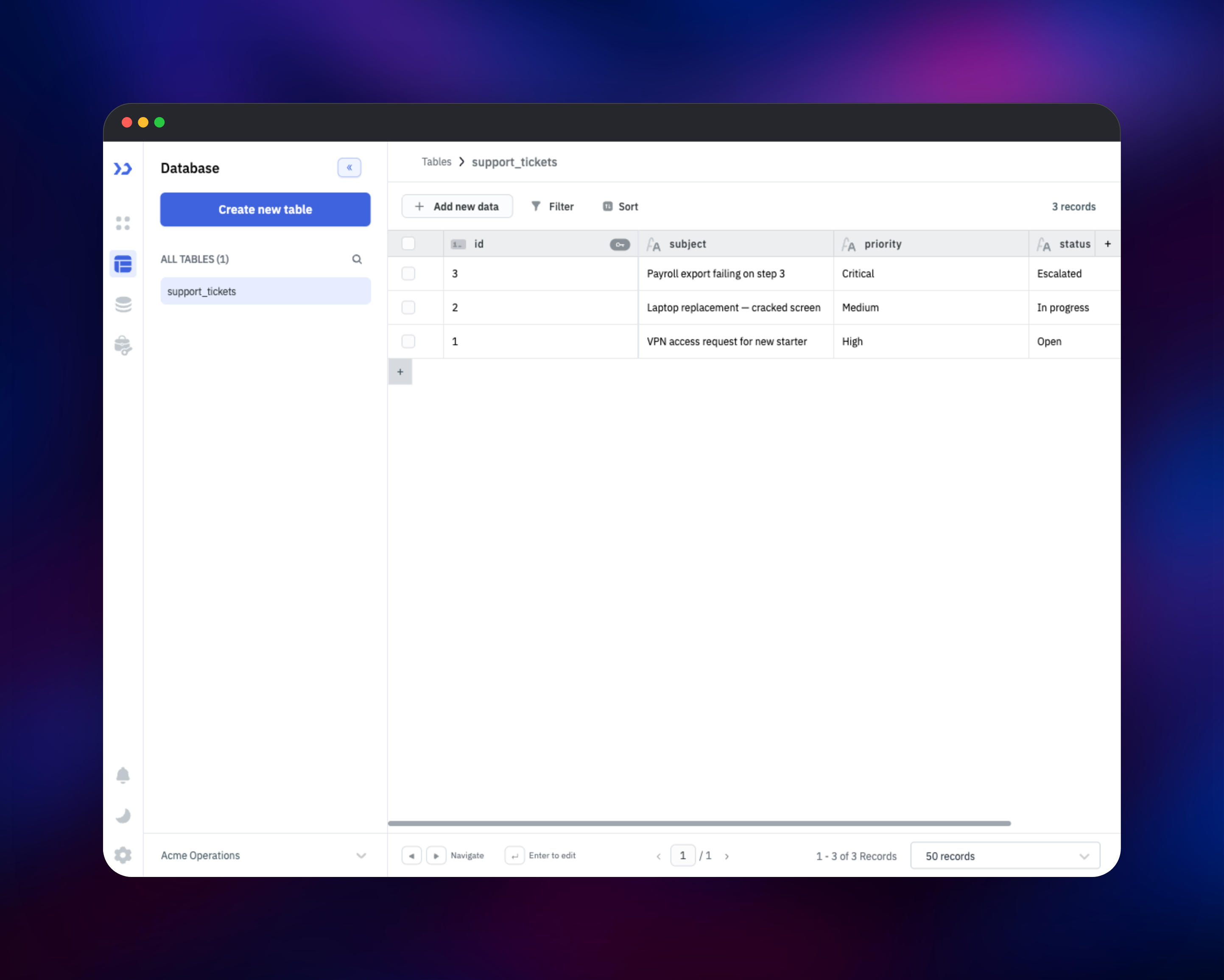
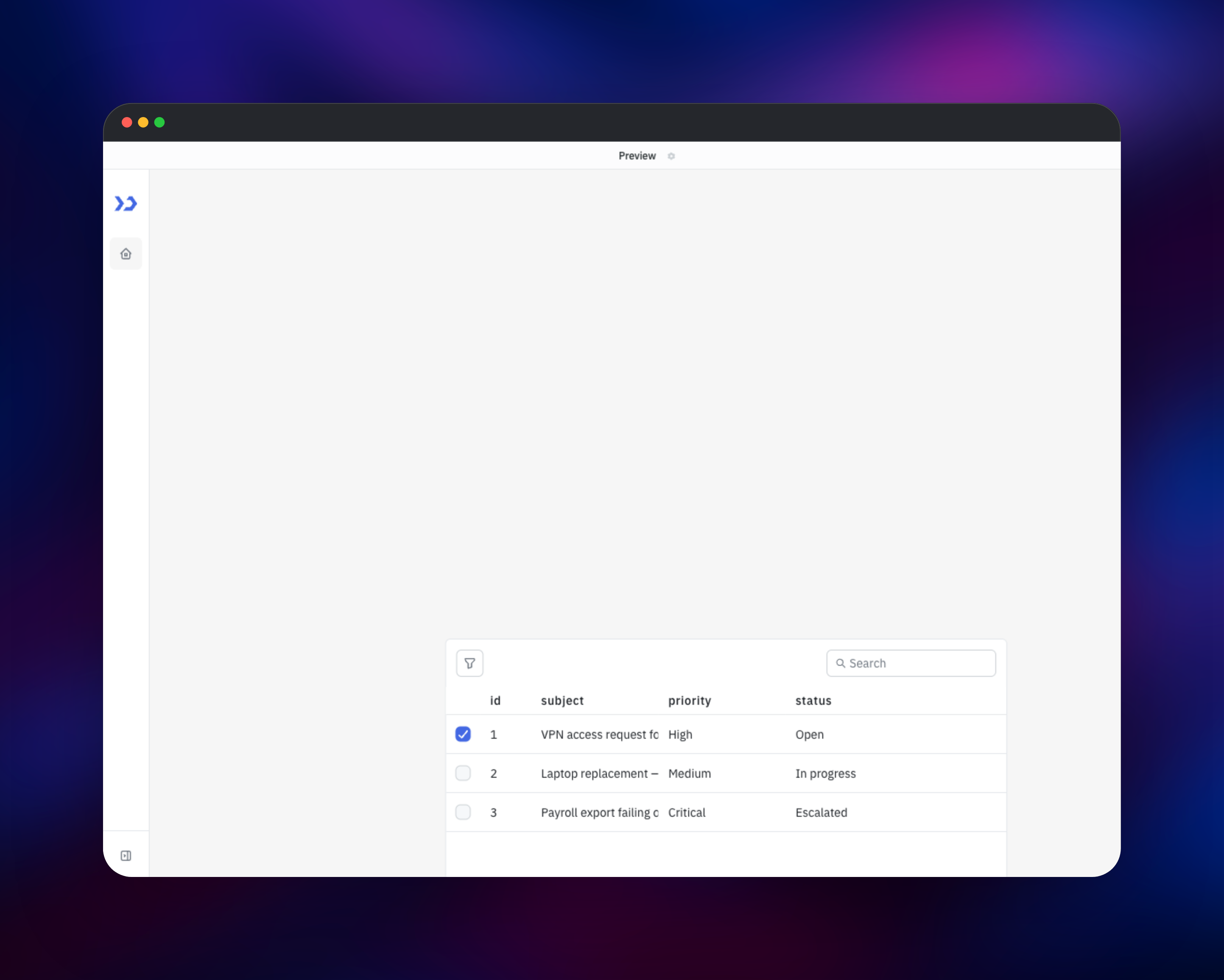
The fastest way to confirm the whole stack works is ToolJet Database, which exercises the app, PostgREST and Postgres together. Open the database icon in the left rail, create a table with two text columns and add a row. Back in the builder, add a query, choose ToolJet DB, pick your table with List rows and hit Run — your rows appear in the preview panel. Drag a Table component onto the canvas, point its Data source at that query, and use the query's Settings tab to run it on application load. Click Preview and you have a working internal tool reading live data.
About Hosting ToolJet
Internal users need screens over production data, and building each one properly costs more engineering time than it is worth. A low-code builder collapses that to an afternoon, and self-hosting keeps the data-source credentials, API keys and OAuth tokens those screens use encrypted in your own Postgres rather than a vendor's.
- Drag-and-drop builder with ~50 components — tables, forms, charts, kanban boards and maps
- 50+ connectors including PostgreSQL, MySQL, MongoDB, Snowflake, BigQuery, Stripe, Airtable, S3 and REST
- JavaScript and Python transformations on query results, plus JS event handlers on components
- ToolJet Database: a built-in no-code Postgres table editor for apps needing their own storage
- Public or private app sharing, and embedding apps elsewhere
The app service is stateless — every app definition, user, session and encrypted credential lives in Postgres — so Railway can restart or scale it freely, and no ToolJet service needs a volume.
Why Deploy ToolJet on Railway
Railway removes the infrastructure work this stack needs:
- Managed PostgreSQL and Redis provisioned and wired up automatically
- Private networking between app, worker, PostgREST and both data stores
- HTTPS and a public domain on first deploy, with HSTS set
- Health checks and automatic restarts on the web service
- One-click scaling as usage grows
- No Dockerfile, reverse proxy or certificates to maintain
Common Use Cases
- Customer support consoles — look up an account, view orders, issue a refund or reset a password without granting database access
- Operations dashboards — sign-off queues, inventory adjustments and content moderation over production tables
- Back-office CRUD — replace spreadsheets with validated forms writing into ToolJet Database
- Internal API front-ends — a safe UI over an internal REST service instead of shared Postman collections
Dependencies for ToolJet
- ToolJet app —
tooljet/tooljet-ce:ce-lts-latest, the community build, serving client and API on port 3000. - ToolJet worker — the same image and tag with
WORKER=true. Keep both on one tag; they share a schema. - PostgreSQL 18 — the system of record. The app creates both databases on first boot, so it needs a role with CREATEDB.
- PostgREST —
postgrest/postgrest:v14.17, pinned. Without it ToolJet Database cannot read or write rows. - Redis — BullMQ job queues plus the domain and CORS cache.
Environment Variables Reference
| Variable | Purpose |
|---|---|
TOOLJET_HOST | Public URL, used for CSRF origin checks and links |
LOCKBOX_MASTER_KEY | 32-byte hex key encrypting stored data-source credentials |
SECRET_KEY_BASE | 64-byte hex key signing session cookies |
PGRST_JWT_SECRET | Shared secret signing ToolJet Database requests |
DISABLE_SIGNUPS | true closes public registration; first-admin setup still works |
WORKER | true on the worker service only |
SMTP_* | Needed for invitations and password resets |
Treat LOCKBOX_MASTER_KEY as permanent — rotating it makes stored credentials undecryptable.
Deployment Dependencies
- Source repository: https://github.com/ToolJet/ToolJet (AGPL-3.0)
- Docker images: https://hub.docker.com/r/tooljet/tooljet-ce and https://hub.docker.com/r/postgrest/postgrest
- Documentation and variable reference: https://docs.tooljet.com/docs/setup/env-vars
Hardware Requirements for Self-Hosting ToolJet
| Resource | Minimum | Recommended |
|---|---|---|
| CPU | 2 vCPU across app + worker | 4 vCPU |
| RAM | 2 GB app, 1 GB worker | 4 GB app, 2 GB worker |
| Storage | 1 GB Postgres | 10 GB+ as data grows |
| Runtime | Node.js 22 (in the image) | PostgreSQL 13+ |
The image sets a 4 GB Node heap ceiling. Memory scales with concurrent builders and query result size, not app count.
Self-Hosting ToolJet with Docker
To run ToolJet outside Railway, generate the secrets first. These shell commands produce the lengths ToolJet expects:
export LOCKBOX_MASTER_KEY=$(openssl rand -hex 32)
export SECRET_KEY_BASE=$(openssl rand -hex 64)
export PGRST_JWT_SECRET=$(openssl rand -hex 32)
Then start the app against an existing PostgreSQL instance. The image has an entrypoint but no default command, so pass one:
docker run -d --name tooljet -p 80:80 \
  -e TOOLJET_HOST=https://tools.example.com \
  -e PORT=80 -e SERVE_CLIENT=true \
  -e LOCKBOX_MASTER_KEY -e SECRET_KEY_BASE \
  -e PG_HOST=postgres -e PG_PORT=5432 \
  -e PG_USER=postgres -e PG_PASS=secret \
  -e PG_DB=tooljet_production \
  tooljet/tooljet-ce:ce-lts-latest npm run start:prod
The entrypoint waits for Postgres, creates its databases and migrates on every boot, so restarts are safe and upgrading means pulling a newer tag.
How Much Does ToolJet Cost to Self-Host?
The community edition is free and open source under AGPL-3.0 with no seat limits, so you pay only for infrastructure. ToolJet also sells cloud and enterprise plans adding workflows, audit logs, SSO/SAML and custom styling; those unlock with a licence key and are not in the community build. On Railway your bill is the usage of the five services — a few dollars a month for a small team.
FAQ
What is ToolJet? An open-source low-code platform for internal business applications. You drag components onto a canvas, connect them to queries against your databases and APIs, and publish to your team.
What does this Railway template deploy? Five services: the ToolJet app with a public URL, a background worker, PostgREST serving ToolJet Database, plus managed PostgreSQL and Redis.
Why does the template include PostgREST and Redis? PostgREST is how ToolJet Database exposes the tables you create; the UI talks to it over REST rather than opening a SQL connection per request. Redis backs the BullMQ queues and the domain cache.
How do I create the first admin user in self-hosted ToolJet?
The /setup screen appears while the instance has no users; fill it in and that account becomes the super admin.
Do I need the worker service if I never use workflows? No. Workflows are a licensed feature, so on a community-edition instance the worker's queues have no producer — scale it to zero and the app is unaffected.
How do I invite my team to a self-hosted ToolJet instance?
Add users from Settings → Workspace → Users, after setting SMTP_USERNAME, SMTP_PASSWORD, SMTP_DOMAIN, SMTP_PORT and DEFAULT_FROM_EMAIL.
Can I upgrade ToolJet without losing my apps? Yes. Everything lives in PostgreSQL and the container migrates on start. Back up the database, then redeploy on a newer tag.
Template Content