
Deploy TypeBot
Open source conversational form builder, self-hosted on Railway

Just deployed
Just deployed

Redis
Just deployed
/data

mailpit
Just deployed
/data

Just deployed
/var/lib/postgresql/data

Just deployed
typebot-files
Bucket
Just deployed
Deploy and Host Typebot on Railway
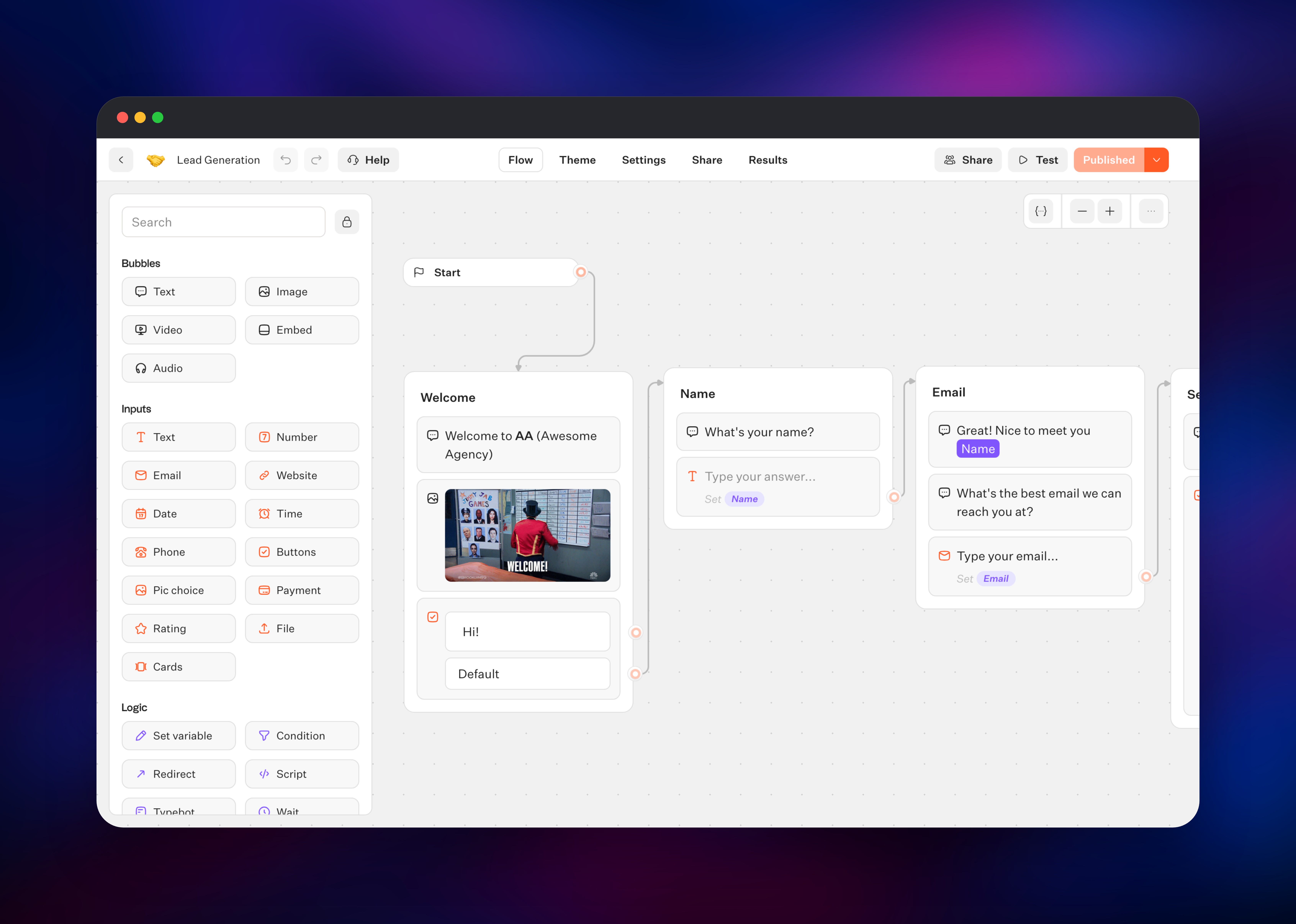
Typebot is an open-source conversational form builder. Instead of a page of input boxes, you design a chat that asks one question at a time on a drag-and-drop canvas, then publish it as a hosted page, an embedded bubble, a popup or a React component. Every answer becomes a variable, so later steps can branch on earlier ones, call your API, write to Google Sheets or ask an LLM — which is what separates it from a static form tool.
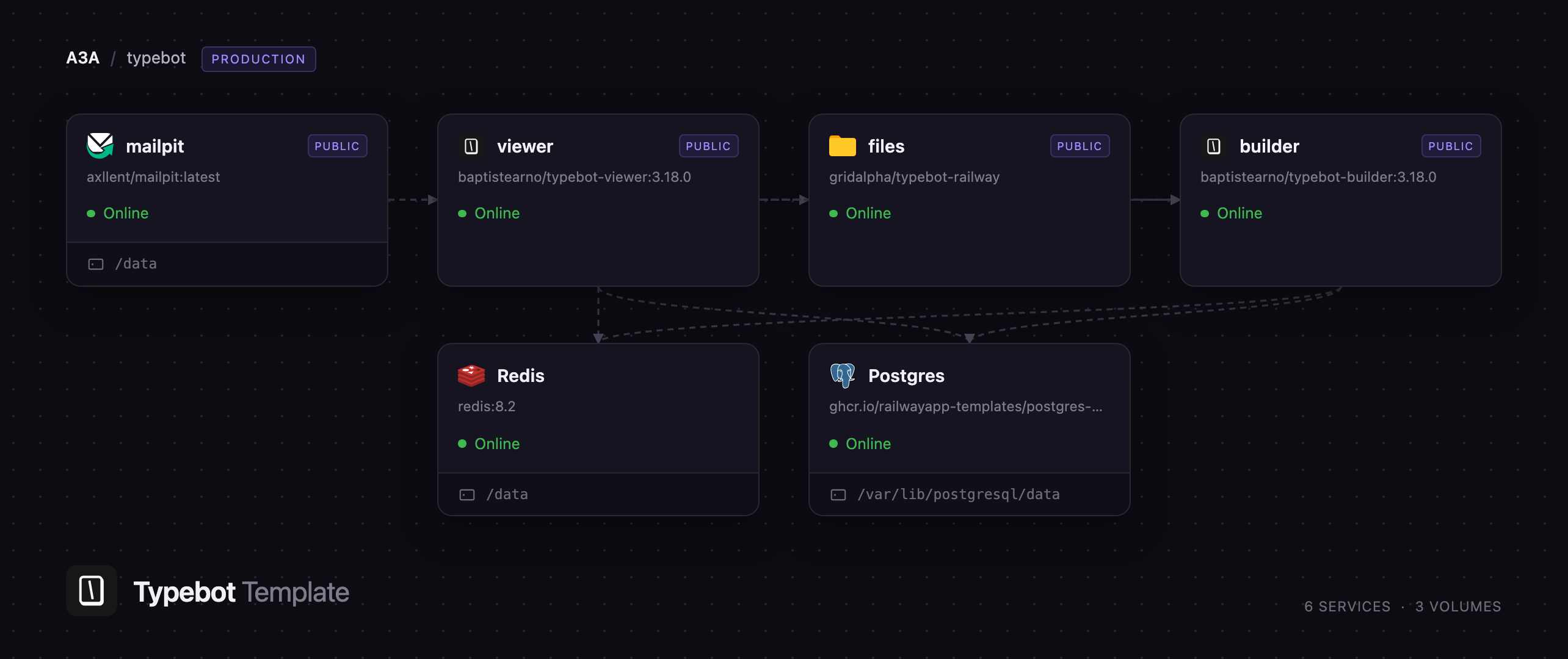
Self-host Typebot on Railway and you get the whole product, with no response caps and no per-seat billing. This template runs both halves as upstream intends: the builder (baptistearno/typebot-builder) is the authenticated editor, API and results dashboard, and the viewer (baptistearno/typebot-viewer) is the public runtime your visitors chat with. Behind them sit Postgres, Redis, a Mailpit inbox so login codes work the moment the deploy finishes, a storage bucket for uploaded media, and a files gateway serving that bucket's public assets.
Getting Started with Typebot on Railway
Set ADMIN_EMAIL on the builder to your own address, deploy, and open the builder's URL. There are no default credentials: Typebot signs you in with a six-digit emailed code, and the first account using ADMIN_EMAIL owns an unlimited workspace. That address also bypasses DISABLE_SIGNUP, which ships as true, so the instance is closed from first boot while you still get in — everyone else joins by invitation under Settings & Members.
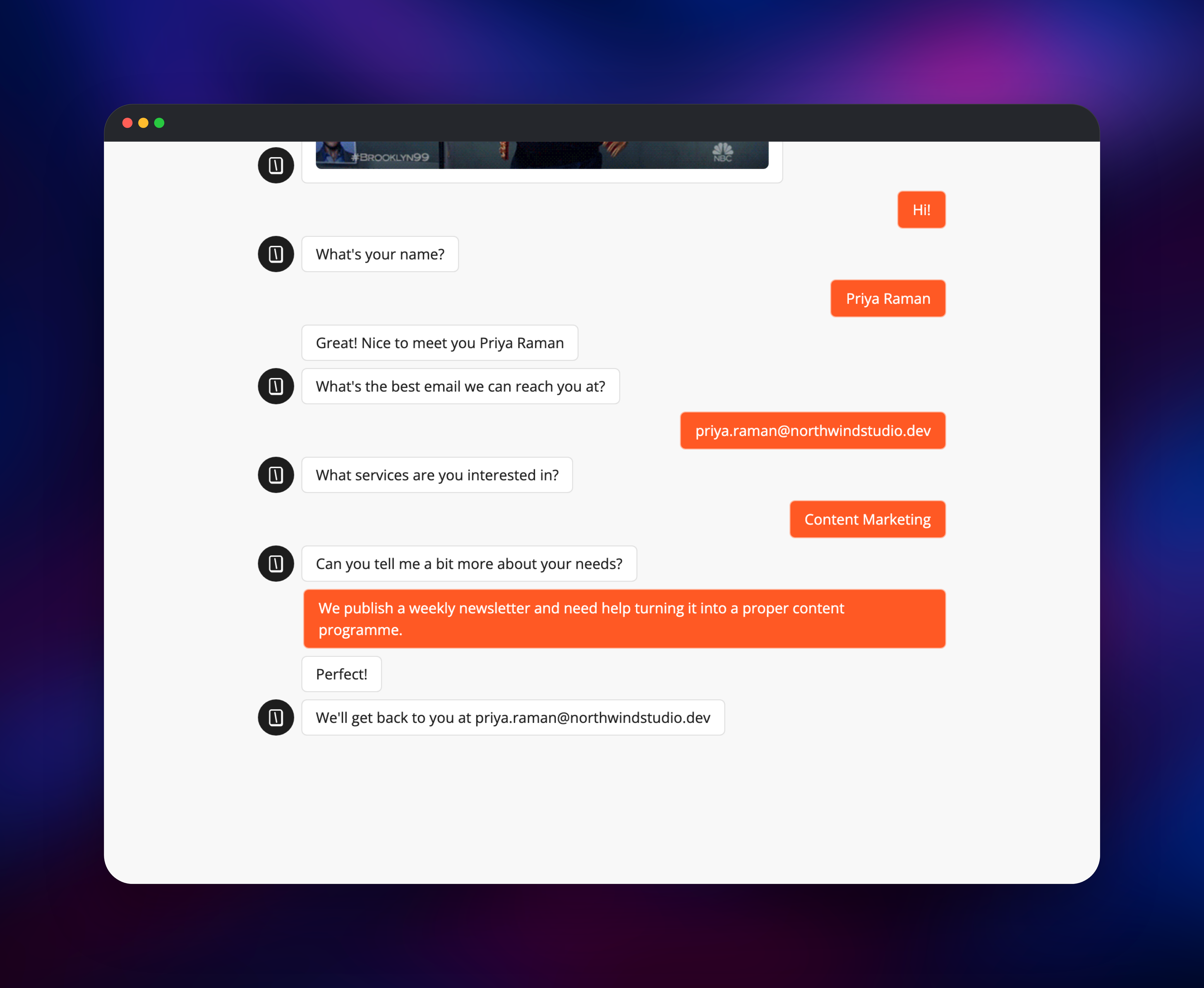
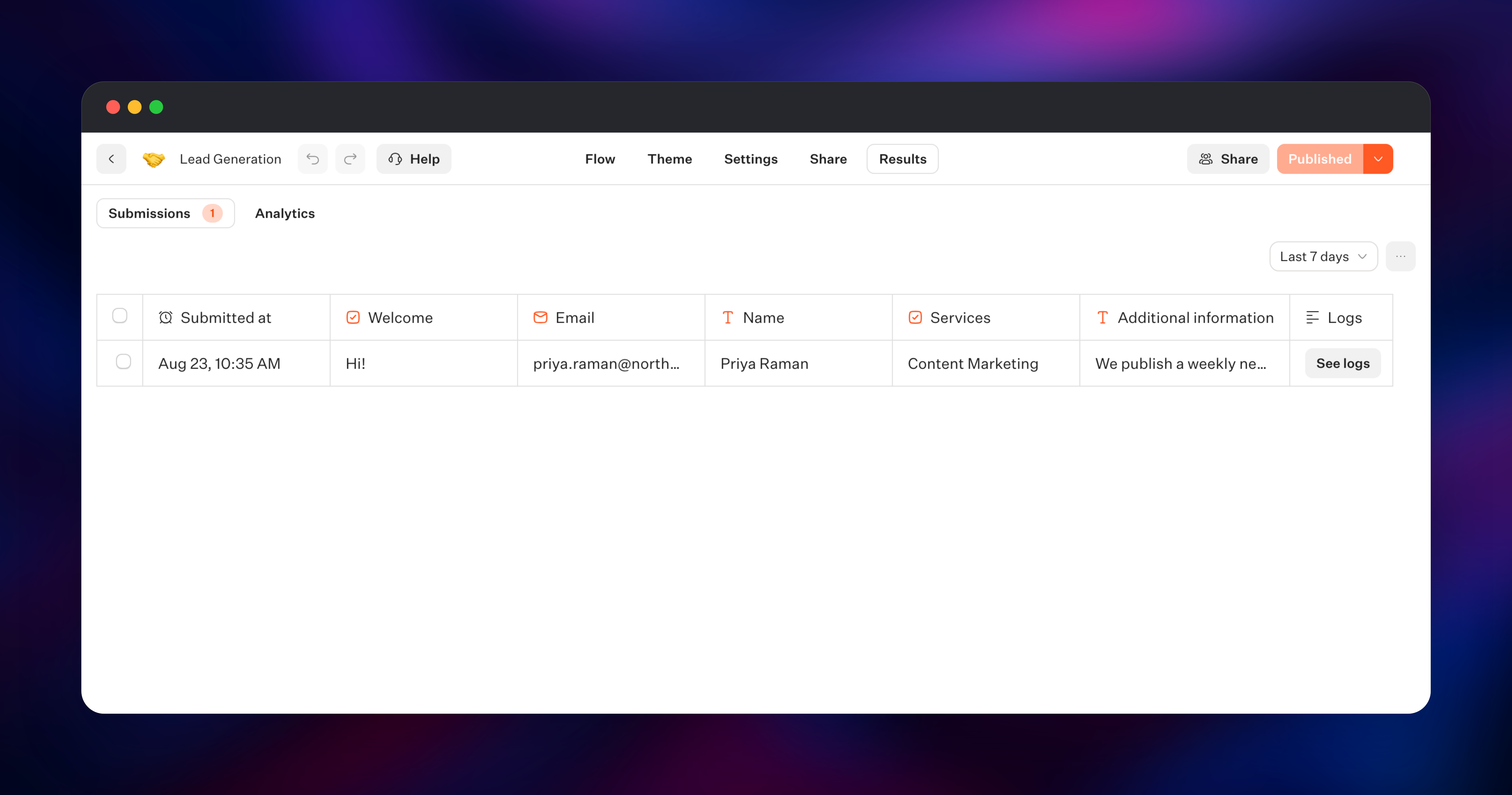
The code goes to the bundled Mailpit inbox, not a real mailbox: open the Mailpit service's URL, sign in with the MP_UI_AUTH credentials, and read the six digits from the newest message. Paste them in to reach your workspace. Click Create a typebot, pick Start from a template, and choose Lead Generation for a working flow. Hit Publish, open the link under Share, and run your own bot as a visitor — then check Results, where those answers should appear as a row. That is the quickest proof the whole stack is wired correctly. For real email, point SMTP_HOST at your own provider or set MP_SMTP_RELAY_* on Mailpit.
About Hosting Typebot
Typebot is two Next.js applications over one Postgres database, which is why the template runs them as separate services. The builder holds everything private — the canvas, your integration credentials, the results table and the API — and only signed-in users reach it. The viewer holds nothing private; it serves published bots and writes answers to the same database, so a bot on a busy site scales independently of your editor.
Key capabilities:
- Input blocks for text, email, phone, number, date, buttons, picture choice, rating, file upload and Stripe payments
- Logic blocks — conditions, variables, scripting, redirects, jumps — so a bot branches on any earlier answer
- Integrations with OpenAI and other LLM providers, Google Sheets, Zapier, Make and HTTP requests
- Embeds as container, bubble or popup, plus React, Next.js, WordPress, Webflow and Shopify
- Theming to fonts, colours, avatars and CSS, and results with completion rates and CSV export
Each supporting service does one job. Postgres stores bots, published versions, sessions and answers. Redis backs the per-IP throttle on sign-in requests; without it that throttle silently does not exist. Mailpit makes passwordless login work with no external setup. The bucket holds uploaded media, and the files service signs reads of it so browsers load public bot media without the bucket being open.
Why Deploy Typebot on Railway
Railway removes the infrastructure work self-hosting normally adds:
- Postgres, Redis and object storage provisioned and wired by the template
- Private networking, so only the web apps are publicly exposed
- HTTPS domains issued automatically, custom domains a DNS record away
- Both apps pinned to matching versions, so an upgrade never splits them
- Scaling per service, independently of the others
Common Use Cases
- Lead capture and qualification — a chat that scores the lead, branches on budget, and posts qualified enquiries to your CRM
- Product onboarding and NPS — ask new users a few in-app questions and route detractors to a support flow
- Support triage — collect account, category and description before a ticket exists, then hand off with context or pass the answers to an LLM to classify
Dependencies for Typebot
baptistearno/typebot-builder:3.18.0— editor, API, results dashboardbaptistearno/typebot-viewer:3.18.0— public runtime for published botsgridalpha/typebot-railway— the files service, a Node gateway signing reads of public bucket objectsaxllent/mailpit:latest— SMTP server and inbox for login codes- Railway managed Postgres 18, Redis and an object storage bucket
Environment Variables Reference
| Variable | Service | Purpose |
|---|---|---|
ADMIN_EMAIL | builder | Owner account; unlimited workspace, bypasses DISABLE_SIGNUP |
DISABLE_SIGNUP | builder | true closes public registration; invited users still join |
ENCRYPTION_SECRET | builder, viewer | 32 chars, encrypts integration credentials — must match |
SMTP_HOST | builder, viewer | Mail server for login codes |
MP_UI_AUTH | mailpit | Credentials protecting the web inbox |
Deployment Dependencies
- Repo: github.com/baptisteArno/typebot.io
- Docs: docs.typebot.io · Images: builder, viewer
- Runtime: Node.js 24, Next.js 16, Prisma on Postgres
Hardware Requirements for Self-Hosting Typebot
| Resource | Minimum | Recommended |
|---|---|---|
| CPU | 2 vCPU total | 4 vCPU |
| RAM | 2 GB total | 4 GB |
| Storage | 1 GB Postgres | 10 GB + object storage |
| Runtime | Node.js 24 | Node.js 24 |
Both apps are modest at idle; the viewer grows with traffic, running a conversation step per message.
Self-Hosting Typebot with Docker
Upstream ships a Compose file, pulled here with its starter environment file:
wget https://raw.githubusercontent.com/baptisteArno/typebot.io/latest/docker-compose.yml
wget https://raw.githubusercontent.com/baptisteArno/typebot.io/latest/.env.example -O .env
ENCRYPTION_SECRET must be exactly 32 characters and identical on both apps, or credentials saved by one cannot be read by the other. Generate one with:
openssl rand -base64 24 | tr -d '\n'; echo
Fill in NEXTAUTH_URL and NEXT_PUBLIC_VIEWER_URL, configure a sign-in method, then run docker compose up -d. The builder listens on 8080 and the viewer on 8081, both plain HTTP, so a TLS-terminating reverse proxy is required in front. This Railway template skips that: both apps, the database, Redis, storage and mail arrive connected on HTTPS.
How Much Does Typebot Cost to Self-Host?
Typebot is source-available under the Functional Source License: any use is permitted except offering Typebot itself as a competing commercial service, so self-hosting for your own business, your clients' projects or internal tooling is allowed, and the code turns Apache 2.0 after two years. There is no licence fee and no response limit when you self-host — on Railway you pay for infrastructure only.
FAQ
What is Typebot?
An open-source builder for conversational forms and chatbots. You design a flow of questions and logic on a canvas, publish it, and embed it as a page, bubble or popup.
What does this Railway template deploy?
Six services: the Typebot builder and viewer, Postgres, Redis, a Mailpit inbox, and a gateway serving public uploads from a managed object storage bucket.
Why does the template include Postgres and object storage?
Postgres holds your bots, their published versions, live sessions and every answer. Object storage makes image, video and file-upload blocks work; without it those assets would sit on a container's disk and vanish on the next deploy.
Do the builder and viewer need the same version?
Yes. They share one schema and one ENCRYPTION_SECRET, and only the builder runs migrations, so this template pins both images to the same tag. Upgrade them together.
How do I log in if there are no default credentials?
Typebot has no passwords. Enter the address you set as ADMIN_EMAIL, then read the six-digit code from the bundled Mailpit inbox using the MP_UI_AUTH credentials. Point SMTP_HOST at a real provider to get codes in a normal mailbox instead.
How do I embed a self-hosted Typebot on my website?
Publish the bot, open the Share tab, and copy a generated snippet — HTML/JavaScript, React, Next.js, WordPress, Webflow, Shopify or Framer. Each points at your own viewer URL, so no traffic reaches typebot.io.
Can I connect Typebot to OpenAI or Google Sheets on a self-hosted instance?
Yes. Every integration block works when self-hosting; you supply your own API keys or OAuth credentials and they are encrypted at rest with ENCRYPTION_SECRET.
Template Content