
Deploy Ubuntu Desktop (Browser)
Ubuntu 24.04 XFCE desktop in your browser with Firefox; Hobby recommended

Just deployed
/home/dev
Deploy and Host an Ubuntu Desktop in the Browser on Railway
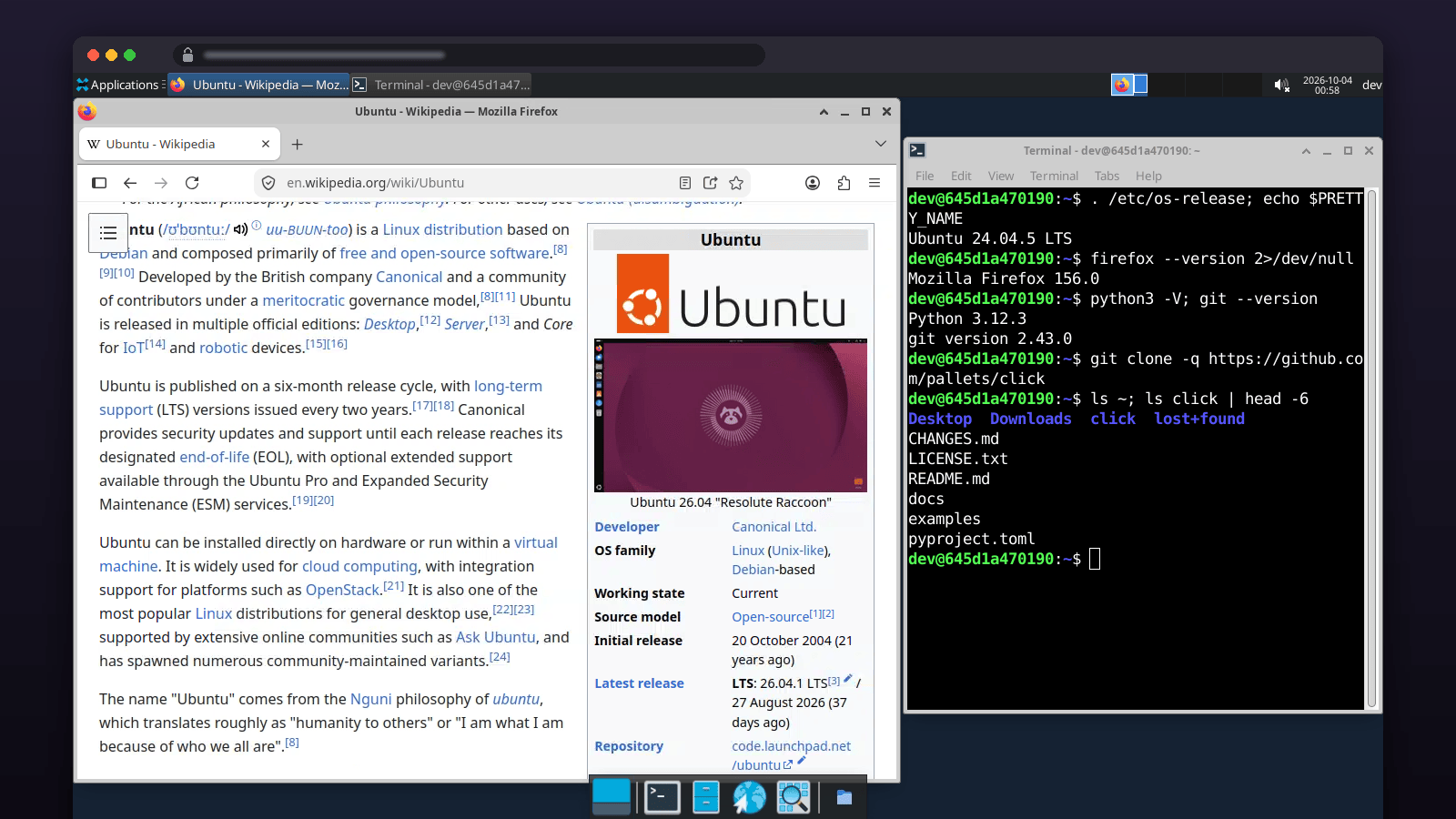
A full Ubuntu 24.04 desktop with Firefox in a browser tab — no VNC client — and a home directory on a volume, so bookmarks, logins and files survive redeploys.
Get started
- Deploy. Nothing to fill in. Hobby is the plan for this template: the idle desktop uses about 195 MB, and Firefox with a few tabs takes it to 1–1.5 GB. On Free (0.5 GB) the desktop runs but Firefox cannot open; Trial (1 GB) fits a few tabs.
- Sign in. Open the service URL. Username
dev; the password isPASSWORDin the service's Variables tab. - Browse. Firefox, Terminal and Files are in the bottom dock; the side panel has clipboard and full-screen controls.
About Hosting an Ubuntu Desktop
A complete Ubuntu 24.04 LTS desktop (XFCE) that runs in your browser tab — no VNC client, no plugin — with Firefox, a terminal, a file manager and a text editor, streamed by KasmVNC over HTTPS. Resize the browser window and the desktop follows. The service runs Xvnc (KasmVNC's X server, which also serves its own web client) on loopback, an XFCE session as user dev, and nginx on the public HTTPS domain adding basic auth in front of everything. KasmVNC streams the screen as video-rate WebP/JPEG over a WebSocket, so it feels far closer to a remote desktop than classic VNC-in-a-browser. The healthcheck /healthz passes only once Xvnc is serving. /home/dev is a Railway volume. There is no GPU and no audio; this is a work desktop, not a media box.
Common Use Cases
- A browser you can leave signed in and reach from anywhere, on an IP that is not your own
- A Linux GUI for a tool that has no web version, from a phone, tablet or Chromebook
- A disposable desktop for testing sites, downloading and inspecting files, or running a GUI installer
- A shared "team machine" with a fixed set of tools, reachable from any device with a browser
- Learning Linux with a real desktop rather than a shell
Dependencies for Ubuntu Desktop Hosting
ghcr.io/will-bogusz/railway-ubuntu-desktop:24.04-20261019(Ubuntu 24.04 + XFCE + KasmVNC 1.5.0 + Firefox, pinned by digest) on a/home/devvolume
Deployment Dependencies
- Image source and Dockerfile (MIT)
- KasmVNC - the remote desktop server and web client
- Railway volumes
Implementation Details
Plan requirements. With the desktop showing and nothing open, the service uses about 195 MB of RAM (measured on this image after five idle minutes; 200 MB peak at boot). Firefox with a few tabs adds roughly 400–700 MB, so plan for 1–1.5 GB in use. On Free (0.5 GB) the desktop runs but Firefox cannot open; Trial (1 GB) fits a few tabs. Hobby (48 GB) is the plan for this template. The image is pinned by digest.
First run. Open the service's public domain and enter dev and the value of PASSWORD from the Variables tab — one click, no inputs: the password is generated for you. The KasmVNC client connects and the XFCE desktop appears. Firefox, Terminal, Files and a text editor are in the bottom dock; the Applications menu is top-left. Change PASSWORD and redeploy to rotate it.
Display. RESOLUTION (default 1440x900) sets the desktop size; the client scales it to your window. Raise it for a sharper image on a large monitor, lower it on slow connections. The gear icon in the client's side panel has quality and scaling settings; Fullscreen hides the browser chrome.
Persistence. Everything under /home/dev survives redeploys and restarts (verified). Firefox's profile, XFCE settings, downloads and anything you save in your home directory persist. apt packages do not — the container layer is replaced on redeploy.
Clipboard and keys. The client's side panel has a clipboard box for copying text in and out, and an on-screen bar for Ctrl/Alt/Esc combinations that the browser would otherwise capture.
Resource use. Firefox is what uses memory. Close tabs you are not using, or set Firefox to unload background tabs. If memory runs out, the system closes Firefox (or the heaviest app) and the desktop keeps running; your files are intact. Choosing Log Out from the menu starts a fresh desktop session.
Risks. Anyone with the password has a desktop with sudo; keep the generated password or set a longer one. Browsing from a hosted IP is subject to Railway's fair-use policy. No GPU: video playback and WebGL are CPU-rendered and slow. Pinned images receive security fixes when you redeploy onto a newer tag, not automatically.
Why Deploy Ubuntu Desktop on Railway?
Railway is a singular platform to deploy your infrastructure stack. Railway will host your infrastructure so you don't have to deal with configuration, while allowing you to vertically and horizontally scale it.
By deploying Ubuntu Desktop on Railway, you are one step closer to supporting a complete full-stack application with minimal burden. Host your servers, databases, AI agents, and more on Railway.
Template Content


