Deploy Umami
Privacy-First Web Analytics
Just deployed

Just deployed
/var/lib/postgresql/data

Redis
Just deployed
/data
Deploy and Host Umami on Railway
Umami is an open source, privacy-first web analytics platform that reports what Google Analytics reports — visitors, page views, referrers, campaigns, conversions — without cookies, without fingerprinting, and without handing visitor behaviour to an advertising company. It stores no personal data, so it needs no consent banner under GDPR, CCPA or PECR, and its tracking script is around 2 KB.
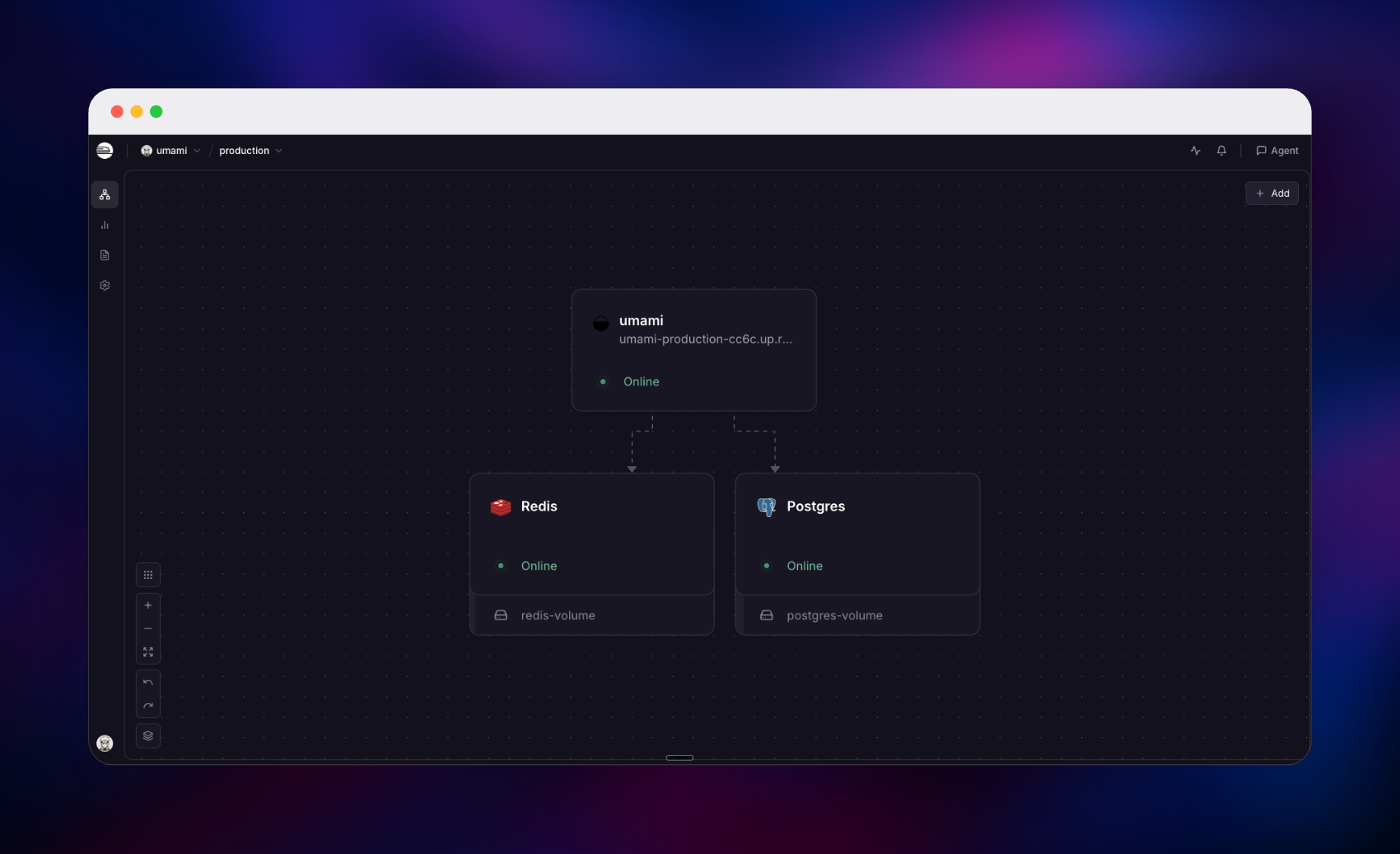
Deploy Umami on Railway and the whole stack arrives pre-wired: the application, a PostgreSQL database holding every website, session and event, and a Redis instance for server-side login sessions and caching. Traffic from your sites hits the collector over HTTPS, is resolved into a session and written to Postgres; the dashboard reads back from Postgres while Redis keeps auth tokens and hot lookups off it. Self-hosting Umami this way needs no volume and no object storage — all state is in Postgres, and the GeoIP city database ships inside the image.
Getting Started with Umami on Railway
The deployed URL opens on the sign-in page. Sign in as admin with the password you set in ADMIN_PASSWORD; if you left that empty, a random one was generated on first boot and printed once in the deploy logs, so search them for "administrator password". Umami has no public sign-up page — the administrator creates every other account from Settings, which is what you want on a public URL.
Then click Websites → Add website and give it a name and the domain to measure. Umami creates a website ID and shows a tracking snippet; copy it into the `` of every page on that site:
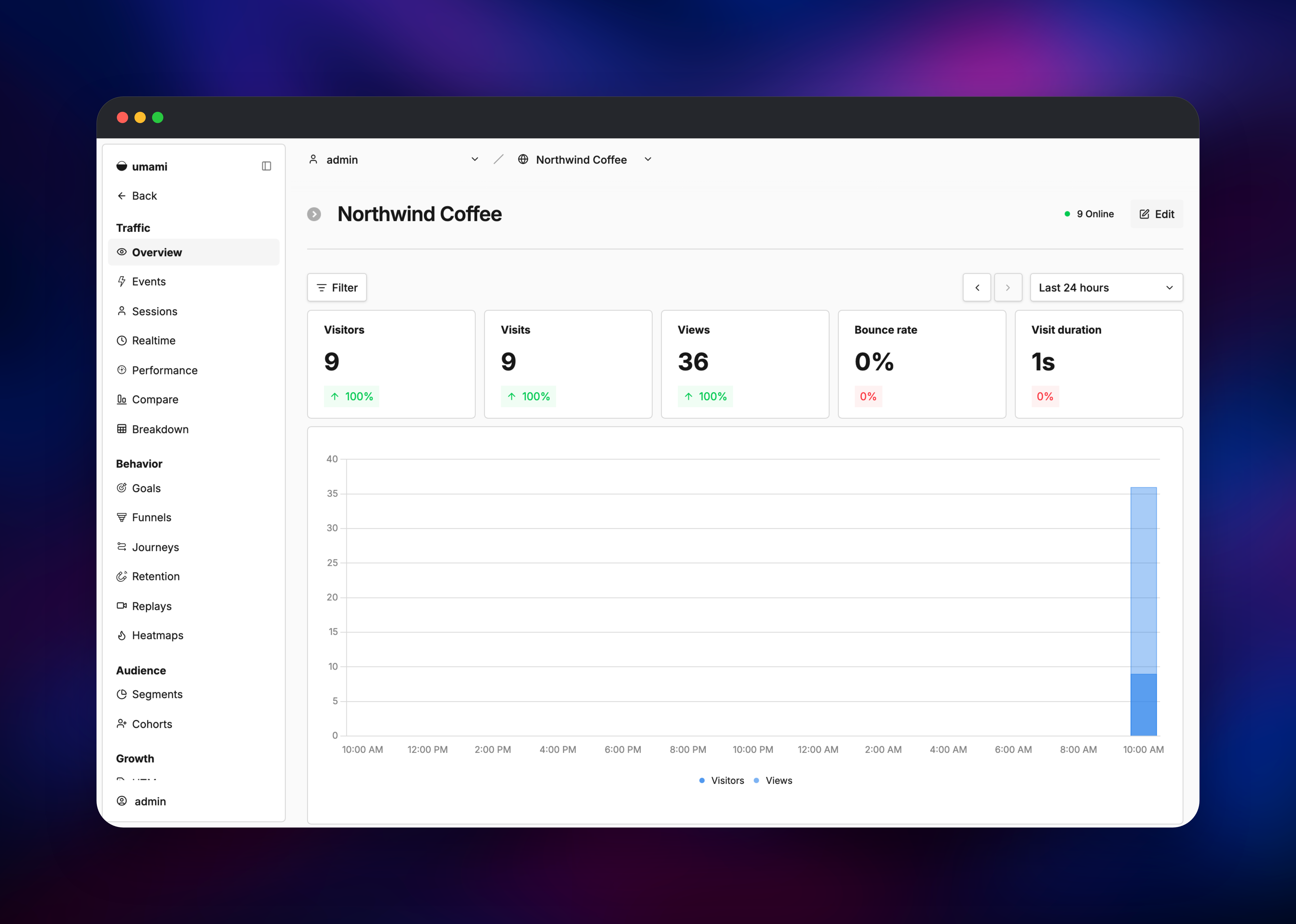
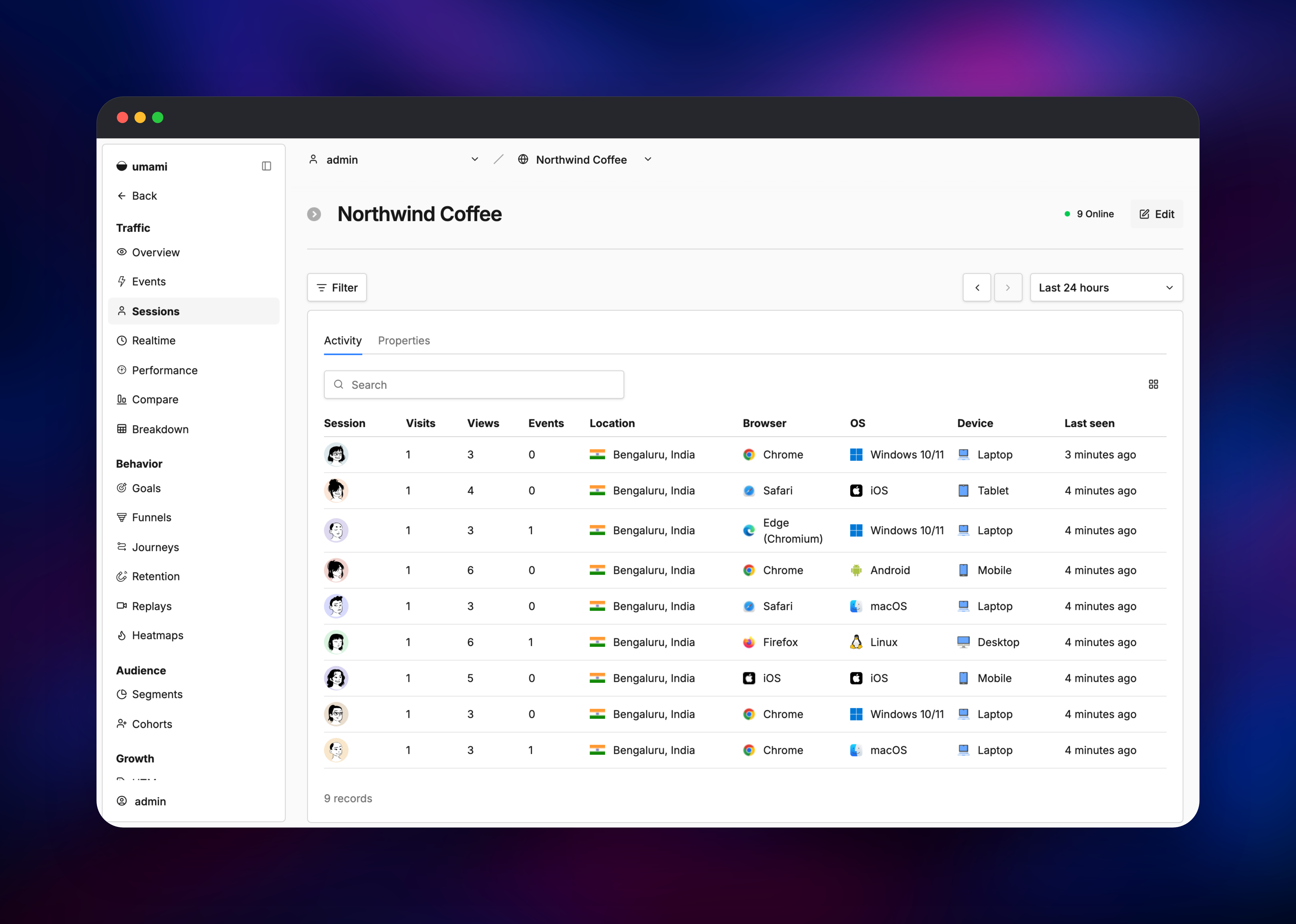
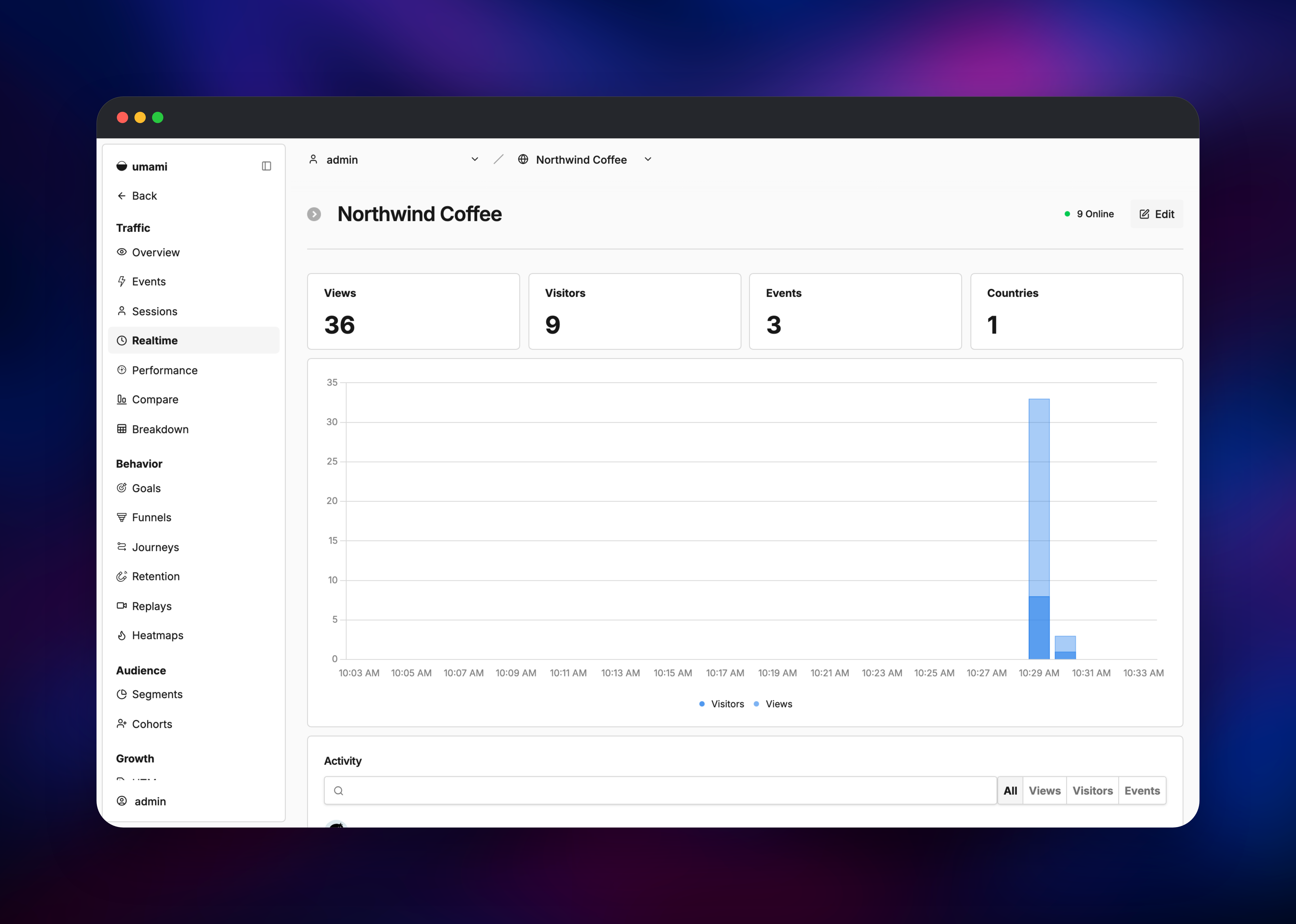
Load a page on your site, then open Realtime — the visit should appear within seconds, which proves collector, database and dashboard are all working. Overview then gives visitors, views, bounce rate and visit duration, while Sessions, Journeys, Funnels and Goals answer what people actually do.
About Hosting Umami
Umami answers where your traffic comes from and what it does, while collecting the minimum needed to answer it. Visitors are identified by a rotating salted hash rather than a cookie or device ID, so a person is recognised within a session but cannot be followed across sites or months. Self-hosting goes further: the raw data never leaves infrastructure you control, which is often decisive for healthcare, finance and EU teams whose legal review rules out third-party analytics.
- Real-time visitors, page views, referrers, UTM campaigns and city-level geography
- Custom events and goals for sign-ups, purchases and any other conversion
- Funnels, journeys, retention and cohort reports for behavioural analysis
- Session replays and heatmaps showing how a visitor used a page
- Unlimited websites and users, team workspaces and shareable public dashboards
- A REST API and a
umami.track()JavaScript API for server-side and SPA tracking
The deployment has three parts. Umami is a Next.js app serving the dashboard, the collector and the tracking script on port 3000. PostgreSQL stores everything durable, and Umami migrates its own schema on every boot, so upgrades need no manual step. Redis is optional but enabled here because it changes authentication: login tokens are stored server-side rather than as self-contained JWTs, so signing out genuinely revokes a token and replicas share one session pool.
Why Deploy Umami on Railway
Railway takes the infrastructure work off your plate:
- Postgres and Redis are provisioned, networked privately and backed up by the platform
- HTTPS, a public domain and certificate renewal are included
- Horizontal scaling is a slider, and shared Redis sessions make it safe
- Deploy logs, metrics and health checks are built in
- No servers, Compose files or reverse proxy config to maintain
Common Use Cases
- Replacing Google Analytics on marketing sites and blogs with no consent banner
- Product analytics for a SaaS app, using custom events and funnels to measure activation
- Agency reporting: one instance covering every client site, a share link per client
- Compliance-driven analytics for EU, healthcare or public-sector sites
Dependencies for Umami
- Umami — built from the umami-railway source repository on top of the official
ghcr.io/umami-software/umami:latestimage. It replaces the administrator account Umami's first migration seeds, so the deployment never serves the documented defaults, and derives the two-factor encryption key fromAPP_SECRET. - PostgreSQL — Railway managed Postgres 18. Umami v3 is Postgres-only; MySQL support was dropped in the v3 line.
- Redis — Railway managed Redis 8, for server-side auth sessions and caching website and user lookups.
Environment Variables Reference
| Variable | Purpose |
|---|---|
DATABASE_URL | Postgres connection string; the only variable Umami truly requires |
APP_SECRET | Signs auth tokens, salts visitor hashes. Keep it stable — changing it signs everyone out |
REDIS_URL | Enables server-side sessions and caching |
ADMIN_PASSWORD | Password written over the seeded administrator account on first boot |
ADMIN_USERNAME | Renames that account; defaults to admin |
CLIENT_IP_HEADER | Header carrying the visitor IP. Leave at x-forwarded-for on Railway |
IGNORE_IP | IPs or CIDR ranges to exclude, e.g. your office network |
ADMIN_PASSWORD_RESET | Set to 1 for one deploy to reset a forgotten password |
Deployment Dependencies
- Source repository: gridalpha/umami-railway
- Upstream project: umami-software/umami
- Container image:
ghcr.io/umami-software/umami:latest - Documentation: umami.is/docs
Hardware Requirements for Self-Hosting Umami
| Resource | Minimum | Recommended |
|---|---|---|
| CPU | 1 vCPU | 2 vCPU |
| RAM | 512 MB for Umami, 512 MB for Postgres | 2 GB for Umami, 2 GB for Postgres, 256 MB for Redis |
| Storage | 1 GB Postgres volume | 10 GB+, sized by event volume and retention |
| Runtime | Node.js 22, PostgreSQL 12+ | Node.js 22, PostgreSQL 18, Redis 8 |
Umami is light; Postgres is what grows, since every page view and event is a row — size storage against traffic and retention.
Self-Hosting Umami
The Railway template is the fastest route, but Umami runs anywhere Docker does. This Compose file is the smallest complete setup:
services:
  umami:
    image: ghcr.io/umami-software/umami:latest
    ports:
      - "3000:3000"
    environment:
      DATABASE_URL: postgresql://umami:umami@db:5432/umami
      APP_SECRET: replace-with-a-random-string
    depends_on:
      - db
  db:
    image: postgres:18-alpine
    environment:
      POSTGRES_DB: umami
      POSTGRES_USER: umami
      POSTGRES_PASSWORD: umami
    volumes:
      - umami-db:/var/lib/postgresql/data
volumes:
  umami-db:
From source it is git clone, a .env with DATABASE_URL and APP_SECRET, then pnpm install && pnpm build && pnpm start. Either way the first sign-in is admin / umami, and changing it immediately is the first job — the Railway template does that at boot.
Is Umami Free to Self-Host?
Umami is open source under the MIT licence, so self-hosting is free and unlimited: no seat charges, no event caps, no feature gating. The maintainers also run Umami Cloud, a hosted version with a free tier and paid plans as volume grows. On Railway you pay only for the compute and storage the three services consume — for a marketing site or small SaaS, a few dollars a month.
FAQ
What is Umami?
Umami is an open source, privacy-first alternative to Google Analytics. It reports visitors, page views, referrers, campaigns, events and conversions without cookies or personal data.
What does this Railway template deploy?
Three services: Umami on a public HTTPS domain, managed PostgreSQL for analytics data, and managed Redis for sessions and caching. The administrator password comes from a variable at first boot, so the instance never serves default credentials.
Why does Umami need PostgreSQL and Redis?
Postgres is Umami's only durable store — websites, users, sessions and every event live there. Redis is optional, but with it enabled login tokens are held server-side, so sign-out genuinely revokes access and you can run several instances.
How do I add Umami tracking to my website?
Add the website in Umami, copy the generated `
Template Content