Deploy Unleash | Open-Source LaunchDarkly, FlagSmith Alternative
Self Host Unleash, control feature releases without touching your codebase

Just deployed

Just deployed
/var/lib/postgresql/data

Deploy and Host Unleash on Railway
Self-host Unleash — the most popular open-source feature flag platform on GitHub, with over 18 million Docker pulls — on Railway in minutes. This template deploys the full Unleash stack: the unleashorg/unleash-server container wired to a managed PostgreSQL database, giving you a production-ready feature management instance without any manual infrastructure work.
Run Unleash on Railway and get gradual rollouts, kill switches, targeting strategies, and A/B testing under your own roof — with no data ever leaving your environment.
Getting Started with Unleash on Railway
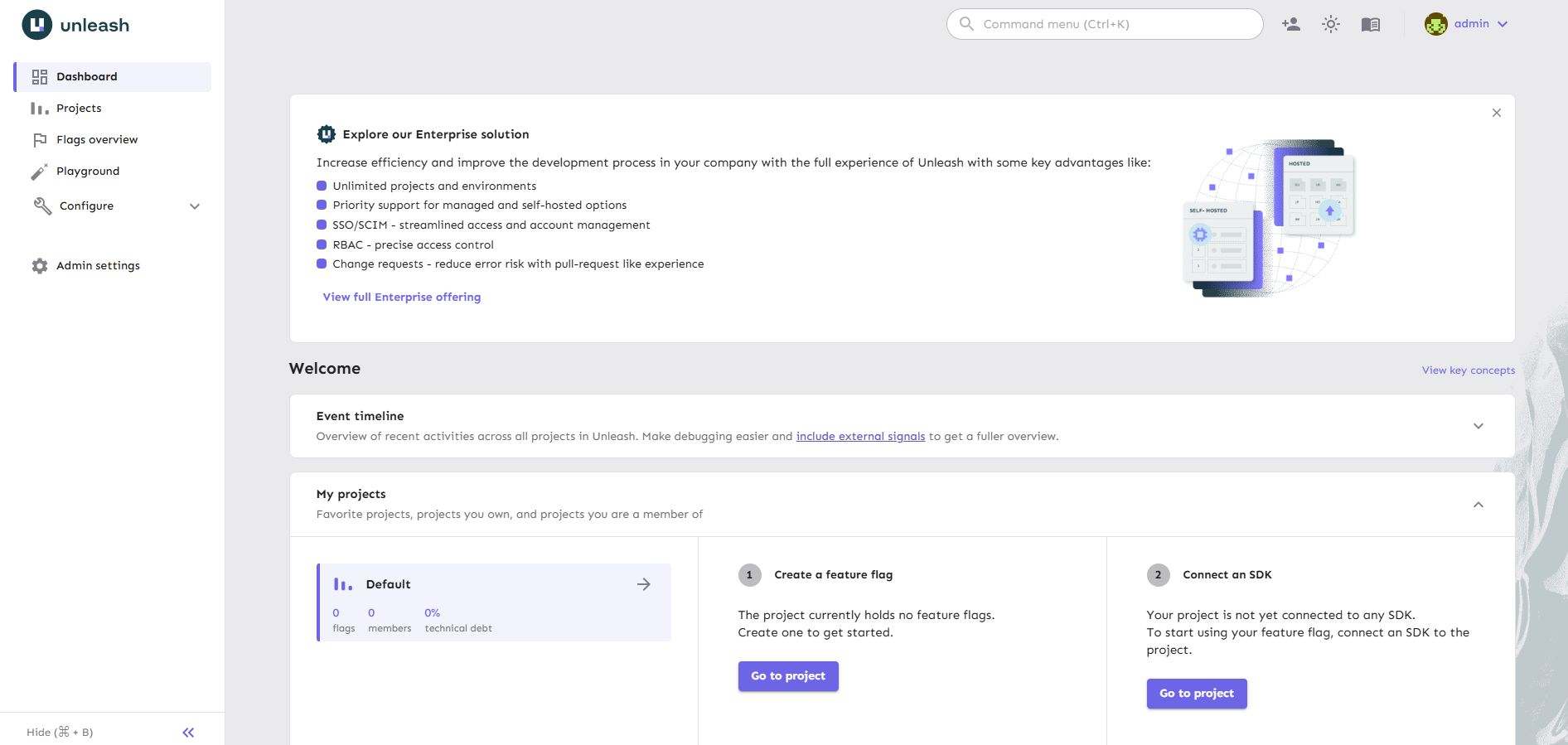
Once the Railway deploy is live, open your Unleash public URL (set via the UNLEASH_URL environment variable). You will be prompted to log in with the default credentials:
- Username:
admin - Password:
unleash4all
⚠️ Change these immediately. Navigate to your profile (top-right avatar) → Profile settings →
From there, create your first project, define environments, and generate an API token under Settings → API Access to connect your application SDKs.
About Hosting Unleash
Unleash is a feature management platform that lets you decouple deployments from feature releases. Instead of redeploying code to toggle behaviour, you flip flags in the Unleash UI and your applications respond instantly via the SDK.
Key features:
- Gradual rollouts by percentage, user ID, or custom strategy
- Kill switches for instant rollback without a redeploy
- Targeting by user segments, IP ranges, and custom context fields
- 12+ official SDKs (Go, Java, Node.js, Python, Ruby, Rust, .NET, PHP) and 10+ community SDKs
- Integrations with Slack, Datadog, Prometheus, Sentry, Jira, and Microsoft Teams
- Privacy-first: flag evaluation happens in your app — end-user data never reaches Unleash
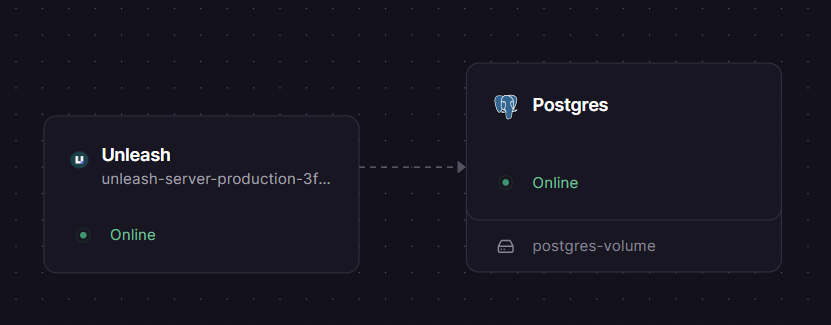
Architecture: The Unleash server (Node.js) connects to PostgreSQL over Railway's private network. SDKs in your application poll or stream flag state directly from the Unleash server. No Redis or cache layer is required for the open-source tier.
Why Deploy Unleash on Railway
Deploy Unleash on Railway and skip the ops overhead:
- No Docker config, volume management, or SSL certificate wiring
- Private networking between Unleash and Postgres out of the box
- Managed Postgres with auto-generated credentials
- One-click redeploys when a new Unleash image is released
- Custom domains and managed TLS included
Common Use Cases
- Progressive delivery — roll out a new API endpoint to 5% of users, watch error rates, then widen the rollout without redeploying
- Kill switches for critical paths — instantly disable a payment flow or third-party integration that starts misbehaving in production
- Beta programs — enable features only for a named list of user IDs or a specific plan/segment
- Trunk-based development — merge incomplete features to main behind a flag; ship without feature branches
Dependencies for Unleash
- Unleash Server —
unleashorg/unleash-server:latest(Docker Hub, GitHub) - PostgreSQL — Railway managed Postgres (provisioned automatically by this template)
Environment Variables Reference
| Variable | Description | Required |
|---|---|---|
DATABASE_HOST | Postgres hostname — set to ${{Postgres.PGHOST}} | Yes |
DATABASE_PORT | Postgres port — set to ${{Postgres.PGPORT}} | Yes |
DATABASE_NAME | Database name — set to ${{Postgres.PGDATABASE}} | Yes |
DATABASE_USERNAME | DB user — set to ${{Postgres.PGUSER}} | Yes |
DATABASE_PASSWORD | DB password — set to ${{Postgres.PGPASSWORD}} | Yes |
DATABASE_SSL | Set to true — Railway Postgres requires SSL | Yes |
DATABASE_SSL_REJECT_UNAUTHORIZED | Set to false — Railway uses self-signed certs | Yes |
UNLEASH_URL | Public URL of your Unleash instance (e.g. https://your-app.up.railway.app) — used for email links and integrations | Yes |
PORT | HTTP port Unleash listens on. Default: 4242 | No |
LOG_LEVEL | Logging verbosity: info, warn, error, debug | No |
Deployment Dependencies
- Runtime: Node.js 20+ (bundled in the Docker image)
- Database: PostgreSQL 13+
- Docker image:
unleashorg/unleash-server:latest - GitHub: github.com/Unleash/unleash
- Docs: docs.getunleash.io
Minimum Hardware Requirements for Self-Hosting Unleash
| Resource | Minimum | Recommended |
|---|---|---|
| CPU | 0.5 vCPU | 1 vCPU |
| RAM | 512 MB | 1 GB |
| Storage (Postgres) | 1 GB | 5 GB+ |
| Node.js | 18+ | 20+ |
| PostgreSQL | 13+ | 15+ |
For teams with high flag evaluation volume, consider deploying Unleash Edge as a caching proxy between your SDKs and the Unleash server to avoid overloading the main instance.
Unleash vs LaunchDarkly vs Flagsmith
| Feature | Unleash OSS | LaunchDarkly | Flagsmith |
|---|---|---|---|
| Open source | ✅ Apache 2.0 | ❌ | ✅ BSD 3-Clause |
| Self-hostable | ✅ | ❌ | ✅ |
| Free self-hosted tier | ✅ Unlimited flags | N/A | ✅ Unlimited flags |
| Paid cloud tier | $75/seat/month | Contact sales | From $99/month |
| Official SDKs | 12+ | 20+ | 12+ |
| Gradual rollouts | ✅ | ✅ | ✅ |
| Custom activation strategies | ✅ | ❌ | ❌ |
| Data stays in your infra | ✅ | ❌ | ✅ (self-hosted) |
Unleash is the strongest choice when data sovereignty matters — flag evaluations happen inside your app, and no user context is ever sent to an external service.
Self-Hosting Unleash Outside Railway
Docker (quickest):
docker run -d \
  -e DATABASE_HOST=your-postgres-host \
  -e DATABASE_PORT=5432 \
  -e DATABASE_NAME=unleash \
  -e DATABASE_USERNAME=unleash_user \
  -e DATABASE_PASSWORD=yourpassword \
  -e DATABASE_SSL=false \
  -e UNLEASH_URL=http://localhost:4242 \
  -p 4242:4242 \
  unleashorg/unleash-server:latest
With Docker Compose (Unleash + Postgres together):
services:
  postgres:
    image: postgres:15
    environment:
      POSTGRES_DB: unleash
      POSTGRES_USER: unleash_user
      POSTGRES_PASSWORD: password
    volumes:
      - pgdata:/var/lib/postgresql/data

  unleash:
    image: unleashorg/unleash-server:latest
    depends_on:
      - postgres
    environment:
      DATABASE_HOST: postgres
      DATABASE_PORT: 5432
      DATABASE_NAME: unleash
      DATABASE_USERNAME: unleash_user
      DATABASE_PASSWORD: password
      DATABASE_SSL: "false"
      UNLEASH_URL: http://localhost:4242
    ports:
      - "4242:4242"

volumes:
  pgdata:
Navigate to http://localhost:4242 and log in with admin / unleash4all.
Is Unleash Free?
The Unleash open-source server (unleashorg/unleash-server) is completely free to self-host under the Apache 2.0 license — unlimited flags, unlimited users, no expiry. On Railway, you pay only for the infrastructure (compute + Postgres storage).
For teams needing unlimited environments, SSO, RBAC, change requests, and audit logs, Unleash Enterprise starts at $75 per seat per month (5-seat minimum), available as cloud-hosted or self-hosted. A 14-day free trial is available at getunleash.io.
FAQ
What is Unleash? Unleash is the most widely used open-source feature flag and feature management platform. It lets engineering teams control feature rollouts, run gradual deployments, and manage kill switches without redeploying code — all from a central UI with SDKs available for every major language.
What does this Railway template deploy?
It deploys two Railway services: the unleashorg/unleash-server Docker image (the Unleash API and admin UI) and a managed PostgreSQL database for persistent storage. Everything is pre-wired — you get a running Unleash instance at a public Railway URL immediately after deploy.
What are the default login credentials?
The default username is admin and the default password is unleash4all. These are hardcoded in the open-source image and cannot be changed via environment variables — you must log in and update the password manually through the admin UI (Profile → Change password) immediately after your first login.
Why does this template include PostgreSQL? Unleash requires PostgreSQL to store all feature flag configuration, user accounts, activation strategies, and audit history. Without a persistent database, all data is lost on container restart. Railway's managed Postgres is the simplest way to provision this with automatic credentials and backups.
Can I use Unleash in production with this setup?
Yes. The unleashorg/unleash-server image is the same one used by teams in production globally. For production use, set UNLEASH_URL to your custom domain, rotate the default admin password immediately, and consider scaling Postgres storage as your flag count grows.
Which SDK should I use to connect my app? Unleash has official SDKs for Node.js, Python, Go, Java, .NET, Ruby, PHP, and Rust on the server side, and JavaScript, React, Android, iOS, Flutter, Svelte, and Vue on the client side. After deploying, generate a client API token under Settings → API Access and follow the SDK quickstart for your language at docs.getunleash.io/sdks.
Template Content