
Deploy Uptime Kuma
Uptime monitoring, incident alerts, certificate expiry and status pages

MySQL
Just deployed
/var/lib/mysql
uptime-kuma
Just deployed
/app/data
Deploy and Host Uptime Kuma on Railway
Uptime Kuma is a self-hosted uptime monitoring tool that checks whether your sites, APIs, servers and containers are up, records every result as a heartbeat, and alerts you the moment one stops answering. It is the MIT-licensed open-source alternative to Pingdom, UptimeRobot and StatusPage — the same monitors, response-time charts, incident alerts and public status pages, with no per-monitor pricing and nobody else holding your data.
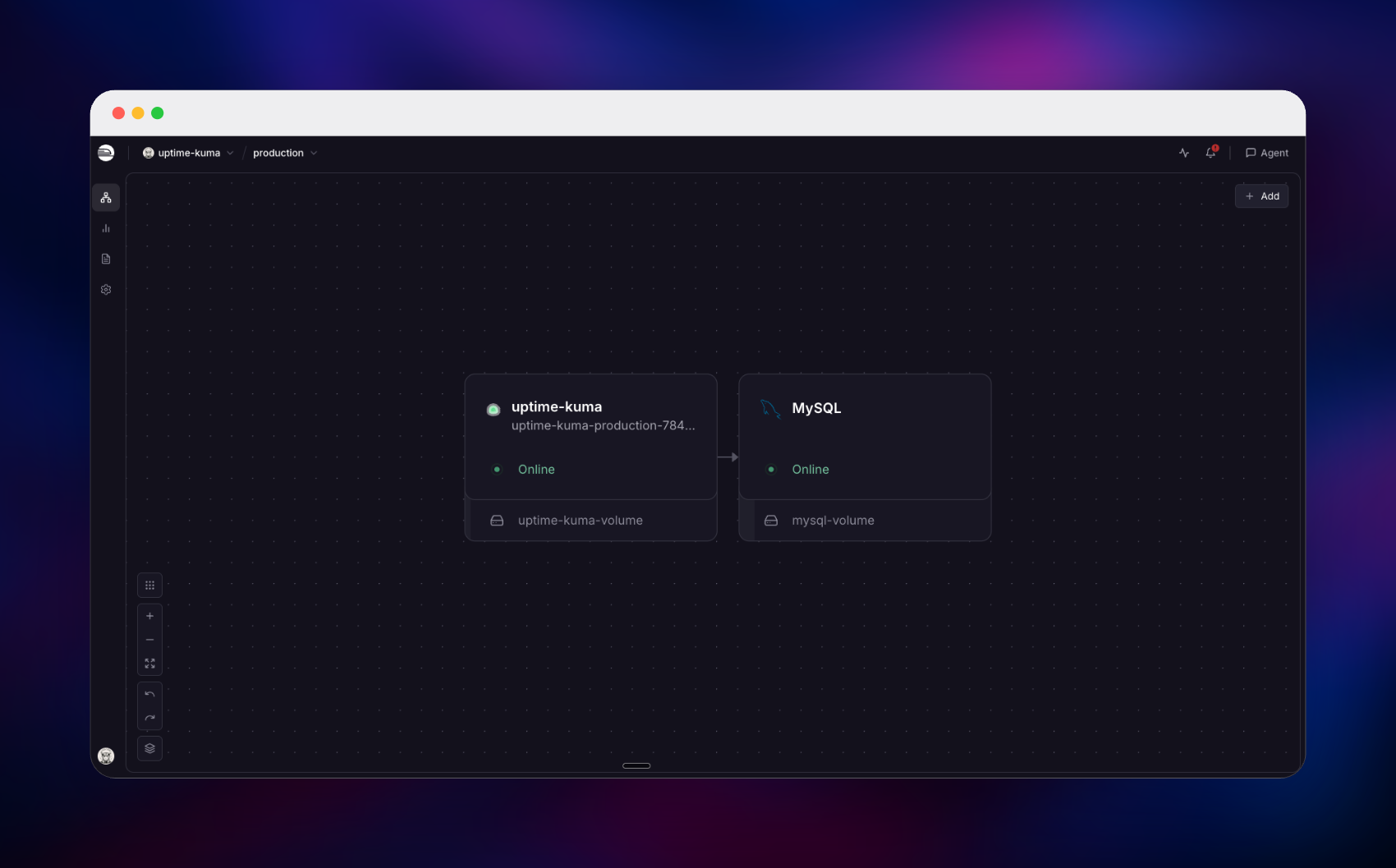
Self-host Uptime Kuma on Railway with two services. uptime-kuma runs the official louislam/uptime-kuma:2 image on port 3001 behind an HTTPS domain, with a volume at /app/data and a health check on /dashboard. A managed MySQL service sits beside it on the private network with no public port, holding every monitor, heartbeat, notification rule and status page on its own volume.
Getting Started with Uptime Kuma on Railway
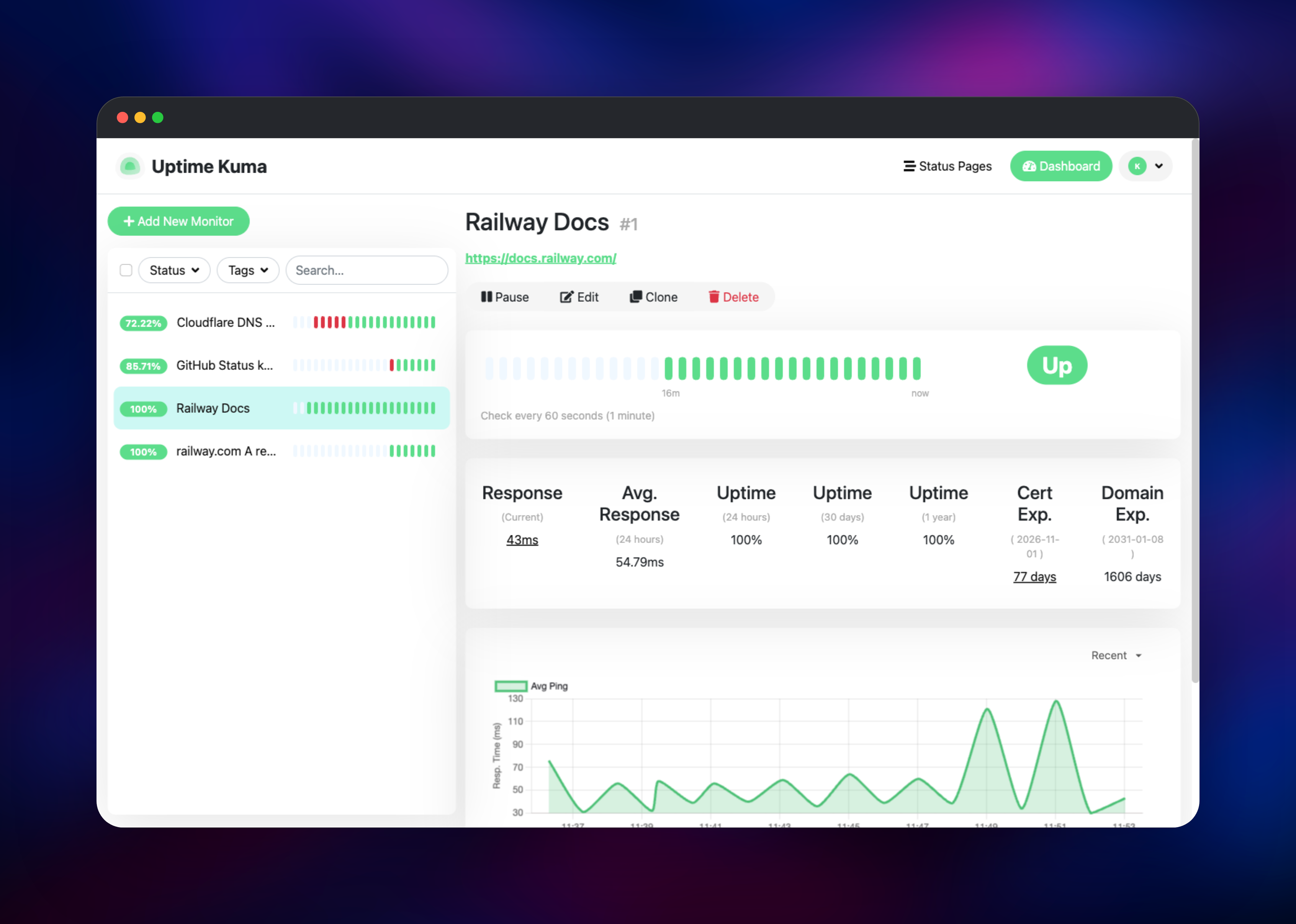
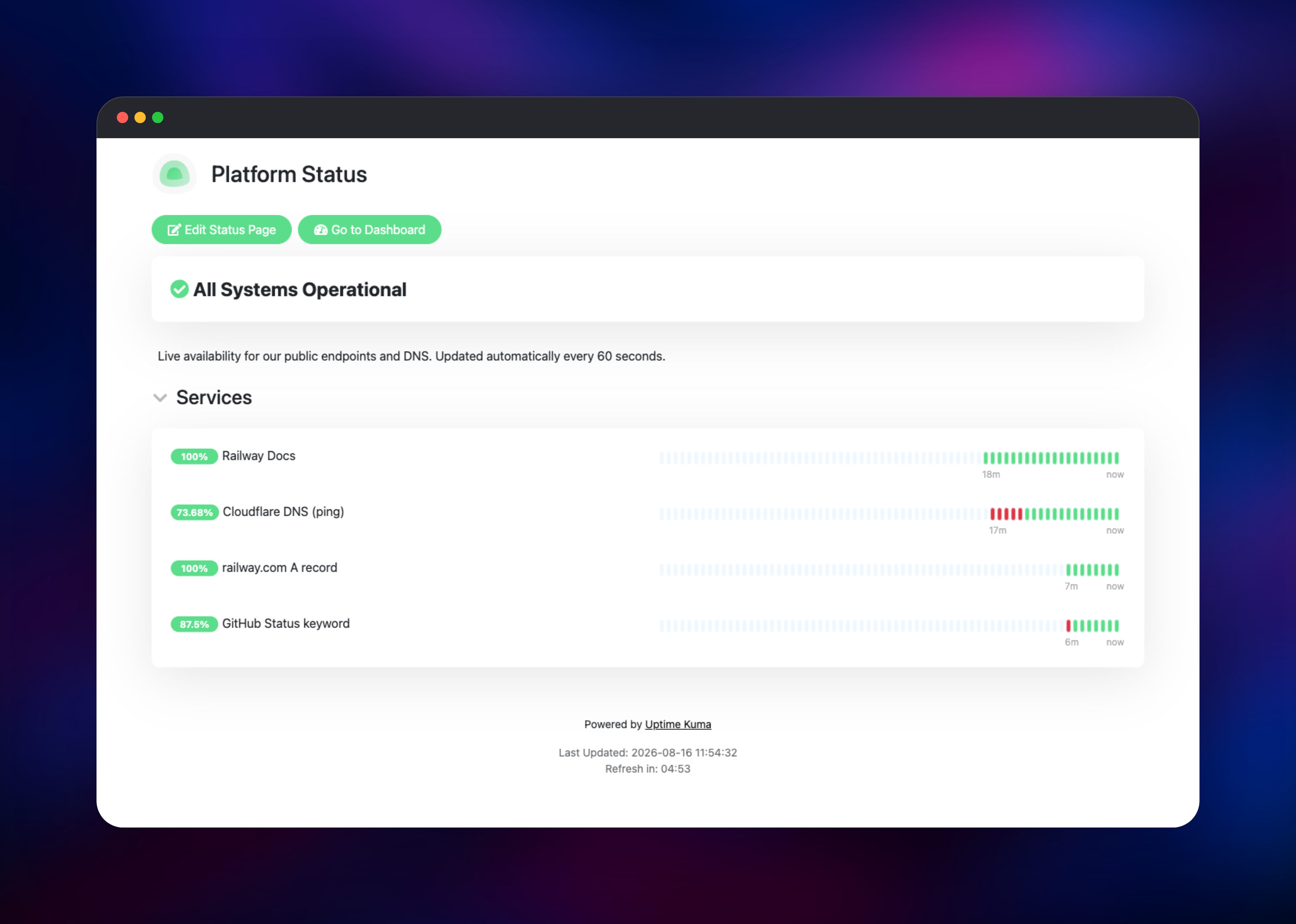
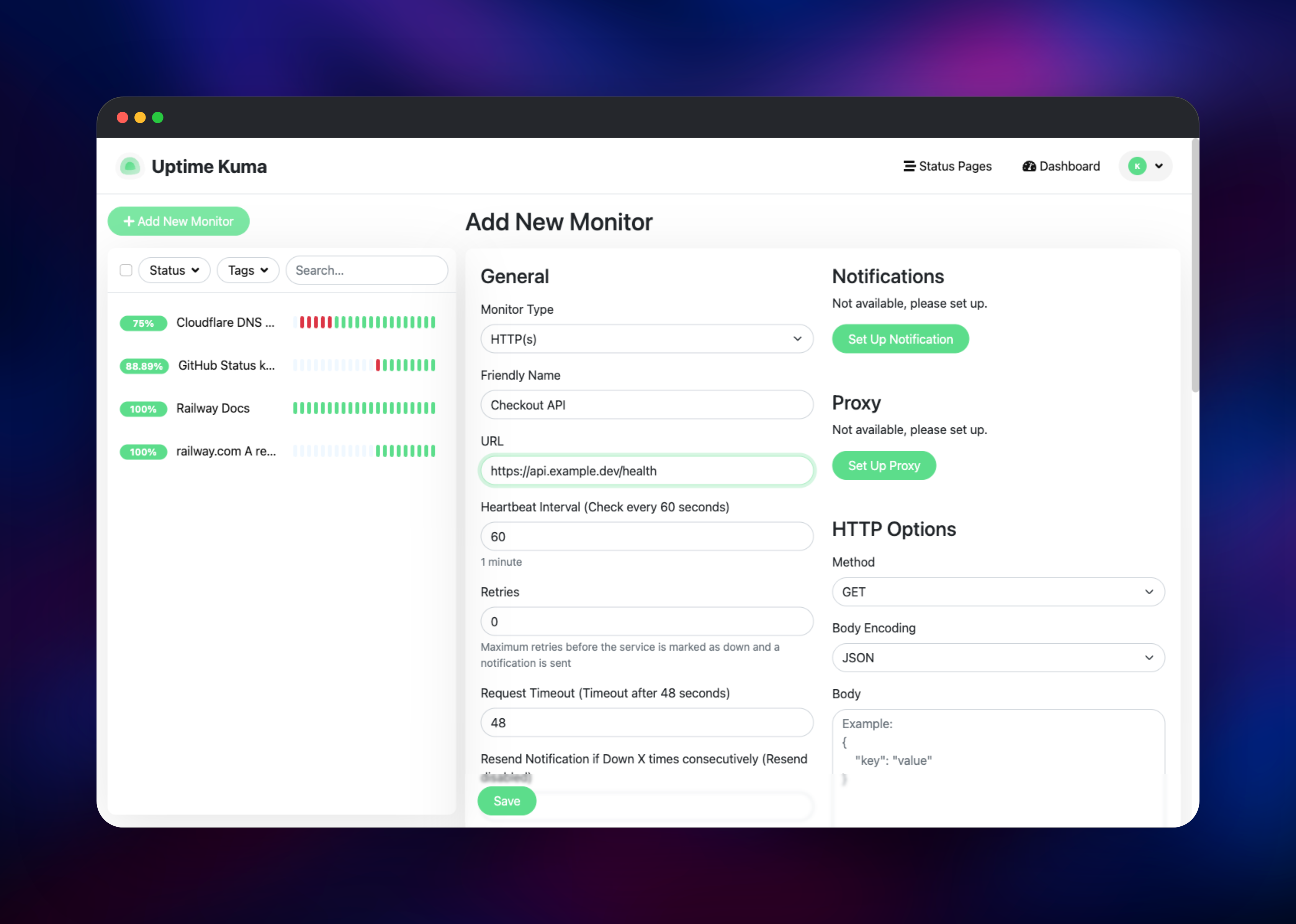
Open the uptime-kuma service's public URL and you land on /setup, where you create the first administrator. There are no default credentials, and because the database is already wired up the wizard skips its database step. Do it immediately: the setup route stays open until someone claims it. Once signed in, open Settings → Reverse Proxy and set Trust Proxy to Yes, so status pages build https:// links behind Railway's TLS edge. Then click Add New Monitor, choose HTTP(s), paste a URL and save; within a minute you get a green heartbeat bar, a response-time chart and, for HTTPS targets, certificate and domain expiry dates. Attach an alert under Setup Notification and press Test. Finally open Status Pages → New Status Page, group your monitors and publish.
About Hosting Uptime Kuma
Uptime Kuma answers one question continuously — is it up? — for far more than web pages. Teams self-host it because a hosted service only sees what is publicly exposed, bills per monitor, and has outages of its own. Running it yourself makes private endpoints reachable, monitor count free, and check history yours.
- 30+ monitor types — HTTP(s) with keyword and JSON-query matching, TCP port, Ping, DNS, Docker containers, gRPC, MQTT, Kafka, SNMP, NTP, database probes, game servers, and push monitors a cron job calls when it finishes.
- 90+ notification providers — Telegram, Discord, Slack, SMTP email, webhooks, PagerDuty, Gotify and more, per monitor or as a default.
- Status pages — as many as you like, each with a custom domain, custom CSS, grouped monitors and an incident banner.
- Certificate and domain expiry alerts, maintenance windows, 2FA, API keys, a key-protected Prometheus
/metricsendpoint, monitor groups and tags, and check intervals down to 20 seconds.
uptime-kuma is the Node.js application: dashboard, scheduler, notification dispatcher and status-page renderer. MySQL holds the state — monitors, heartbeat history, notification config, status pages, users and API keys — so a database backup is a complete backup. /app/data holds icon uploads, real-browser screenshots and Docker TLS certificates.
Why Deploy Uptime Kuma on Railway
Railway handles everything about self-hosting a monitor that is not monitoring.
- Managed MySQL, provisioned and connected on first deploy.
- A persistent volume for uploads and screenshots.
- An HTTPS domain for the dashboard and status pages.
- Private networking keeps the database off the internet.
- A health check that passes only once the database is reachable.
- Deploy logs, metrics and rollbacks.
Common Use Cases
- Public status page — monitor your site, API and dashboard, group them, publish on your own subdomain.
- Internal service checks — the monitor runs inside your project, so it can probe private services a hosted monitor cannot reach.
- Expiry watch — warnings weeks before a TLS certificate or domain registration lapses.
- Cron and backup heartbeats — give each job a push URL to call when it finishes; a missing call raises the alert.
Dependencies for Uptime Kuma
louislam/uptime-kuma:2— app, scheduler and status-page server on port 3001, volume at/app/data.- MySQL — Railway's managed MySQL, private to the project, storing configuration and heartbeat history on a volume at
/var/lib/mysql. The app connects in MariaDB-compatible mode.
Ping monitors work out of the box: containers run without CAP_NET_RAW, which stops Debian's capability-tagged ping binary launching at all, so the template ships this start command to clear that file capability and hand off to the image's own entrypoint:
/bin/sh -c 'setcap -r /usr/bin/ping 2>/dev/null || { mkdir -p /usr/local/bin && cp /usr/bin/ping /usr/local/bin/ping; }; echo "boot: ping=$(command -v ping) caps=[$(getcap /usr/bin/ping 2>/dev/null)]"; exec /usr/bin/dumb-init -- node server/server.js'
Run one replica: the scheduler runs in-process with no leader election, so a second replica duplicates every check and notification. Scale the database instead.
Environment Variables Reference
| Variable | Service | Purpose |
|---|---|---|
UPTIME_KUMA_DB_TYPE | uptime-kuma | Use MySQL/MariaDB instead of SQLite |
UPTIME_KUMA_DB_HOSTNAME, _PORT, _NAME, _USERNAME, _PASSWORD | uptime-kuma | Connection details for the managed database |
NODE_OPTIONS | uptime-kuma | Node heap ceiling for the container |
MYSQL_USER, MYSQL_PASSWORD | MySQL | Scoped app account created on first boot |
Deployment Dependencies
Source: louislam/uptime-kuma (MIT) · image louislam/uptime-kuma · docs uptime.kuma.pet
Hardware Requirements for Self-Hosting Uptime Kuma
| Resource | Minimum | Recommended |
|---|---|---|
| CPU | 1 vCPU across both services | 2 vCPU |
| RAM | 512 MB app + 512 MB MySQL | 1–2 GB app, 1 GB MySQL |
| Storage | 1 GB app volume + 1 GB database | 5 GB each |
| Runtime | Node.js, bundled in the image; MySQL or MariaDB | Railway managed MySQL 9 |
Memory grows with monitor count and retained history; disk growth lands on the database.
Self-Hosting Uptime Kuma with Docker
The smallest setup is one container on the built-in SQLite database:
docker run -d --restart=always -p 3001:3001 \
  -v uptime-kuma:/app/data \
  --name uptime-kuma louislam/uptime-kuma:2
To mirror the Railway template, run it against a real database. The following is a docker-compose.yml:
services:
  uptime-kuma:
    image: louislam/uptime-kuma:2
    ports: ["3001:3001"]
    volumes: ["uptime-kuma:/app/data"]
    environment:
      UPTIME_KUMA_DB_TYPE: "mariadb"
      UPTIME_KUMA_DB_HOSTNAME: "db"
      UPTIME_KUMA_DB_PORT: "3306"
      UPTIME_KUMA_DB_NAME: "kuma"
      UPTIME_KUMA_DB_USERNAME: "uptimekuma"
      UPTIME_KUMA_DB_PASSWORD: "change-me"
  db:
    image: mysql:9
    volumes: ["mysql:/var/lib/mysql"]
    environment:
      MYSQL_DATABASE: "kuma"
      MYSQL_USER: "uptimekuma"
      MYSQL_PASSWORD: "change-me"
      MYSQL_RANDOM_ROOT_PASSWORD: "yes"
volumes:
  uptime-kuma:
  mysql:
Setting UPTIME_KUMA_DB_TYPE skips the wizard's database step, so the first screen is admin creation.
Is Uptime Kuma Free? What Does It Cost to Self-Host?
Uptime Kuma is free and open source under the MIT licence — no paid edition, no monitor cap, no seat pricing, nothing held back behind a tier. Self-hosting on Railway costs only the infrastructure the two services use: the app container, the managed MySQL, two volumes and a little bandwidth. The workload is idle between checks, so unlike per-monitor pricing, your fiftieth monitor costs almost nothing.
FAQ
What is Uptime Kuma?
A free, MIT-licensed, self-hosted monitoring tool. It polls your websites, APIs, servers and network services on a schedule, records each result as a heartbeat, alerts you through 90+ providers when a check fails, and publishes the results as a public status page.
What does this Railway template deploy?
The uptime-kuma app from the official louislam/uptime-kuma:2 image, public on port 3001 with a volume at /app/data, plus a managed MySQL database on the private network with its own volume. There are no default credentials — you create the admin account on first visit.
Why MySQL instead of Uptime Kuma's built-in SQLite database?
Upstream treats SQLite as the small-deployment option and offers MariaDB/MySQL for everything else, exposed in version 2 as an environment variable. A managed database gets its own backups and keeps write-heavy heartbeat data off the app container's disk.
Do Ping monitors work in self-hosted Uptime Kuma on Railway?
Yes, with nothing to configure. The template's start command clears the file capability that would otherwise stop the ping binary launching inside a container.
Why is the image pinned to the 2 tag instead of latest?
On Docker Hub latest still points at the unmaintained 1.23.x line; active development and recent security fixes live in version 2.
Template Content
MySQL
mysql:9.4uptime-kuma
louislam/uptime-kuma:2