
Deploy Windmill
Turn scripts into scheduled jobs, APIs and internal apps

Just deployed
/var/lib/postgresql/data
windmill-server
Just deployed
windmill-extra
Just deployed
windmill-worker-native
Just deployed
windmill-worker
Just deployed
/tmp/windmill/cache

Just deployed

Deploy and Host Windmill on Railway
Windmill is an open-source developer platform that turns ordinary scripts into production infrastructure. Write a function in Python, TypeScript, Go, Bash, PHP or plain SQL, and Windmill gives it an auto-generated input form, a REST endpoint, a webhook, a cron schedule, retries, logging and permissions — without you building any of it. Those scripts compose into multi-step flows with branching, loops and error handlers, and into internal apps. Teams reach for it when cron jobs have outgrown a single box, when Airflow is too heavy for a set of small tasks, and when a low-code tool like Zapier cannot express the logic they need. Every runnable is just code, so it stays reviewable and versioned.
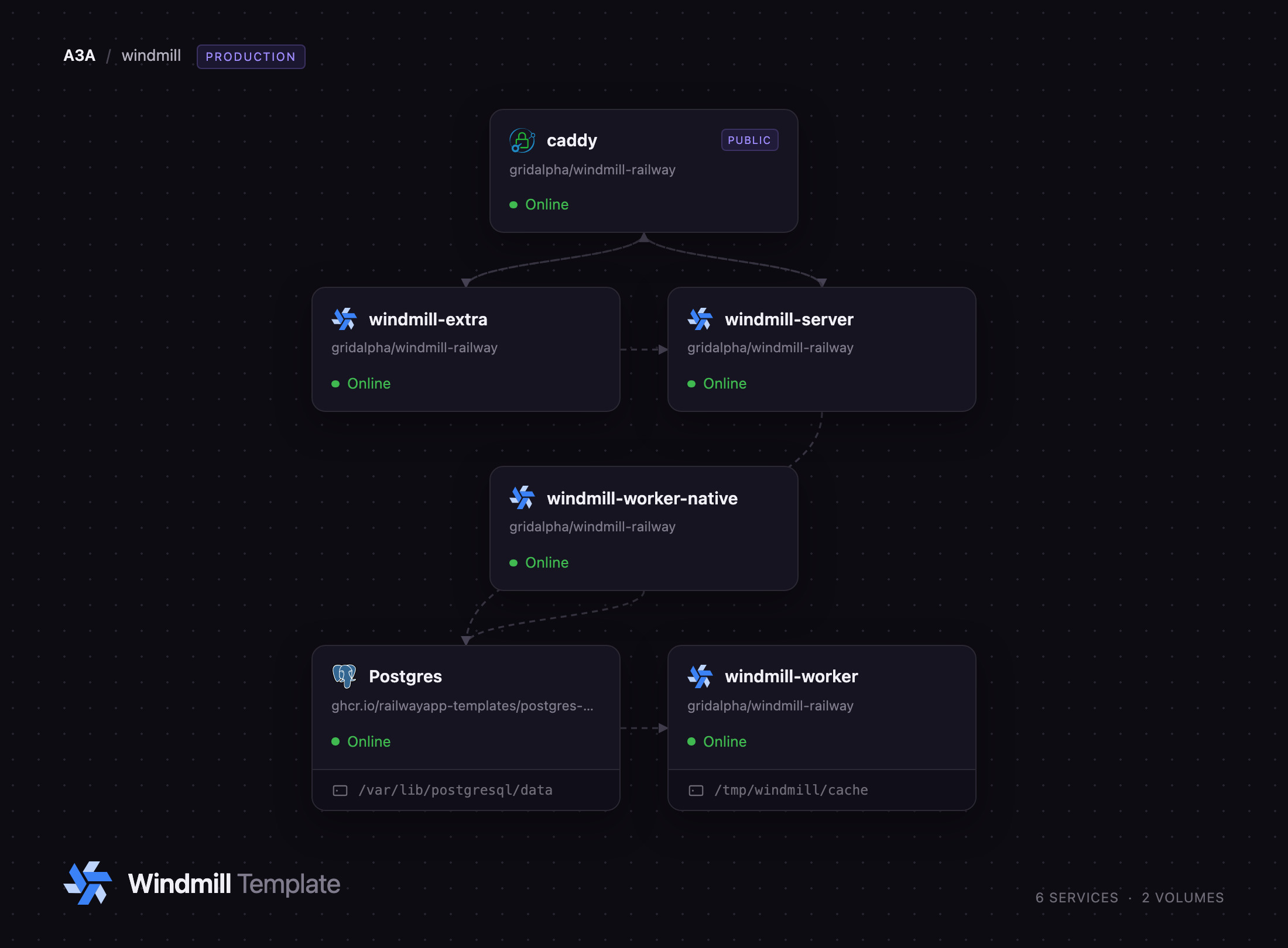
Self-hosting Windmill takes more than one container, and this template wires up the shape upstream documents for production. A Caddy proxy holds the public domain and is the only service exposed to the internet. Behind it, the server runs the frontend, API and migrations; a general worker tier executes jobs in its own container; a native worker tier takes lightweight jobs so they never queue behind a slow Python build; an extra-services container supplies the editor's language servers and debugger; and Postgres holds all state, including the queue. No separate queue or cache is needed, and capacity grows by adding worker replicas or groups.
Getting Started with Windmill on Railway
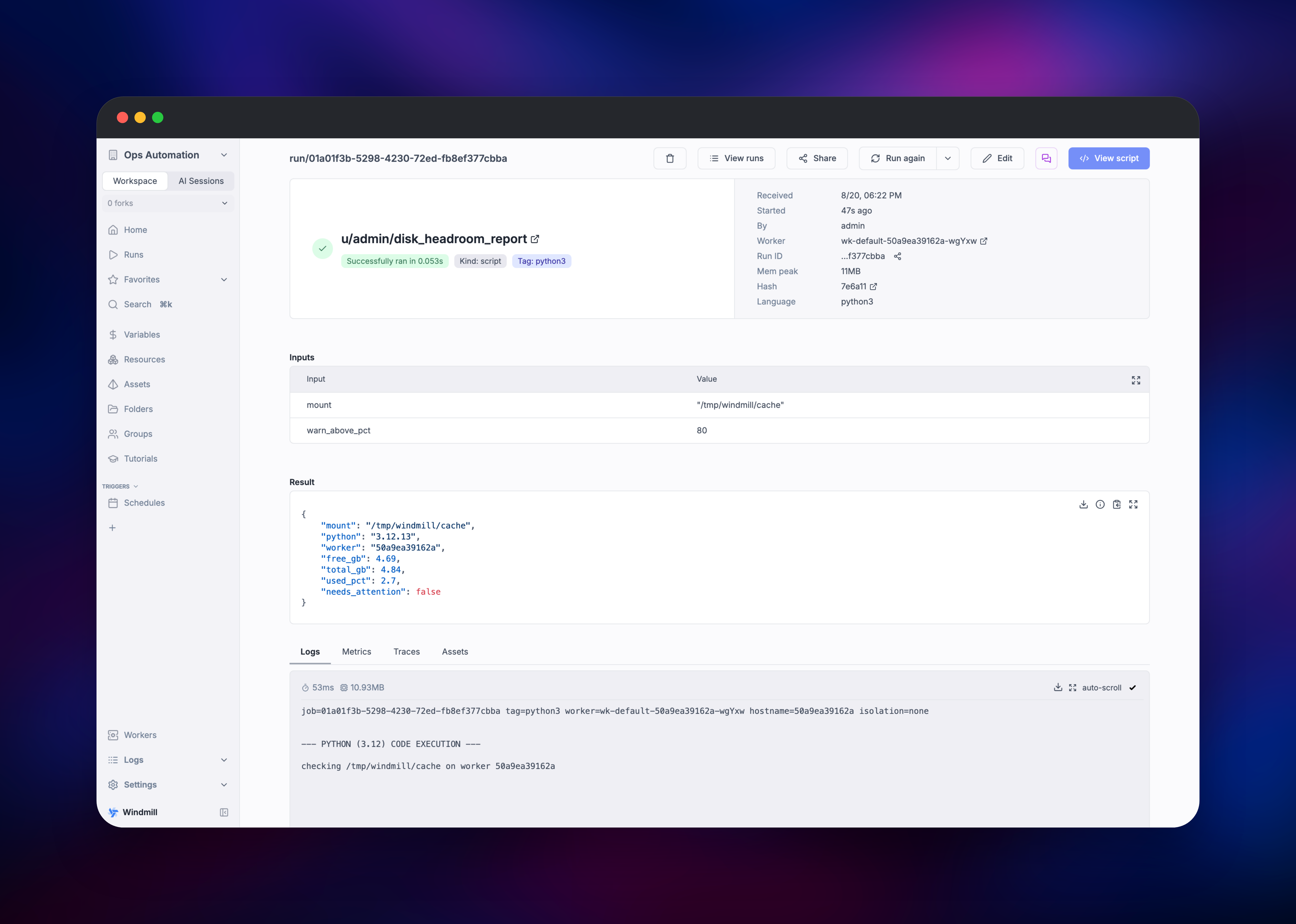
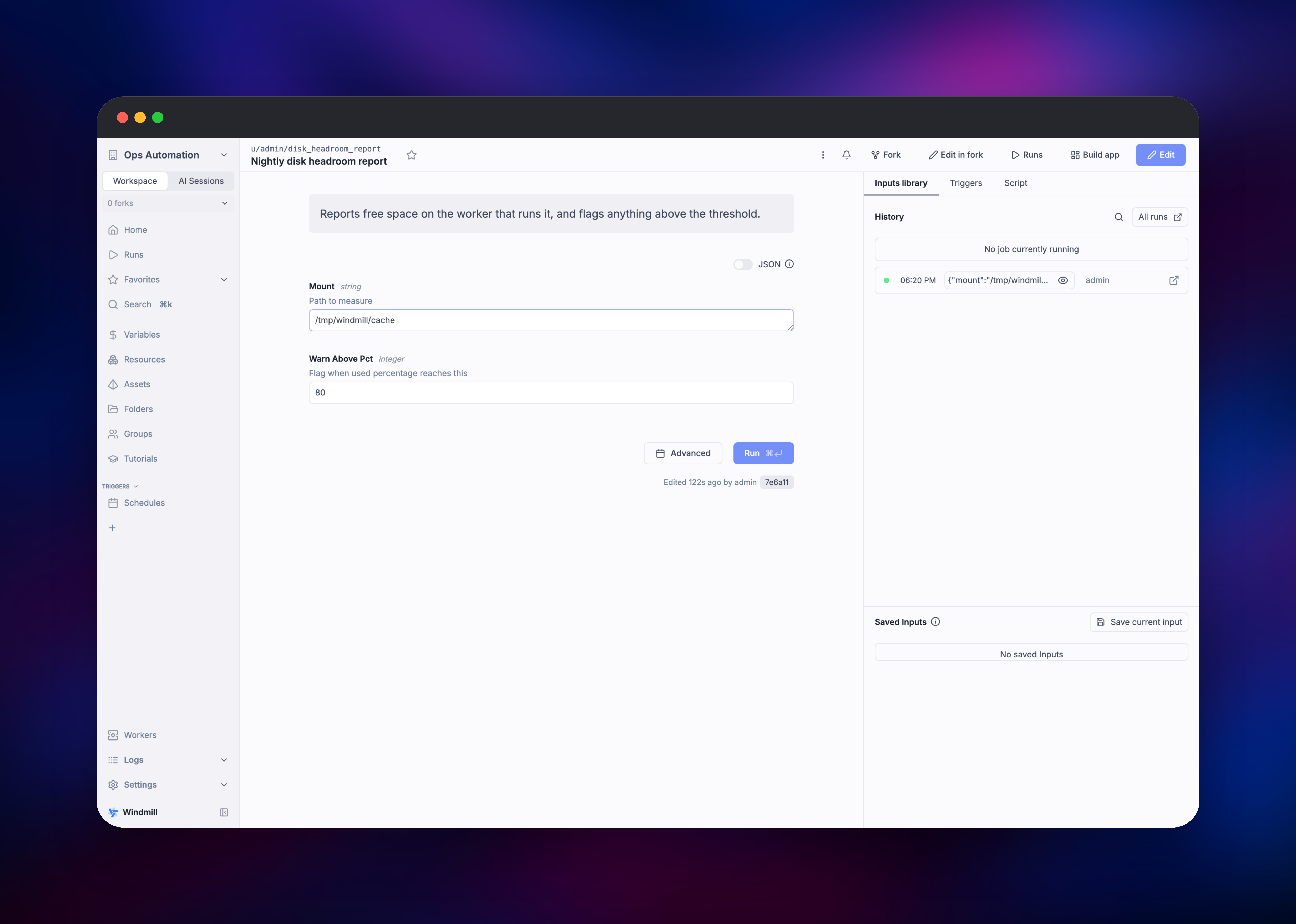
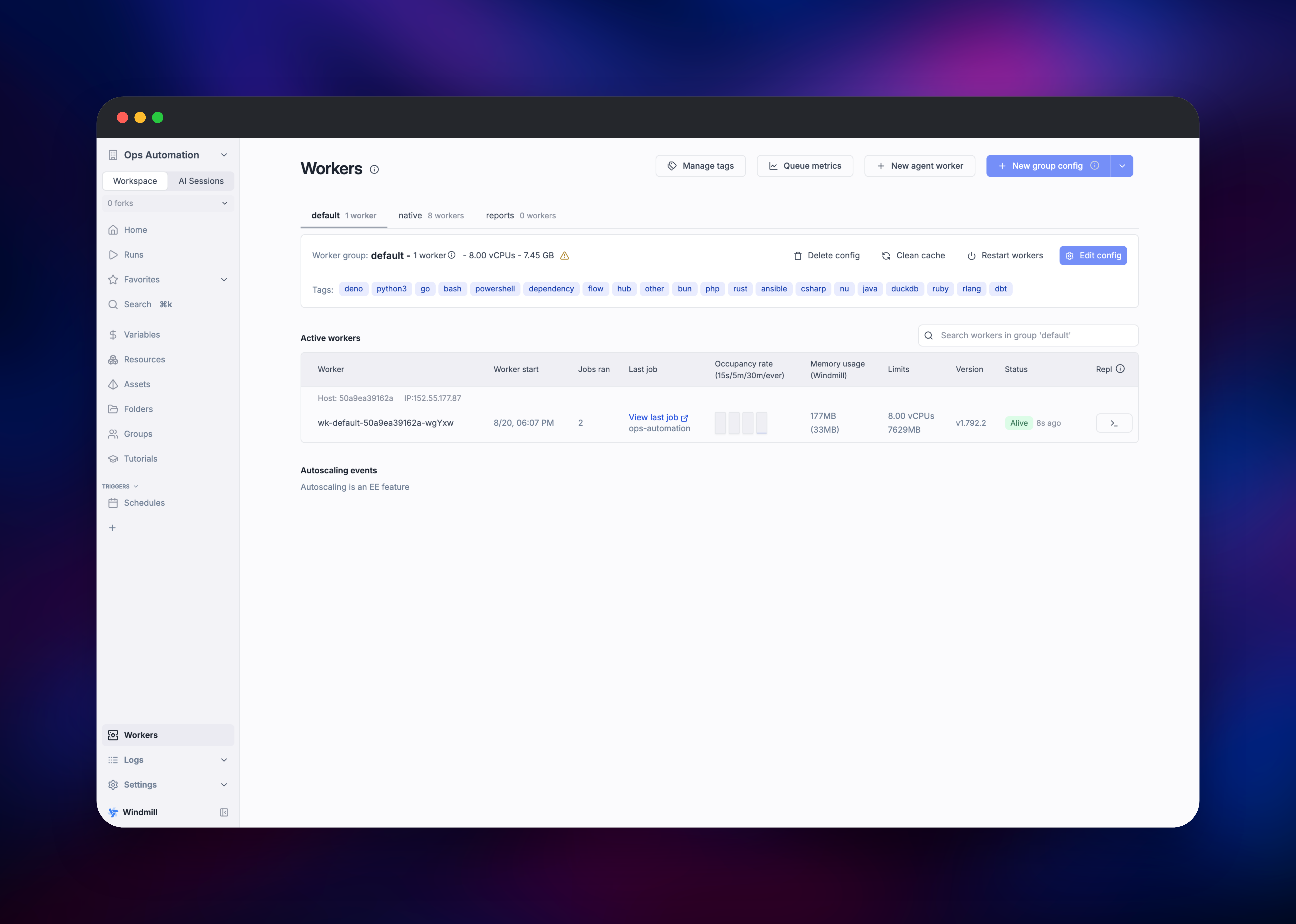
Open the public URL and you land on a sign-in screen. Windmill seeds one superadmin, admin@windmill.dev, and this template replaces the well-known default password with the value you set in WM_ADMIN_PASSWORD. Your first step is creating a workspace — everything in Windmill lives inside one. From the workspace home, click New script and pick a language; the editor gives you autocomplete backed by the language-server container. Give your main function typed arguments and Windmill builds an input form from them automatically — the feature that best explains the tool: your function's parameters become the UI. Deploy and run it, and the run page shows the inputs, the JSON result, the logs and the worker that picked the job up — confirmation that jobs execute on the worker tier, not the web server. The Workers page shows both groups reporting in; from there, attach a schedule or webhook trigger.
About Hosting Windmill
Windmill sits between a job scheduler and an internal-tools builder. Self-hosting makes sense when your automations touch private databases, internal APIs or credentials you would rather not hand a SaaS vendor, and when per-task pricing looks expensive next to a server you run anyway.
Key features:
- Scripts in Python, TypeScript (Deno and Bun), Go, Bash, PHP, Rust, C# and direct SQL against Postgres, MySQL, BigQuery, Snowflake and DuckDB
- Auto-generated input forms and documented webhook endpoints for every script
- A flow editor with branching, for-loops, parallelism, retries and error handlers
- An app builder for internal dashboards backed by your own scripts
- Schedules, triggers, a secrets store, audit logs and role-based permissions
- Worker groups and tags, so heavy jobs run on their own machines
The Railway services map onto that cleanly. Caddy is the public entry point, splitting traffic by path between the extra-services container and the server. windmill-server answers the API, serves the UI and runs migrations. windmill-worker is the general execution tier and carries a volume for the dependency cache, so Python wheels and Go modules survive restarts. windmill-worker-native takes only lightweight jobs, keeping quick tasks fast while long builds occupy the general tier. windmill-extra supplies autocomplete, type checking and the debugger. Postgres stores scripts, flows, apps, secrets, run history and the queue.
Why Deploy Windmill on Railway
Railway removes the operational work self-hosting Windmill usually implies:
- Private networking between server, workers and Postgres, no VPC to configure
- Managed Postgres with backups, so the queue and history are not your problem
- Worker replicas scale from the dashboard, not a compose file
- A persistent volume keeps the dependency cache across deploys
- HTTPS and a domain out of the box
Common Use Cases
- Internal automation: nightly reports, SaaS-to-SaaS syncs, and provisioning routines needing branching and error handling
- ETL and data pipelines: pulling from APIs, transforming with Python or DuckDB, loading into a warehouse on a schedule
- Internal tools: small apps over your production database, with a backend your team can read
- AI agent backends: scripts exposed as webhooks or tools, secrets central, every run logged
Dependencies for Windmill
ghcr.io/windmill-labs/windmill— server and both worker tiers run this Community Edition image, switched byMODEghcr.io/windmill-labs/windmill-extra— language servers, multiplayer and debugger behind one gatewaycaddy:2-alpine— path-based reverse proxy giving the deployment one origin- Railway managed Postgres 18 — application state and the job queue
Environment Variables Reference
| Variable | Service | Purpose |
|---|---|---|
DATABASE_URL | server, workers | Postgres connection string, ?sslmode=disable on the private network |
MODE | server, workers | server or worker — the role the image starts in |
BASE_URL | server | Public URL used in webhook links and emails |
WM_ADMIN_PASSWORD | server | Password set on the seeded superadmin at first boot |
REQUIRE_SIGNED_DEBUG_REQUESTS | extra | Keep true; false exposes an unauthenticated debugger |
Deployment Dependencies
- Source and compose reference: github.com/windmill-labs/windmill
- Self-hosting docs: windmill.dev/docs/advanced/self_host
- Script library: hub.windmill.dev
Hardware Requirements for Self-Hosting Windmill
| Resource | Minimum | Recommended |
|---|---|---|
| CPU | 2 vCPU total | 4+ vCPU, ~1 per worker process |
| RAM | 2 GB | 4–8 GB; upstream suggests 1–2 GB per worker |
| Storage | 1 GB Postgres + 2 GB cache | 10 GB+ if jobs install big dependencies |
| Database | PostgreSQL 14+ | PostgreSQL 16 or newer |
Self-Hosting Windmill with Docker
Upstream ships a compose file with the same shape this template deploys. This pulls it down and starts everything locally:
curl https://raw.githubusercontent.com/windmill-labs/windmill/main/docker-compose.yml -o docker-compose.yml
curl https://raw.githubusercontent.com/windmill-labs/windmill/main/Caddyfile -o Caddyfile
curl https://raw.githubusercontent.com/windmill-labs/windmill/main/.env -o .env
docker compose up -d
To add capacity, scale the worker service rather than the server:
docker compose up -d --scale windmill_worker=6
One caveat with a managed database: Windmill creates a windmill_admin role with BYPASSRLS on first boot, which needs a Postgres superuser. Providers that withhold it need those roles created by hand first, with upstream's init-db-as-superuser.sql. Railway's managed Postgres grants superuser, so no extra step is needed.
How Much Does Windmill Cost to Self-Host?
Windmill's Community Edition is free to run internally with no seat or execution limits, and it is what this template deploys, with the core source under AGPLv3. A paid Enterprise Edition adds collaborative editing, full-text job-log search, distributed dependency caching and worker autoscaling. On Railway you pay only for the compute, storage and bandwidth used.
FAQ
What is Windmill? Windmill is an open-source platform that turns scripts into scheduled jobs, APIs, multi-step flows and internal apps. It is written in Rust, and runs your code in Python, TypeScript, Go, Bash, SQL and other languages.
What does this Railway template deploy? Six services: a Caddy proxy on the public domain, the Windmill server, a general worker tier, a native worker tier, the language-server and debugger container, and Postgres.
Why does Windmill need Postgres? Postgres is not just storage here — it is the job queue. Scripts, flows, apps, secrets and run history live in it, and workers poll it for work, which is why there is no Redis or RabbitMQ.
What is the default login for self-hosted Windmill?
Upstream seeds admin@windmill.dev with the password changeme. This template sets your own password on that account during first boot, so the published default never works on a fresh deployment.
How do I scale Windmill workers on Railway?
Raise the replica count on the worker service, or raise NUM_WORKERS to run more processes per container — one per vCPU is upstream's guidance. For heavier isolation, add a worker service with a different WORKER_GROUP and route jobs to it with tags.
Do the server and worker images have to be the same version? Yes. Every Windmill service shares one database schema, so upgrade the server, both worker tiers and the extra-services container together.
Template Content
windmill-server
gridalpha/windmill-railwaywindmill-extra
gridalpha/windmill-railwaywindmill-worker-native
gridalpha/windmill-railwaywindmill-worker
gridalpha/windmill-railway