
Deploy WooCommerce
Online store software for selling products on your own website
woocommerce
Just deployed
/var/www/html

Redis
Just deployed
/data

mailpit
Just deployed
/data

MySQL
Just deployed
/var/lib/mysql
Deploy and Host WooCommerce on Railway
WooCommerce is the open-source e-commerce platform built on WordPress, and it powers more online stores than anything else on the web — roughly a third of all stores whose platform can be identified. It turns a WordPress site into a full shop: catalogue, cart, checkout, orders, customer accounts, coupons, tax and shipping rules, and transactional email. Because it is a plugin rather than a hosted service, you own the database, the media and the customer records outright.
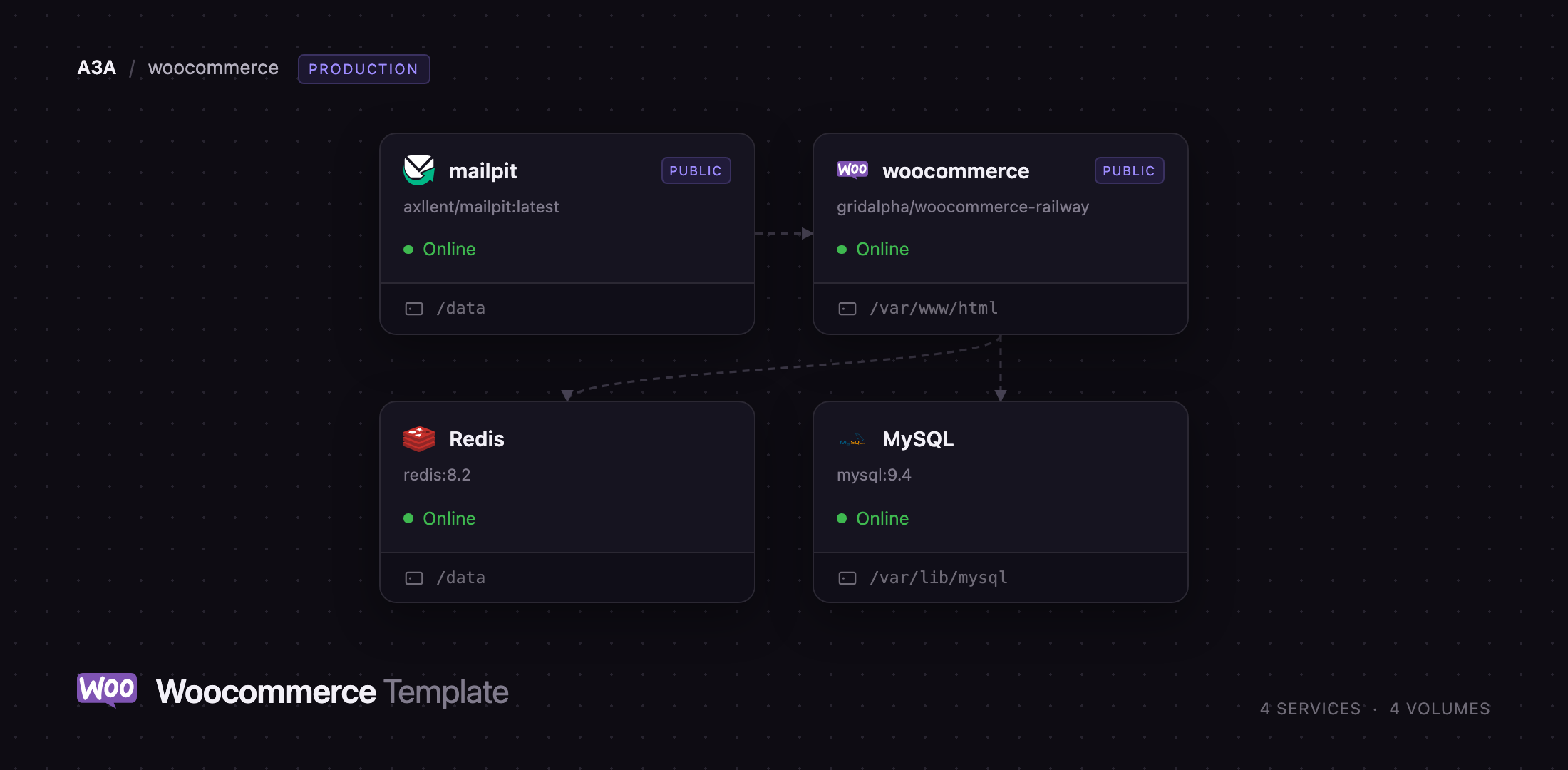
Deploy WooCommerce on Railway and you get a store already trading, not an installer. The template runs WordPress with WooCommerce activated, a managed MySQL database holding products and orders, a managed Redis object cache, and Mailpit capturing the order email the store sends. On first boot the container installs WordPress, creates a database-scoped MySQL account, seeds a sample catalogue with images, enables a shipping and a payment method, and starts a scheduler loop so background jobs fire without waiting for traffic.
Getting Started with WooCommerce on Railway
Set WORDPRESS_ADMIN_USER, WORDPRESS_ADMIN_PASSWORD and WORDPRESS_ADMIN_EMAIL before you deploy — they are read once, while the installer runs, and afterwards the password is a hash only WordPress can change. Every other variable has a working default.
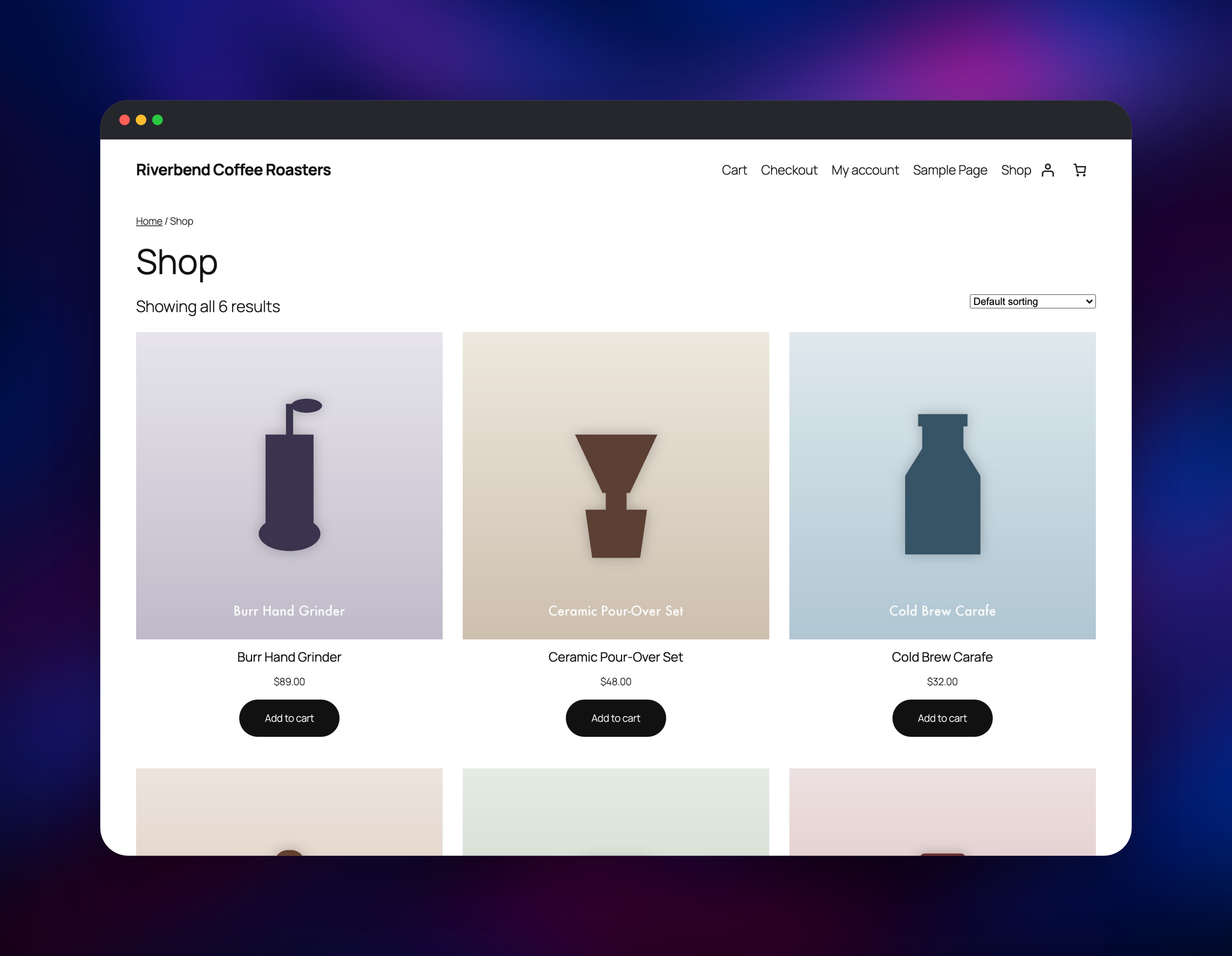
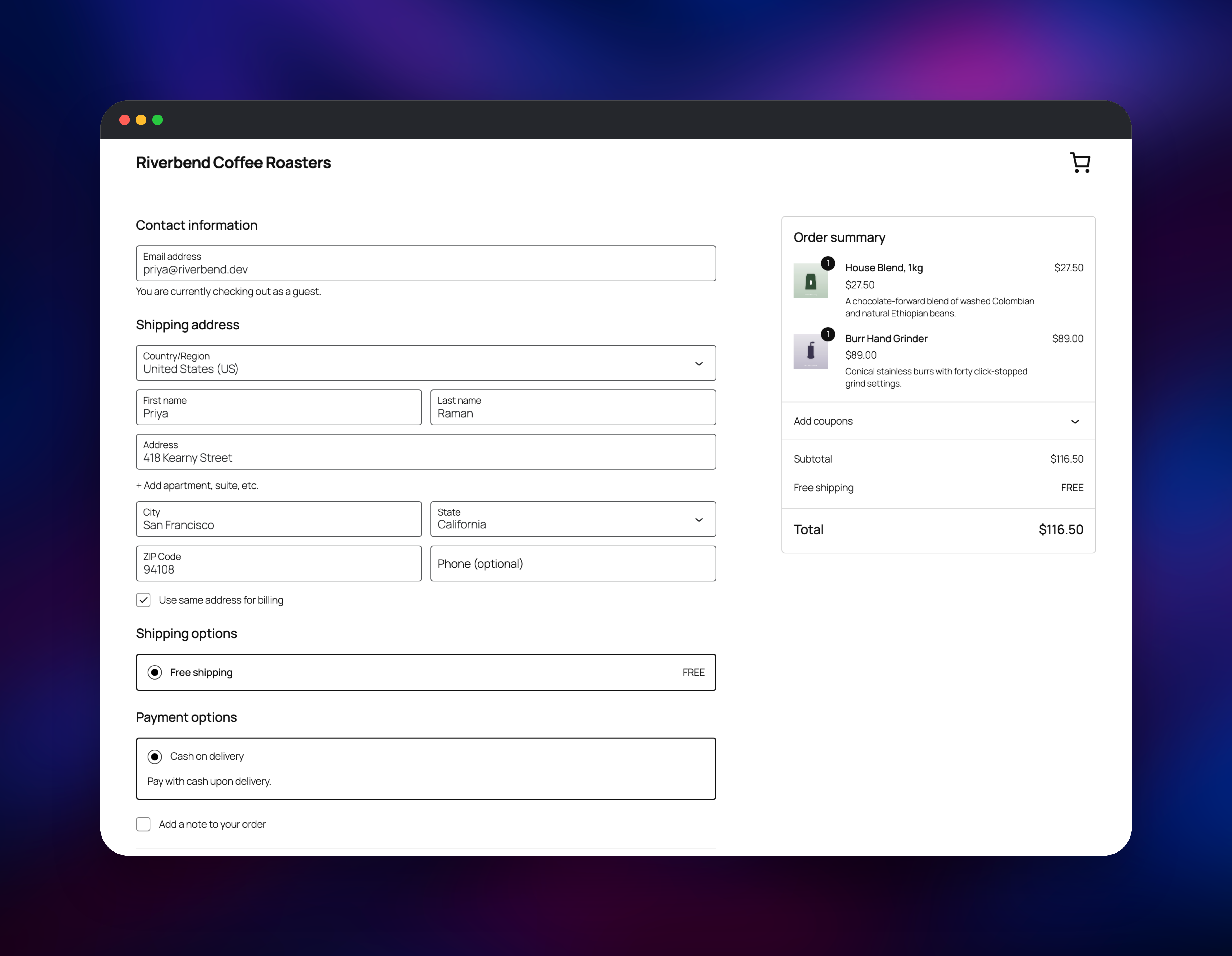
When the deploy finishes, open the public URL. You should land on a live storefront, not a setup wizard. Visit /shop/, add a product to the cart, and go to /checkout/. Cash on delivery is enabled and free shipping covers every region, so you can complete a real order without connecting a gateway — the fastest way to confirm the stack is healthy, since it writes to MySQL, reads through the cache and sends two emails.
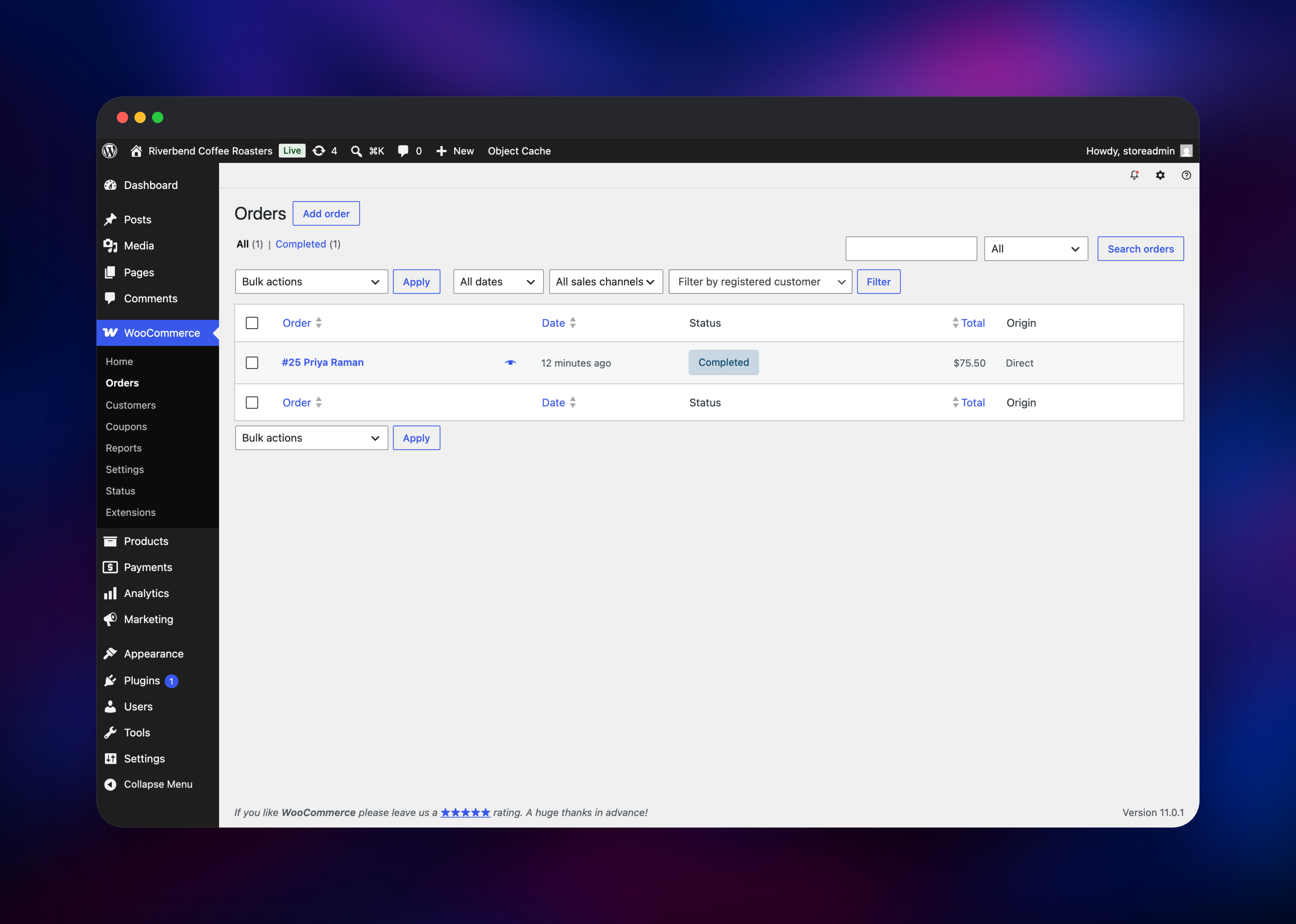
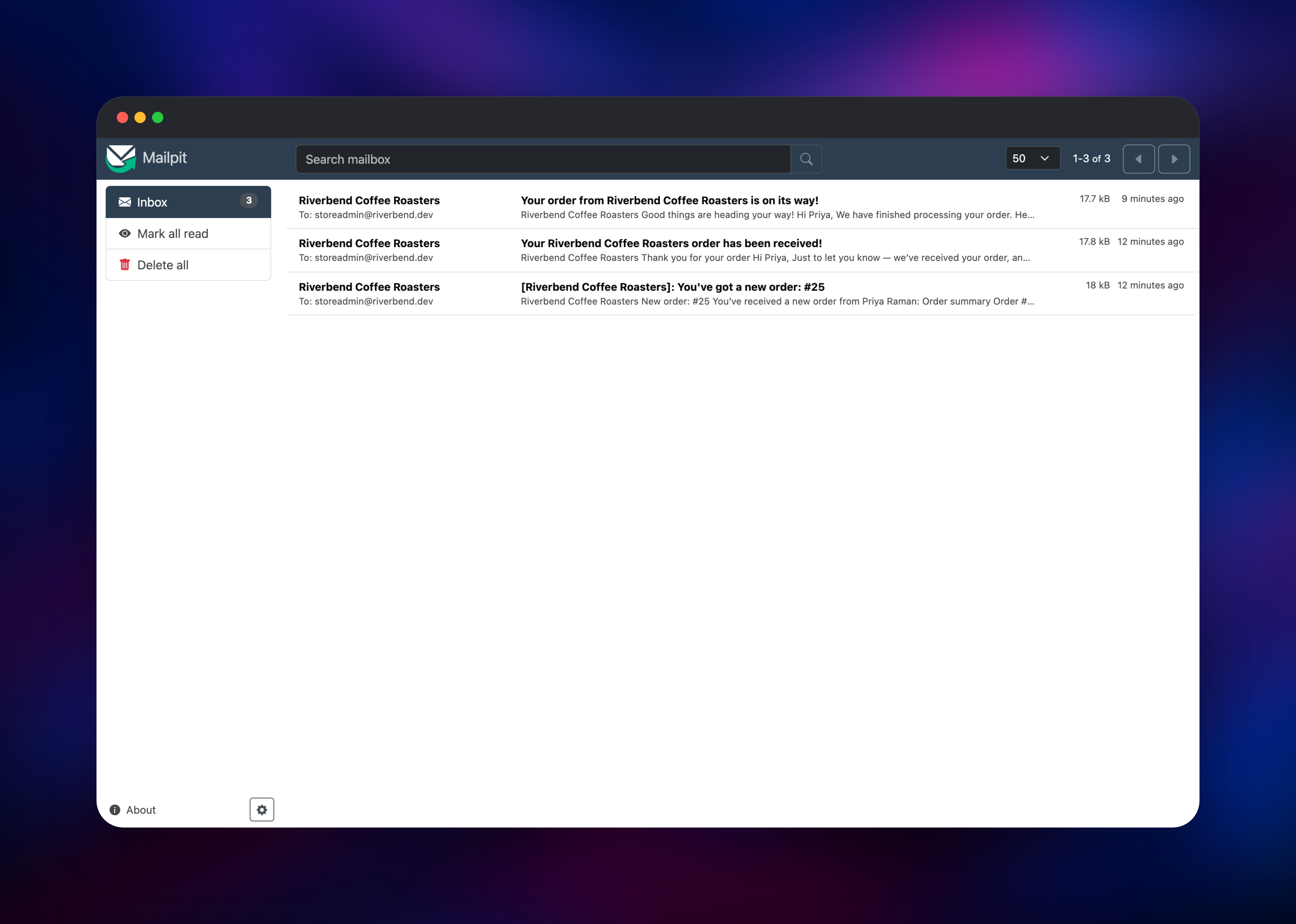
Sign in at /wp-admin/ and open WooCommerce → Orders; your test order will be there. Mailpit's public URL — protected by MP_UI_AUTH — holds the customer confirmation and the new-order notice. Then make it yours: delete the sample products, set your address and currency under WooCommerce → Settings, and add a gateway under WooCommerce → Payments.
About Hosting WooCommerce
Hosting WooCommerce yourself means running WordPress with PHP, a MySQL database, persistent storage for media, and something that reliably runs scheduled work. Teams choose it to keep customer data in their own infrastructure, avoid per-transaction fees, or build on WordPress content they already publish.
Key features:
- Simple, variable, grouped, downloadable and virtual products, with stock management
- A block-based cart and checkout that works in any modern WordPress theme
- Orders, refunds, coupons, tax classes, shipping zones and guest checkout
- A REST API and a public Store API for headless frontends
The Railway architecture is four services. WooCommerce is the WordPress container serving HTTP, keeping wp-content — uploads, plugins, themes — on a persistent volume. MySQL stores products, orders, customers and settings. Redis backs the object cache, which matters more here than on a content site because WooCommerce is unusually heavy on option and meta queries. Mailpit gives the store somewhere to send mail, so order confirmations exist and are readable from day one.
Why Deploy WooCommerce on Railway
Railway removes the server administration a self-hosted store usually needs.
- MySQL, Redis and volumes are provisioned with the app, already networked
- HTTPS and a public domain are issued automatically, with no certificates to manage
- Private networking keeps the database, cache and SMTP listener off the internet
- Scaling CPU and memory is a slider; logs, metrics and rollbacks are built in
Common Use Cases
- A direct-to-consumer storefront for a brand that also publishes on WordPress
- Digital downloads and licence keys, using virtual products with no shipping
- A headless commerce backend, with a custom frontend on the WooCommerce Store API
Dependencies for WooCommerce
- WooCommerce —
wordpress:7.0-php8.4-apache, extended by gridalpha/woocommerce-railway, which adds WP-CLI, configures the store at boot and ships the SMTP and hardening must-use plugins - MySQL — managed MySQL 9, the system of record for products and orders
- Redis — managed Redis 8, object cache via the Redis Object Cache plugin
- Mailpit —
axllent/mailpit:latest, private SMTP on 1025 plus a protected inbox
Environment Variables Reference
| Variable | Purpose |
|---|---|
WORDPRESS_ADMIN_USER / _PASSWORD / _EMAIL | First administrator, read once at install |
WOOCOMMERCE_STORE_COUNTRY / _CITY / _ADDRESS / _POSTCODE | Store address, for tax and shipping |
WOOCOMMERCE_CURRENCY | Store currency, USD by default |
WOOCOMMERCE_SEED_SAMPLE_PRODUCTS | Set false for an empty catalogue |
WORDPRESS_SMTP_HOST / _PORT / _USER / _PASSWORD / _SECURE | Outbound mail; point at a real relay in production |
Deployment Dependencies
Runtime is PHP 8.4 with Apache and mod_php, MySQL 9 and Redis 8. Sources: github.com/woocommerce/woocommerce, hub.docker.com/_/wordpress, github.com/axllent/mailpit.
Hardware Requirements for Self-Hosting WooCommerce
| Resource | Minimum | Recommended |
|---|---|---|
| CPU | 1 vCPU | 2 vCPU |
| RAM | 512 MB | 2 GB across all services |
| Storage | 5 GB volume | 10 GB or more with heavy product imagery |
| Runtime | PHP 8.1+, MySQL 8+ | PHP 8.4, MySQL 9, Redis 8 |
Self-Hosting WooCommerce
Self-hosting WooCommerce means running WordPress and installing the plugin. The smallest setup is WordPress plus MySQL, which Docker does in two commands:
docker run -d --name wpdb -e MYSQL_DATABASE=wordpress \
  -e MYSQL_USER=wordpress -e MYSQL_PASSWORD=change-me \
  -e MYSQL_ROOT_PASSWORD=change-me-too -v wpdb:/var/lib/mysql mysql:9

docker run -d --name wp --link wpdb:db -p 8080:80 \
  -e WORDPRESS_DB_HOST=db -e WORDPRESS_DB_NAME=wordpress \
  -e WORDPRESS_DB_USER=wordpress -e WORDPRESS_DB_PASSWORD=change-me \
  -v wp:/var/www/html wordpress:7.0-php8.4-apache
That serves WordPress at http://localhost:8080, where you still run the installer and add the plugin by hand. To skip both, use WP-CLI — what this template does on first boot:
wp core install --url=https://example.com --title="My Store" \
  --admin_user=storeadmin --admin_password=... --admin_email=you@example.com
wp plugin install woocommerce --activate
wp option update woocommerce_coming_soon no
That last line matters more than it looks: every new install is hidden behind a site-wide "coming soon" placeholder until the store is explicitly launched, and completing the onboarding profile does not clear it.
Is WooCommerce Free?
WooCommerce is free and open source under the GPL, and so is WordPress. There are no licence fees, no per-store charges and no cut of your sales — WooCommerce earns from optional paid extensions and from WooPayments. Payment providers still charge processing fees, and on Railway you pay only for what the four services use.
FAQ
What is WooCommerce?
An open-source e-commerce plugin that adds a product catalogue, cart, checkout, orders and customer accounts to a WordPress site. It is the most widely deployed e-commerce software online.
What does this Railway template deploy?
WordPress with WooCommerce activated on a persistent volume, a managed MySQL database, a managed Redis object cache, and Mailpit as an SMTP destination with a protected inbox. The store is trading when the deploy finishes.
Why does the template include Redis and Mailpit?
WooCommerce runs many option and meta queries per page, and a persistent object cache is the single biggest thing you can do about it. Mailpit exists because a container has no mail transfer agent, so without an SMTP destination every order confirmation is silently dropped. Repoint WORDPRESS_SMTP_HOST at a real relay before taking real orders.
How do I accept real payments in self-hosted WooCommerce?
The template enables cash on delivery so checkout works right away. For real payments, go to WooCommerce → Payments, install a gateway — WooPayments, Stripe, PayPal or a regional provider — and supply your own credentials.
Can I use my own domain and theme?
Yes. Add a custom domain in Railway's service settings; the store reads its canonical URL from the environment on every boot, so nothing in the database needs editing. Any WordPress theme works — WooCommerce ships block templates for shop, product, cart and checkout.
Does WordPress update itself, and can I install plugins?
Plugin and theme installation is enabled, and WordPress applies minor core updates automatically. Editing plugin and theme files from the browser is disabled — a deliberate hardening choice on a public store. The core version is held on a line WooCommerce has certified, so the admin may offer a newer major than the container ships.
Template Content

