
Deploy WordPress
Deploy WordPress with MariaDB. No traffic caps. No renewal price hikes.
Deploy and Host WordPress on Railway

WordPress is the world's most popular open-source CMS, powering 43% of all websites — from personal blogs to enterprise e-commerce stores. This template deploys a production-ready WordPress instance with a managed MariaDB database, persistent volume for media uploads, and automatic HTTPS — giving you dedicated cloud infrastructure at a fraction of managed WordPress hosting costs.
Self-host WordPress for ~$5–10/month — versus WP Engine at $30/month, Kinsta at $35/month, and SiteGround which renews at $29.99/month. Full data ownership. No traffic caps.
What This Template Deploys
| Service | Purpose |
|---|---|
| WordPress | The CMS runtime — PHP/Apache container serving your WordPress site with the full plugin and theme ecosystem |
| MariaDB | Managed relational database — stores posts, pages, users, settings, and all plugin data persistently |
| Persistent Volume | Mounted at wp-content/uploads — media files, theme assets, and plugin files survive every redeploy |
All services connect over Railway's private network. Database credentials are injected automatically via reference variables — no manual connection string setup required.
About Hosting WordPress on Railway
Traditional shared WordPress hosting puts your site on overcrowded servers with other customers, imposes traffic caps, charges renewal rates that often triple after the first year, and locks you into proprietary control panels. Managed WordPress hosts like WP Engine and Kinsta solve the performance problem but start at $30–35/month for a single site with visitor caps.
Railway gives you dedicated container infrastructure with no traffic caps, persistent storage, automatic HTTPS, and private database networking — at ~$5–10/month flat. No cPanel. No FTP. No renewal price shock. Your WordPress instance runs in an isolated container alongside its own MariaDB database, with media files persisted on a Railway volume.
Typical cost: ~$5–10/month on Railway's Hobby plan for the full stack.
Deploy in Under 5 Minutes
- Click Deploy on Railway and wait for WordPress and MariaDB to provision (~3–5 minutes)
- Railway injects all database credentials automatically — no manual DB configuration
- Open your Railway-assigned URL — the WordPress installation wizard loads immediately
- Set your site title, admin username, and password
- Install your theme and plugins — your WordPress site is live
No cPanel. No FTP. No SSH. No server configuration.
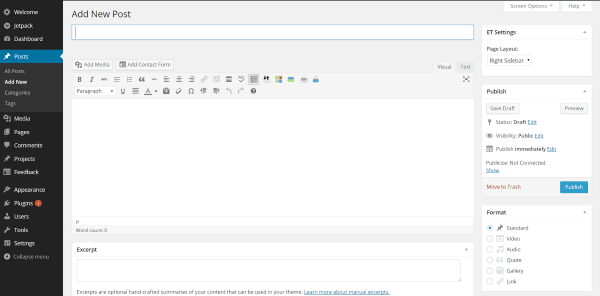
Common Use Cases
- Managed WordPress alternative to WP Engine — get dedicated container infrastructure without the $30/month single-site cap, visitor limits, or annual contract requirements
- Run WooCommerce without Shopify transaction fees — self-host a full e-commerce store with WooCommerce; no 0.5–2% transaction fees, no platform lock-in, full plugin flexibility
- WordPress with a dedicated database instead of shared hosting — Railway provisions a private MariaDB instance per deployment; no shared database servers, no noisy neighbours
- Agency client WordPress hosting — deploy isolated WordPress instances per client on Railway; each gets its own container, database, and volume with no cross-contamination
- LMS and membership site hosting — run LearnDash, LifterLMS, or MemberPress on dedicated infrastructure without hitting shared hosting resource limits during course launches
- WordPress staging and production environments — spin up a separate Railway project for staging; mirror the production stack exactly without additional shared hosting accounts
Configuration
| Variable | Required | Description |
|---|---|---|
WORDPRESS_DB_HOST | ✅ Auto-injected | MariaDB private hostname — injected via Railway reference variable |
WORDPRESS_DB_NAME | ✅ Auto-injected | Database name — injected from the Railway MariaDB service |
WORDPRESS_DB_USER | ✅ Auto-injected | Database user — injected from the Railway MariaDB service |
WORDPRESS_DB_PASSWORD | ✅ Auto-injected | Database password — injected securely via Railway reference variable |
MYSQL_ROOT_PASSWORD | ✅ Required | Set a strong root password for the MariaDB service |
WORDPRESS_TABLE_PREFIX | Optional | Table prefix — defaults to wp_. Change for security on public instances |
WORDPRESS_DEBUG | Optional | Set to false in production. Set to true only for local debugging |
WORDPRESS_URL | Recommended | Set to your Railway public domain or custom domain after deploy |
All database connection variables are injected automatically from the MariaDB service via Railway reference variables. You do not need to set them manually.
WordPress on Railway vs. Managed Hosting Providers
| Railway (~$5–10/mo) | WP Engine | Kinsta | SiteGround (renewal) | |
|---|---|---|---|---|
| Entry price | ~$5–10/mo flat | $30/mo | $35/mo | $29.99/mo (renewal) |
| Renewal price hike | ✅ None | ❌ Contract-based | ❌ Annual billing | ❌ Steep renewal jump |
| Traffic/visitor cap | ✅ None | ❌ 25,000 visits/mo | ❌ 25,000 visits/mo | ❌ 10,000 visits/mo |
| Dedicated database | ✅ Private MariaDB | ✅ Yes | ✅ Yes | ❌ Shared |
| Data ownership | ✅ Your infrastructure | ⚠️ WP Engine servers | ⚠️ Kinsta/GCP servers | ⚠️ SiteGround servers |
| Custom PHP config | ✅ Full control | ⚠️ Limited | ⚠️ Limited | ❌ Restricted |
| Multi-site per price | ✅ Per project | ❌ Extra cost | ❌ Extra cost | ❌ Extra cost |
Dependencies for WordPress Hosting
- Railway account — Hobby plan (~$5–10/month) covers WordPress, MariaDB, and the volume
- A domain name (optional) — Railway provides a public URL; custom domains can be added free
- Optional: Cloudflare for CDN, DNS management, and DDoS protection in front of Railway
Deployment Dependencies
- WordPress.org — official source and plugin repository
- WordPress Documentation — developer and configuration reference
- WooCommerce — e-commerce plugin for WordPress
- Railway Volumes Documentation — persistent storage setup
- Railway Custom Domains — domain setup
Implementation Details
This template deploys WordPress as a PHP/Apache container connected to a Railway-managed
MariaDB instance over private networking. The wp-content/uploads directory is mounted on a
Railway persistent volume so media files, theme assets, and plugin files survive every redeploy
and version update. Database credentials are injected via Railway reference variables — the
MariaDB connection details update automatically if the database service is reprovisioned.
WordPress serves on port 80 with Railway's HTTPS layer handling SSL termination automatically.
No Nginx configuration, no SSL certificate management, no .htaccess editing required for
Railway's HTTPS proxy to work with WordPress permalinks.
Frequently Asked Questions
How much does WordPress on Railway cost compared to WP Engine or Kinsta? The full stack — WordPress, MariaDB, and persistent volume — runs at approximately $5–10/month on Railway's Hobby plan. WP Engine starts at $30/month for one site with a 25,000 visit cap. Kinsta starts at $35/month with the same visitor limit. SiteGround's renewal rate jumps to $29.99/month after the introductory period. Railway has no visitor caps and no renewal pricing.
Do I lose my WordPress content and media if Railway redeploys?
No. Post content, pages, and settings are stored in the MariaDB database which persists
independently of the WordPress container. Media files are stored on the Railway volume mounted
at wp-content/uploads. Both survive redeploys, version updates, and container restarts.
Can I run WooCommerce on this Railway deployment? Yes. WooCommerce installs and runs as a standard WordPress plugin. There are no restrictions on which plugins you can install. The MariaDB database handles WooCommerce's additional tables without additional configuration.
Can I use a custom domain instead of the Railway URL?
Yes. Add your domain in Railway service settings under Custom Domains. Update WORDPRESS_URL
to your custom domain in the Variables tab. Railway provisions HTTPS for custom domains
automatically — no SSL certificate purchase or renewal required.
How do I update WordPress to a newer version?
Update via the standard WordPress admin dashboard at /wp-admin — the same as any WordPress
installation. For container-level updates, change the WordPress Docker image tag in Railway
service settings and redeploy. Your MariaDB data and volume files are unaffected by either.
Can I run multiple WordPress sites on one Railway account? Yes — deploy a separate Railway project for each site. Each project gets its own WordPress container, MariaDB database, and persistent volume. There is no cross-contamination between projects and no per-site add-on fee beyond each project's compute usage.
Why Deploy WordPress on Railway?
Railway is a singular platform to deploy your infrastructure stack. Railway will host your infrastructure so you don't have to deal with configuration, while allowing you to vertically and horizontally scale it.
By deploying WordPress on Railway, you get a production-grade CMS with a dedicated MariaDB database, persistent media storage, automatic HTTPS, and no traffic caps — at ~$5–10/month flat with no renewal price hikes and full ownership of your data and infrastructure.
Template Content

