
Deploy Xinference (Xorbits Inference) | OpenAI-Compatible API
Self-host Xinference. Self host LLMs, embeddings, rerankers & more.
Xinference
Just deployed
/data

Deploy and Host Xinference on Railway
Xinference (Xorbits Inference) is an open-source model serving platform that lets you run large language models, speech recognition, image generation, and embedding models behind an OpenAI-compatible API. Self-host Xinference on Railway when you want a single private endpoint that swaps OpenAI/Anthropic for local GGUF, Llama, Qwen, Mistral, and Whisper models — without rewriting any of your application code.
This Railway template deploys the official xprobe/xinference:latest-cpu image as a single service with a persistent volume for model weights, an auto-generated public domain on port 9997, and built-in JWT + API key authentication rendered from environment variables at boot. There is no external database — Xinference stores model registry, virtual environments, and HuggingFace cache directly on the attached volume.
Getting Started with Xinference on Railway
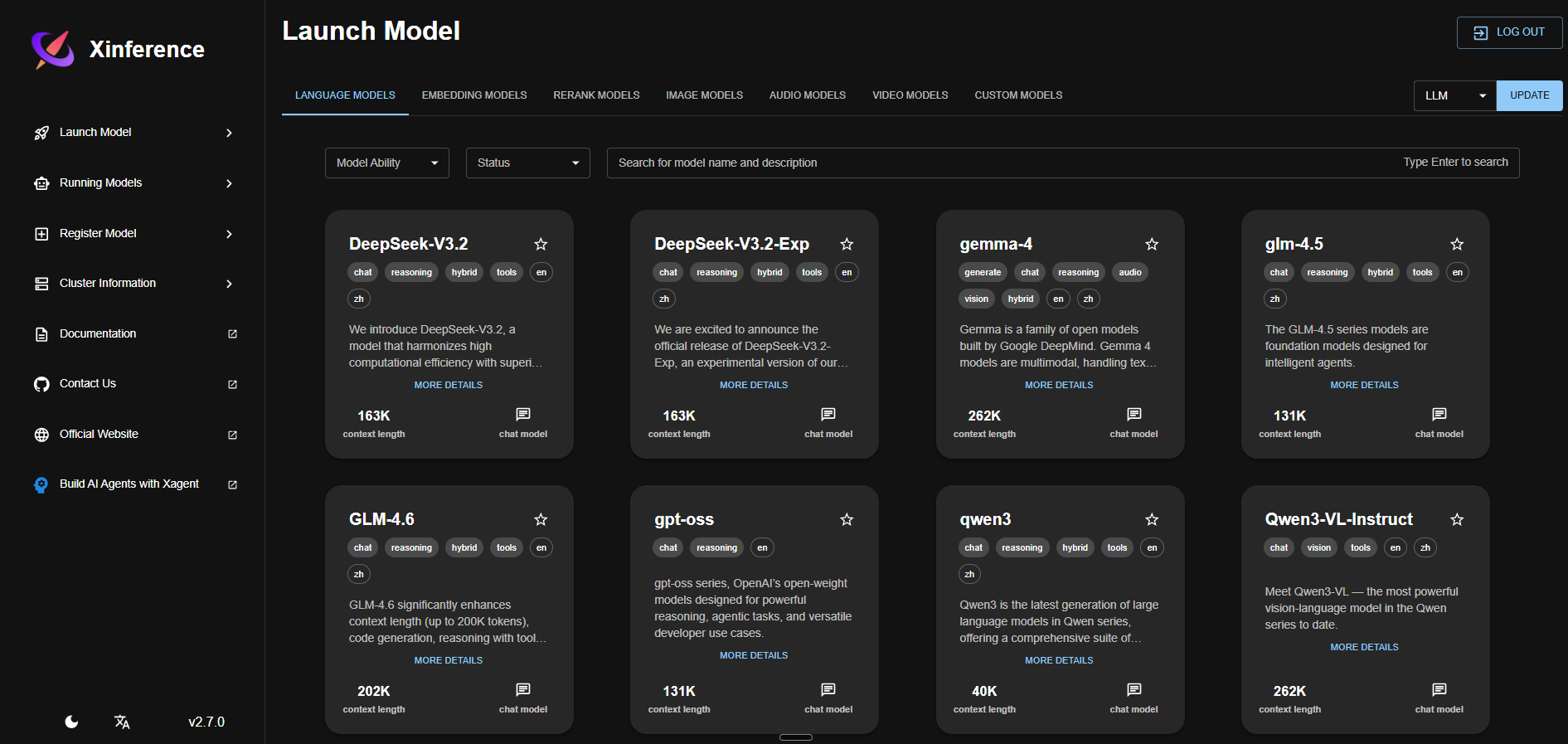
After the deploy turns green, open the public Railway URL with /ui/ appended (note the trailing slash) and log in with the XINFERENCE_ADMIN_USER and XINFERENCE_ADMIN_PASSWORD you set in the env vars. The web UI lists every supported model in the registry — pick a small Q4-quantized model that fits in 8 GB RAM (e.g. qwen2.5-instruct 7B Q4_K_M, bge-small-en-v1.5 for embeddings, or bge-reranker-base for reranking), click Launch, and watch it download to /data/huggingface. Once the model is running, point any OpenAI SDK at https:///v1 and pass your XINFERENCE_API_KEY as the bearer token. The full Swagger reference lives at /docs.
About Hosting Xinference
Xinference is a model orchestration layer maintained by Xorbits. It wraps llama.cpp, transformers, sentence-transformers, and several other inference backends behind one HTTP API and one Python SDK. You launch any supported model with one click, scale replicas up and down, and call them through the same /v1/chat/completions, /v1/embeddings, /v1/audio/transcriptions, and /v1/images/generations endpoints OpenAI uses.
Key features:
- OpenAI-compatible REST API — drop-in replacement for
openai.OpenAI()clients - Web UI for model management — launch, stop, list, monitor without writing code
- Model registry — built-in catalog of dozens of LLMs, embedding, rerank, audio, and image models
- Multi-backend — llama.cpp (GGUF), transformers, sentence-transformers, FunASR, ChatTTS
- Built-in auth — JWT sessions plus per-user API keys with admin/read/start/stop permissions
- Custom model registration — point at any HuggingFace repo or local GGUF file
Why Deploy Xinference on Railway
Railway gives you a one-click path to a private OpenAI-compatible endpoint:
- Public HTTPS URL provisioned automatically with TLS
- Persistent volume keeps downloaded models across redeploys
- Single env-var bundle configures auth, model source, and API key
- Memory and replica scaling controlled from the Railway dashboard
- Pay only for actual compute and storage usage
Common Use Cases
- Private LLM gateway — swap
api.openai.comfor your Railway URL across an entire stack without touching client code - Self-hosted embeddings for RAG — run BGE, GTE, or Nomic embedding models for vector search pipelines
- On-call rerank service — host BGE-Reranker or Cohere-compatible rerankers next to your existing search index
- Whisper transcription endpoint — point voice apps at
/v1/audio/transcriptionsfor fully self-hosted speech-to-text
Dependencies for Xinference on Railway
This template ships a single service:
- Xinference —
xprobe/xinference:latest-cpu(Docker Hub) — serves the API, web UI, and runs all model inference
Environment Variables Reference
| Variable | Purpose |
|---|---|
XINFERENCE_HOME | Persistent model + state directory (set to /data for the volume) |
HF_HOME | HuggingFace cache directory (set under the same volume) |
XINFERENCE_MODEL_SRC | Model registry source: huggingface or modelscope |
XINFERENCE_SECRET_KEY | JWT signing secret — must be a stable hex string |
XINFERENCE_ADMIN_USER | Admin login username for the web UI |
XINFERENCE_ADMIN_PASSWORD | Admin login password — bootstrap-only, do not rotate |
XINFERENCE_API_KEY | Bearer token for /v1/* endpoints — must be sk- + 13 chars (16 total) |
PORT | Container port (9997) |
RAILWAY_RUN_UID | Set to 0 so the container can write to the volume |
Deployment Dependencies
- Runtime: Python 3.11 + CPU-only PyTorch + xllamacpp (GGUF inference)
- Docker image:
xprobe/xinference:latest-cpu(Docker Hub) - Source: github.com/xorbitsai/inference
- Docs: inference.readthedocs.io
Hardware Requirements for Self-Hosting Xinference
Xinference on Railway is CPU-only. Right-size the plan to the largest model you intend to run.
| Resource | Minimum | Recommended |
|---|---|---|
| CPU | 2 vCPU | 4–8 vCPU |
| RAM | 4 GB (small embedding models only) | 8 GB (7B Q4 LLMs) |
| Storage | 10 GB volume | 50 GB volume (multiple models) |
| Runtime | Linux x86_64 | Linux x86_64 |
Anything beyond a 7B Q4_K_M model needs more than 8 GB RAM and will OOM at launch — pick smaller quants or smaller models.
Self-Hosting Xinference Locally
Reproduce the Railway deploy locally with the same official image:
docker run -d --name xinference \
  -p 9997:9997 \
  -v xinference-data:/data \
  -e XINFERENCE_HOME=/data \
  -e HF_HOME=/data/huggingface \
  xprobe/xinference:latest-cpu \
  xinference-local --host 0.0.0.0 --port 9997
Then launch a model from the CLI:
docker exec xinference xinference launch \
  --model-name qwen2.5-instruct \
  --size-in-billions 7 \
  --model-format ggufv2 \
  --quantization Q4_K_M
For production deploys with auth, add --auth-config /path/to/auth.json to the start command — see the auth docs for the JSON schema.
Xinference vs Ollama
| Feature | Xinference | Ollama |
|---|---|---|
| OpenAI-compatible API | Yes | Yes |
| Web UI for model management | Built-in | Third-party |
| Embedding & rerank models | First-class | Limited |
| Audio (Whisper) & image gen | Yes | No |
| Built-in auth (JWT + API keys) | Yes | No |
| GGUF backend | Yes (xllamacpp) | Yes (llama.cpp) |
Both are great for self-hosting LLMs; Xinference is the better pick when you also need embeddings, reranking, and audio models behind one auth-protected endpoint.
How Much Does Xinference Cost to Self-Host?
Xinference itself is fully open-source under the Apache 2.0 license — there is no paid tier and no license fee. Hosting cost on Railway is purely infrastructure: the CPU-only image and a small 7B-quantized model fit comfortably in an 8 GB plan, so you pay for compute, RAM, and the storage your model files consume on the volume. Larger models or higher concurrency need a bigger plan.
FAQ — Self-Hosting Xinference on Railway
What is Xinference and why self-host it? Xinference is an open-source serving framework for LLMs, embeddings, rerankers, and audio/image models behind a single OpenAI-compatible API. Self-hosting on Railway gives you private inference, no per-token billing, and full control over which model runs.
What does this Railway template deploy?
A single Xinference service backed by the official xprobe/xinference:latest-cpu image, with a persistent volume mounted at /data, JWT + API key authentication generated from environment variables, and a public HTTPS domain on port 9997.
Why does this template not include a database? Xinference is fully self-contained. Model weights, virtual environments, and the HuggingFace cache live on the attached volume, and there is no external metadata store — that's why the deploy is a single service.
How do I enable API key auth in self-hosted Xinference on Railway?
The start command renders an auth JSON file from XINFERENCE_SECRET_KEY, XINFERENCE_ADMIN_USER, XINFERENCE_ADMIN_PASSWORD, and XINFERENCE_API_KEY at boot, then passes --auth-config to xinference-local. Just set those four env vars; auth is on by default.
Why must XINFERENCE_API_KEY be exactly 16 characters?
Xinference's auth validator hard-fails any key that is not sk- + 13 alphanumeric characters (16 total). Longer keys crash the REST API at startup with ValueError: Api-Key should be a string started with 'sk-' with a total length of 16.
Can I run a 13B or 70B model on this template? Not on the default 8 GB Railway plan. Practical CPU-only inference tops out around 7B parameters in Q4 quantization. Bigger models need a higher-memory plan and accept much slower inference because no GPU is attached.
Can I use Xinference as a drop-in replacement for the OpenAI SDK?
Yes. Set the SDK's base_url to https:///v1 and the API key to your XINFERENCE_API_KEY, then call chat.completions.create() as normal. Embeddings and audio transcription endpoints follow the same pattern.
Template Content
Xinference
xprobe/xinference:latest-cpuXINFERENCE_ADMIN_USER
Admin login username
XINFERENCE_ADMIN_PASSWORD
Admin login password


