
Deploy AI Proxy
A high-performance AI gateway for OpenAI, Claude, Gemini & more.

Redis
Just deployed
/data

Just deployed
/var/lib/postgresql/data

Aiproxy
Just deployed
Deploy and Host AI Proxy on Railway
AI Proxy is a high-performance AI gateway that provides a unified entry point for OpenAI, Claude, Gemini, and other AI providers.
This Railway template deploys AI Proxy with PostgreSQL and Redis, giving you persistent configuration, shared caching, request logging, analytics, multi-tenant controls, and a built-in management panel.
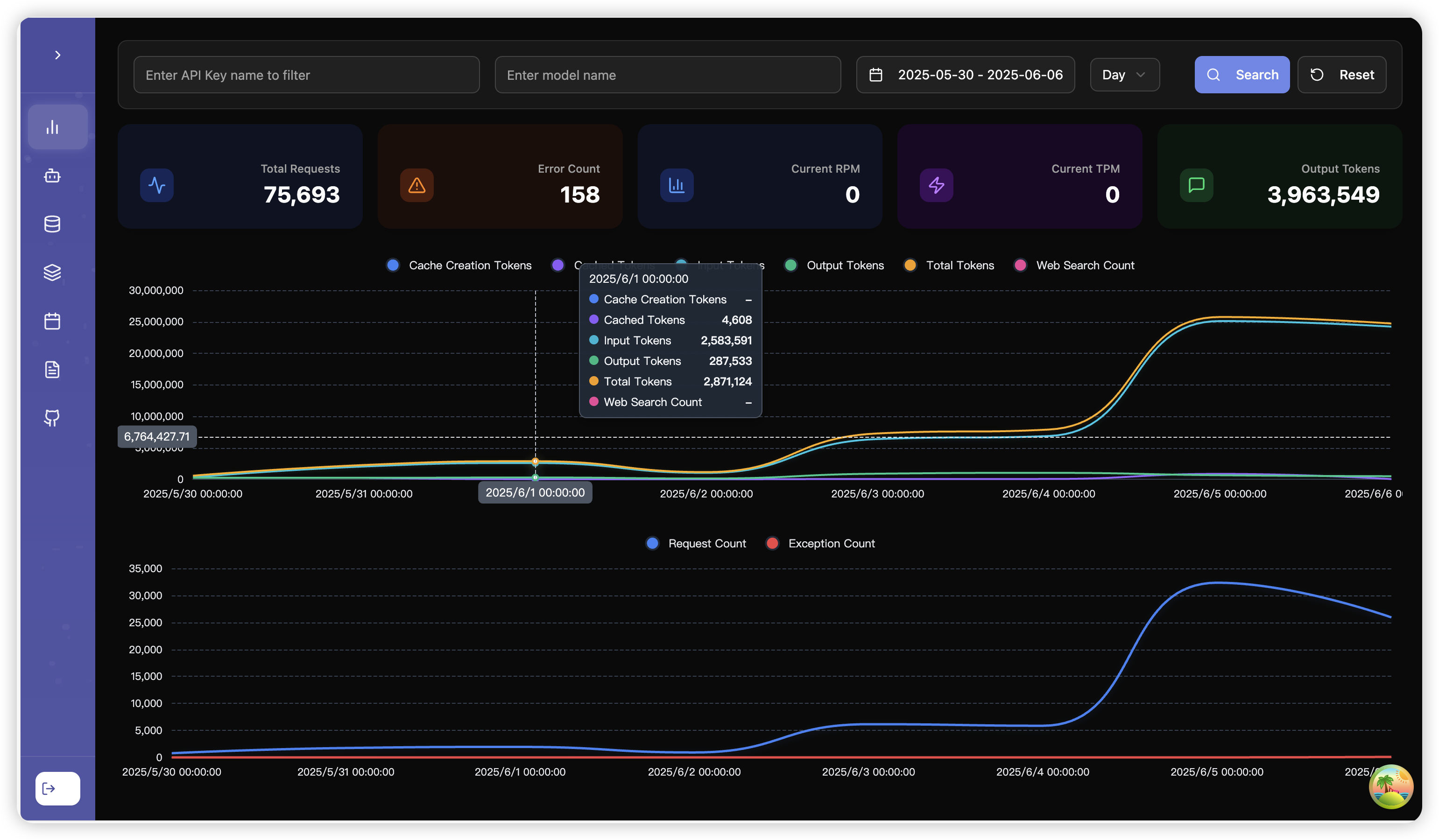
About Hosting AI Proxy
AI Proxy acts as a middleware layer between your applications and multiple AI providers.
It supports OpenAI-compatible APIs together with Claude and Gemini protocols, while adding intelligent retry handling, channel prioritization, load balancing, monitoring, quotas, billing controls, and plugin-based extensions.
This template uses PostgreSQL for persistent application data and Redis for caching and shared runtime state over Railway private networking.
Included Services
- AI Proxy — AI gateway, management panel, API, routing, analytics
- PostgreSQL — Persistent application and configuration database
- Redis — Cache and shared runtime state
- Railway Private Networking — Internal communication between services
Common Use Cases
- Create a unified AI API endpoint for multiple providers
- Route traffic across OpenAI, Anthropic, Gemini, and compatible APIs
- Add retry and automatic error recovery to AI requests
- Balance traffic across multiple provider channels
- Manage multiple organizations and tenants
- Apply RPM, TPM, and usage quotas
- Track request volume, errors, latency, and costs
- Build an internal AI gateway for applications and agents
- Provide OpenAI-compatible access to multiple backend providers
- Centralize AI provider credentials and routing policies
- Add Redis-backed caching for repeated AI requests
- Expose MCP integrations through a centralized gateway
Dependencies for AI Proxy Hosting
This template includes:
- AI Proxy
- PostgreSQL
- Redis
PostgreSQL stores persistent AI Proxy data, while Redis provides caching and shared runtime functionality.
No external database services are required after deployment.
AI Proxy Management Panel
AI Proxy includes a built-in web management interface.
After deployment, open the public domain assigned to the AI Proxy service.
The management panel can be used to manage and monitor:
- AI provider channels
- Models
- Organizations
- Access tokens
- Routing configuration
- Request logs
- Usage statistics
- Error rates
- Cost information
- Quotas
- Plugins
- MCP integrations
The same public service also exposes the AI gateway API.
API Endpoints
The AI Proxy service listens on port:
3000
A typical deployment URL looks like:
https://your-aiproxy-domain.up.railway.app
OpenAI-compatible API:
https://your-aiproxy-domain.up.railway.app/v1
Swagger API documentation:
https://your-aiproxy-domain.up.railway.app/swagger/index.html
Health endpoint:
https://your-aiproxy-domain.up.railway.app/api/status
Persistent Storage
AI Proxy stores its primary persistent application data in PostgreSQL.
PostgreSQL uses a Railway Volume to ensure configuration, users, channels, and other database data survive service restarts and redeployments.
Redis can also use a Railway Volume if cache persistence is desired.
The AI Proxy application service itself does not require a persistent volume when PostgreSQL is used as the primary database.
PostgreSQL
PostgreSQL is used as AI Proxy's primary SQL database.
AI Proxy connects to PostgreSQL using the SQL_DSN environment variable referenced from the PostgreSQL service.
The PostgreSQL service should remain internal and does not need a public domain.
Redis
Redis provides caching and shared state for AI Proxy.
AI Proxy connects to Redis through Railway private networking using the REDIS connection variable.
The Redis service should not be exposed publicly.
Using Redis provides benefits such as:
- Shared cache storage
- Faster repeated requests
- Plugin caching support
- Better behavior when scaling gateway instances
- Reduced duplicate upstream AI provider requests
Important Environment Variables
AI Proxy
ADMIN_KEY
Administrative key used to access AI Proxy management functionality.
Keep this value private.
SQL_DSN
PostgreSQL connection string used for persistent application data.
REDIS
Redis connection URL used by AI Proxy.
LOG_DETAIL_STORAGE_HOURS
Controls how long detailed request logs are retained.
BILLING_ENABLED
Enables AI Proxy billing and usage accounting functionality.
SAVE_ALL_LOG_DETAIL
Controls whether detailed request information is stored.
TZ
Defines the application timezone.
Networking
The intended Railway architecture is:
Internet
   │
   ▼
Railway HTTPS
   │
   ▼
AI Proxy
  :3000
   │
   ├──────────────► PostgreSQL
   │                   :5432
   │
   └──────────────► Redis
                       :6379

        Railway Private Network
Only the AI Proxy service should have a public domain.
PostgreSQL and Redis should remain private.
After Deployment
- Wait until AI Proxy, PostgreSQL, and Redis are running.
- Generate a public domain for the AI Proxy service on port
3000. - Keep PostgreSQL and Redis private.
- Open the AI Proxy public URL.
- Authenticate using the configured administrative key.
- Add your first AI provider channel.
- Configure the supported models for that channel.
- Create an access token or group for your application.
- Test the
/v1/modelsendpoint. - Send your first chat completion request through AI Proxy.
- Review request logs and usage statistics from the management panel.
Example OpenAI-Compatible Request
curl https://your-aiproxy-domain.up.railway.app/v1/chat/completions \
  -H "Authorization: Bearer YOUR_AIPROXY_TOKEN" \
  -H "Content-Type: application/json" \
  -d '{
    "model": "gpt-4o-mini",
    "messages": [
      {
        "role": "user",
        "content": "Hello from AI Proxy"
      }
    ]
  }'
Applications that already support OpenAI-compatible endpoints can typically integrate by changing the base URL and API token.
Security Notice
For production deployments:
- Keep
ADMIN_KEYsecret - Do not expose PostgreSQL publicly
- Do not expose Redis publicly
- Use dedicated AI Proxy tokens for applications
- Avoid sharing provider API keys directly with client applications
- Apply tenant quotas and rate limits where appropriate
- Review logs before enabling detailed request storage for sensitive workloads
- Rotate credentials if they are exposed
AI Proxy vs Alternatives
| Feature | AI Proxy | Portkey Gateway | LiteLLM | Direct Provider APIs |
|---|---|---|---|---|
| OpenAI-compatible API | ✅ | ✅ | ✅ | ⚠️ |
| Claude protocol | ✅ | ✅ | ✅ | Provider-specific |
| Gemini protocol | ✅ | ✅ | ✅ | Provider-specific |
| Multi-provider routing | ✅ | ✅ | ✅ | ❌ |
| Load balancing | ✅ | ✅ | ✅ | ❌ |
| Automatic retries | ✅ | ✅ | ✅ | Limited |
| Built-in management UI | ✅ | ❌ in basic gateway image | ✅ | ❌ |
| PostgreSQL support | ✅ | ❌ basic gateway | ✅ | ❌ |
| Redis caching | ✅ | ✅ | ✅ | ❌ |
| Multi-tenant controls | ✅ | ⚠️ | ✅ | ❌ |
| Usage analytics | ✅ | ⚠️ | ✅ | Provider-specific |
| MCP support | ✅ | ⚠️ | ⚠️ | ❌ |
| Self-hosted | ✅ | ✅ | ✅ | ❌ |
AI Proxy is particularly useful when you need a full self-hosted gateway with both API compatibility and a visual management layer.
Why Deploy AI Proxy on Railway?
Railway is a singular platform to deploy your infrastructure stack. Railway will host your infrastructure so you don't have to deal with configuration, while allowing you to vertically and horizontally scale it.
Deploying AI Proxy on Railway provides:
- Automatic HTTPS domains
- Private networking between services
- Persistent PostgreSQL storage
- Redis-backed caching
- Simple secret management
- Integrated logs and monitoring
- Easy redeployments and upgrades
- A built-in management panel
- A production-oriented three-service architecture
This template provides a straightforward way to run a complete self-hosted AI gateway with persistent storage, caching, routing, analytics, and multi-provider support.
Template Content


