
Deploy Appwrite | Open Source Firebase Alternative
Self Host Appwrite: auth, DB, storage, realtime, functions & more
DB

MariaDB
Just deployed
/var/lib/mysql

Redis-zZ2r
Just deployed
/data
Appwrite
Worker-Deletions
Just deployed
Appwrite-Console
Just deployed
Worker-Databases
Just deployed
Appwrite
Just deployed
/storage
Appwrite-Realtime
Just deployed
Worker-Mails
Just deployed

Nginx
Just deployed
Deploy and Host Appwrite on Railway

Self-host Appwrite on Railway for a complete open-source Backend-as-a-Service with authentication, databases, file storage, serverless functions, and real-time WebSocket subscriptions — no vendor lock-in, no per-API-call fees.
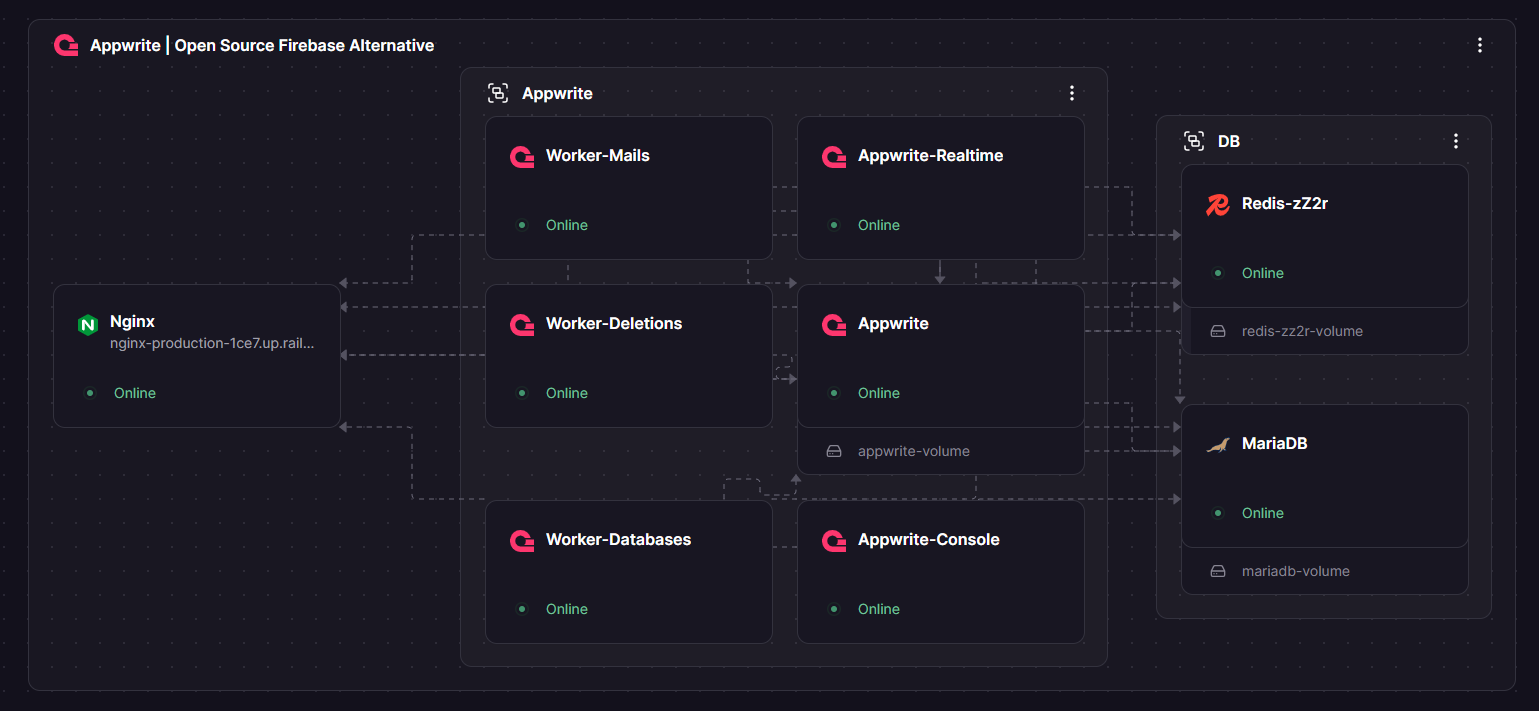
This Railway template pre-configures Appwrite 1.9.0 with MariaDB, a Railway-managed Redis, three Swoole workers, the Appwrite Console, and an Nginx reverse proxy that unifies the API, Console, and WebSocket under a single public domain.
Getting Started with Appwrite on Railway
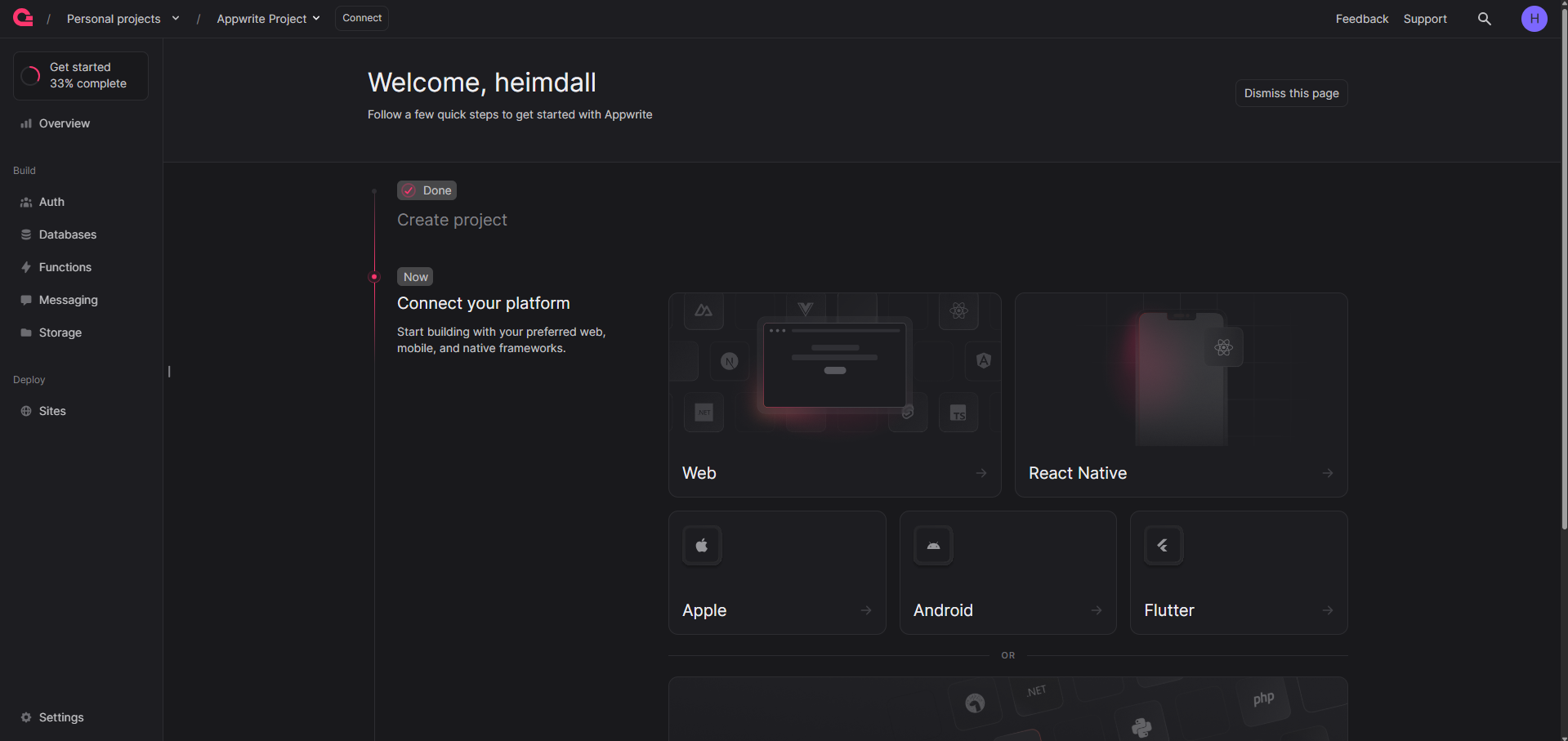
Open the Nginx service domain — the single public URL fronting the whole stack. You'll land on the Appwrite Console sign-in page. Click Sign Up to create the first account (it becomes root admin; further signups are blocked by _APP_CONSOLE_WHITELIST_ROOT=enabled). Create your first Project, copy its Project ID, then integrate your app with the Appwrite SDK.
npm install -g appwrite-cli
appwrite login --endpoint https://${{Nginx.RAILWAY_PUBLIC_DOMAIN}}/v1
appwrite init project
About Hosting Appwrite
Appwrite is an open-source BaaS (55,000+ GitHub stars, BSD 3-Clause) that replaces Firebase, Supabase, or custom backend stacks.
- Auth — email, phone, magic URLs, 30+ OAuth2 providers
- Databases — document collections with schemas, indexes, queries
- Storage — uploads with transforms, compression, encryption
- Functions — serverless execution across 30+ runtimes
- Messaging — email, SMS, push via provider integrations
- Realtime — WebSocket subscriptions for live events
The template runs the same appwrite/appwrite:1.9.0 image as API, Realtime, and workers with different start commands — matching Appwrite's docker-compose architecture.
Why Deploy Appwrite on Railway
Deploy Appwrite on Railway in under 10 minutes and keep full data ownership without cloud-provider lock-in.
- Zero per-API-call or storage fees — pay Railway compute only
- Railway-managed Redis with auth, backups, and private networking
- Unified single-domain routing via Nginx reverse proxy
- Cross-service variable references keep secrets clean and rotatable
- Automatic TLS termination at Railway's edge — no cert management
Common Use Cases for Self-Hosted Appwrite
- Mobile app backends — auth, push notifications, and storage for iOS, Android, Flutter, and React Native apps
- SaaS product backends — multi-tenant projects, team management, webhooks, and role-based access control
- Real-time collaboration tools — live document editing, chat apps, and dashboards using WebSocket subscriptions
- Internal tools and admin panels — data management UIs, reporting, and audit-logged workflows
Dependencies for Appwrite
- Appwrite API (
appwrite/appwrite:1.9.0) — PHP/Swoole REST and GraphQL API on port 80 - Appwrite Console (
appwrite/console:7.8.26) — static SvelteKit SPA on port 80 - Appwrite Realtime (
appwrite/appwrite:1.9.0) — Swoole WebSocket server (startCommand: realtime) - Worker-Databases / Worker-Deletions / Worker-Mails — background job consumers
- MariaDB (
mariadb:10.11) — relational database for all Appwrite data - Redis-zZ2r (Railway-managed Redis) — cache, pub/sub, queues, rate-limiting
- Nginx (
nginx:alpine) — reverse proxy unifying API, Console, and Realtime
Environment Variables Reference for Appwrite on Railway
| Variable | Service | Description |
|---|---|---|
_APP_DB_ADAPTER | Appwrite + workers | Must be mariadb — default is mongodb |
_APP_DOMAIN | Appwrite + workers | Public-facing domain (Nginx URL) |
_APP_OPENSSL_KEY_V1 | Appwrite + workers | Server-side encryption key (64 hex chars) |
_APP_REDIS_USER / _APP_REDIS_PASS | Appwrite + workers | Auth for Railway-managed Redis |
_APP_OPTIONS_ROUTER_PROTECTION | Appwrite + workers | Must be disabled when using a reverse proxy |
_APP_CPU_NUM / _APP_WORKER_PER_CORE | Realtime | Caps Swoole worker count to avoid Railway thread limits |
_APP_CONSOLE_WHITELIST_ROOT | Appwrite | enabled locks signups after the first admin |
_APP_STORAGE_LIMIT | Appwrite | Max upload size in bytes (30MB default) |
Deployment Dependencies
- Docker Hub: appwrite/appwrite, appwrite/console
- GitHub: appwrite/appwrite (55,000+ stars)
- Docs: appwrite.io/docs
- Runtime: PHP 8.2 + Swoole, SvelteKit (Console), Nginx (Console and reverse proxy)
Hardware Requirements for Self-Hosting Appwrite on Railway
| Resource | Minimum | Recommended |
|---|---|---|
| CPU | 2 vCPUs | 4 vCPUs |
| RAM | 4 GB | 8 GB |
| Storage | 10 GB | 50 GB+ |
| Runtime | Docker 20+ | Docker 24+ |
Appwrite spreads load across 9 containers. The Realtime service is capped at 4 Swoole workers to stay within Railway's per-container thread limits.
Self-Hosting Appwrite with Docker
Minimal Docker Compose for local development and reference:
services:
  appwrite:
    image: appwrite/appwrite:1.9.0
    environment:
      _APP_DB_ADAPTER: mariadb
      _APP_DB_HOST: mariadb
      _APP_REDIS_HOST: redis
    depends_on: [mariadb, redis]
  mariadb:
    image: mariadb:10.11
    environment:
      MYSQL_DATABASE: appwrite
  redis:
    image: redis:7.4-alpine
On Railway, use cross-service refs like ${{MariaDB.RAILWAY_PRIVATE_DOMAIN}} instead of hostnames:
git clone https://github.com/appwrite/appwrite.git && cd appwrite
docker compose up -d
How Much Does Appwrite Cost to Self-Host on Railway?
Appwrite is 100% free and open-source under BSD 3-Clause — no license fees, no per-API charges, no feature gates. On Railway, you pay compute only ($10–30/month for light traffic). Appwrite Cloud's Pro plan starts at $25/month per organization with caps; self-hosting removes those limits.
FAQ
What is Appwrite and why self-host it on Railway? Appwrite is an open-source BaaS for auth, databases, storage, functions, and real-time. Self-hosting on Railway gives you data ownership, no usage fees, and a private deployment.
What does this Appwrite Railway template deploy? Nine services: Appwrite API, Console, Realtime, three workers (Databases, Deletions, Mails), MariaDB, a Railway-managed Redis, and an Nginx reverse proxy unifying them under one domain.
Why does Appwrite need both MariaDB and Redis? MariaDB stores persistent data (users, projects, collections, file metadata). Redis handles sessions, cache, Realtime pub/sub, rate-limiting, and async job queues.
How do I connect my app to self-hosted Appwrite on Railway?
Install the Appwrite SDK, set the endpoint to https:///v1, and paste your Project ID. All SDK methods work identically to Appwrite Cloud.
Why is _APP_DB_ADAPTER=mariadb required in this template?
The appwrite/appwrite:1.9.0 image defaults to MongoDB. Without _APP_DB_ADAPTER=mariadb, Appwrite speaks MongoDB wire protocol to MariaDB and crashes.
How do I enable OAuth login in self-hosted Appwrite? In the Console, go to Auth → Settings, enable the provider, paste the OAuth client ID and secret, and add your Nginx callback URL.
Template Content
MariaDB
mariadb:10.11Worker-Deletions
appwrite/appwrite:1.9.0Appwrite-Console
appwrite/console:7.8.26Worker-Databases
appwrite/appwrite:1.9.0Nginx
nginx:alpineAppwrite
appwrite/appwrite:1.9.0Redis-zZ2r
redis:8.2.1Appwrite-Realtime
appwrite/appwrite:1.9.0Worker-Mails
appwrite/appwrite:1.9.0

