
Deploy ArchiveBox
Deploy ArchiveBox on Railway: archive URLs to HTML, PDF, WARC & screenshots
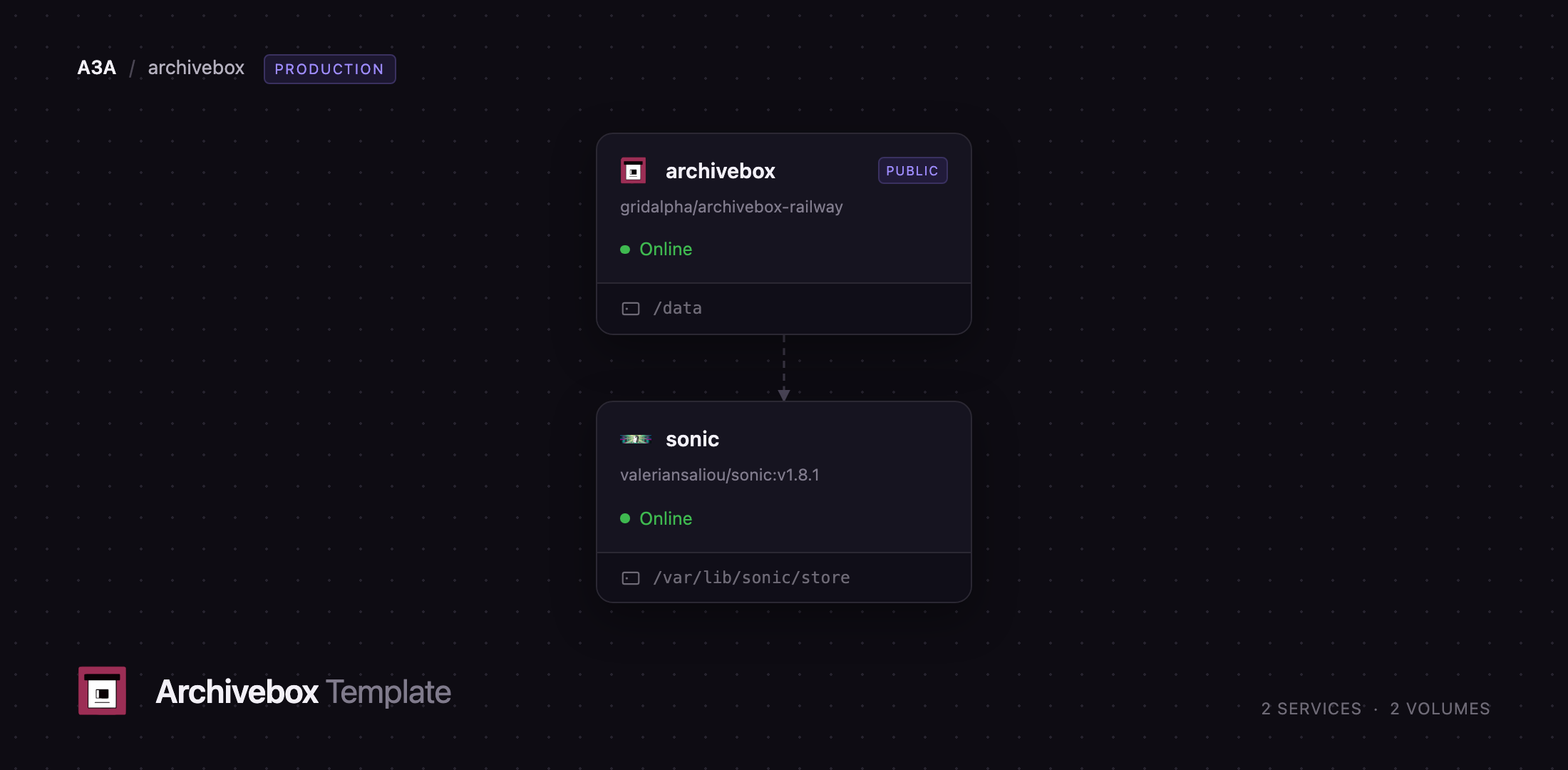
archivebox
Just deployed
/data

Just deployed
/var/lib/sonic/store
Deploy and Host ArchiveBox on Railway
ArchiveBox is an open-source web archiving tool that takes a URL and keeps a permanent, offline-readable copy of what was on that page. For each link it saves an HTML snapshot, a SingleFile bundle, a PDF, a full-page screenshot, the rendered DOM, a WARC crawl and readable article text, so the content survives edits, paywalls and dead domains. Researchers, journalists, lawyers and anyone tired of link rot use it as a personal Wayback Machine they control.
Self-host ArchiveBox on Railway and this template gives you the two services that make it useful in production. The archivebox service runs the web UI, the extractors and a supervised scheduler for recurring imports, with a volume at /data holding the SQLite index and every archived file. The sonic service runs Sonic, a fast schema-less search backend, on the private network with its own volume; ArchiveBox pushes the text of every captured page into it, so you can search the contents of your archive, not just titles and URLs. Only the web service gets a public domain, and the archive is behind login by default.
Getting Started with ArchiveBox on Railway
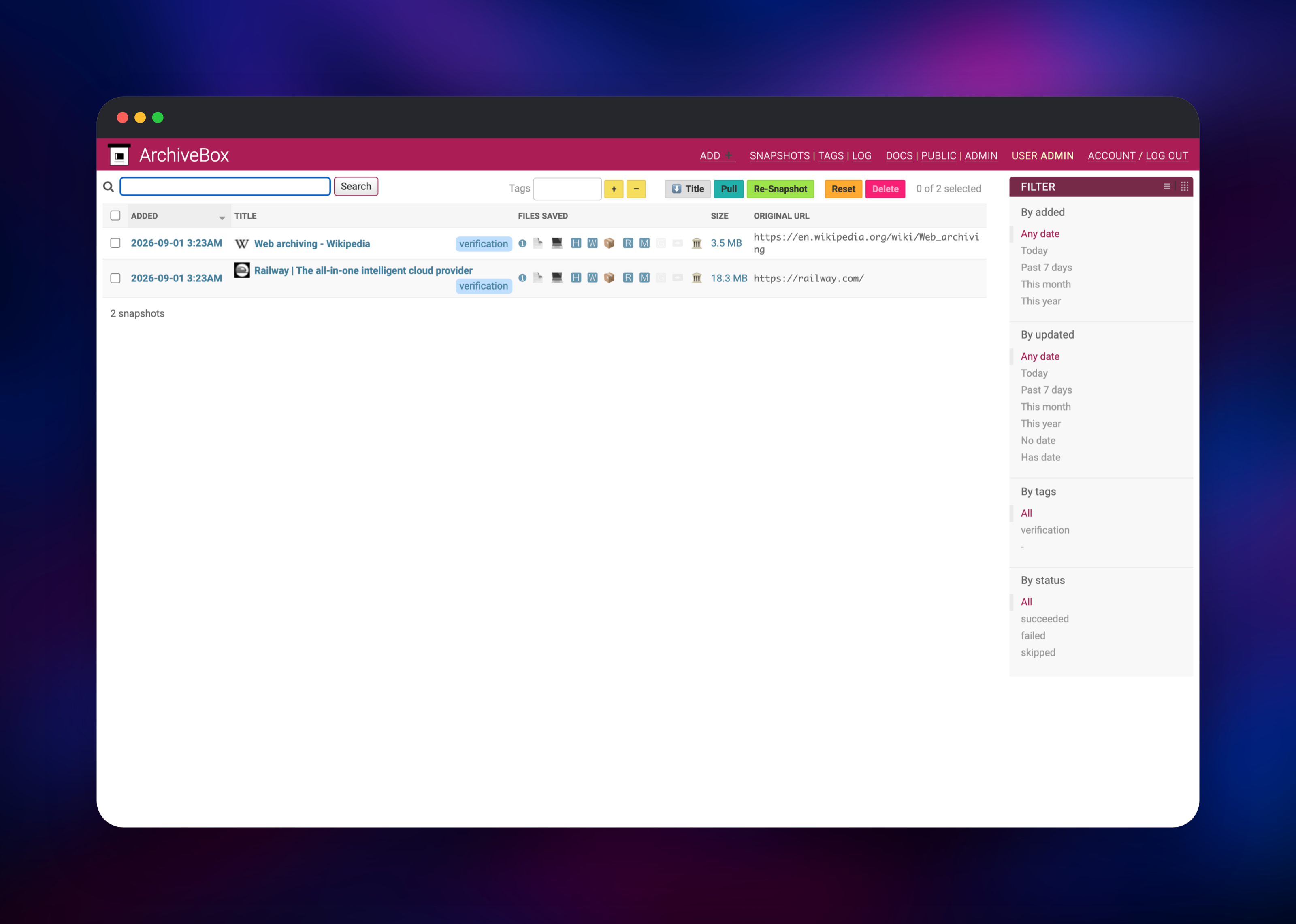
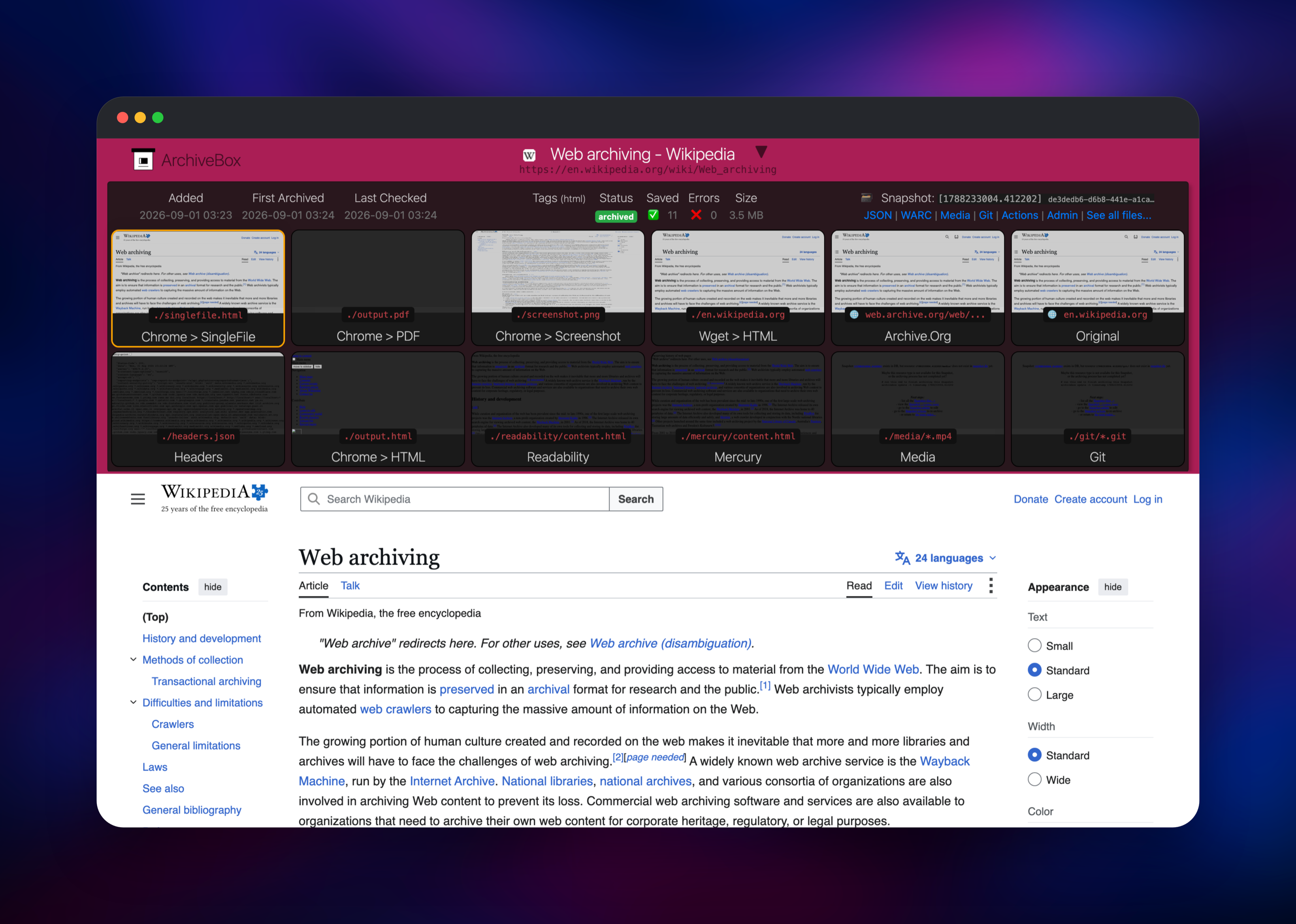
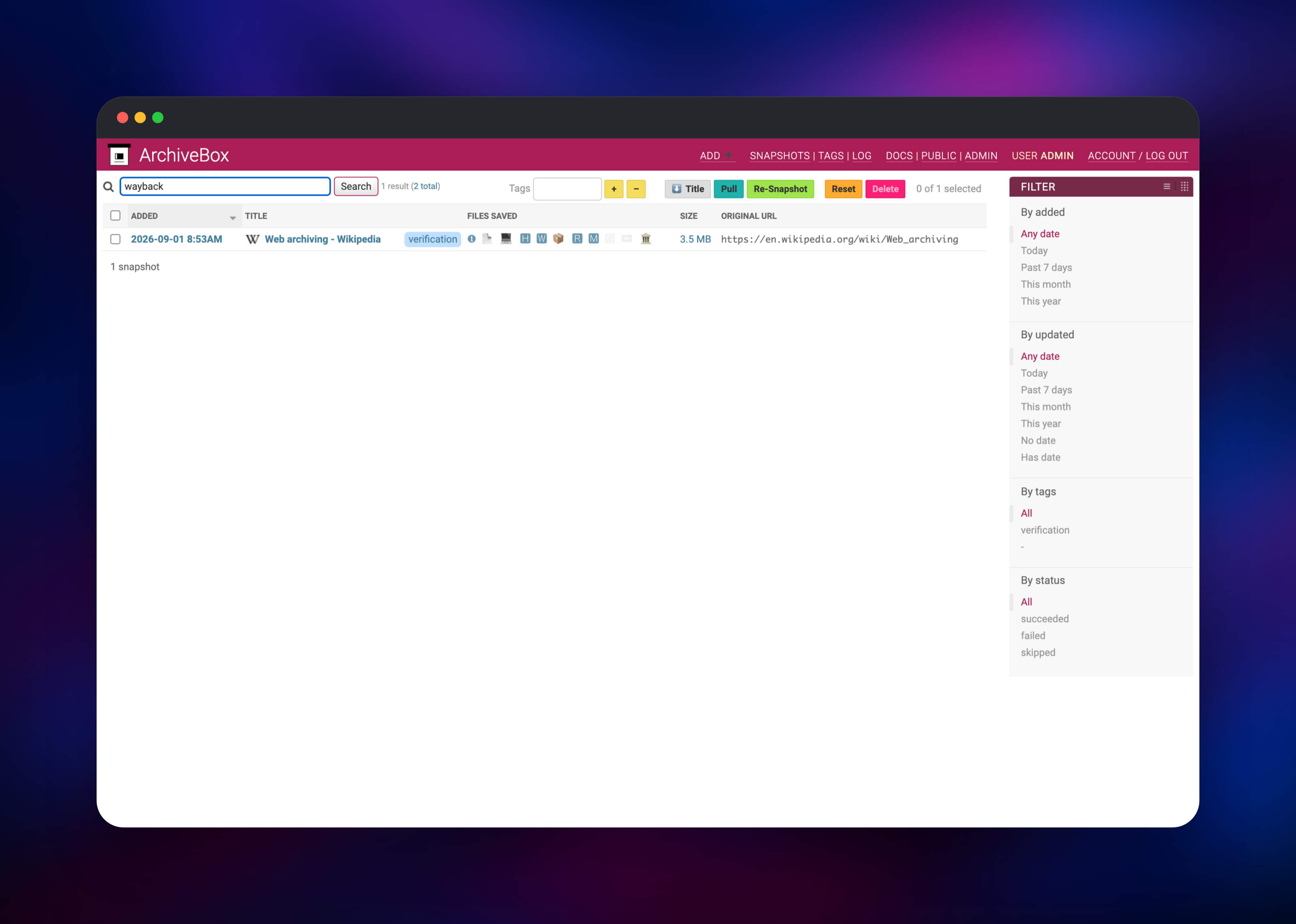
ADMIN_USERNAME and ADMIN_PASSWORD become the superuser, created on first boot: set your own, or read the generated password in the service's Variables tab. When the deployment goes green, open the public URL — every page redirects to /admin/login/, since anonymous access to the index and to archived files is off in this template. Sign in, open Add ➕ in the top navigation, paste one or more URLs (one per line), tag them if you like, and submit. Archiving runs inline, so the page holds for a minute or two per URL while eleven extractors run; you then land on the snapshot index showing the page title, size on disk and an icon per saved output. Click a snapshot to see every capture side by side — SingleFile, PDF, screenshot, wget mirror, readability text and the archive.org submission — and any tile to open that copy. Then search for a word that appears inside an archived page: a hit on a word that is not in the title or URL means Sonic is indexing and the whole stack works.
About Hosting ArchiveBox
ArchiveBox is a Django application wrapping a set of capture tools — Chromium via Playwright, wget, SingleFile, readability, Mercury, yt-dlp and git — behind one index. It suits you when you need proof of what a page said rather than a reading list: every snapshot is a folder of ordinary files you can grep, back up or open years later without ArchiveBox running.
Key features:
- Eleven extractors per URL: title, favicon, SingleFile, PDF, screenshot, DOM, wget mirror, WARC, readability, Mercury and plain text
- Imports from bookmarks exports, RSS, Pocket, Pinboard, Wallabag or a plain URL list
- Optional submission of every URL to archive.org
- Tags, filters and bulk re-snapshot from the admin
- Full-text search across archived page contents, backed by Sonic
- A JSON and WARC view of every snapshot, so the data is never locked in
Two Railway services do the work. archivebox serves the UI and runs the captures; since Railway attaches one volume per service, it also runs the scheduler upstream ships as a separate container, with its crontab on the volume so recurring jobs survive redeploys. sonic holds the search index in its own volume, private and password-protected.
Why Deploy ArchiveBox on Railway
Railway removes the setup that usually stalls a self-hosted archiver.
- Persistent volumes for the archive and the search index
- Private networking between the app and Sonic — no exposed search port
- Managed HTTPS on a public domain, no reverse proxy to configure
- Generated secrets and cross-service references wired before first boot
- Vertical scaling as your archive grows
- Deploy-on-push from the source repository
Common Use Cases
- Preserving cited sources for research, journalism or legal work, so a page stays readable after the original changes
- Building a private, searchable copy of your bookmarks that survives paywalls and dead links
- Snapshotting product pages or docs on a schedule to keep an evidence trail of what changed
- Archiving a site before a migration, keeping WARC files any Wayback-compatible viewer can replay
Dependencies for ArchiveBox
archivebox/archivebox:latest— the official image (Django, Chromium, wget, SingleFile, readability, yt-dlp), built from the archivebox-railway source repositoryvaleriansaliou/sonic:v1.8.1— the Sonic search backend- Two persistent volumes:
/datafor the archive and index,/var/lib/sonic/storefor the search index - No external database: ArchiveBox 0.7 keeps its index in SQLite on the volume
Environment Variables Reference
| Variable | Purpose |
|---|---|
ADMIN_USERNAME / ADMIN_PASSWORD | Superuser created on first boot |
PUBLIC_INDEX / PUBLIC_SNAPSHOTS | False keeps the index and archived files private |
PUBLIC_ADD_VIEW | True lets anonymous visitors submit URLs |
SAVE_MEDIA | True enables yt-dlp video and audio capture |
MEDIA_MAX_SIZE | Per-file ceiling for media downloads |
TIMEOUT | Seconds allowed per extractor before it gives up |
SEARCH_BACKEND_ENGINE | sonic for full-text search, ripgrep for one service |
SAVE_ARCHIVE_DOT_ORG | Submits each URL to the Internet Archive |
ENABLE_SCHEDULER | Runs the recurring-import scheduler |
Deployment Dependencies
- Source repository:
- Upstream project:
- Image:
- Documentation:
Hardware Requirements for Self-Hosting ArchiveBox
| Resource | Minimum | Recommended |
|---|---|---|
| CPU | 1 vCPU | 2–4 vCPU (Chromium captures are CPU-bound) |
| RAM | 1 GB | 2–4 GB |
| Storage | 5 GB volume | 20 GB+; roughly 1–20 MB per page |
| Runtime | Python 3.11, Node 24, Chromium | Same, supplied by the image |
Storage is the number to watch: a text page costs a few megabytes, and enabling SAVE_MEDIA can multiply that by a hundred.
Self-Hosting ArchiveBox
The image is self-contained. This starts ArchiveBox locally with a data directory in the current folder:
docker run -d -p 8000:8000 -v "$PWD/data:/data" \
  -e ADMIN_USERNAME=admin -e ADMIN_PASSWORD=changeme \
  archivebox/archivebox:latest \
  archivebox server --quick-init 0.0.0.0:8000
Add URLs from the command line instead of the UI, which is also how a bookmarks export is imported:
docker run -v "$PWD/data:/data" archivebox/archivebox:latest \
  add --depth=0 'https://example.com'
To schedule recurring imports on Railway, open a shell into the service and register the job once — it is picked up within a minute and persists on the volume:
archivebox schedule --every=day --depth=1 'https://example.com/feed.xml'
How Much Does ArchiveBox Cost to Self-Host?
ArchiveBox is free and open source under the MIT licence, and so is Sonic. There is no paid tier, no seat count and no feature behind a licence key. The only cost is infrastructure: on Railway you pay for the container's CPU and memory plus the two volumes, and disk usage is what grows over time. A personal archive of a few thousand pages sits comfortably in a small instance.
FAQ
What is ArchiveBox? An open-source self-hosted web archiving tool. Give it URLs and it saves HTML, PDF, screenshot, WARC and text copies of each page into a folder you own, indexed and searchable through a web UI.
What does this Railway template deploy? Two services: the ArchiveBox web app with a volume for the archive and its SQLite index, and a Sonic search backend with its own volume on the private network. Only the web app has a public URL.
Why does the template include a separate search service?
ArchiveBox can grep the archive with ripgrep, but that slows down as it grows. Sonic keeps a real full-text index of page contents so search stays fast. Set SEARCH_BACKEND_ENGINE=ripgrep to run one service instead.
Is my archive public?
No. PUBLIC_INDEX, PUBLIC_SNAPSHOTS and PUBLIC_ADD_VIEW are all off, so every page and archived file requires a login. Turn the first two on for a public archive, and the third to let anyone submit URLs.
How do I archive a YouTube video or other media?
Media capture with yt-dlp is off by default because it fills a volume quickly. Set SAVE_MEDIA=True and raise MEDIA_MAX_SIZE, and only archive media you have the right to keep.
Why is adding a URL slow?
Each URL runs eleven extractors, several driving a headless Chromium, so a minute or two per page is normal. Raise TIMEOUT on slow networks, or narrow the extractor list on the Add screen.
How do I back up or move my archive?
Everything lives under /data: index.sqlite3 plus one folder of ordinary files per snapshot. Copy that directory and the archive moves to any other ArchiveBox instance.
Template Content
archivebox
gridalpha/archivebox-railway

