
Deploy AstrBot - OpenClaw alternative
OpenClaw alternative: AI agent framework with IM & LLM integration
Astrbot
Just deployed
/AstrBot/data
Deploy and Host AstrBot on Railway
AstrBot is a modern, open-source AI agent platform that enables you to build intelligent chatbots for popular messaging platforms using today's leading large language models. It combines AI conversations, plugins, knowledge bases, multimodal capabilities, MCP support, and agent workflows into a single platform, making it easy to deploy production-ready AI assistants for personal, business, and community use.
About Hosting AstrBot
Deploying AstrBot on Railway provides a fast, production-ready hosting solution without the complexity of managing infrastructure. Railway automatically builds the application using its Dockerfile, provisions networking, and allows persistent storage through Volumes so your configuration, plugins, and data survive deployments.
AstrBot includes a modern WebUI for managing AI providers, messaging platform integrations, plugins, personas, and knowledge bases. Once deployed, you can connect providers such as OpenAI, Gemini, Anthropic, DeepSeek, Ollama, LM Studio, Dify, Coze, and many others using secure Railway environment variables.
Railway also provides automatic deployments from GitHub, centralized logs, monitoring, custom domains, and seamless scaling, allowing you to focus on building AI-powered applications instead of maintaining servers.
Dependencies for AstrBot Hosting
- Persistent Volume (recommended for configuration, plugins, uploads, and data)
- API credentials for your preferred AI provider (OpenAI, Gemini, DeepSeek, Anthropic, Ollama, etc.)
Deployment Dependencies
- GitHub Repository: https://github.com/AstrBotDevs/AstrBot
- Docker Image: https://hub.docker.com/r/soulter/astrbot
- Official Documentation: https://docs.astrbot.app/
Implementation Details
Recommended Railway Configuration
| Setting | Value |
|---|---|
| Builder | Dockerfile |
| Dockerfile Path | Dockerfile |
| Root Directory | Leave blank |
| Start Command | Leave blank (use Dockerfile default) |
| Public Networking | Enabled |
| Persistent Volume | /AstrBot/data |
| Environment Variables | TZ, AI provider API keys, and any optional AstrBot configuration variables |
Recommended Environment Variables
TZ=UTC
OPENAI_API_KEY=your_api_key
OPENAI_BASE_URL=https://api.openai.com/v1
Attach a Railway Volume to preserve configuration, plugins, and uploaded data across deployments.
First Login
On the first deployment, AstrBot automatically generates a dashboard username and password for security reasons.
Retrieve Your Login Credentials
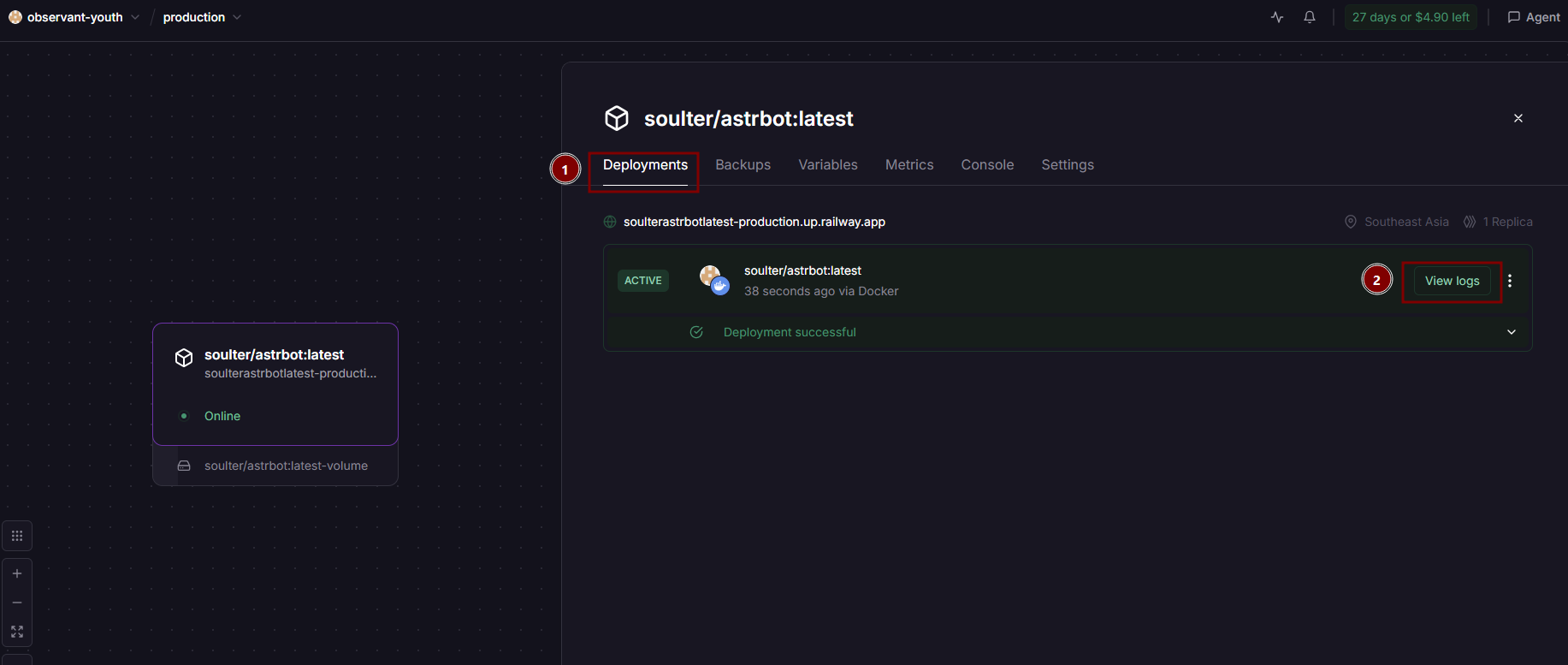
- Open your Railway Project.
- Select the AstrBot service.
- Go to Deployments.
- Open the latest deployment.
- Click View Logs.
- Select Deploy Logs.
- Copy the generated dashboard username and password.
Step 1 – Open Deploy Logs
Step 2 – Copy the Generated Credentials
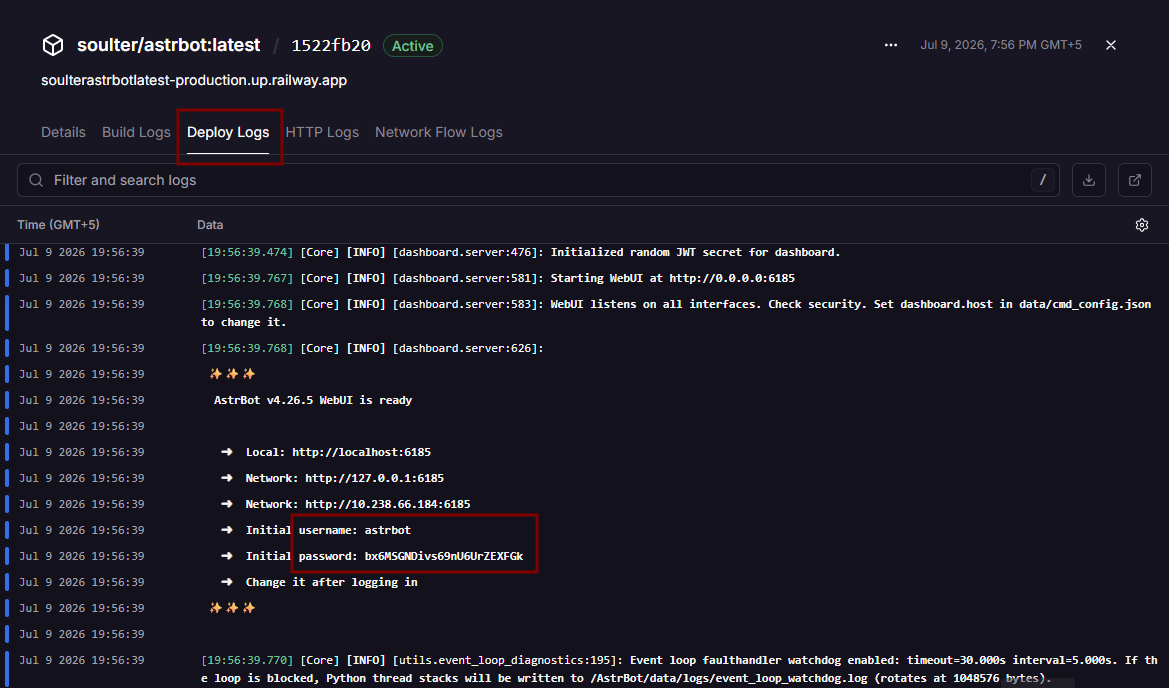
You will see output similar to:
username: astrbot
password: xxxxxxxxxxxxxxxxx
Use these credentials to log in to the AstrBot WebUI.
Note: These credentials are generated only during the initial deployment. Save them somewhere safe, as you'll need them to access the dashboard.
Common Use Cases
- Build AI assistants for Telegram, Discord, Slack, QQ, WeChat, and other messaging platforms.
- Create customer support, automation, and knowledge base chatbots powered by modern LLMs.
- Develop extensible AI agents with plugins, tools, multimodal capabilities, and custom workflows.
✨ Features
- 💯 Free & Open Source
- 🤖 Production-ready AI Agent Platform
- 💬 AI LLM Conversations
- 🧠 Knowledge Base Support
- 🧩 1000+ Community Plugins
- 🛠️ MCP (Model Context Protocol) Support
- 🎭 Persona & Character Management
- 🗜️ Automatic Context Compression
- 🌐 Built-in Web Dashboard
- 💻 Built-in ChatUI
- 🎙️ Speech-to-Text Support
- 🔊 Text-to-Speech Support
- 🖼️ Multimodal AI (Images, Audio & Files)
- 🛡️ Secure Agent Sandbox
- 🌍 Internationalization (i18n)
- ⚡ Highly Extensible Plugin Architecture
📱 Supported Messaging Platforms
AstrBot integrates with many messaging and collaboration platforms, including:
- Telegram
- Discord
- Slack
- OneBot v11
- WeChat Official Accounts
- WeCom
- Feishu (Lark)
- DingTalk
- LINE
- Mattermost
- KOOK
- Misskey
- Satori
- Matrix
- Rocket.Chat
- VoceChat
…and many more.
🧠 Supported AI Providers
Large Language Models
- OpenAI
- Anthropic Claude
- Google Gemini
- DeepSeek
- Moonshot AI
- Zhipu AI
- Ollama
- LM Studio
- SiliconFlow
- ModelScope
- OneAPI
- AIHubMix
- 302.AI
- CompShare
- TokenPony
- PPIO Cloud
AI Platforms
- Dify
- Coze
- Alibaba Cloud Bailian
Speech-to-Text
- OpenAI Whisper
- SenseVoice
- Xiaomi MiMo Omni
Text-to-Speech
- OpenAI TTS
- Gemini TTS
- Azure TTS
- FishAudio
- GPT-SoVITS
- Edge TTS
- Minimax TTS
- Volcano Engine TTS
- Xiaomi MiMo TTS
🚀 Common Use Cases
- AI assistants for Telegram, Discord, Slack, QQ, and WeChat
- Customer support chatbots
- Enterprise knowledge base assistants
- AI-powered automation agents
- Personal AI companions
- Community moderation bots
- AI workflow automation
- Educational AI tutors
- Plugin-powered AI applications
- Internal company assistants
Why Deploy AstrBot on Railway?
Railway is a singular platform to deploy your infrastructure stack. Railway will host your infrastructure so you don't have to deal with configuration, while allowing you to vertically and horizontally scale it.
By deploying AstrBot on Railway, you are one step closer to supporting a complete full-stack application with minimal burden. Host your servers, databases, AI agents, and more on Railway.
Template Content
Astrbot
soulter/astrbot:latest

