
Deploy AutoGen Studio
Visual tool for building and testing teams of AI agents
autogen-studio
Just deployed
/data

Just deployed

Just deployed
/var/lib/postgresql/data
Deploy and Host AutoGen Studio on Railway
AutoGen Studio is Microsoft's low-code web interface for building multi-agent AI systems. It sits on top of the AutoGen AgentChat framework and turns what is normally Python into a drag-and-drop canvas: assemble agents, attach model clients and tools, pick a termination condition, and watch the team work through a task message by message. Teams use it to prototype an agent workflow in an afternoon, then export it as JSON their application loads directly.
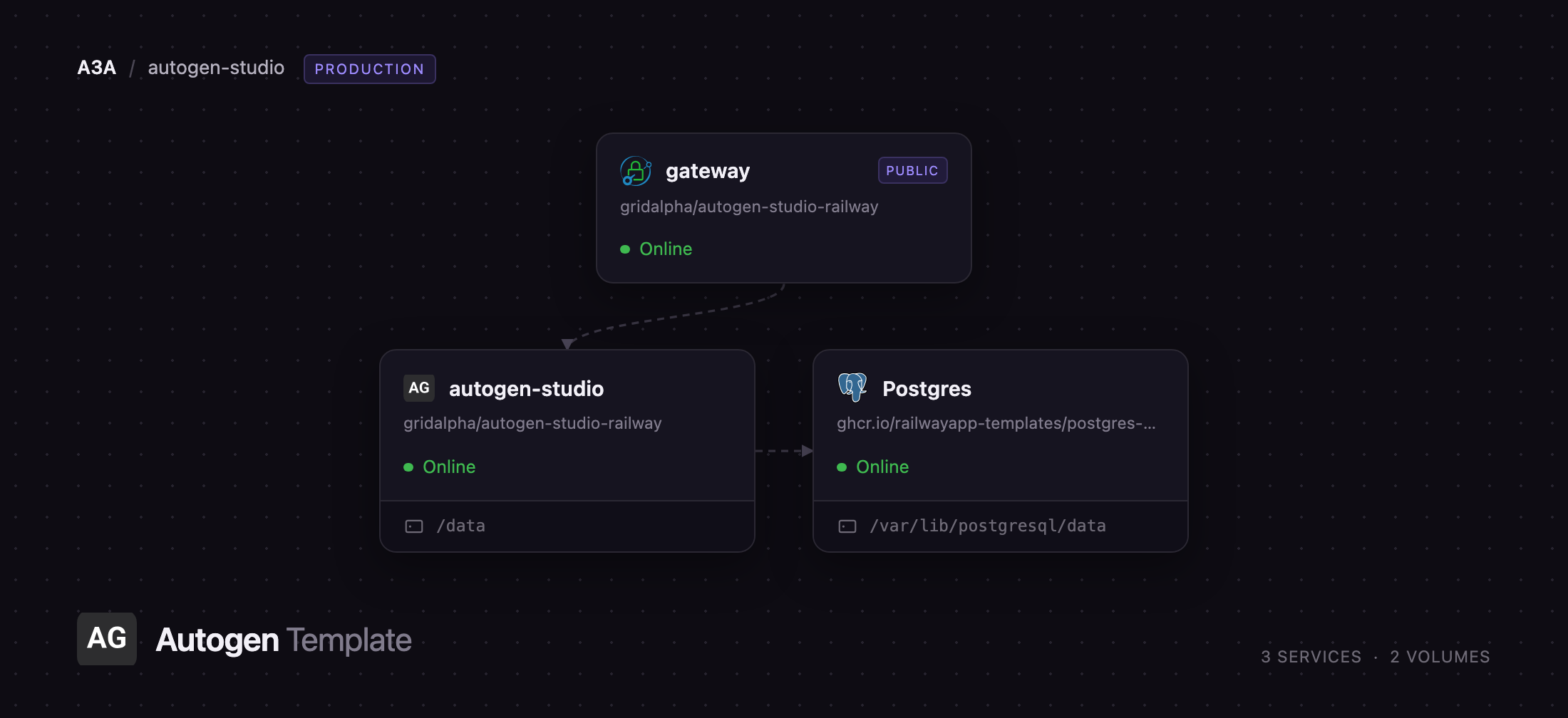
Deploy AutoGen Studio on Railway and three services arrive wired together. A Caddy gateway holds the public domain and puts HTTP basic authentication in front of everything, because AutoGen Studio ships no login of its own. Behind it the app serves the FastAPI backend and the web UI on a private address, with a 5 GB volume for generated files. Managed Postgres stores every team, session, run and message, so your work survives redeploys. Nothing but the gateway is reachable from the internet.
Getting Started with AutoGen Studio on Railway
Open the generated Railway domain and your browser will prompt for a username and password — the values of GATEWAY_USERNAME and GATEWAY_PASSWORD on the gateway service. Past that prompt you land in the Playground, with Team Builder, Gallery and Deploy in the left rail. Before running anything, add a model provider key to the autogen-studio service: OPENAI_API_KEY, ANTHROPIC_API_KEY or AZURE_OPENAI_API_KEY. Without one you can still build and save teams, but the gallery teams show a "Missing credentials" warning and any run stops at the first model call.
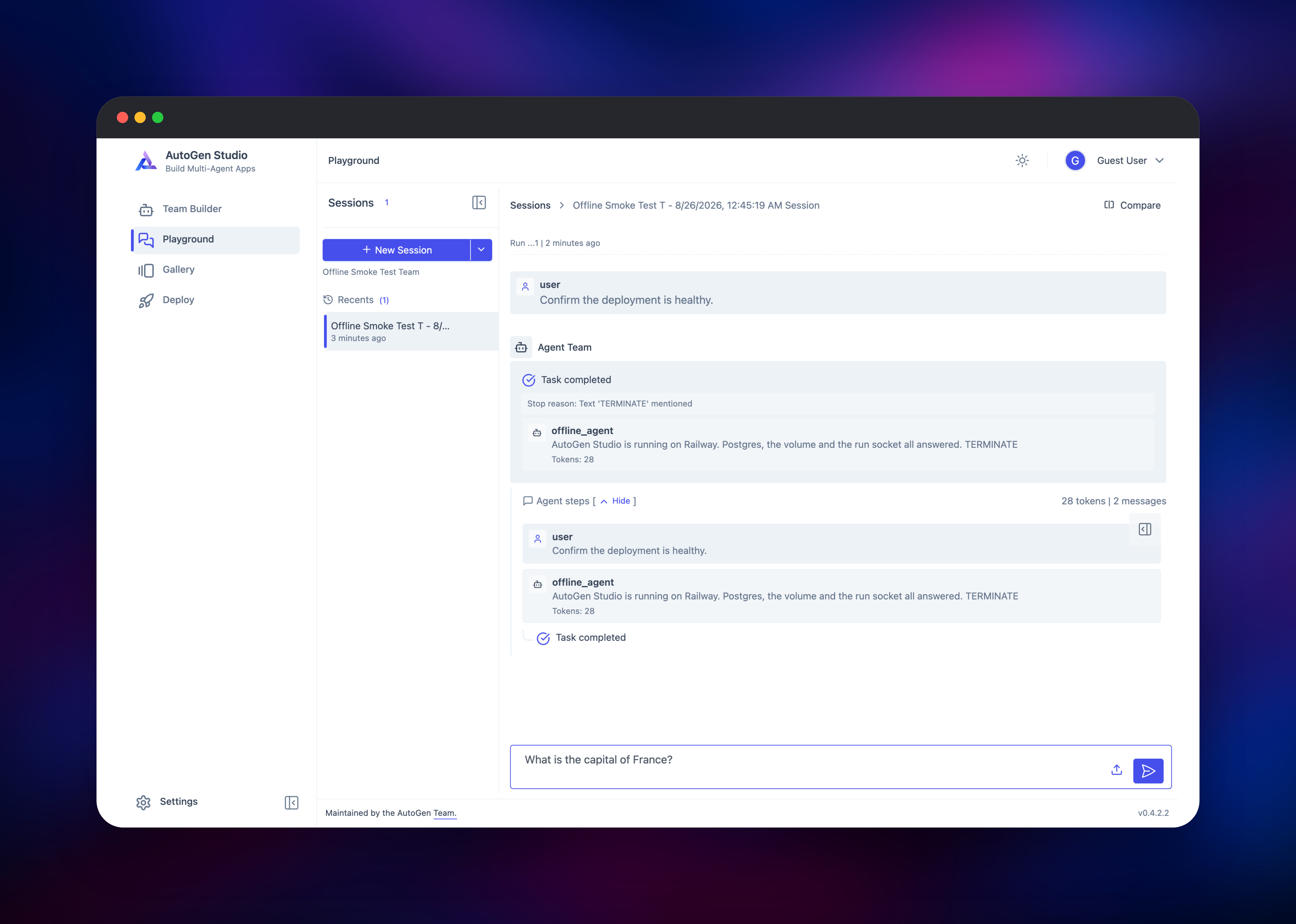
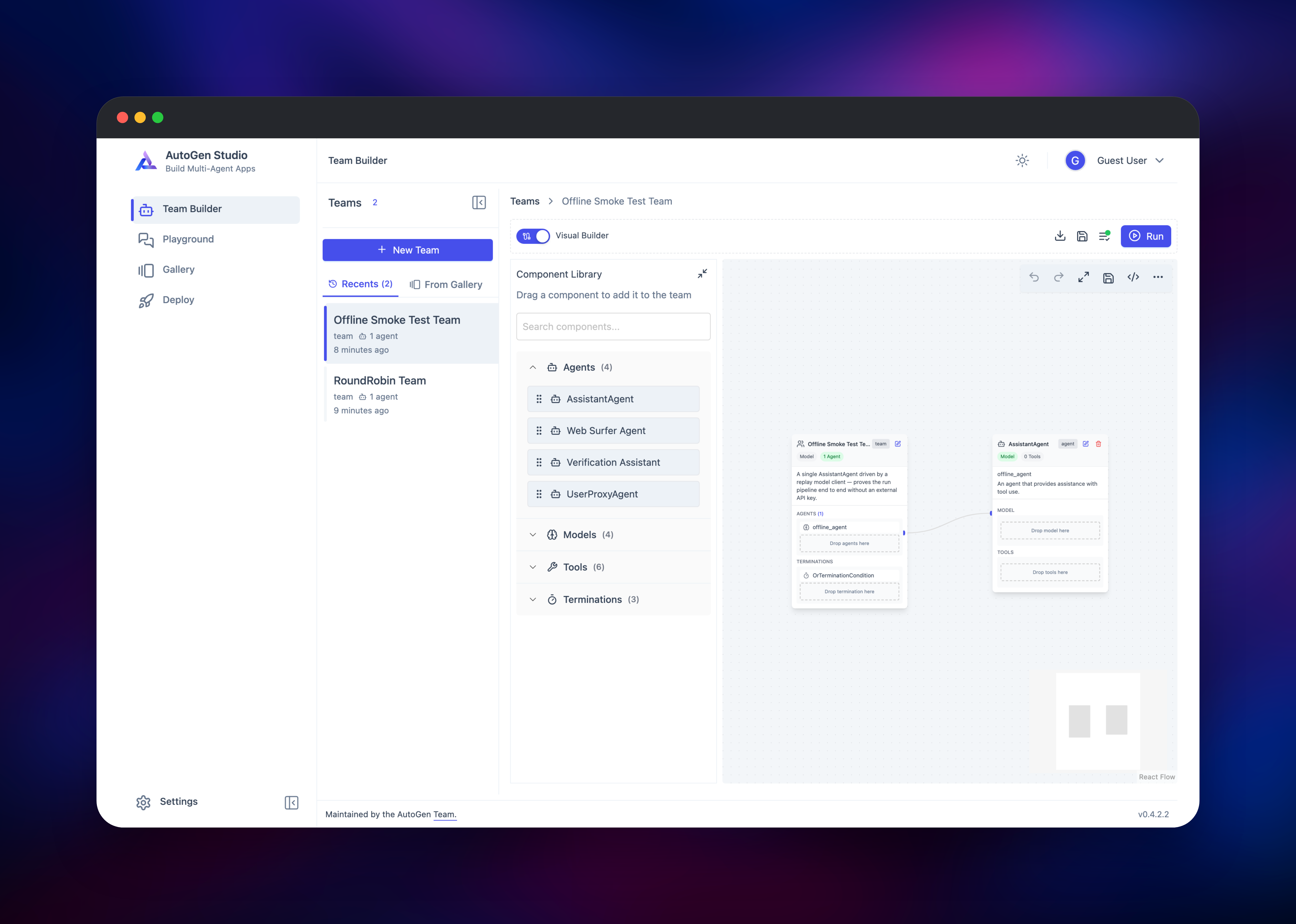
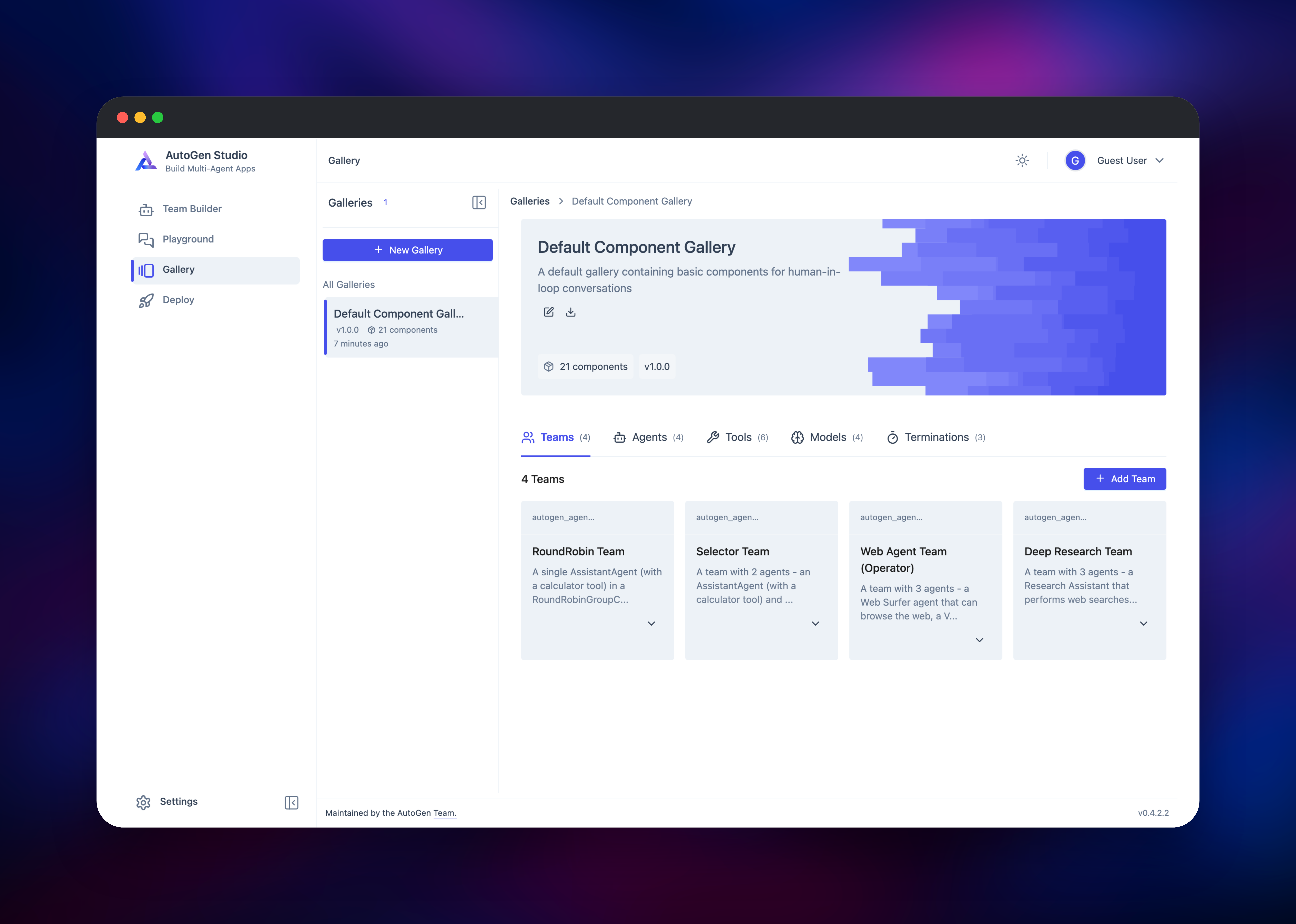
With a key set, open Team Builder, pick "RoundRobin Team" and press Run — a single assistant with a calculator tool, done in seconds. Then move to the Playground, click New Session, choose a team, and type a task. Messages stream in over a WebSocket as each agent takes its turn, with token counts and a stop reason when the team terminates. Your session reappearing in the sidebar after a reload confirms Postgres is wired up. The Gallery holds four teams, four agents, six tools, four model clients and three termination conditions, all reusable in teams of your own.
About Hosting AutoGen Studio
AutoGen Studio is the visual front end for AutoGen, the multi-agent framework Microsoft Research released in 2023 and rewrote around an asynchronous core for version 0.4. Self-hosting gives you control over the two things that matter with agents: where your model keys live, and where the transcripts of what those agents did end up.
Key features:
- Visual team builder with a node canvas for agents, models, tools and termination conditions
- Streaming playground showing every agent turn, tool call and token count
- Component gallery of reusable teams, agents and tools, importable and exportable as JSON
- Model clients for OpenAI, Azure OpenAI, Anthropic and any OpenAI-compatible endpoint such as Ollama or vLLM
- A web-surfing agent backed by a headless browser, plus a Python code-execution tool
The architecture has three parts. The gateway is stock Caddy: it terminates the public domain, checks basic auth, and reverse-proxies everything to the app over the private network, including the WebSocket that carries a run. The app is a single uvicorn worker — runs are tracked in process memory keyed by run id, so it is deliberately not scaled out. Postgres holds all durable state; the volume holds generated files and migrations.
Upstream calls AutoGen Studio a prototyping tool rather than a production application, and AutoGen moved to community maintenance in 2025 with Microsoft Agent Framework as its successor. Treat it as an internal tool for your team.
Why Deploy AutoGen Studio on Railway
Railway removes the setup work self-hosting an agent studio usually involves:
- Postgres provisioned and connected, no connection strings to assemble
- A password-protected public URL from the first deploy, with TLS handled
- A persistent volume already mounted for generated files and migrations
- Headless Chromium preinstalled, so the web-surfing agent works immediately
- One-click redeploys when you change a model key or upgrade the app
Common Use Cases
- Prototyping a research or analysis workflow as a team of specialised agents before committing it to code
- Comparing how different model providers handle the same multi-agent task in one session
- Giving a non-Python teammate a way to design and test agent behaviour without touching a repository
Dependencies for AutoGen Studio
- AutoGen Studio — the
autogenstudiopackage from PyPI on apython:3.11-slimbase, published at github.com/microsoft/autogen - Caddy —
caddy:2-alpine, the authentication gateway and only public entry point - PostgreSQL — Railway's managed Postgres, storing teams, sessions, runs, messages and galleries
- A model provider key — yours; OpenAI, Anthropic and Azure OpenAI work out of the box
Environment Variables Reference
| Variable | Service | Purpose |
|---|---|---|
GATEWAY_PASSWORD | gateway | Password for the browser login prompt |
GATEWAY_USERNAME | gateway | Username for the same prompt, defaults to admin |
OPENAI_API_KEY | autogen-studio | Enables the OpenAI model clients in the gallery |
ANTHROPIC_API_KEY | autogen-studio | Enables the Anthropic model client |
DATABASE_URL | autogen-studio | Postgres connection, rewritten at boot for SQLAlchemy |
AUTOGENSTUDIO_APPDIR | autogen-studio | Volume path for generated files and migrations |
Deployment Dependencies
- Source repository: github.com/microsoft/autogen
- Package: pypi.org/project/autogenstudio
- Documentation: microsoft.github.io/autogen
Hardware Requirements for Self-Hosting AutoGen Studio
| Resource | Minimum | Recommended |
|---|---|---|
| CPU | 1 vCPU | 2 vCPU |
| RAM | 1 GB | 2 GB — the web-surfing agent starts a browser |
| Storage | 1 GB volume | 5 GB volume plus the database |
| Runtime | Python 3.10+ | Python 3.11 |
Inference happens at your provider, so the app stays light. Memory is what to watch: a team using the web surfer holds a Chromium instance open for the whole run.
Self-Hosting AutoGen Studio
Locally it installs from PyPI and runs against SQLite. These shell commands install it and start the UI on port 8081:
pip install -U autogenstudio
autogenstudio ui --port 8081 --appdir ~/.autogenstudio
For a server, point it at PostgreSQL instead. Note the postgresql+psycopg:// scheme — SQLAlchemy picks its driver from that prefix, and a plain postgresql:// URL will not select psycopg 3:
pip install -U autogenstudio "psycopg[binary]"
export OPENAI_API_KEY="sk-your-key"
autogenstudio ui \
  --host 0.0.0.0 --port 8081 \
  --database-uri "postgresql+psycopg://user:password@host:5432/autogenstudio" \
  --appdir /data
Put it behind a reverse proxy that requires authentication. The application's own auth options are none, GitHub OAuth, Microsoft MSAL and Firebase, so an unproxied instance on the default none lets anyone who finds the URL start runs against your model credits.
Is AutoGen Studio Free?
AutoGen Studio is free and open source under the MIT licence, with no paid tier or seat limits. On Railway you pay only for compute, the volume and the database. The real cost is your model provider bill: every agent turn is an API call, and a team makes several per task.
FAQ
What is AutoGen Studio?
A web application from Microsoft for building and testing multi-agent AI systems visually. You compose agents, models and tools on a canvas, then run the team against a task and watch each turn stream in.
What does this Railway template deploy?
Three services: AutoGen Studio itself, a Caddy gateway providing HTTP basic authentication and the public domain, and a managed PostgreSQL database, plus a 5 GB volume on the app.
Why does the template include PostgreSQL instead of SQLite?
AutoGen Studio defaults to a SQLite file in its app directory. Postgres keeps teams, sessions and run history in a managed database with its own backups, and avoids file-locking trouble across redeploys.
How do I add my OpenAI or Anthropic API key to AutoGen Studio?
Set OPENAI_API_KEY or ANTHROPIC_API_KEY on the autogen-studio service and redeploy. The gallery's model clients read them from the environment, so no key needs typing into a component's configuration.
Can I use Ollama or a local model with self-hosted AutoGen Studio?
Yes. Add an OpenAI-compatible model client in Team Builder and set its base_url to your endpoint; the default gallery includes an example pointing at a local server that you can edit.
Is it safe to expose AutoGen Studio on a public URL?
Only behind authentication. Without the gateway, every route — including the one that starts a run — answers anonymously. The Python code-execution tool runs code inside the app container, so treat UI access as shell access.
Template Content
autogen-studio
gridalpha/autogen-studio-railway

