
Deploy CloudBeaver
A web-based database manager for working with multiple SQL databases.
cloudbeaver
Just deployed
/opt/cloudbeaver/workspace
Deploy and Host CloudBeaver on Railway
CloudBeaver is a web-based database management platform built by the DBeaver team. It provides a browser interface for connecting to and managing multiple database systems, running SQL queries, exploring schemas, browsing data, and managing database connections from a centralized workspace.
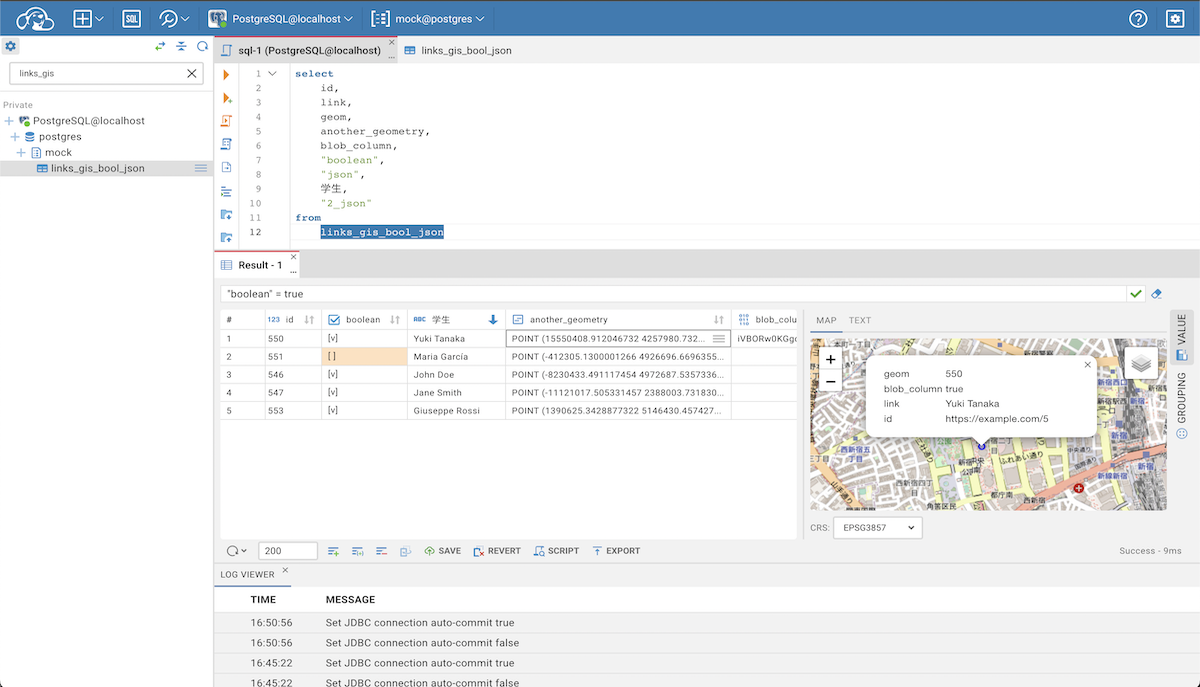
About Hosting CloudBeaver
Hosting CloudBeaver gives developers and teams a shared browser-based database management environment without requiring each user to install a desktop database client.
CloudBeaver can connect to databases running on Railway, other cloud providers, private infrastructure, or any reachable database server. It supports a wide range of SQL databases and provides a familiar DBeaver-style workflow for query execution, schema exploration, data browsing, and connection management.
Deploying CloudBeaver on Railway simplifies the infrastructure required to keep the service available while preserving application state and configuration.
Why Use CloudBeaver?
| Capability | CloudBeaver |
|---|---|
| 🌐 Browser-based database management | ✅ |
| 🗄️ Multiple database engines | ✅ |
| 📝 SQL query editor | ✅ |
| 🔎 Schema exploration | ✅ |
| 📊 Data browsing | ✅ |
| 🔌 Multiple saved connections | ✅ |
| 👥 Multi-user workflows | ✅ |
| 🔐 Built-in authentication | ✅ |
| 🧰 DBeaver-based tooling | ✅ |
| 🏠 Self-hosted deployment | ✅ |
| ☁️ Remote database access | ✅ |
CloudBeaver is especially useful when you want a centralized database workspace that can be accessed from any browser without installing a local database client.
Common Use Cases
| Use Case | Description |
|---|---|
| 🗄️ Multi-database management | Manage different database engines from one interface |
| 📝 SQL development | Write, execute, and test SQL queries |
| 🔎 Schema exploration | Inspect schemas, tables, columns, indexes, and relationships |
| 📊 Data browsing | Browse and inspect database records directly from the browser |
| 👨💻 Developer tooling | Provide developers with a shared database workspace |
| ☁️ Cloud database access | Connect to databases across cloud environments |
| 🧪 Development & testing | Inspect application databases during development and QA |
| 👥 Team access | Provide centralized access for multiple users |
Dependencies for CloudBeaver Hosting
| Dependency | Required |
|---|---|
| CloudBeaver application | ✅ |
| Persistent application storage | ✅ Recommended |
| Database to connect to | ✅ External or existing |
| Dedicated PostgreSQL dependency | ❌ |
| Redis | ❌ |
| Separate backend service | ❌ |
CloudBeaver is a standalone database management application. The databases you manage are connection targets, not application dependencies.
CloudBeaver vs Other Relevant Platforms
| Feature | CloudBeaver | DBX | Adminer | pgAdmin |
|---|---|---|---|---|
| 🌐 Web interface | ✅ | ✅ | ✅ | ✅ |
| 🏠 Self-hosted | ✅ | ✅ | ✅ | ✅ |
| 🗄️ Multi-database support | ✅ | ✅ | ✅ | ❌ PostgreSQL-focused |
| 📝 SQL editor | ✅ | ✅ | ✅ | ✅ |
| 🔎 Schema exploration | ✅ | ✅ | ✅ | ✅ |
| 👥 Multi-user workflows | ✅ | ⚠️ | ❌ | ✅ |
| 🔐 Built-in authentication | ✅ | ✅ | ⚠️ Limited | ✅ |
| 🧰 Advanced database tooling | ✅ | ✅ | ⚠️ Basic | ✅ |
| 🪶 Lightweight deployment | ⚠️ Moderate | ✅ | ✅ | ⚠️ Moderate |
| 🎯 Primary focus | Shared DB workspace | Modern multi-DB client | Simple DB administration | PostgreSQL administration |
Which One Should You Use?
| Platform | Best Choice When |
|---|---|
| CloudBeaver | ✅ You want a shared, browser-based database workspace with broad database support |
| DBX | ✅ You want a modern and lightweight multi-database client |
| Adminer | ✅ You want a very simple and minimal database administration interface |
| pgAdmin | ✅ You primarily manage PostgreSQL and need deeper PostgreSQL-specific tooling |
CloudBeaver is a strong choice when multiple users or developers need centralized access to several database systems through a consistent web interface.
Security Considerations
CloudBeaver includes built-in authentication and user management, but database administration interfaces should still be treated as sensitive infrastructure.
| Security Consideration | Recommendation |
|---|---|
| 🔐 Administrator credentials | Use a strong and unique password |
| 👥 User access | Only create accounts for trusted users |
| 🗄️ Database credentials | Use dedicated and least-privilege database accounts |
| 🌐 Public exposure | Limit internet access when it is not required |
| 🔄 Credential rotation | Rotate credentials when access changes |
| 📋 Permissions | Restrict database access based on actual user needs |
For private or internal deployments, consider removing or disabling public access when external access is unnecessary.
Important Usage Notes
| Consideration | Recommendation |
|---|---|
| 💾 Persistence | Preserve application state and saved configuration across redeployments |
| 🔌 Connectivity | Ensure target databases are reachable from CloudBeaver |
| 🔐 Credentials | Avoid using highly privileged database accounts unless necessary |
| 🌐 Network access | Prefer private networking when connecting to internal databases |
| 📦 Backups | Back up important application configuration and database credentials |
| 👥 Shared environments | Use separate users and appropriate permissions for team deployments |
Why Deploy CloudBeaver on Railway?
Railway is a singular platform to deploy your infrastructure stack. Railway will host your infrastructure so you don't have to deal with configuration, while allowing you to vertically and horizontally scale it.
By deploying CloudBeaver on Railway, you are one step closer to supporting a complete full-stack application with minimal burden. Host your servers, databases, AI agents, and more on Railway.
Template Content
cloudbeaver
dbeaver/cloudbeaver:latest

