
Deploy Docker Registry
A private server for storing and sharing container images
Just deployed

Redis
Just deployed
/data

registry-ui
Just deployed
registry-storage
Bucket
Just deployed
Deploy and Host Docker Registry on Railway
Docker Registry is the reference implementation of the OCI Distribution Specification, the server behind docker push and docker pull. Maintained by the CNCF as distribution/distribution, it gives a team its own image store rather than an account on a shared one, so proprietary images stay private, CI stops hitting Docker Hub rate limits, and build artifacts live where you choose.
Self-host Docker Registry on Railway and the template wires up three services. registry runs registry:3 and serves the /v2/ API on a public HTTPS domain — the endpoint you point docker login at. Railway terminates TLS for you, so no insecure-registries entry is needed on any client. registry-ui runs joxit/docker-registry-ui, a browsable catalog of everything you have pushed; it proxies the registry over the private network, so one login covers both. Redis holds distribution's shared blob-descriptor cache, which lets the registry run more than one replica coherently. Every layer, manifest and tag goes to a Railway object storage bucket rather than a disk, so nothing is pinned to a single container.
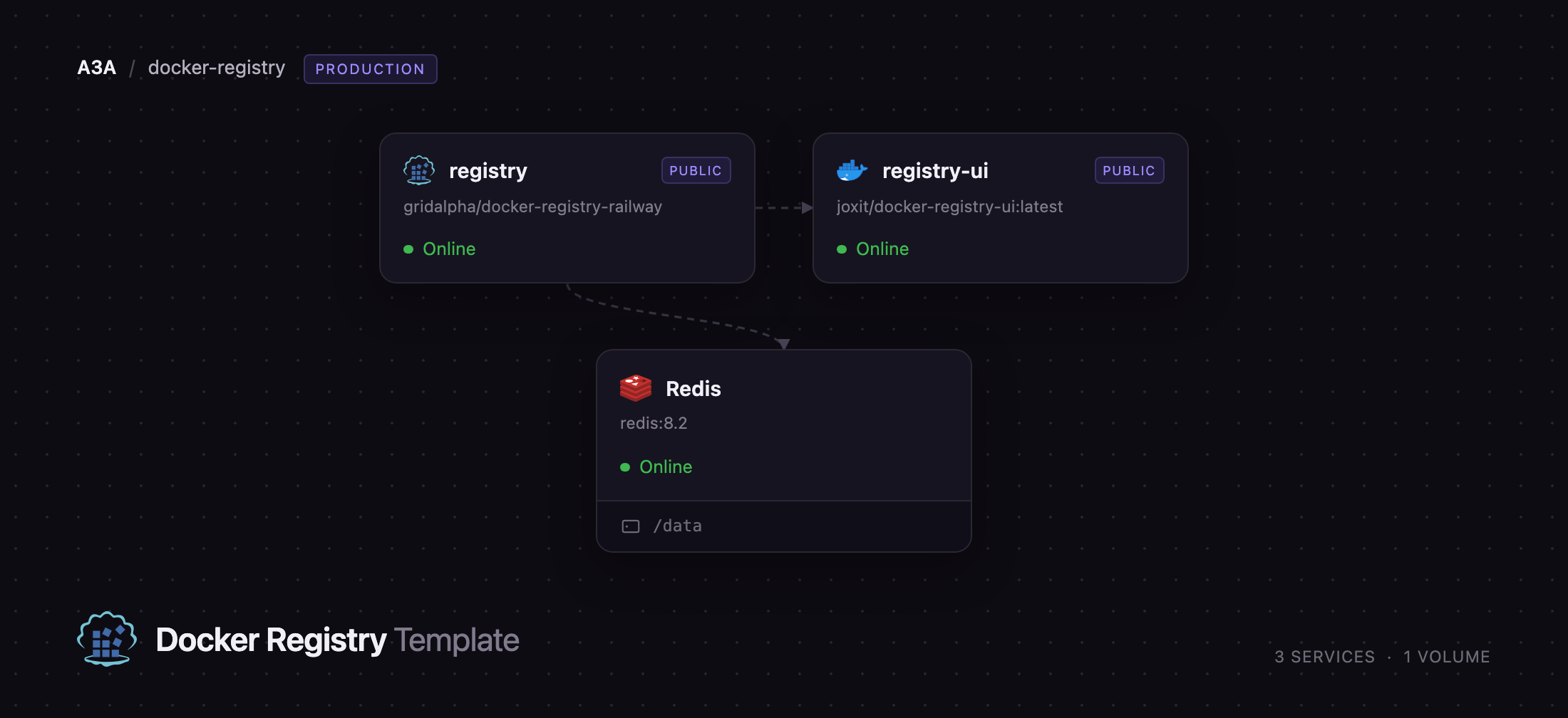
Getting Started with Docker Registry on Railway
Set REGISTRY_PASSWORD at deploy time — that, with the optional REGISTRY_USERNAME (default admin), is the one account the registry accepts. There are no default credentials and anonymous access is rejected, so a fresh deployment is closed the moment it is live. Open the registry-ui URL first: the browser shows a basic-auth prompt from the registry itself, and signing in gets you an empty catalog. Now log in from your terminal against the registry URL, tag a local image with that hostname and push it:
docker login registry-production.up.railway.app -u admin
docker tag alpine:3.23 registry-production.up.railway.app/base/alpine:3.23
docker push registry-production.up.railway.app/base/alpine:3.23
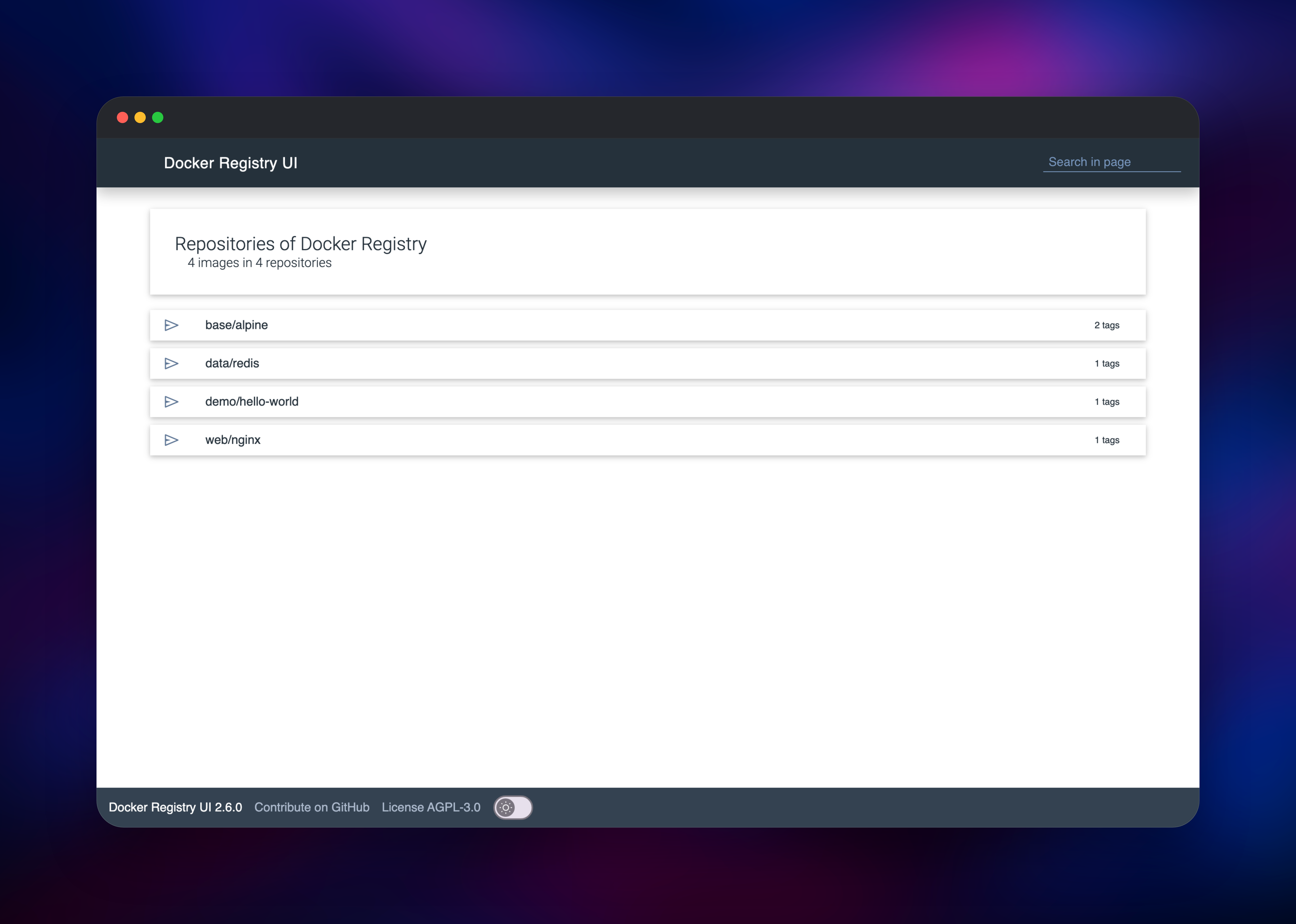
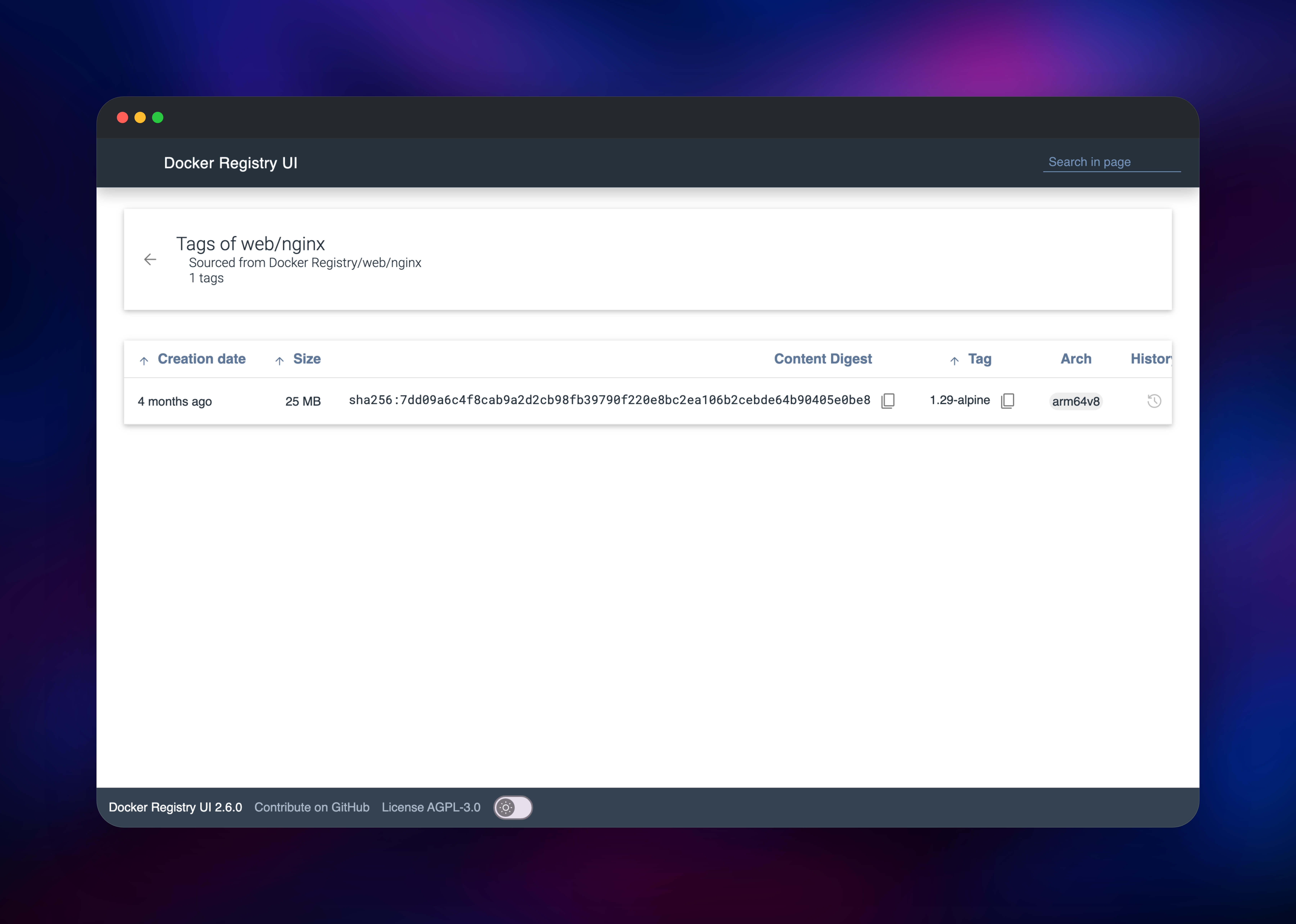
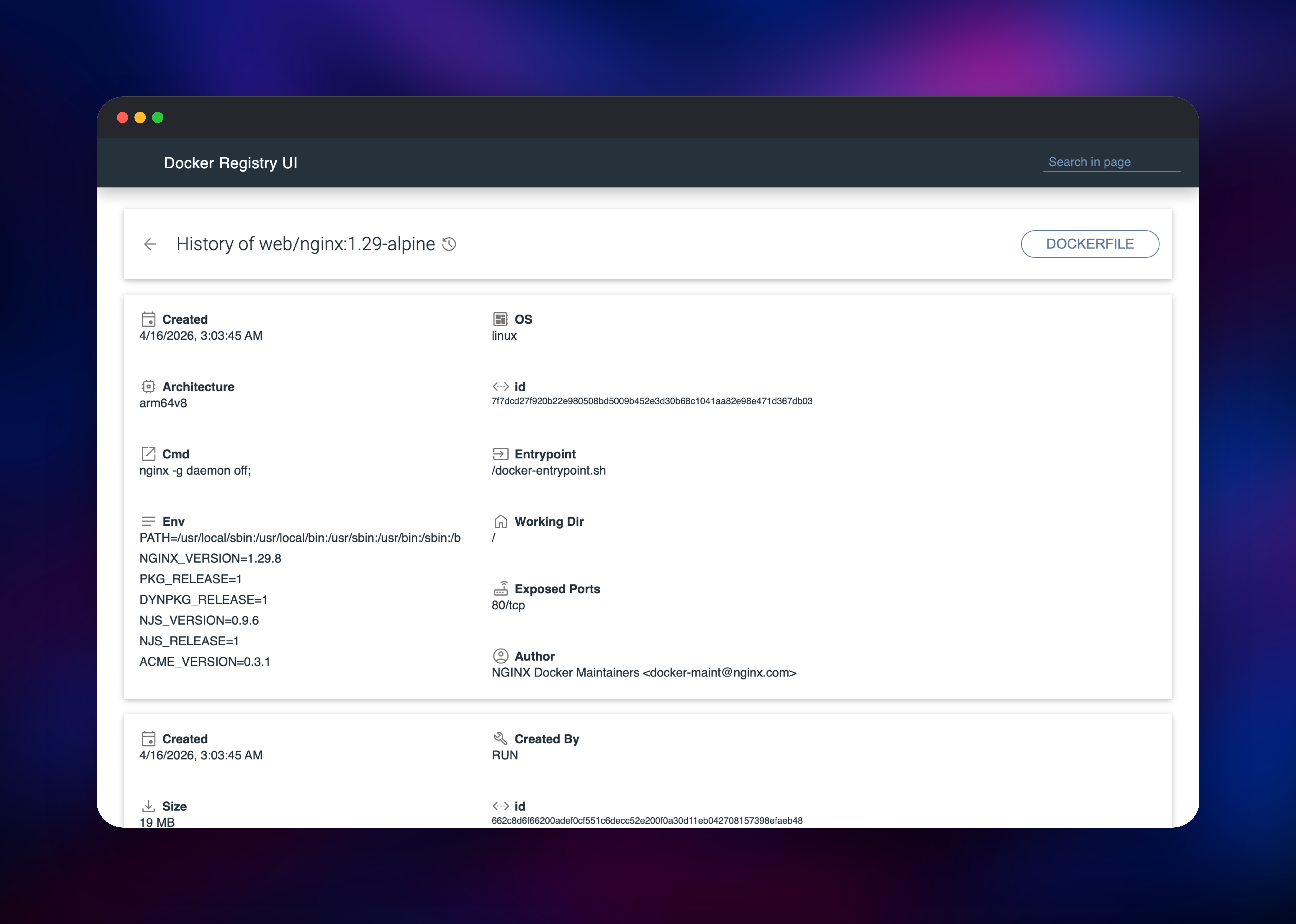
Refresh the UI and the repository appears with its tag count. Click into it for creation date, size, content digest and architecture, and the history icon for layer commands, entrypoint and environment. To confirm reads, docker pull the same tag elsewhere.
About Hosting Docker Registry
A container registry is a content-addressable store: clients upload layers by digest, then a manifest naming them, then a tag pointing at the manifest. Docker Registry implements exactly that and nothing more, which is why it is small and fast. Teams self-host when images hold source, models or customer data that should not sit in a third-party account, or when CI pulls enough that public rate limits bite.
- Full OCI Distribution Specification v1.1 support: Docker, Podman, BuildKit, containerd, Skopeo, ORAS and Helm all work unchanged
- Username and password auth on every request, catalog reads included
- Object-storage backend, so image data is not tied to one container's disk
- Tag deletion through the API and the web UI, plus Prometheus metrics privately
- Stores any OCI artifact, not only images — Helm charts, WASM modules, SBOMs
The split is clean: the registry owns the API and all storage access, the UI is a static app plus a small reverse proxy holding no state, and Redis caches blob descriptors so repeated lookups skip object storage.
Why Deploy Docker Registry on Railway
Railway removes the parts of running a registry that are not about images:
- HTTPS is provisioned automatically, which Docker clients require
- Object storage is attached in the same project, credentials as references
- Redis is one managed service, not a second thing to operate
- The private network keeps the UI-to-registry hop off the internet
- More replicas is a slider, because no service owns local state
Common Use Cases
- Private images for a team — build in CI, push here, pull from staging and production, no per-seat cost
- Your organisation's golden base images — so builds stop depending on public registry availability
- Kubernetes or Nomad clusters — pulls stay inside your own infrastructure
- OCI artifact storage — Helm charts, WASM modules and SBOMs, addressed by digest
Dependencies for Docker Registry
- registry — gridalpha/docker-registry-railway, a thin layer on the official
registry:3image that generates the bcrypt password file and storage configuration at startup - registry-ui —
joxit/docker-registry-ui:latest, web catalog and reverse proxy - Redis — managed Redis, distribution's blob-descriptor cache
- Object storage — a bucket holding every layer, manifest and tag
Environment Variables Reference
| Variable | Service | Purpose |
|---|---|---|
REGISTRY_PASSWORD | registry | Password docker login accepts. Required |
REGISTRY_USERNAME | registry | Account name, defaults to admin |
REGISTRY_HTTP_SECRET | registry | Signs upload state; identical on every replica |
PORT | registry | 5001, the private port the health check probes; the API stays on 5000 |
S3_BUCKET, S3_ENDPOINT, S3_ACCESS_KEY_ID, S3_SECRET_ACCESS_KEY, S3_REGION | registry | Bucket credentials, as references |
REDIS_HOST, REDIS_PORT, REDIS_USER, REDIS_PASSWORD | registry | Blob-descriptor cache; unset them for an in-process one |
NGINX_PROXY_PASS_URL | registry-ui | Private address of the registry |
DELETE_IMAGES | registry-ui | Whether the UI offers tag deletion |
Anything not listed can be set with distribution's own REGISTRY_ overrides, layered on top of the generated configuration file.
Deployment Dependencies
- Source repository: distribution/distribution
- Official image: registry on Docker Hub
- Configuration: distribution docs
- Web UI: Joxit/docker-registry-ui
Hardware Requirements for Self-Hosting Docker Registry
The registry is a single Go binary streaming bytes, so it is bound by bandwidth, not CPU.
| Resource | Minimum | Recommended |
|---|---|---|
| CPU | 0.5 vCPU | 1–2 vCPU |
| RAM | 256 MB | 512 MB–1 GB |
| Storage | Object storage, grows with images | Object storage; no volume needed |
| Runtime | Go 1.25 binary in an Alpine image | Same, plus Redis for multi-replica |
Self-Hosting Docker Registry with Docker
The smallest useful local instance keeps images on a mounted volume and has no password:
docker run -d -p 5000:5000 --name registry \
  -v registry-data:/var/lib/registry \
  registry:3
Anything reachable from another machine needs TLS and a password. Generate a bcrypt entry — the only format distribution accepts — and point the registry at it:
htpasswd -Bbn admin 'your-password' > auth/htpasswd
docker run -d -p 5000:5000 --name registry \
  -v "$PWD/auth:/auth" -v registry-data:/var/lib/registry \
  -e REGISTRY_AUTH=htpasswd \
  -e REGISTRY_AUTH_HTPASSWD_REALM="Docker Registry" \
  -e REGISTRY_AUTH_HTPASSWD_PATH=/auth/htpasswd \
  registry:3
Swapping the filesystem backend for S3-compatible object storage means replacing the storage.filesystem block in config.yml with a storage.s3 block; the two cannot both be present. On Railway that file is generated at boot.
Is Docker Registry Free?
Docker Registry is open source under the Apache 2.0 licence, free for any use including commercial, with no seat count, image limit or paid tier. On Railway you pay only for what the deployment consumes: two small containers, managed Redis, and object storage billed by the gigabyte.
FAQ
What is Docker Registry?
The open-source server that stores and distributes container images, implementing the OCI Distribution Specification. Every docker push and docker pull speaks its API, whether the far end is Docker Hub or your own instance.
What does this Railway template deploy?
Three services: the registry on a public HTTPS domain, a web UI for browsing repositories and tags, and managed Redis for the blob-descriptor cache. Image data lives in a Railway object storage bucket.
Why does the template include Redis and object storage?
Object storage keeps image data off any container's disk, so the registry stays stateless and survives redeploys. Redis holds the blob-descriptor cache all replicas share, which is what makes running more than one correct.
Can I create more than one user in self-hosted Docker Registry?
The password-file backend has no per-user permissions — anyone who can pull can also push and delete. For separate read-only and read-write identities, distribution supports a token authentication server via its auth.token settings.
How do I reclaim space after deleting images from Docker Registry?
Deleting a tag removes the reference immediately, but the layers are freed by a separate registry garbage-collect pass, which upstream requires you to run against a read-only registry.
Template Content


