
Deploy Filestash | Open Source Dropbox UI
Self-Host Filestash. Web file manager for S3, FTP, SFTP, NFS& more.
Filestash
Just deployed
/app/data/state

Deploy and Host Filestash on Railway
Filestash is an open-source web file manager that puts a polished, multi-user UI in front of storage you already have — S3, FTP, SFTP, SMB, WebDAV, NFS, Git, Backblaze B2, MinIO, IPFS, Storj, even Dropbox or Google Drive. Self-host Filestash on Railway to turn any backend into a fast, browser-accessible file portal with sharing, previews, image/PDF/office viewers, and an admin console — without writing a custom Nextcloud-sized stack.
This Railway template deploys the official machines/filestash:latest Docker image with a persistent volume mounted at /app/data/state (config + embedded SQLite + plugins + search index + logs in one place), a public HTTPS domain on port 8334, and an idempotent start command that pre-creates the state subdirectories Filestash expects on first boot.
Getting Started with Filestash on Railway
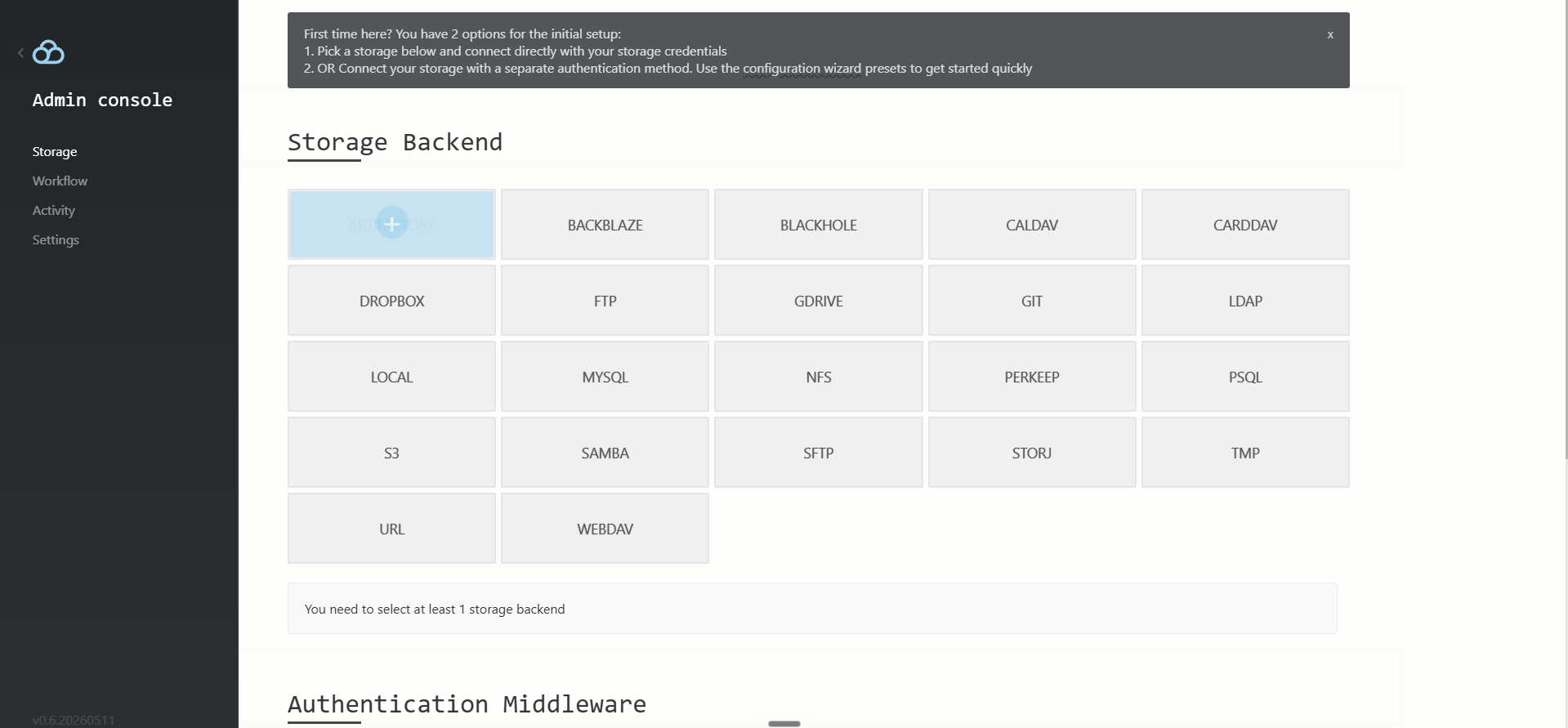
After Railway shows the service as Active, click the generated public domain — your browser will redirect to /admin/setup. This is the single most important step: Filestash has no first-boot password seeding via environment variables, so whoever loads /admin/setup first becomes the admin. Set a strong password before sharing the URL with anyone. From /admin you can then attach storage backends (S3, FTP, SFTP, SMB, WebDAV, etc.), wire OAuth/SAML identity providers, enable the force_ssl option, and tune access controls per role. Storage credentials are encrypted into the embedded SQLite database under the persistent volume.

About Hosting Filestash on Railway
Filestash is the "Dropbox UI for everyone's existing storage": it doesn't own bytes, it federates them. It's written in Go, ships as a single ~344 MB Docker image bundling ffmpeg, tinytex, emacs-nox, poppler-utils, and tor so previews work out of the box, and persists everything (admin config, embedded SQLite sessions/audit log, full-text search index, installed plugins) under one volume.
Key features:
- 20+ storage backends (S3, FTP, SFTP, SMB, WebDAV, NFS, Git, B2, Storj, Dropbox, Google Drive, IPFS, …)
- Browser previews for images, video, audio, PDF, Office files, code, markdown
- Per-share public links with optional password protection and expiration
- OAuth2 / SAML / OpenID / LDAP authentication plugins
- Role-based access control via the admin console
- Hot-pluggable plugin system (
/app/data/state/plugins/) - Built-in full-text search across mounted backends
The architecture on Railway is single-service: one container, one Railway volume. No external database or cache required — SQLite under the volume handles all state.
Why Deploy Filestash on Railway
- One-click deploy of the official
machines/filestash:latestDocker image, no fork required - Persistent volume mounted at
/app/data/stateso config and shares survive redeploys - Public HTTPS domain on port 8334 — auto-issued and renewed by Railway
- Idempotent start command pre-creates state subdirs so first boot doesn't crash on missing
log/access.log RAILWAY_RUN_UID=0sidesteps the root-owned volume vs non-root container conflict- Vertical-scale RAM/CPU from the dashboard if you enable the video transcoder plugin
Common Use Cases for Self-Hosted Filestash
- Give a non-technical team a Dropbox-style UI in front of your existing S3 bucket
- Expose an internal SFTP/SMB share to remote contractors with audited shareable links
- Replace
aws s3 cpworkflows with previews, full-text search, and drag-and-drop uploads - Front a backup target (B2, MinIO, Storj) for occasional restores without CLI overhead
Dependencies for the Filestash Railway Deployment
- Filestash —
machines/filestash:latest(GitHub, Docker Hub)
Environment Variables Reference
| Variable | Purpose |
|---|---|
PORT | Public-facing port — must be 8334 (Filestash hardcodes its listen port and ignores $PORT) |
APPLICATION_URL | Public URL used for share-link generation and OAuth callbacks |
RAILWAY_RUN_UID | Forces the container to run as root so it can write to the root-owned Railway volume |
CANARY | Enables newer/beta features (recommended) |
LOG_LEVEL | One of DEBUG, INFO, WARNING, ERROR |
Deployment Dependencies
- Runtime: Docker (single container)
- Image: machines/filestash on Docker Hub
- Source: mickael-kerjean/filestash on GitHub
- Docs: filestash.app/docs
Hardware Requirements for Self-Hosting Filestash
| Resource | Minimum | Recommended |
|---|---|---|
| CPU | 0.5 vCPU | 1–2 vCPU |
| RAM | 128 MB | 512 MB – 1 GB |
| Storage | 1 GB | 5 GB+ (Filestash state only — actual files live on the remote backends) |
| Runtime | Docker | Docker |
The 344 MB image plus the volume's full-text search index drive most of the memory cost. Bump RAM to 2–4 GB if you enable the plg_video_transcoder plugin or serve dozens of concurrent users.
Self-Hosting Filestash with Docker
The Railway template runs the same image you would use locally. The vendor's minimal Docker recipe is:
docker run -d --name filestash \
  -p 8334:8334 \
  -v filestash-state:/app/data/state \
  -e APPLICATION_URL=https://files.example.com \
  machines/filestash:latest
On Railway the equivalent service-instance start command (set via serviceInstanceUpdate GraphQL) pre-creates the state subdirectories so the first boot doesn't crash on the empty volume:
/bin/sh -c 'mkdir -p /app/data/state/log /app/data/state/config /app/data/state/db /app/data/state/certs /app/data/state/plugins /app/data/state/search && exec /app/filestash'
Source build instructions (Go 1.21+, Node 18+, libvips, ffmpeg) live in the project README.
How Much Does Filestash Cost to Self-Host?
Filestash itself is open source under the AGPLv3 license — there is no license fee for self-hosters. On Railway you only pay infrastructure: typically a few dollars per month for a small container plus the persistent volume. The vendor also sells a paid Enterprise tier and a hosted SaaS at filestash.app, but the Docker image you self-host on Railway is fully functional and free.
FAQ
What is Filestash and why self-host it on Railway? Filestash is an open-source web file manager that exposes any S3/FTP/SFTP/SMB/WebDAV/NFS backend through a multi-user UI with previews, sharing, and RBAC. Self-hosting it on Railway gives you a Dropbox-style frontend over storage you already own — no per-seat fees, no third-party trust.
What does this Railway template deploy?
A single Docker service running machines/filestash:latest on port 8334, fronted by a Railway-issued HTTPS domain, with a persistent volume mounted at /app/data/state for config, embedded SQLite, plugins, search index, and logs.
Why does the template use an embedded SQLite database instead of Postgres? Filestash stores only metadata, sessions, shares, and audit entries — workloads SQLite handles comfortably on a single container. Avoiding an external Postgres service keeps the template to one container, one volume, and zero cross-service env wiring.
How do I set the admin password for self-hosted Filestash on Railway?
There is no env var. After the deploy goes live, open https:///admin/setup immediately and pick a password. Anyone who hits that URL first becomes the admin — set the password before sharing the URL.
Why is RAILWAY_RUN_UID=0 required for Filestash?
The machines/filestash image's default user is the non-root filestash account, but Railway volumes are root-owned. Without RAILWAY_RUN_UID=0, Filestash crash-loops on mkdir: cannot create directory '/app/data/state/log': Permission denied during first boot.
How do I connect S3, SFTP, or WebDAV to self-hosted Filestash?
Log in to /admin, open Backend, click Add a backend, pick the provider (S3, SFTP, etc.), paste credentials, and save. Credentials are encrypted into the SQLite state database under /app/data/state/db/.
Template Content
Filestash
machines/filestash:latest