
Deploy Firefly III | Open-Source Personal Finance Manager
Self Host Firefly III. Personal finance, budgets, multi-currency & more
Firefly III
Just deployed
/var/www/html/storage/upload

Just deployed
/var/lib/postgresql/data
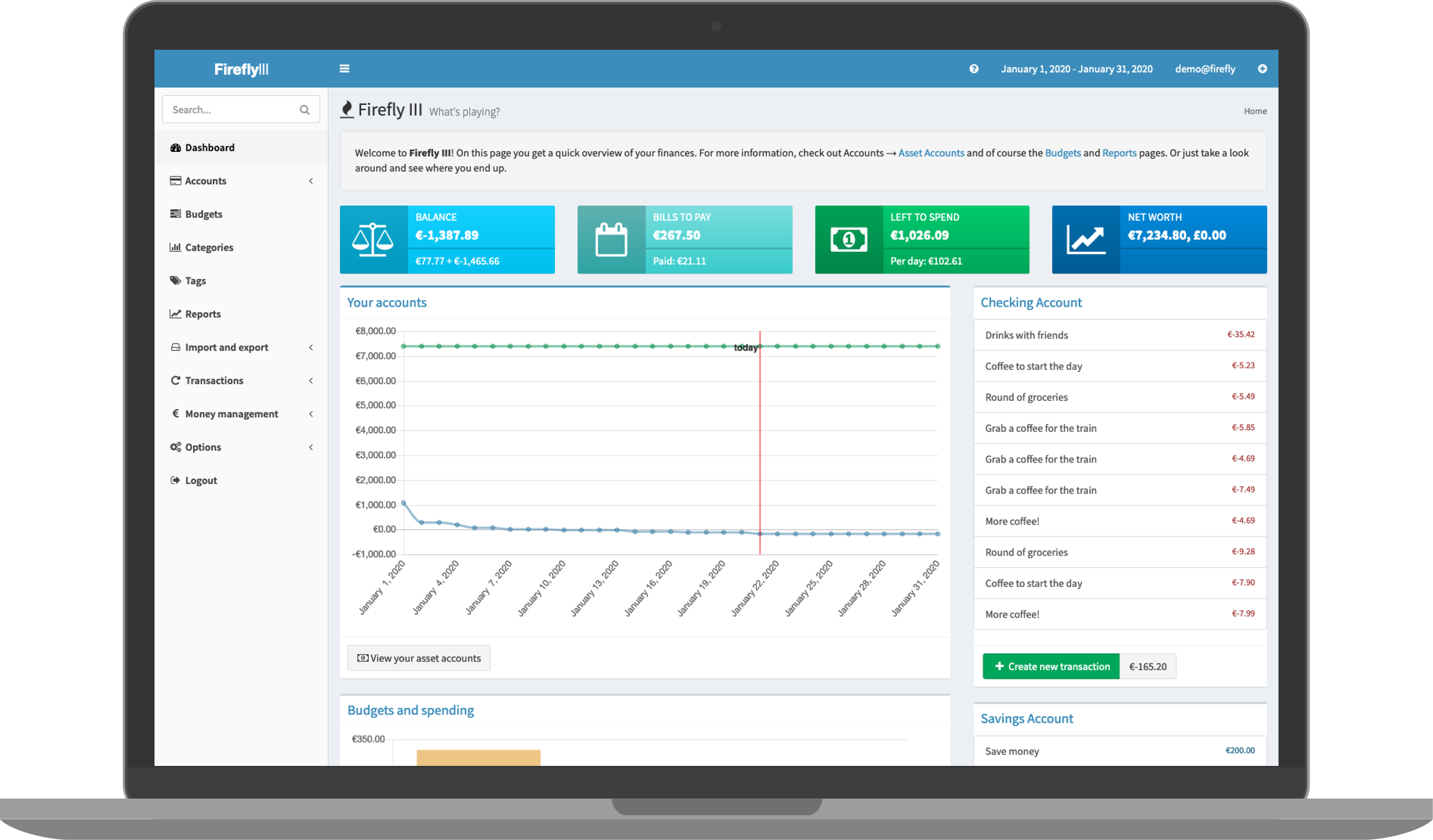
Deploy and Host Firefly III on Railway
Deploy Firefly III on Railway to run your own private, open-source personal finance manager with full double-entry bookkeeping, budgets, categories, and multi-currency support. Self-host Firefly III with complete data ownership — no ads, no tracking, no third-party access to your financial data.
This Railway template pre-configures Firefly III (fireflyiii/core:latest) with a PostgreSQL database, persistent upload storage, and production-ready environment variables including secure encryption keys and trusted proxy settings behind Railway's TLS-terminating edge.
Getting Started with Firefly III on Railway
After deployment completes, visit your Railway-generated public URL. Firefly III automatically runs database migrations on first boot and generates encryption keys. You'll land on the registration page where you can create your first user account — this becomes the administrator. Once registered, navigate to the dashboard and create your first asset account (checking, savings, credit card). Add your first transaction to start tracking finances. Set up budgets under the Budgets menu to allocate monthly spending limits across categories.
About Hosting Firefly III
Firefly III is a free, open-source (AGPLv3) personal finance manager created by James Cole. It uses double-entry bookkeeping — every transaction has both a source and a destination — giving you an accurate picture of where money flows. Unlike cloud-based tools like YNAB or Mint, Firefly III runs entirely on your own infrastructure and never contacts external servers unless you explicitly configure it to.
Key features of self-hosted Firefly III include:
- Double-entry bookkeeping with support for withdrawals, deposits, and transfers
- Multi-currency support — track accounts and transactions in any currency
- Budgets, categories, and tags for organizing spending
- Advanced rule engine that auto-categorizes transactions based on conditions
- Data Importer for CSV, OFX, and bank-connected imports via Spectre/Nordigen
- JSON REST API with full CRUD access and optional webhooks
- Recurring transactions for automated entries on schedules
- Reports and charts showing spending per week, month, year, or custom range
Why Deploy Firefly III on Railway
- One-click deploy with PostgreSQL and persistent storage pre-configured
- No server management — Railway handles scaling, SSL, and uptime
- Persistent volume keeps uploaded attachments safe across redeploys
- Environment-variable-driven configuration — no config files to manage
- Private by design — your financial data stays on your infrastructure
Common Use Cases for Self-Hosted Firefly III
- Personal budgeting — track income and expenses across multiple bank accounts with envelope-style budgets
- Multi-currency expense tracking — manage finances in different currencies for travel, remote work, or international accounts
- Automated transaction categorization — use the rule engine to auto-tag and sort recurring transactions from bank imports
- Financial reporting for freelancers — generate income/expense reports by category with double-entry accuracy for tax preparation
Dependencies for Firefly III on Railway
- Firefly III —
fireflyiii/core:latest— the main PHP/Laravel application running on Nginx + PHP-FPM - PostgreSQL — Railway-managed Postgres database for all financial data
Environment Variables Reference for Firefly III
| Variable | Description | Example |
|---|---|---|
APP_KEY | 32-char encryption key (must be static) | openssl rand -hex 16 |
APP_URL | Public-facing URL | https://${{RAILWAY_PUBLIC_DOMAIN}} |
DB_CONNECTION | Database driver | pgsql |
DB_HOST | Database hostname | ${{Postgres.PGHOST}} |
TRUSTED_PROXIES | Reverse proxy trust | * |
STATIC_CRON_TOKEN | Token for cron endpoint | ${{secret(32)}} |
DEFAULT_LANGUAGE | Default UI language | en_US |
Deployment Dependencies
- Docker image:
fireflyiii/coreon Docker Hub - Source code: firefly-iii/firefly-iii on GitHub
- Official docs: docs.firefly-iii.org
- Runtime: PHP 8.x with Laravel framework, served via Nginx + PHP-FPM
Hardware Requirements for Self-Hosting Firefly III
| Resource | Minimum | Recommended |
|---|---|---|
| CPU | 1 vCPU | 2 vCPUs |
| RAM | 256 MB | 512 MB |
| Storage | 1 GB | 5 GB (for attachments) |
| Runtime | Docker 20+ | Docker Compose v2+ |
Firefly III is lightweight — a single PHP application with modest requirements. The PostgreSQL database adds minimal overhead for personal use.
Self-Hosting Firefly III with Docker
Pull the official Docker image and connect it to a PostgreSQL database:
docker run -d \
  --name firefly-iii \
  -p 8080:8080 \
  -e APP_KEY=$(openssl rand -hex 16) \
  -e DB_CONNECTION=pgsql \
  -e DB_HOST=your-postgres-host \
  -e DB_PORT=5432 \
  -e DB_DATABASE=firefly \
  -e DB_USERNAME=firefly \
  -e DB_PASSWORD=your-secure-password \
  -e APP_URL=https://your-domain.com \
  -e TRUSTED_PROXIES=* \
  -v firefly_uploads:/var/www/html/storage/upload \
  fireflyiii/core:latest
Or use Docker Compose with the official configuration:
services:
  app:
    image: fireflyiii/core:latest
    ports:
      - "8080:8080"
    environment:
      APP_KEY: "your-32-character-app-key-here!!"
      DB_CONNECTION: pgsql
      DB_HOST: db
      DB_PORT: 5432
      DB_DATABASE: firefly
      DB_USERNAME: firefly
      DB_PASSWORD: secure-password
      APP_URL: https://your-domain.com
      TRUSTED_PROXIES: "*"
    volumes:
      - firefly_uploads:/var/www/html/storage/upload
    depends_on:
      - db
  db:
    image: postgres:16
    environment:
      POSTGRES_DB: firefly
      POSTGRES_USER: firefly
      POSTGRES_PASSWORD: secure-password
    volumes:
      - firefly_db:/var/lib/postgresql/data
volumes:
  firefly_uploads:
  firefly_db:
Is Firefly III Free to Self-Host?
Firefly III is completely free and open-source under the AGPLv3 license. There are no paid tiers, no premium features, and no usage limits. The developer accepts donations via GitHub Sponsors and Patreon but the software is fully functional without payment. When self-hosting on Railway, your only cost is Railway infrastructure usage — typically under $5/month for personal use with the Hobby plan.
Firefly III vs YNAB — Which Personal Finance Tool to Choose?
| Feature | Firefly III | YNAB |
|---|---|---|
| Pricing | Free (open-source) | $14.99/month |
| Hosting | Self-hosted | Cloud-only |
| Data privacy | Full control | Third-party servers |
| Multi-currency | Native support | Single currency per budget |
| Accounting method | Double-entry bookkeeping | Envelope budgeting |
| Bank sync | Via Data Importer (Nordigen/Spectre) | Built-in direct sync |
| Mobile app | Community apps (Waterfly III) | Official iOS/Android |
| API | Full REST API | Limited API |
Firefly III suits users who want full data ownership, double-entry accuracy, and multi-currency support without subscription fees. YNAB is better for users who want a polished mobile experience with direct bank connections and guided budgeting methodology.
FAQ — Firefly III on Railway
What is Firefly III and why should I self-host it? Firefly III is a free, open-source personal finance manager that uses double-entry bookkeeping. Self-hosting gives you complete control over your financial data — no third party can access, sell, or lose your transaction history.
What does this Railway template deploy for Firefly III?
This template deploys two services: the Firefly III application (fireflyiii/core:latest) and a Railway-managed PostgreSQL database. It includes a persistent volume for file uploads and pre-configures environment variables for production use behind Railway's HTTPS proxy.
Why does Firefly III need PostgreSQL on Railway? Firefly III stores all accounts, transactions, budgets, rules, and user data in a relational database. PostgreSQL provides reliable ACID-compliant storage. The Railway-managed instance includes automatic backups and persistent volumes.
How do I import bank transactions into self-hosted Firefly III? Use the Firefly III Data Importer — a separate tool that connects to your Firefly III instance via its API. It supports CSV file imports and automated bank connections via Nordigen (GoCardless) and Spectre (Salt Edge). Deploy it as a separate Railway service pointing to your Firefly III API URL.
Can I use Firefly III on mobile with this Railway deployment? Firefly III's web interface is responsive and works in mobile browsers. For a native app experience, community-built apps like Waterfly III (Android) connect to your self-hosted instance via the REST API. Point the app at your Railway public URL.
How do I set up recurring transactions in Firefly III on Railway?
Create recurring transactions in the UI under Automation → Recurring transactions. To process them automatically, hit the cron endpoint daily: curl https://your-domain/api/v1/cron/. You can set up a separate cron service on Railway or use an external cron job service.
Template Content
Firefly III
fireflyiii/core:latest

