Deploy Gitingest
Turns a Git repository into one text file you can paste into an LLM
gitingest
Just deployed
Deploy and Host Gitingest on Railway
Gitingest turns any Git repository into a single, prompt-friendly text file. Paste a repository URL and it clones the code, walks the tree, and returns one digest: a directory listing plus the contents of every file that matters, with a token estimate so you know whether it fits your model's context window. Developers use it to hand a codebase to Claude, ChatGPT or Gemini in one paste, to build retrieval corpora, and to read unfamiliar projects without cloning them. Self-host Gitingest when you want that on repositories you would rather not send through someone else's server, or when you want an API endpoint your own tools can call without a shared rate limit.
Deploy Gitingest on Railway and you get the whole product in one service. The template runs the official ghcr.io/coderamp-labs/gitingest image as a service named gitingest, on a public HTTPS domain, health-checked at /health. A request arrives at Railway's edge, the FastAPI app clones the repository into container-local scratch space, builds the digest, deletes the clone, and returns the result — inline in the browser and as a downloadable .txt. No database, queue or object storage to configure: every digest is derived from a commit and rebuilt in seconds.

Getting Started with Gitingest on Railway
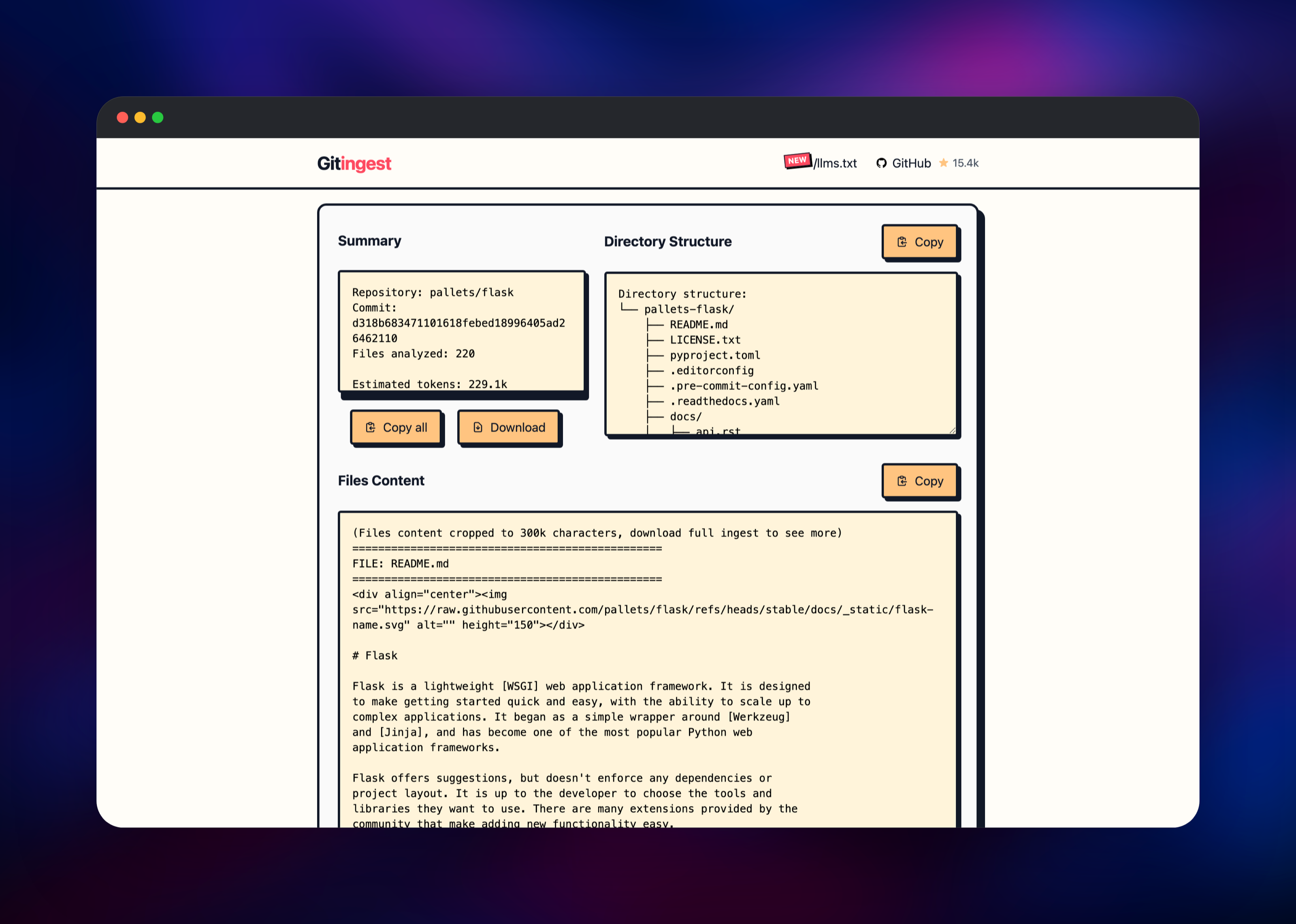
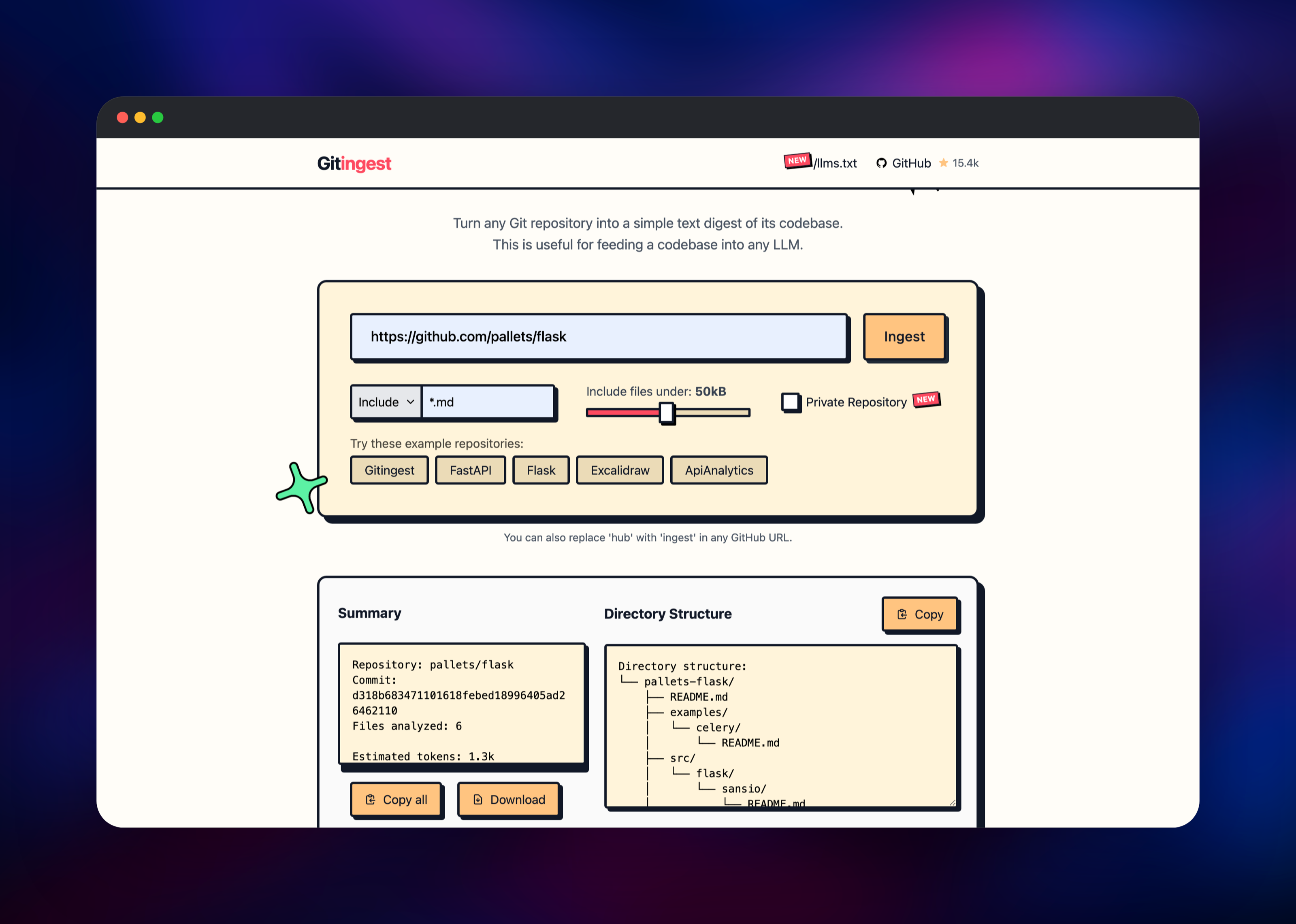
There is no sign-up, admin account or first-run wizard — open the public URL and the tool is ready. Paste a repository URL such as https://github.com/pallets/flask and press Ingest; within seconds you get a Summary panel (repository, commit SHA, files analysed, estimated tokens), a Directory Structure panel, and the file contents below them. Use Copy all for the clipboard, or Download for the full .txt, which is not truncated the way the preview is. Narrow a large repository with the dropdown beside the URL field: Include with *.md for documentation only, or Exclude with patterns like tests/, *.lock, then use the slider to skip oversized files. Any GitHub URL works by swapping the hostname — github.com/owner/repo becomes your-domain/owner/repo. For a private repository, tick Private Repository and paste a GitHub token with repo scope. GET /health returns {"status":"healthy"} and /docs renders the API reference.
About Hosting Gitingest
Gitingest is an open-source (MIT) Python project from Coderamp Labs that ships three ways: a web app, a JSON API, and a gitingest CLI and library on PyPI. The problem it solves is mundane but constant — models take text, and a repository is a tree whose structure matters. Copying files by hand loses the layout; uploading an archive wastes context on lockfiles and vendored dependencies. Gitingest applies default ignore rules, respects your patterns and per-file size cap, and emits one deterministic document with the tree at the top.
Key features:
- One-paste digests from GitHub, GitLab, Bitbucket, Gitea, Codeberg and self-hosted Git hosts
- Include/exclude glob patterns and a maximum file-size slider
- Token estimate and file count before you spend model context
- URL-hack ingestion: replace
hubwith your host in any GitHub URL - JSON API with an OpenAPI schema, plus a CLI and Python package
- Private repositories via a personal access token supplied per request
This deployment is one stateless FastAPI service behind Railway's HTTPS edge. Digests are written to container-local storage and served from an unguessable UUID path, so links resolve for the life of the deployment and are regenerated on demand afterwards.
Why Deploy Gitingest on Railway
Railway removes the setup self-hosting normally implies:
- One service, one click — no database, queue or storage to wire up
- HTTPS domain, TLS and health checks provisioned automatically
- Variables preset for correct client-IP and host handling
- Vertical and horizontal scaling from the dashboard
- Custom domains and private networking without extra config
Common Use Cases
- Feeding whole codebases to an LLM — digest a repository and paste it into Claude, ChatGPT or a local model to ask architecture questions.
- Internal tooling that needs an API — call
POST /api/ingestfrom a script, CI job or agent to fetch a repository as text without shelling out togit. - Building RAG corpora — pull the documentation subset of many repositories on a schedule and index the output.
Dependencies for Gitingest
- gitingest — the only service. Image
ghcr.io/coderamp-labs/gitingest:v0.3.1: Python 3.13, FastAPI on uvicorn, withgitinstalled for cloning. - Outbound HTTPS — the container clones from public Git hosts. Nothing else is required.
Environment Variables Reference
| Variable | Default in this template | What it does |
|---|---|---|
PORT | 8000 | Port the app listens on and Railway health-checks |
ALLOWED_HOSTS | * | Host allow-list. The image's own default accepts only gitingest.com, which would reject your domain |
FORWARDED_ALLOW_IPS | * | Trusts Railway's proxy headers so the built-in 10 requests/minute limit applies per real visitor |
S3_ENABLED | unset | Cache digests in S3-compatible storage. Needs a publicly readable bucket plus S3_ENDPOINT, S3_ACCESS_KEY, S3_SECRET_KEY, S3_BUCKET_NAME |
GITINGEST_SENTRY_DSN | unset | Send errors to Sentry. Set GITINGEST_SENTRY_ENABLED alongside it |
GITINGEST_METRICS_ENABLED and GITINGEST_SENTRY_ENABLED are switched on by the variable existing, not by its value — false still enables them. Leave them unset if unwanted.
Deployment Dependencies
- Source repository: https://github.com/coderamp-labs/gitingest
- Python package: https://pypi.org/project/gitingest
- Hosted instance: https://gitingest.com
Hardware Requirements for Self-Hosting Gitingest
| Resource | Minimum | Recommended |
|---|---|---|
| CPU | 0.5 vCPU | 2 vCPU |
| RAM | 512 MB | 2 GB |
| Storage | 1 GB ephemeral | 5 GB ephemeral |
| Runtime | Python 3.8+ with git | Official Docker image |
Memory is what matters: a digest is assembled in memory before it is written, so a monorepo with a high size cap needs more headroom. Start at 512 MB and raise it if large ingests fail.
Self-Hosting Gitingest
The image needs no configuration beyond the port and host settings. To run it locally with Docker:
docker run -d --name gitingest -p 8000:8000 \
  -e PORT=8000 \
  -e ALLOWED_HOSTS='*' \
  ghcr.io/coderamp-labs/gitingest:v0.3.1
Note that the registry publishes no latest tag, so always pin a release tag as shown above.
It is also a CLI and Python library — the fastest way to try it without a server. The following installs it and writes a digest to a file:
pip install gitingest
gitingest https://github.com/coderamp-labs/gitingest -o digest.txt
gitingest /path/to/local/checkout --include-pattern "*.py" -o py-only.txt
The deployed API is the same engine, returning summary, tree and content as JSON:
curl -X POST https://your-domain.up.railway.app/api/ingest \
  -H 'content-type: application/json' \
  -d '{"input_text":"https://github.com/pallets/flask","max_file_size":50,"pattern_type":"exclude","pattern":""}'
How Much Does Gitingest Cost to Self-Host?
Gitingest is free and open source under the MIT licence — no paid tier, licence key or usage cap — and gitingest.com is free too. Self-hosting costs only infrastructure: on Railway, one small service billed on the CPU and memory it uses, a few dollars a month for intermittent use. Bandwidth and CPU during large clones are what scale, so watch usage if the instance is public.
FAQ
What is Gitingest? An open-source tool that converts a Git repository into a single prompt-friendly text digest — directory tree plus file contents, with a token estimate — so you can paste a codebase into an LLM.
What does this Railway template deploy?
One service named gitingest, running ghcr.io/coderamp-labs/gitingest:v0.3.1 on a public HTTPS domain with a /health check. No database, cache or storage service is required.
Why is there no database or object storage in this template? Nothing it produces is long-lived state: digests are derived from a commit and regenerated in seconds, so they are written to container-local storage. Optional S3 support caches them in a bucket, but that bucket must be publicly readable to serve download links.
How do I ingest a private repository on my self-hosted Gitingest?
Tick Private Repository and paste a GitHub token with repo scope, or send "token" in the POST /api/ingest body. It is used only for that request.
Does self-hosted Gitingest rate-limit requests?
Yes — 10 requests per minute per client IP, and this template sets FORWARDED_ALLOW_IPS so the limit keys on the real visitor rather than Railway's proxy. There is no built-in authentication, so put access control in front if the instance should be private.
Can I call Gitingest from a script or an agent?
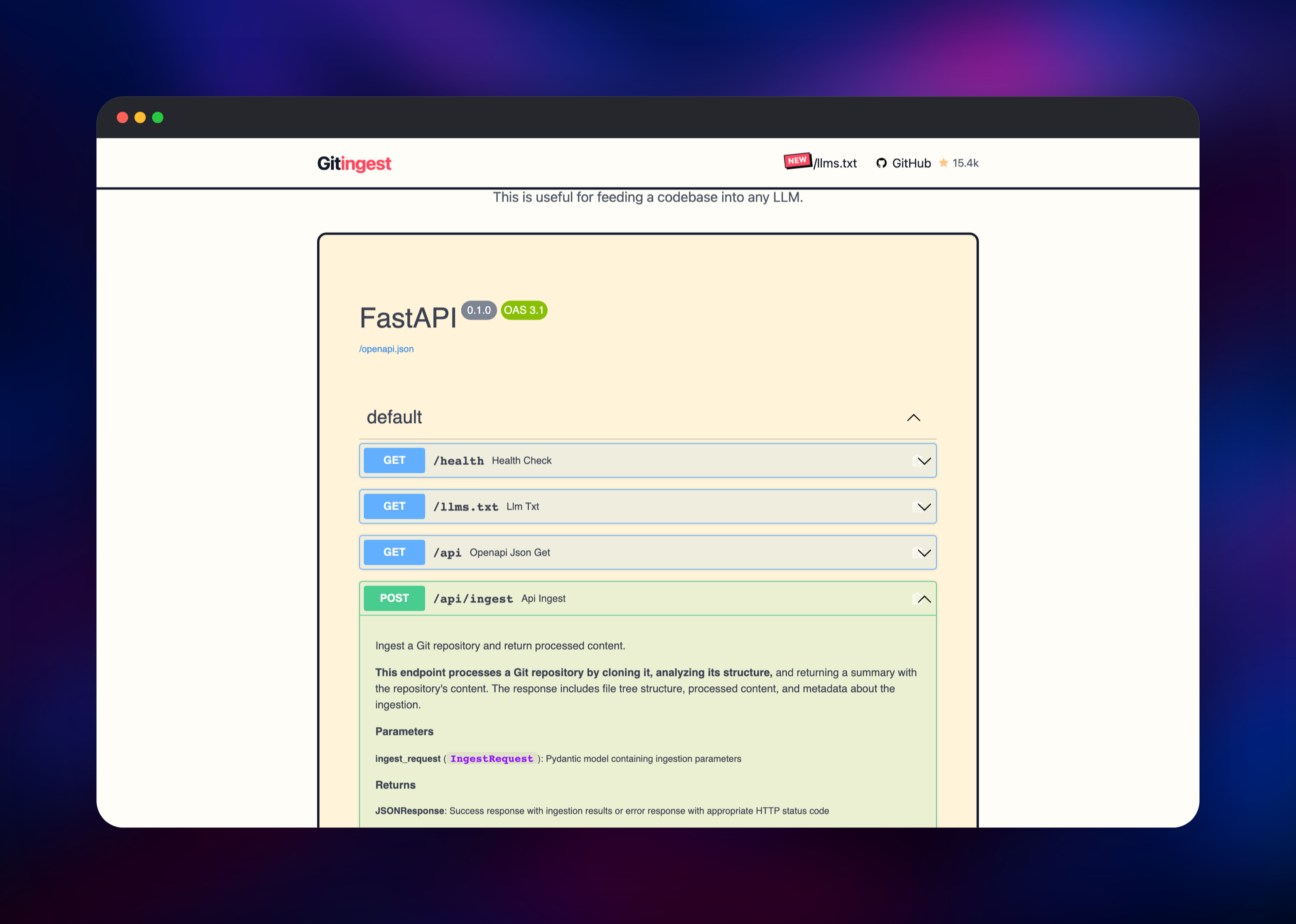
Yes — POST /api/ingest and GET /api/{user}/{repository} return JSON; the OpenAPI schema is at /api and an interactive reference at /docs.
Template Content


