
Deploy GitLab | Open Source GitHub Alternative on Railway
Self-host GitLab CE. Built-in CI/CD (DevOps), Git repos, and issue tracking
GitLab
Just deployed
/var/opt/gitlab
Deploy and Host GitLab on Railway
Deploy GitLab Community Edition on Railway to get a fully self-hosted DevOps platform with built-in Git repository management, CI/CD pipelines, issue tracking, and code review. Self-host GitLab on Railway with a single gitlab/gitlab-ce container that bundles PostgreSQL, Redis, Sidekiq, Puma, Gitaly, and Nginx — no external databases required.
This template pre-configures GitLab with memory-optimized settings for Railway's infrastructure, handles TLS termination via Railway's edge proxy, and persists all data (repositories, uploads, database) on a single Railway volume.
Getting Started with GitLab on Railway
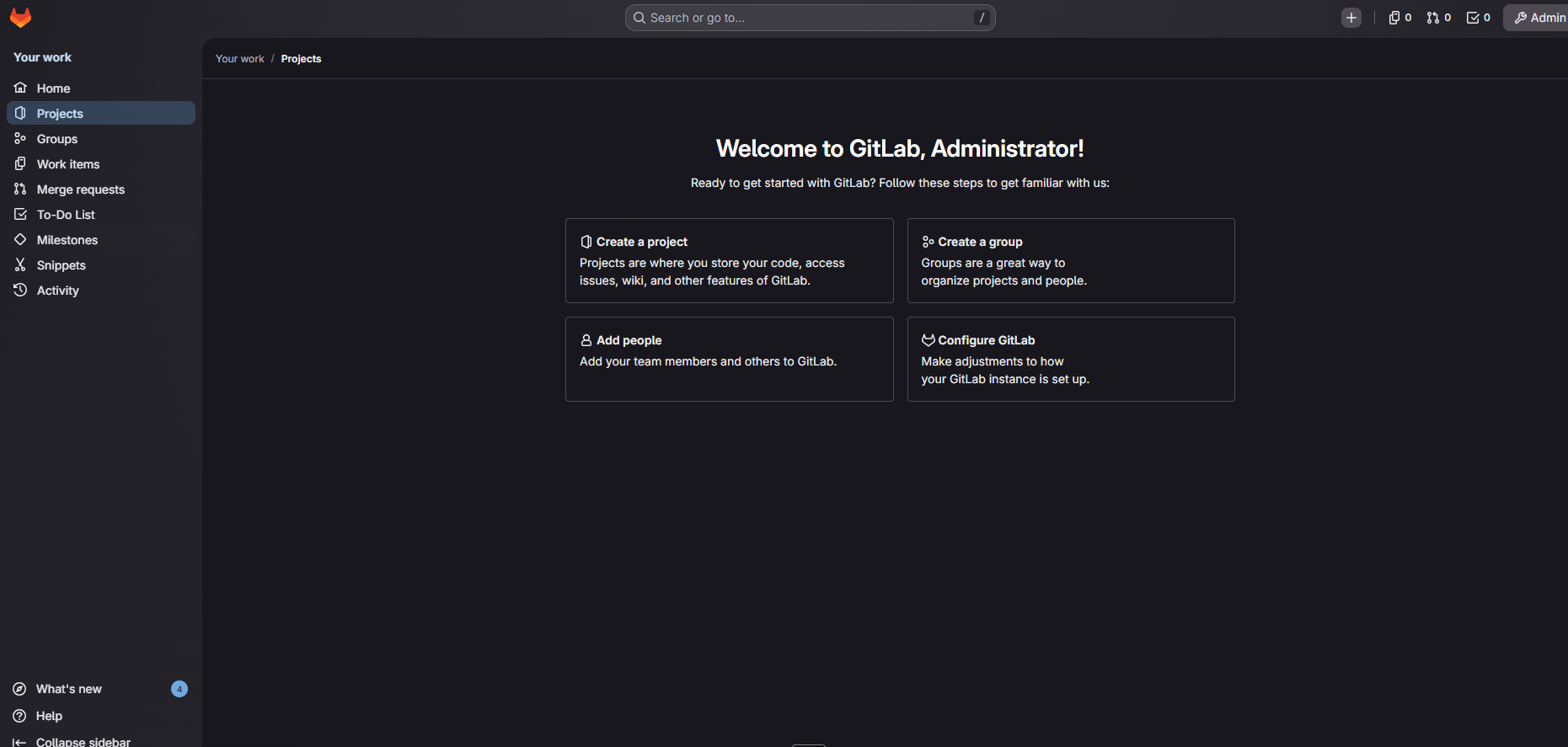
Once the deployment reaches SUCCESS status, navigate to your Railway-generated URL. The initial boot takes 5–10 minutes while GitLab runs its omnibus reconfigure and database migrations — this is normal.
Sign in with
- username
root - password set in your
GITLAB_ROOT_PASSWORD
environment variable. After first login, you'll be prompted to change the root password. Create your first project, push code via HTTPS, and configure your first .gitlab-ci.yml pipeline. Navigate to Admin Area (wrench icon) to configure user registration, email settings, and security policies.
About Hosting GitLab CE
GitLab Community Edition is an open-source, end-to-end DevOps platform that covers the entire software development lifecycle in a single application. Unlike GitHub, which requires assembling multiple third-party tools, GitLab integrates everything natively:
- Source Code Management — Git repositories with merge requests, code review, and branch protection
- CI/CD Pipelines — Auto DevOps detects language, builds containers, runs tests, and deploys automatically
- Issue Tracking & Boards — Kanban boards, epics, milestones, and time tracking
- Container Registry — Built-in Docker registry for storing and distributing images
- Security Scanning — SAST, DAST, dependency scanning, and secret detection
- Wiki & Snippets — Project documentation and code snippet sharing
The gitlab/gitlab-ce Docker image is an all-in-one container running PostgreSQL, Redis, Puma (web server), Sidekiq (background jobs), Gitaly (Git storage), and Nginx under the Omnibus package manager.
Why Deploy GitLab on Railway
Railway eliminates the infrastructure complexity of self-hosting GitLab:
- One-click deploy with persistent volume for all Git repositories and database data
- Automatic TLS/HTTPS via Railway's edge proxy — no certificate management
- Memory-optimized configuration reduces RAM usage by ~400MB vs defaults
- Scale up to 8GB RAM for larger teams without server migration
- No Docker Compose, no VM provisioning, no reverse proxy configuration
Common Use Cases for Self-Hosted GitLab
- Private code hosting — keep proprietary source code on infrastructure you control, meeting compliance requirements for regulated industries
- Unified DevOps pipeline — replace GitHub + Jenkins + Jira with a single platform for code, CI/CD, issues, and deployments
- Internal developer portal — host documentation wikis, code snippets, and project templates for engineering teams
- Air-gapped development — run GitLab in environments without external internet access for sensitive projects
Dependencies for Self-Hosted GitLab on Railway
The template deploys a single service:
- GitLab CE —
gitlab/gitlab-ce:latest(all-in-one: web server, database, cache, background workers, Git storage)
Environment Variables Reference for GitLab on Railway
| Variable | Description | Example |
|---|---|---|
GITLAB_OMNIBUS_CONFIG | Ruby configuration block for all GitLab settings | external_url 'https://...' |
GITLAB_ROOT_PASSWORD | Initial admin password (bootstrap-only) | Generated hex string |
PORT | HTTP listening port | 80 |
RAILWAY_RUN_UID | Run container as root for volume permissions | 0 |
Deployment Dependencies
- Runtime: Ruby, Go, Node.js (all bundled in the Omnibus image)
- Docker Hub: gitlab/gitlab-ce
- GitHub: gitlabhq/gitlabhq
- Docs: docs.gitlab.com/install/docker
Hardware Requirements for Self-Hosting GitLab
| Resource | Minimum | Recommended |
|---|---|---|
| CPU | 2 cores | 4 cores |
| RAM | 4 GB | 8 GB |
| Storage | 10 GB | 50 GB+ |
| Runtime | Docker 20+ | Docker 24+ |
GitLab's memory footprint depends on active users and CI/CD workload. The Railway template disables Prometheus monitoring and reduces Puma/Sidekiq concurrency to fit within 8 GB comfortably for teams up to 20 users.
Self-Hosting GitLab with Docker
Run GitLab CE locally with Docker:
docker run -d \
  --name gitlab \
  --hostname gitlab.example.com \
  -p 443:443 -p 80:80 -p 22:22 \
  --shm-size 256m \
  -v gitlab_config:/etc/gitlab \
  -v gitlab_logs:/var/log/gitlab \
  -v gitlab_data:/var/opt/gitlab \
  -e GITLAB_OMNIBUS_CONFIG="external_url 'https://gitlab.example.com'" \
  gitlab/gitlab-ce:latest
Or with Docker Compose:
services:
  gitlab:
    image: gitlab/gitlab-ce:latest
    hostname: gitlab.example.com
    environment:
      GITLAB_OMNIBUS_CONFIG: |
        external_url 'https://gitlab.example.com'
        puma['worker_processes'] = 2
        sidekiq['concurrency'] = 10
    ports:
      - "80:80"
      - "443:443"
      - "22:22"
    volumes:
      - gitlab_config:/etc/gitlab
      - gitlab_logs:/var/log/gitlab
      - gitlab_data:/var/opt/gitlab
    shm_size: 256m
volumes:
  gitlab_config:
  gitlab_logs:
  gitlab_data:
How Much Does GitLab Cost to Self-Host?
GitLab Community Edition is 100% free and open-source under the MIT License. There are no licensing fees, user limits, or feature restrictions on the CE edition. GitLab also offers Premium ($29/user/month) and Ultimate ($99/user/month) tiers with advanced security, compliance, and support features — but CE covers Git hosting, CI/CD, issue tracking, and code review without cost.
On Railway, you pay only for infrastructure: compute time and storage. A typical small-team GitLab instance uses ~4–8 GB RAM and 10–50 GB storage.
GitLab vs GitHub for Self-Hosting
| Feature | GitLab CE | GitHub Enterprise Server |
|---|---|---|
| Self-host cost | Free (MIT License) | $21/user/month |
| Built-in CI/CD | Yes (native pipelines) | GitHub Actions |
| Container Registry | Included | Included |
| Issue Tracking | Yes (boards, epics, milestones) | Yes (projects, milestones) |
| Security Scanning | SAST, DAST, dependency scanning | Dependabot, code scanning |
| Auto DevOps | Yes | No |
| Kubernetes Integration | Native agent | Third-party required |
GitLab CE is the strongest option for teams that want a free, self-hosted, all-in-one DevOps platform without assembling multiple tools.
FAQ
What is GitLab and why should you self-host it? GitLab is an open-source DevOps platform that provides Git repository management, CI/CD, issue tracking, and security scanning in a single application. Self-hosting gives you full control over your source code, compliance with data residency requirements, and eliminates per-user licensing costs.
What does this Railway template deploy for GitLab?
This template deploys a single gitlab/gitlab-ce:latest container that bundles PostgreSQL, Redis, Puma, Sidekiq, Gitaly, and Nginx. It includes memory-optimized configuration, TLS termination via Railway's proxy, and a persistent volume for all data.
Why does GitLab on Railway need 8GB of memory? GitLab runs multiple internal services (web server, database, cache, background workers, Git storage) in a single container. The template disables monitoring services and reduces worker counts to fit within 8 GB, but GitLab's initial database migration during first boot is the most memory-intensive phase.
Can I use SSH for Git operations on Railway-hosted GitLab? No. Railway does not support inbound SSH connections. All Git operations (clone, push, pull) must use HTTPS URLs. Configure Git credentials or personal access tokens for authentication.
How do I enable email notifications in self-hosted GitLab on Railway?
Add SMTP configuration to GITLAB_OMNIBUS_CONFIG: set gitlab_rails['smtp_enable'] = true, configure smtp_address, smtp_port, smtp_user_name, smtp_password, and smtp_domain. Services like SendGrid, Mailgun, or AWS SES work well.
How do I back up GitLab data on Railway?
GitLab data persists on the Railway volume at /var/opt/gitlab. Use GitLab's built-in backup tool via the web terminal: gitlab-backup create. For automated backups, configure gitlab_rails['backup_upload_connection'] in your OMNIBUS_CONFIG to push backups to S3-compatible storage.
Can I run GitLab CI/CD runners on Railway? The GitLab instance itself runs on Railway, but CI/CD runners need Docker-in-Docker or shell execution, which Railway containers don't support. Register external runners (on a VPS or cloud VM) that connect back to your Railway-hosted GitLab instance.
Template Content
GitLab
gitlab/gitlab-ce:latestGITLAB_ROOT_PASSWORD
Create root password. Note: default username to login is 'root'


