
Deploy Healthchecks
Cron Job Monitoring Service
Healthchecks
Just deployed

Just deployed
/var/lib/postgresql/data
Deploy and Host Healthchecks on Railway
Healthchecks is a self-hosted cron job monitoring service. It listens for HTTP requests (pings) from your scheduled tasks and sends alerts when they don't arrive on time.
Use Healthchecks to:
- Monitor background jobs and cron tasks
- Get instant alerts when tasks fail or miss their schedule
- Track job performance and execution time
- Receive notifications via email, Slack, Discord, PagerDuty, and 20+ other integrations
Don't use Healthchecks to monitor uptime of websites or services. It's specifically designed for monitoring scheduled tasks.
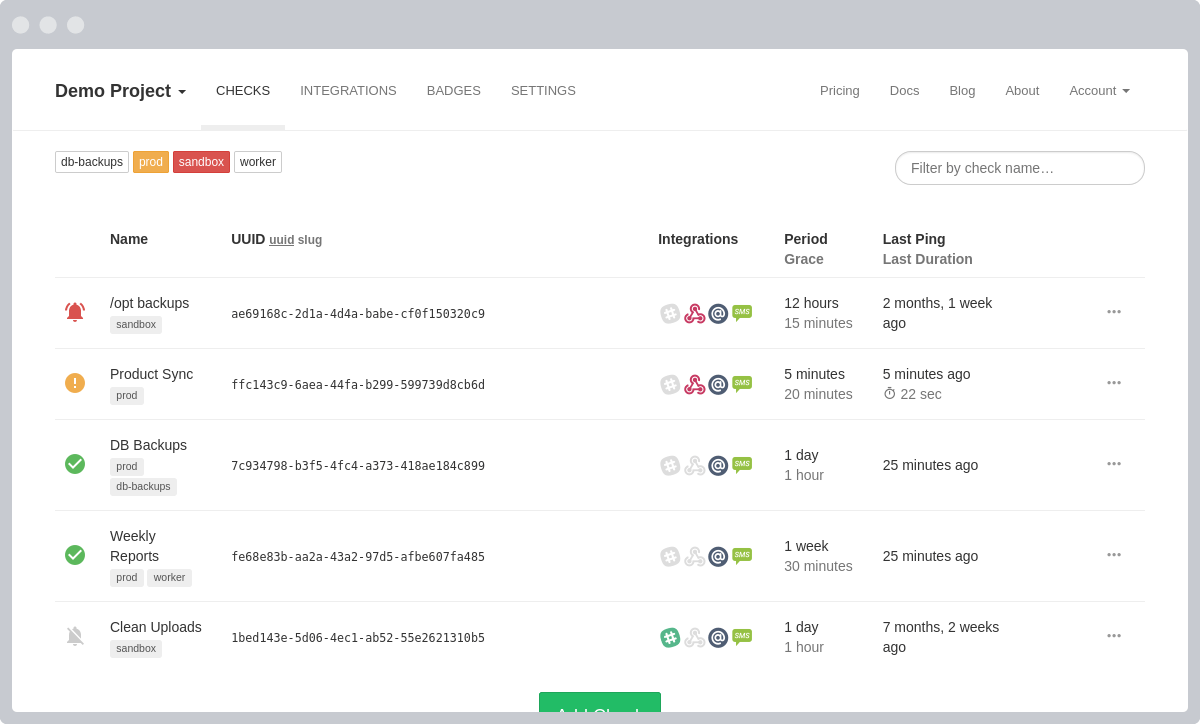


About Hosting Healthchecks
- Healthchecks Web Application - The main interface and API for managing checks
- PostgreSQL Database - Persistent data storage with automatic backups
- Background Workers - Automated alert delivery and report generation
- Health Monitoring - Automatic health checks to ensure the system is running smoothly
This Railway template comes with Apprise enabled, giving you access to 25+ notification services including:
- Slack - Real-time notifications in Slack channels
- Discord - Alerts in Discord servers
- Microsoft Teams - Team notifications
- Telegram - Bot notifications
- PagerDuty - Incident management integration
- Opsgenie - Alert routing
- Twilio - SMS alerts
- Signal - Signal messages
- And 15+ more services...
Common Use Cases
Use Healthchecks to:
- Monitor background jobs and cron tasks
- Get instant alerts when tasks fail or miss their schedule
- Track job performance and execution time
- Receive notifications via email, Slack, Discord, PagerDuty, and 20+ other integrations
Don't use Healthchecks to monitor uptime of websites or services. It's specifically designed for monitoring scheduled tasks.
Dependencies for Healthchecks Hosting
-
Railway Account: You'll need a Railway account to deploy this template. A PRO or Enterprise plan is recommended for SMTP support. A Free or Hobby plan can be used but SMTP will not work. You still can use other notification methods (Slack, Discord, etc.). If you don't have an account, sign up at railway.com.
-
Email Sender Provider: An email provider is necessary for the complete setup. We recommend Resend, and all default values are provided for it in this template—however, you must provide your own API KEY.
-
(Optional) Other SMTP Providers: While we recommend Resend, any SMTP-compatible provider is supported (e.g., SendGrid, Mailgun, Gmail). Note that using a different provider will require changing more environment variables during deployment.
-
Valid User Email: You must provide a valid email address during deployment. This will be used for your first login and to receive system notifications.
-
Admin Password: You must set a password for your admin account during the deployment process.
Deployment Dependencies
Read official documentation to learn how to create checks, set up notifications, monitor your cron jobs effectively and troubleshoot common issues.
Visit Healthchecks Documentation.
Official Github Repository: https://github.com/healthchecks/healthchecks
Implementation Details
Default Configuration (Resend - Minimal Setup)
This template comes pre-configured with Resend as the email provider. For the default setup, you only need to provide:
- Valid User Email - Your email address for login and notifications
- Admin Password - Your admin account password
Optional:
- Resend API Key - Sign up at Resend.com, get your API key from the dashboard, and provide it as
EMAIL_HOST_PASSWORD
That's it! All other SMTP settings are pre-configured for Resend:
EMAIL_HOST=smtp.resend.comEMAIL_PORT=587EMAIL_HOST_USER=resendEMAIL_USE_TLS=TrueEMAIL_USE_SSL=False
Using Alternative Email Providers
If you prefer to use another provider like SendGrid, Mailgun, or Gmail, you will need to configure additional environment variables during deployment or in the Railway variables dashboard:
EMAIL_HOST- Your provider's SMTP hostEMAIL_PORT- Your provider's SMTP port (typically 587 or 465)EMAIL_HOST_USER- Your provider's username or emailEMAIL_HOST_PASSWORD- Your provider's password or API keyEMAIL_USE_TLS/EMAIL_USE_SSL- Security settings (depends on provider)
Note for Gmail: Requires an App Password instead of your regular password. Enable 2-Factor Authentication first.
Why Deploy Healthchecks on Railway?
Railway is a singular platform to deploy your infrastructure stack. Railway will host your infrastructure so you don't have to deal with configuration, while allowing you to vertically and horizontally scale it.
By deploying Healthchecks on Railway, you are one step closer to supporting a complete full-stack application with minimal burden. Host your servers, databases, AI agents, and more on Railway.
Template Content
Healthchecks
Experto-AI/railway-healthchecksSUPERUSER_EMAIL
Super User email for LOGIN and EMAIL reception (e.g. admin@mydomain.com)
SUPERUSER_PASSWORD
Super User password for LOGIN (e.g. P4$$word)