
Deploy Immich
Google Photos alternative. Self-hosted photo and video library

Redis
Just deployed
/data
immich-machine-learning
Just deployed
/cache
immich-server
Just deployed
/data

immich-postgres
Just deployed
/var/lib/postgresql/data

Deploy and Host Immich on Railway
Immich is a high-performance, self-hosted photo and video library — an open-source alternative to Google Photos that keeps your camera roll on infrastructure you control. You get automatic phone backup through native iOS and Android apps, a timeline, albums, shared links, face grouping, a map of geotagged shots, and natural-language search that finds "sunset over the harbour" without you tagging anything.
Self-host Immich on Railway and you get the production topology upstream recommends, already wired together. Four services are provisioned: the Immich server, serving the web app, the mobile API and the background job workers; a machine learning service running CLIP, face-detection and OCR models; PostgreSQL 14 with the VectorChord extension, holding metadata and the vector embeddings behind semantic search; and Redis, carrying the job queues that move an upload through metadata extraction, thumbnailing, transcoding and indexing. Only the server is exposed publicly. Media lands on a persistent volume attached to the server, and the models cache on a volume of their own.
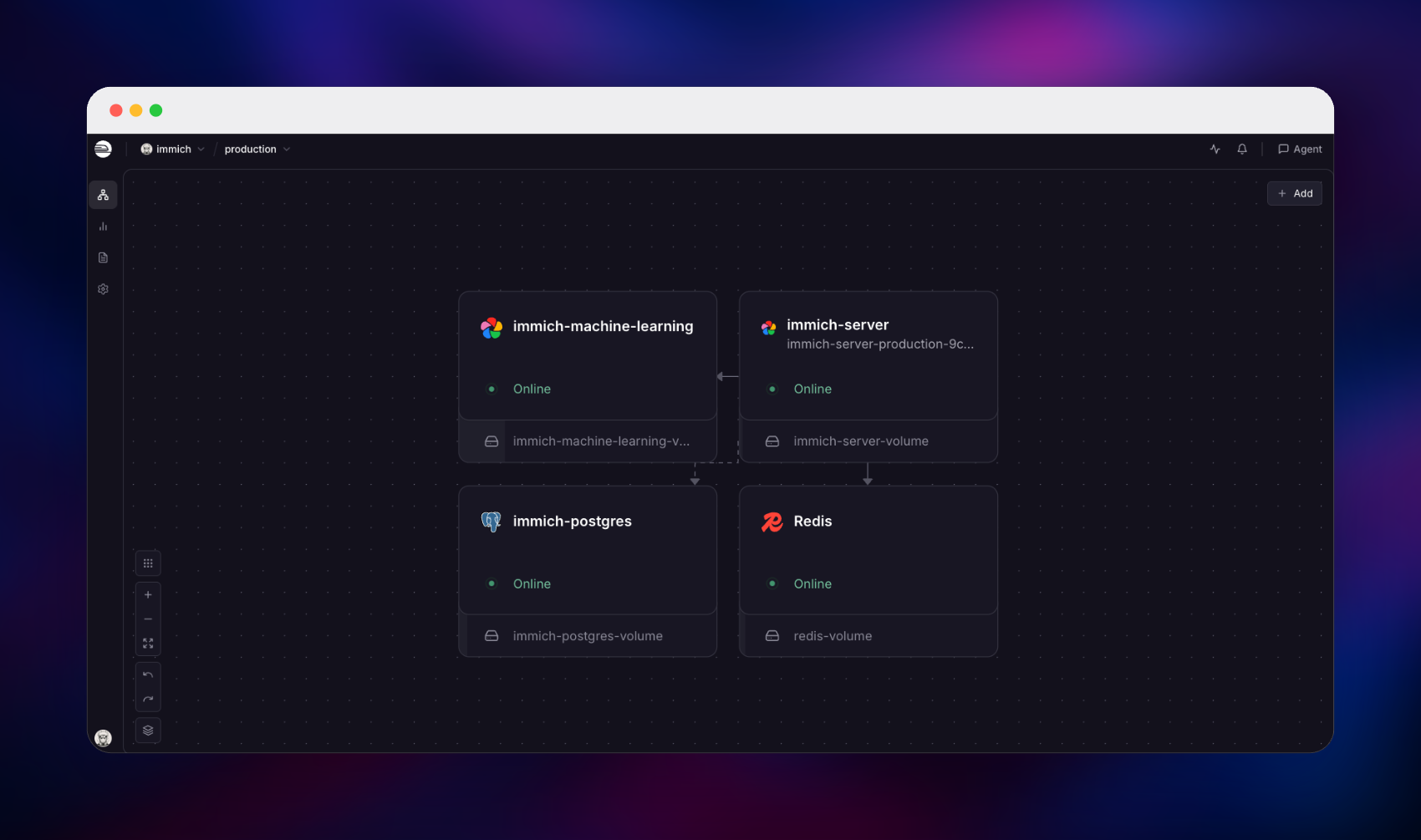
Getting Started with Immich on Railway
When the deploy finishes, open the public URL and you will see a Welcome to Immich screen. There are no default credentials: click Getting Started, and the first account you create becomes the administrator, after which that route closes automatically and further users are invited from the admin panel. A short wizard then covers theme, language and the optional external services.
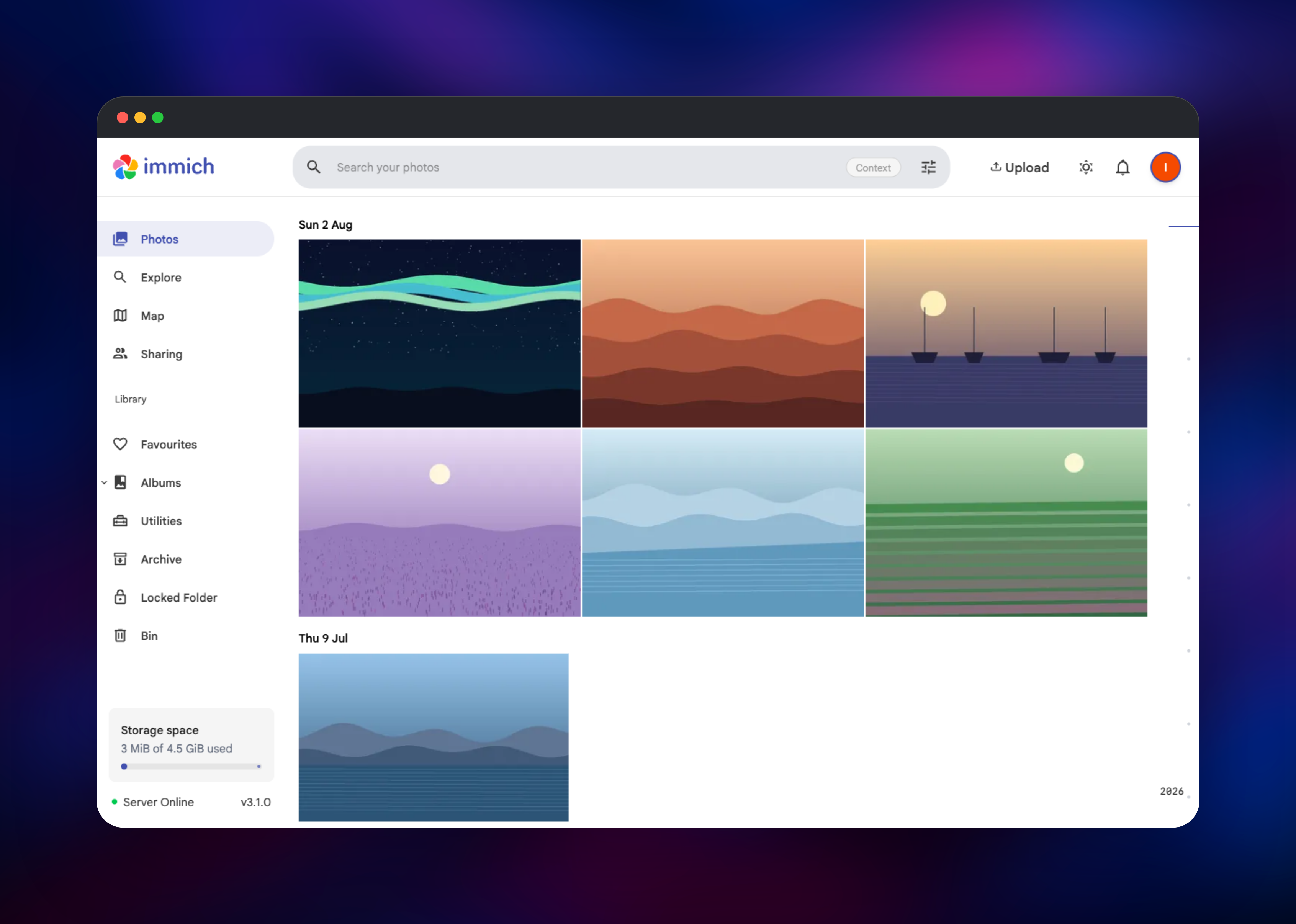
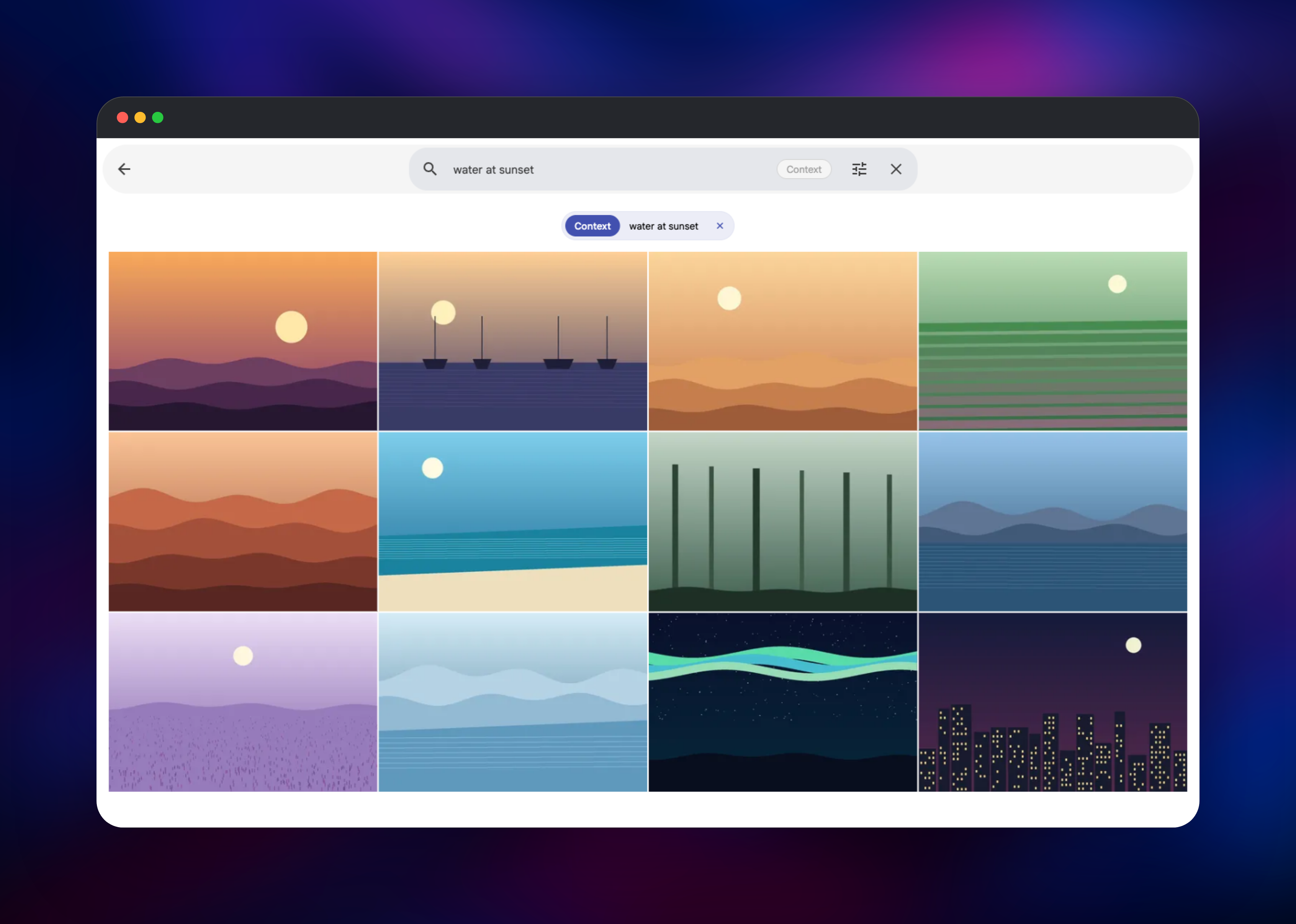
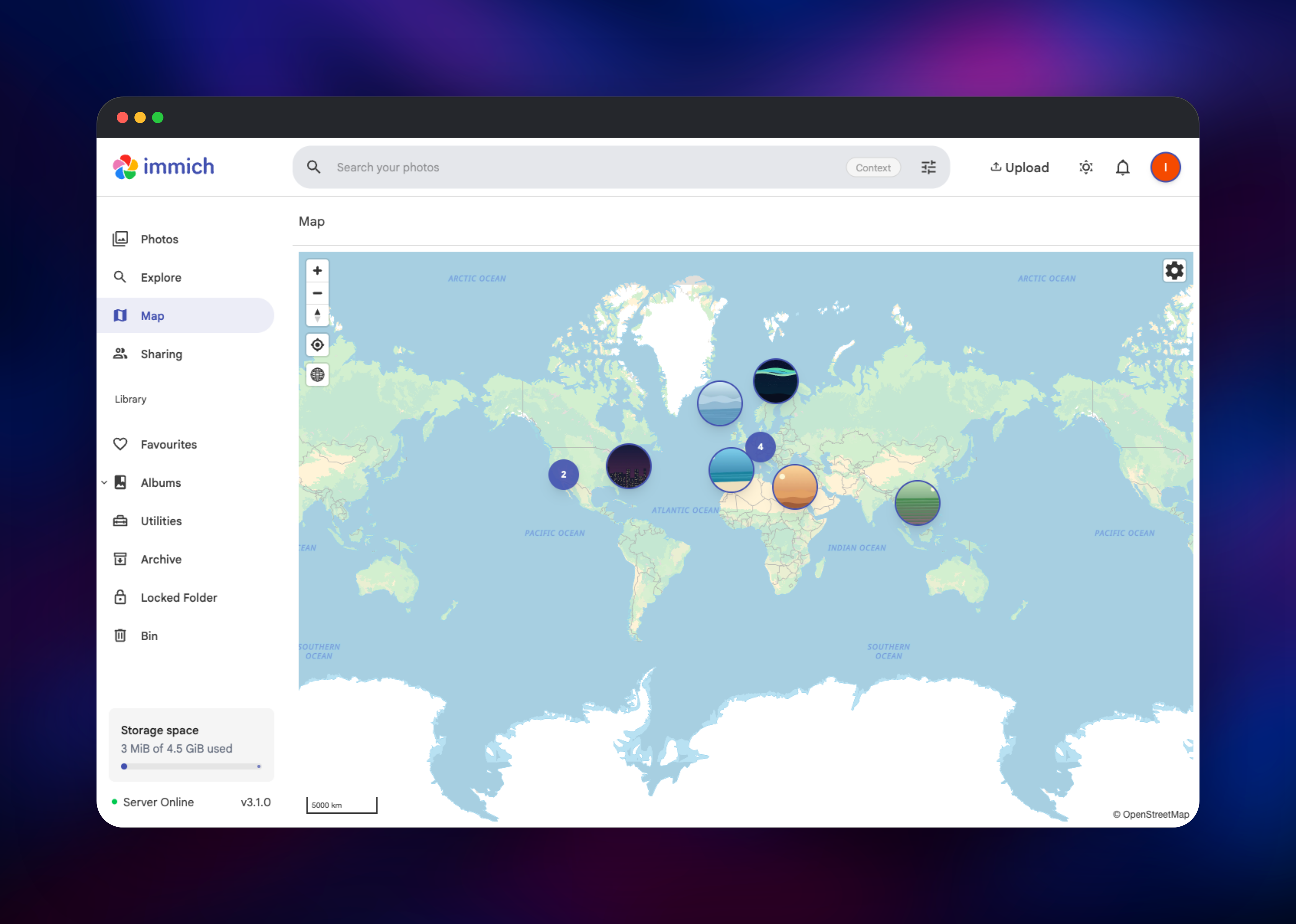
You will land on the Photos timeline, empty on a fresh install. Click Upload, select some images, and watch them appear as the server extracts EXIF data, generates thumbnails, resolves GPS coordinates to place names and queues each asset for machine learning. To confirm everything works end to end, type a plain description of one of your photos into the search bar — something like water at sunset — and press Enter. If the right images come back, the server, the machine learning service, Redis and the vector index in PostgreSQL are all talking to each other. Open Map to see geotagged shots plotted worldwide, and Administration → Job Queues to watch the workers. Then install the mobile app, point it at your public URL, and enable backup.
About Hosting Immich
Phone cameras produce more data every year than any free cloud tier will hold. Self-hosting Immich puts the originals on storage you own, at original quality, with no per-gigabyte pricing.
Key features:
- Automatic background backup from iOS and Android, including motion photos
- Natural-language smart search powered by CLIP, plus OCR search inside images
- Face detection and grouping, so people can be named and browsed
- Albums, shared albums and public links with optional passwords and expiry
- A map view built from photo GPS metadata, with reverse-geocoded place names
- Multi-user accounts with storage quotas, plus read-only external libraries
The server answers every web and mobile request and runs the workers that process uploads. The machine learning container is separate so model loading never blocks the API. PostgreSQL stores all metadata and, thanks to VectorChord, the search embeddings themselves — search is a database query, not a separate search engine. Redis holds the job queues, so a large import processes steadily in the background instead of timing out a request.
Why Deploy Immich on Railway
Railway removes the administration that usually comes with a photo library this size.
- Private networking links server, database, queue and inference with no exposed ports
- Persistent volumes keep originals and cached models across restarts and redeploys
- Managed Redis and a VectorChord-enabled Postgres, with no extension installation
- TLS and a public domain provisioned automatically for the mobile apps
- Health checks and restart policies already configured on every service
Common Use Cases
- Replacing a Google Photos or iCloud subscription with a family library that has no storage tier and no monthly fee
- Giving a household one shared archive, with an account and storage quota per person
- Archiving a photographer's originals at full quality while still browsing them in a fast, searchable timeline
- Indexing scanned family photos as an external library, then using face grouping to identify people
Dependencies for Immich
ghcr.io/immich-app/immich-server:v3— web app, mobile API and background job workersghcr.io/immich-app/immich-machine-learning:v3— CLIP, face recognition and OCR inferenceghcr.io/immich-app/postgres:14-vectorchord0.4.3-pgvectors0.2.0— PostgreSQL 14 with VectorChord, pgvecto.rs and pgvector- Redis — background job queues
Both Immich images must run the same major version, which is why they are pinned to v3. The database image is pinned exactly: Immich checks the VectorChord version on every boot and refuses to start if it is incompatible, so a stock PostgreSQL image will not work.
Environment Variables Reference
| Variable | Purpose |
|---|---|
DB_HOSTNAME | Private hostname of the Postgres service |
DB_USERNAME / DB_PASSWORD / DB_DATABASE_NAME | Database credentials |
REDIS_HOSTNAME / REDIS_PORT / REDIS_PASSWORD | Redis connection used for the job queues |
IMMICH_MACHINE_LEARNING_URL | Private URL of the inference service |
IMMICH_PORT / PORT | Port the server listens on (2283) |
IMMICH_TRUSTED_PROXIES | Proxy ranges to trust, so HTTPS is detected |
MACHINE_LEARNING_REQUEST_THREADS | Inference thread pool size |
Deployment Dependencies
- Source repository: https://github.com/immich-app/immich
- Official documentation: https://docs.immich.app
Hardware Requirements for Self-Hosting Immich
| Resource | Minimum | Recommended |
|---|---|---|
| CPU | 2 cores | 4+ cores |
| RAM | 6 GB across all services | 8 GB or more |
| Storage | Library size plus 10–20% | Grow the volume as the library grows |
| Database | PostgreSQL 14–19 with VectorChord | Provided by the template |
| Runtime | Linux container | Provided by Railway |
Immich's guidance is 6 GB of RAM minimum, mostly for the machine learning container. Storage matters most: thumbnails and transcoded video add 10–20% on top of the originals, so size the volume with headroom and grow it before it fills.
Self-Hosting Immich
On Railway, deploying this template is the whole process. To run the same stack on your own machine, Immich publishes a compose file and an environment template. The following shell commands fetch both:
wget -O docker-compose.yml https://github.com/immich-app/immich/releases/latest/download/docker-compose.yml
wget -O .env https://github.com/immich-app/immich/releases/latest/download/example.env
Edit .env to set UPLOAD_LOCATION to the folder holding your originals, DB_DATA_LOCATION to a local SSD path, and DB_PASSWORD to something random. Then start the stack:
docker compose up -d
Immich is then available on port 2283, running the same four components as the Railway deployment.
How Much Does Immich Cost to Self-Host?
Immich is free and open source under the AGPL-3.0 licence, and the project has committed that all features stay free with nothing behind a paywall. An optional purchase at buy.immich.app supports the engineers building it but unlocks nothing. On Railway you pay only for the compute and storage the four services use, so cost is driven mainly by how large your library grows.
FAQ
What is Immich?
Immich is a self-hosted photo and video management application. It backs up your phone's camera roll automatically, then gives you a searchable timeline, albums, face grouping and a map — the features people expect from Google Photos, on your own infrastructure.
What does this Railway template deploy?
Four services: the Immich server, a machine learning service for search and face recognition, a PostgreSQL database with the VectorChord extension, and Redis for job queues. The server gets a public domain and a volume for your media; everything else stays private.
Why does Immich need PostgreSQL and Redis?
PostgreSQL stores photo metadata and the vector embeddings behind natural-language search, which is why the specialised database image is required. Redis carries the job queues, so uploading a thousand photos processes in the background rather than blocking the app.
How do I connect the Immich mobile app to my self-hosted server?
Install Immich from the App Store or Google Play, choose to enter a server URL, and paste the public URL of the deployed server. Sign in with the admin account you created, then turn on backup and pick which albums to sync.
Can I use a regular PostgreSQL database with Immich?
Not without preparation. Immich requires the VectorChord extension and verifies its version at startup, refusing to boot if it is missing or incompatible. This template ships the database image maintained by the Immich project, which already has it configured.
Template Content
Redis
redis:8.2immich-machine-learning
ghcr.io/immich-app/immich-machine-learning:v3immich-server
ghcr.io/immich-app/immich-server:v3
