Deploy Inngest
Durable execution, queues, crons, retries, step functions, webhooks
inngest
Just deployed

gateway
Just deployed

Redis
Just deployed
/data

Just deployed
/var/lib/postgresql/data
Deploy and Host Inngest on Railway
Inngest is a durable execution engine for background jobs, queues and multi-step workflows. You write ordinary functions in your own codebase, wrap the risky parts in step.run(), and Inngest does the rest: every step is checkpointed, failed steps retry with backoff, step.sleep() can pause a workflow for a month, and step.waitForEvent() blocks until a real user acts. Teams reach for it when cron jobs and a Redis queue stop being enough: AI pipelines calling flaky model APIs, billing flows that must not double-charge, onboarding spanning days. Your functions stay in your app and Inngest calls them over HTTP, so there is no worker fleet to build.
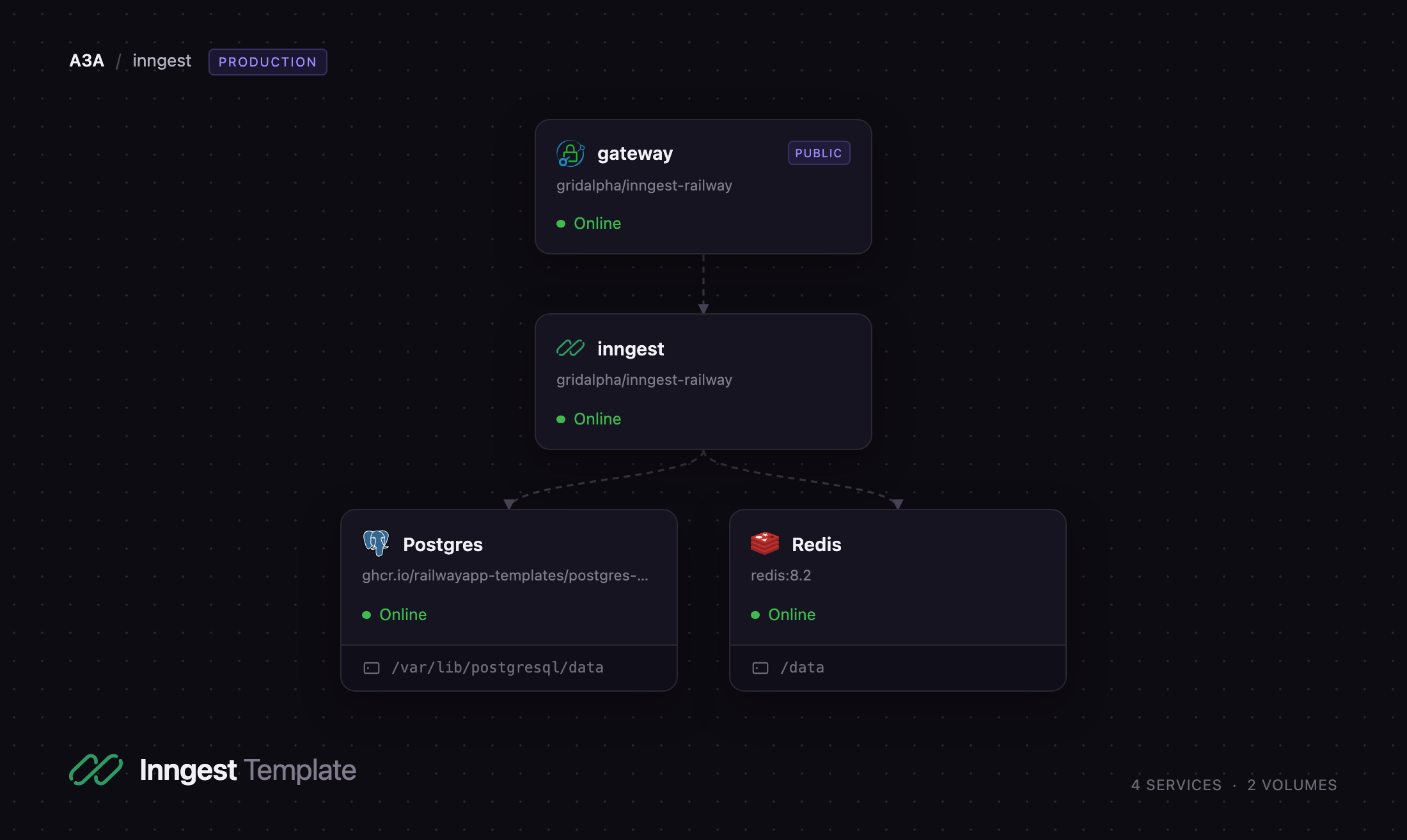
Self-host Inngest on Railway and you own the event history and queue rather than renting them. This template runs four services: the Inngest server, a Caddy gateway that is the only public entry point, PostgreSQL for configuration and run history, and Redis backing the queue, run state and realtime streams. The gateway matters more than it sounds — the self-hosted server ships no authentication for its dashboard, GraphQL API, profiling handlers or metrics endpoint, so this template puts HTTP basic auth in front of all of them while letting SDK traffic reach the key checks Inngest already enforces.
Getting Started with Inngest on Railway
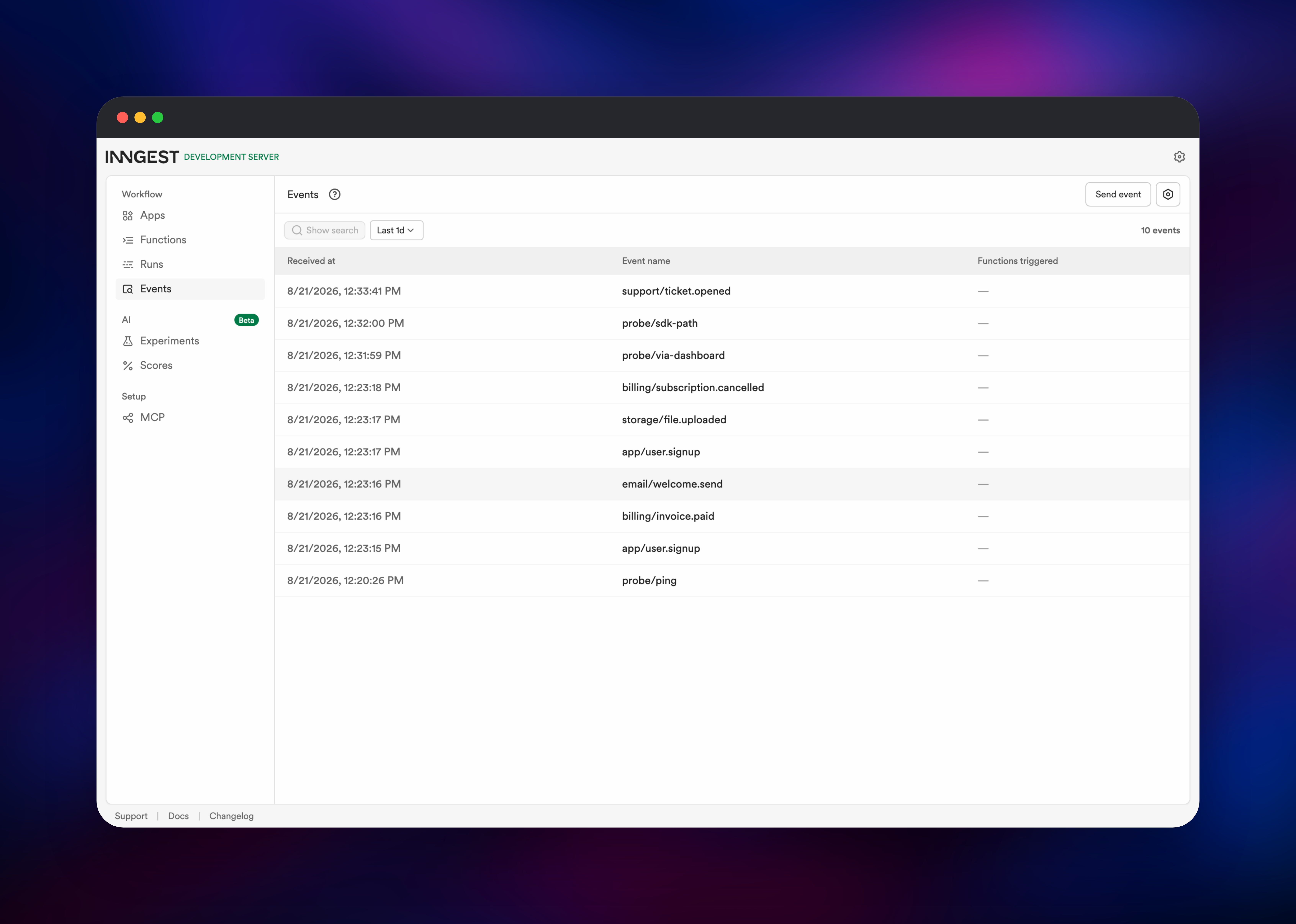
Set a DASHBOARD_PASSWORD when you deploy — it is the only value you must supply. Open the generated URL, sign in as admin, and the dashboard loads: Apps, Functions, Runs and Events.
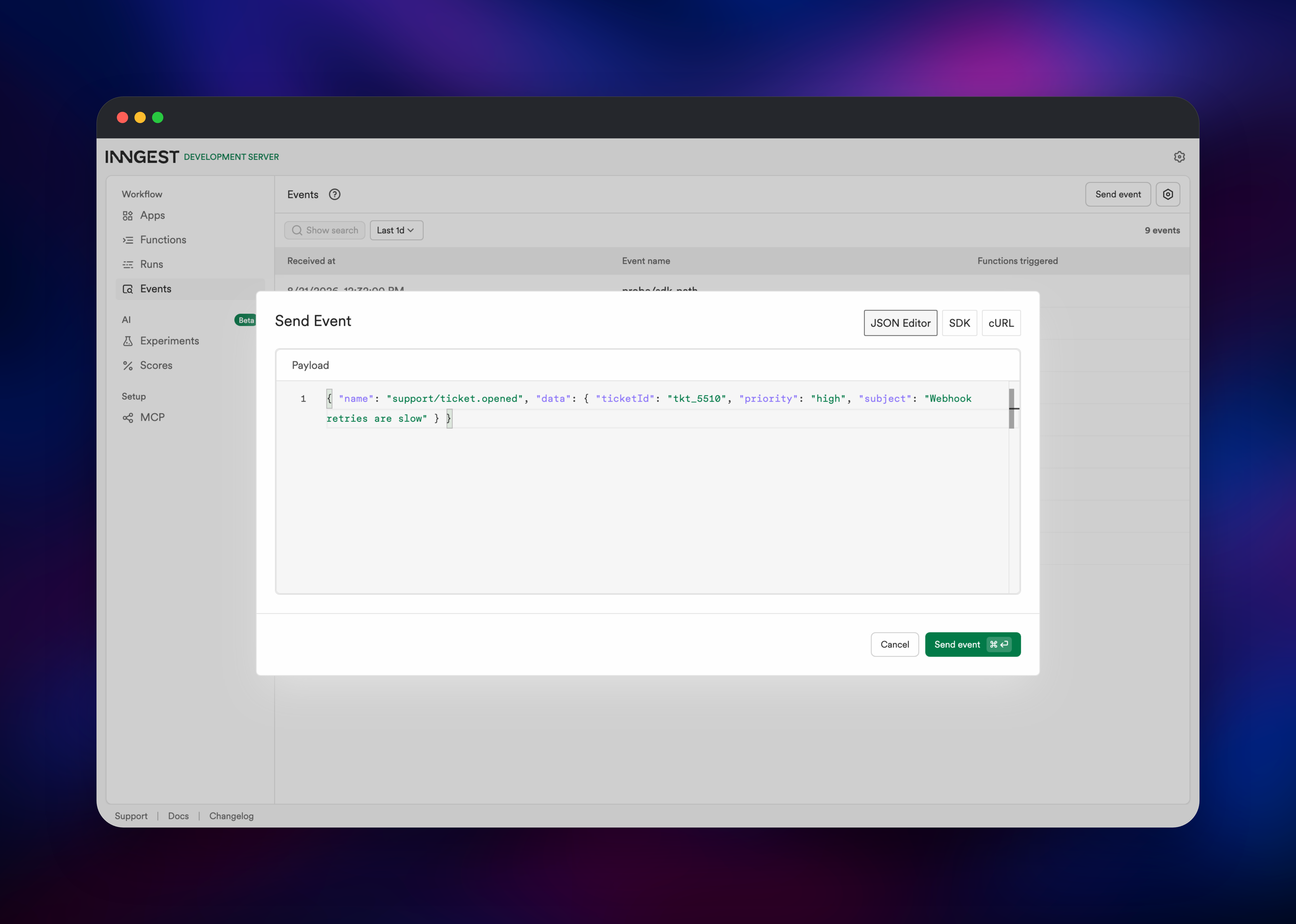
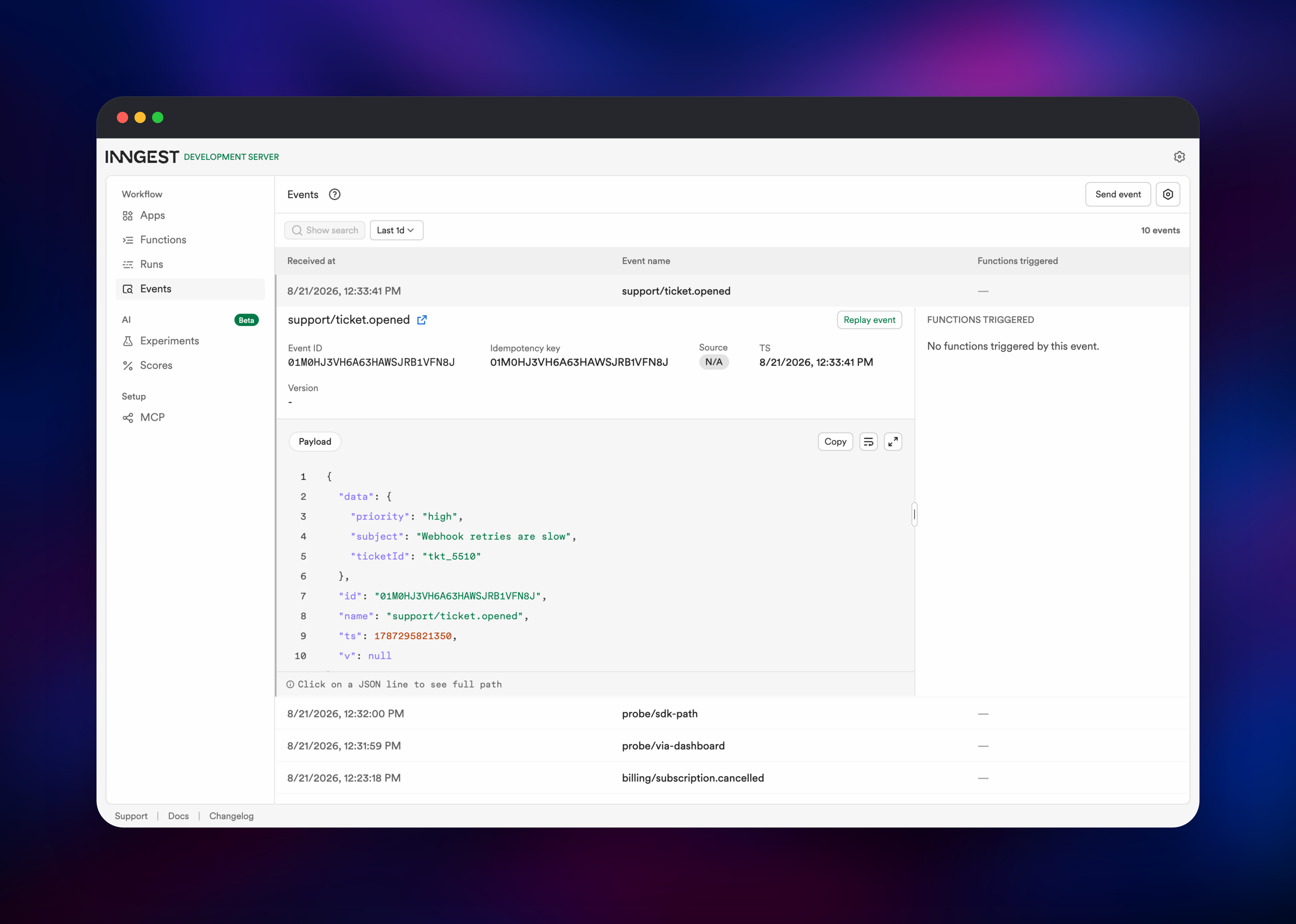
Prove it works before wiring up code. Open Events, click Send event, and paste a payload such as {"name": "app/user.signup", "data": {"userId": "usr_1"}}. It appears in the stream at once; click the row for its ID, payload and a Replay event button. Then connect your app: set INNGEST_EVENT_KEY, INNGEST_SIGNING_KEY and INNGEST_BASE_URL in it, deploy it with an Inngest serve() handler at /api/inngest, and open Apps → Sync new app with that endpoint's URL. Inngest registers every function it finds, and each matching event then produces a run you can follow under Runs.
About Hosting Inngest
Inngest replaces a queue, a workflow state store and a scheduler with one server that calls your existing HTTP endpoints. Self-hosting makes sense when event payloads carry customer data you would rather not send to a vendor, or when you want run history in a database you control.
Key features:
- Durable steps — each
step.run()result is persisted, so a crash resumes from the last completed step - Flow control — concurrency, throttling, rate limiting, debounce and priority, declared per function
- Event-driven triggers — fan-out from one event, plus
waitForEventfor human-in-the-loop pauses - Cron schedules — recurring functions defined in code, no separate scheduler
- Full run history — every step, input, output and retry in the dashboard, with replay
Inngest runs the event API, executor and dashboard, and holds no public domain of its own. Caddy takes public traffic and decides per path whether a request needs the dashboard password or already carries an Inngest key. PostgreSQL stores apps, functions, events and run history, migrating itself on boot. Redis carries the queue, in-flight state and realtime subscriptions.
Why Deploy Inngest on Railway
Railway removes the operational work this stack would otherwise need:
- Postgres and Redis provisioned and wired over private networking
- TLS and a public domain issued automatically
- One password to set; every key generated for you
- Health checks and restart policies already configured
Common Use Cases
- AI and LLM pipelines — chain model calls with per-step retries, so one timeout does not restart an expensive job
- Billing workflows — Stripe webhooks fanned out to idempotent steps that survive redeploys
- User lifecycle automation — onboarding and win-back sequences that sleep for days between steps
- Scheduled data work — nightly syncs and reports as cron functions with run history
Dependencies for Inngest
inngest/inngest:latest— the server, from github.com/inngest/inngestcaddy:2-alpine— the authenticating reverse proxy- Railway PostgreSQL — configuration and run history
- Railway Redis — queue, run state and realtime pub/sub
Both built services come from github.com/gridalpha/inngest-railway, which adds a boot script to each image.
Environment Variables Reference
| Variable | Service | Purpose |
|---|---|---|
DASHBOARD_PASSWORD | gateway | Dashboard password; hashed at boot |
DASHBOARD_USERNAME | gateway | Dashboard username, defaults to admin |
INNGEST_SIGNING_KEY | inngest | Signs server-to-app traffic; must match your SDK |
INNGEST_EVENT_KEY | inngest | Key in the /e/{key} event URL |
INNGEST_POSTGRES_URI | inngest | PostgreSQL connection string |
INNGEST_REDIS_URI | inngest | Redis connection string |
INNGEST_QUEUE_WORKERS | inngest | Concurrent step executors, default 100 |
Any inngest start flag works as a variable: uppercase it, swap hyphens for underscores, prefix INNGEST_.
Deployment Dependencies
Hardware Requirements for Self-Hosting Inngest
| Resource | Minimum | Recommended |
|---|---|---|
| CPU | 1 vCPU | 2 vCPU |
| RAM | 1 GB | 2 GB |
| Storage | Database only | 10 GB+ as history grows |
| Runtime | Docker | Docker |
The server is a single Go binary and stays light. Postgres growth is what to watch: every event and step is a row.
Self-Hosting Inngest
The server needs a signing key, an event key and both datastores. This runs it under Docker:
docker run -p 8288:8288 -p 8289:8289 \
  -e INNGEST_HOST=0.0.0.0 \
  -e INNGEST_SIGNING_KEY=$(openssl rand -hex 32) \
  -e INNGEST_EVENT_KEY=$(openssl rand -hex 16) \
  -e INNGEST_POSTGRES_URI=postgres://user:pass@postgres:5432/inngest \
  -e INNGEST_REDIS_URI=redis://redis:6379 \
  inngest/inngest:latest inngest start
Two details bite on first run: the signing key must be hex with an even number of characters, and the server binds localhost unless you set INNGEST_HOST=0.0.0.0. Point your application at it with these variables:
INNGEST_BASE_URL=https://your-inngest-url
INNGEST_EVENT_KEY=your-event-key
INNGEST_SIGNING_KEY=your-signing-key
INNGEST_DEV=0
INNGEST_DEV=0 is what stops the SDK looking for a local development server.
Is Inngest Free to Self-Host?
The server and CLI are source-available under the Server Side Public License, each release relicensed to Apache 2.0 on a delay; every SDK is Apache 2.0. Self-hosting is free — no execution metering, no seat count, no feature gate — so you pay only for the Railway resources these services use. Inngest Cloud is the managed alternative: a free Hobby tier with 50,000 executions a month, then Pro from $99/month, where an execution is the run plus each step inside it.
FAQ
What is Inngest? A durable execution engine. You write functions in your own codebase with its SDK; Inngest queues them, calls them over HTTP, retries failed steps and keeps each run's state, so long workflows survive crashes and deploys.
What does this Railway template deploy? Four services: the Inngest server, a Caddy gateway holding the public domain and the dashboard password, PostgreSQL for run history, and Redis for the queue and run state.
Why does self-hosted Inngest need both Postgres and Redis? Postgres is the durable record — apps, functions, events, completed runs. Redis is the hot path: the queue, in-flight run state and realtime subscriptions. Without them the server falls back to SQLite and an in-memory queue, which lose everything on restart.
How do I connect my app to self-hosted Inngest?
Set INNGEST_BASE_URL to your deployment URL, plus INNGEST_EVENT_KEY, INNGEST_SIGNING_KEY and INNGEST_DEV=0. Then sync it from Apps → Sync new app using the public URL of your serve() handler. Inngest must be able to reach that URL — it calls your app, not the reverse.
Why is the dashboard behind a password prompt? The open-source server does not authenticate its dashboard, GraphQL API, profiling handlers or metrics endpoint, so anyone with the URL could read every event and cancel runs. The gateway closes that with basic auth while leaving the key-authenticated SDK routes open, so your functions keep working.
Can I run Inngest's Connect transport on this template?
Connect works for apps inside the same Railway project, over private networking. Workers outside it should use a standard HTTP serve() endpoint, Inngest's default transport.
Can I run more than one Inngest server? Yes. The server scales horizontally against shared Postgres and Redis, and scheduled functions deduplicate through the queue rather than firing once per process, so extra replicas do not duplicate cron runs.
Template Content