
Deploy Langflow
Langflow: visual builder for AI agents and RAG flows. Needs Trial or Hobby

Langflow
Just deployed
/app/langflow

Just deployed
/var/lib/postgresql/data
Deploy and Host Langflow with Railway
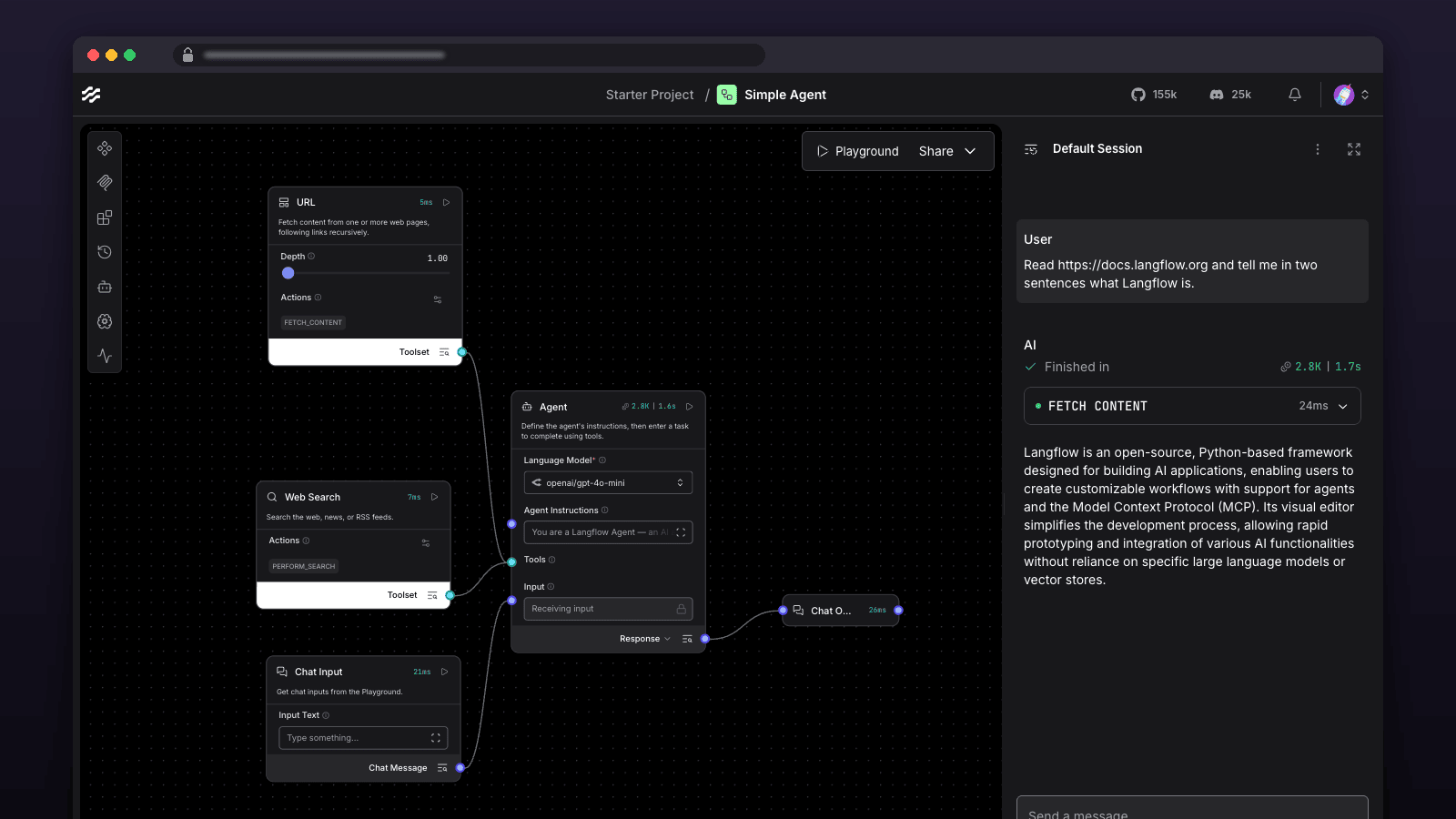
Build AI agents and RAG pipelines on a visual canvas, test them in the built-in chat, and call them as an API or MCP server — with flows, users and keys stored in Postgres.
Get started — runs on Trial (1 GB) and Hobby, not on Free (0.5 GB). On Free it stops at startup with a one-line plan message.
- Deploy. Nothing to fill in; Postgres and every secret are generated.
- Sign in. Open the Langflow service URL. Username
admin; the password isLANGFLOW_SUPERUSER_PASSWORDin the service's Variables tab. - Build a flow. Start from the Simple Agent template, add your OpenAI or Anthropic key as a global variable, and chat with it in the Playground.
About Hosting Langflow
Langflow is the open-source visual builder for AI agents and RAG pipelines: drag components onto a canvas, wire models, prompts, tools, vector stores and memory together, test in a built-in chat, then call the result as an API or MCP server. This template deploys the official Langflow image pinned by digest with a Postgres 17 database, a persistent volume for uploaded files and the encryption key, every secret generated for you, and a deployment healthcheck. Langflow runs as one Python service that serves the editor, the API and flow execution. Flows, users, API keys and global variables live in Postgres; the volume at /app/langflow holds the encryption key that protects stored credentials, uploaded files and profile pictures. Schema migrations run automatically on start, including on upgrades. Login is required (LANGFLOW_AUTO_LOGIN=false) because the service is reachable on a public domain; the first account is the generated superuser, and new sign-ups stay inactive until an admin activates them. The container runs as root on Railway so it can write to the root-owned volume mount - the same approach Railway's own database templates take.
Common Use Cases
- Prototype a RAG pipeline over your documents with OpenAI, Anthropic, Gemini, Ollama or any OpenAI-compatible endpoint
- Build a multi-tool agent visually, then expose it as a REST endpoint or MCP server for your app
- Give a non-engineering team a hosted playground with per-user logins and shared global API keys
- Evaluate prompts and models side by side in the built-in chat before committing to code
- Run scheduled or webhook-triggered flows without standing up your own orchestration
Dependencies for Langflow Hosting
langflowai/langflow:1.12.2(Docker Hub, pinned by digest)ghcr.io/railwayapp-templates/postgres-ssl:17(Railway's Postgres image, pinned by digest) on a/var/lib/postgresql/datavolume
Deployment Dependencies
- Langflow documentation and the environment variable reference
- Langflow on GitHub (MIT)
- Railway volumes and private networking
Implementation Details
Plan requirements: Trial or higher. Langflow runs as a single process using about 0.85 GB once started (measured on this exact image, 2026-10-18), so it fits Trial's 1 GB limit and runs comfortably on Hobby; Postgres adds about 60 MB as a separate service. Railway's Free plan (0.5 GB) cannot run it: importing Langflow alone takes about 0.5 GB. On Free the service log says so in one line - "Langflow needs about 1 GB of RAM, but this service is limited to 476 MB" - instead of a crash loop with no explanation. On Trial the headroom is about 100 MB: a simple flow runs, but large documents, local embeddings or many concurrent runs need Hobby.
First run. There is nothing to fill in at deploy time. Open the Langflow service's public domain. Log in with username admin and the value of LANGFLOW_SUPERUSER_PASSWORD from the Variables tab. Change it under your profile if you like. Add provider keys either as OPENAI_API_KEY / ANTHROPIC_API_KEY service variables (both optional, then redeploy) or as global variables inside Langflow, which are encrypted with LANGFLOW_SECRET_KEY.
Networking. New deployments receive one public HTTPS domain targeting Langflow on port 7860. Postgres stays on Railway's private network.
Calling flows from code. Create an API key under your profile, then POST https://YOUR-DOMAIN/api/v1/run/FLOW_ID with an x-api-key header. Each flow's API access panel shows the exact request.
Generated secrets. LANGFLOW_SECRET_KEY, LANGFLOW_SUPERUSER_PASSWORD and the Postgres password are generated at deploy time. Back up LANGFLOW_SECRET_KEY with your database backups: rotating it makes stored provider keys unreadable.
Healthcheck. Railway polls /health_check (which also checks the database) before routing traffic to a new deployment, so redeploys and upgrades cut over only once migrations have finished.
Start command. The service starts with a short shell check: it reads the container's memory limit and, below about 0.9 GB, prints the plan message above and exits instead of starting a server that would be killed. Above that it starts Langflow's own app with uvicorn in a single process - the same launch path langflow run uses on macOS and Windows. langflow run on Linux adds a CLI parent and a Gunicorn master that each hold a copy of the imported code, which pushes startup past 1 GB. Settings such as LANGFLOW_HOST, LANGFLOW_PORT, LANGFLOW_LOG_LEVEL and LANGFLOW_BACKEND_ONLY are read from the environment as usual; LANGFLOW_WORKERS is fixed at 1.
Persistence. Redeploys and restarts keep every flow, user and key (Postgres volume) and the encryption key and uploads (/app/langflow volume). A Postgres restart makes /health_check report db: error for a few seconds; Langflow reconnects on its own.
Upgrades. The image is pinned. To upgrade, change the Langflow service's image tag to a newer release and redeploy; Langflow migrates the schema on start. Read the release notes first - component changes can affect existing flows.
Variables you may want to change. LANGFLOW_NEW_USER_IS_ACTIVE (false) gates sign-ups behind admin activation. DO_NOT_TRACK (true) disables telemetry. Remove LANGFLOW_AUTO_LOGIN=false only if the service is not reachable from the internet.
Risks. Flows execute arbitrary components, including code and HTTP calls, with the service's network access - only give accounts to people you trust. Pinned images receive security fixes when you upgrade, not automatically. Railway's fair-use policy applies to what your flows do.
Why Deploy Langflow on Railway?
Railway is a singular platform to deploy your infrastructure stack. Railway will host your infrastructure so you don't have to deal with configuration, while allowing you to vertically and horizontally scale it.
By deploying Langflow on Railway, you are one step closer to supporting a complete full-stack application with minimal burden. Host your servers, databases, AI agents, and more on Railway.
Template Content


