
Deploy LibreChat
Private multi-provider AI chat: agents, code interpreter, document RAG
LibreChat
Just deployed
/app/client/public/images

meilisearch
Just deployed
/meili_data

Just deployed
/var/lib/postgresql/data

MongoDB
Just deployed
/data/db
Just deployed
/app/hf-cache
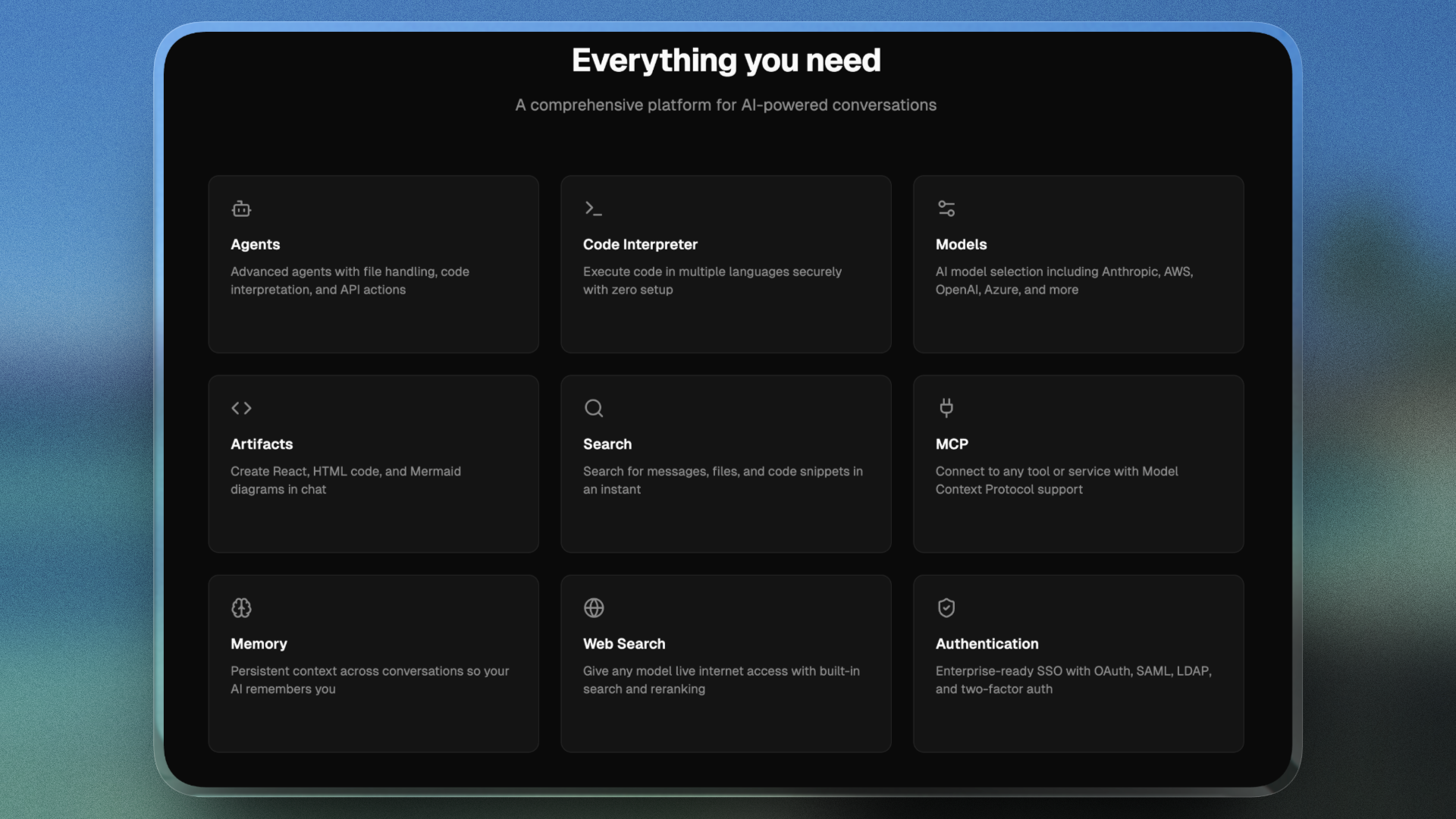
Deploy and Host LibreChat on Railway
LibreChat is a self-hosted, open-source AI chat platform that puts every model provider behind one ChatGPT-style interface. It is bring-your-own-key by design: add an OpenAI, Anthropic, Google or OpenRouter credential and your team gets one governed URL with AI agents, MCP tools, a code interpreter, RAG file uploads and multi-user auth — every prompt and message in a database you own.
Self-host LibreChat on Railway as five services behind one public domain. librechat (port 3080) serves it and mounts a volume for uploaded images. Managed MongoDB stores users, conversations, prompts and agents; Meilisearch indexes them for search; the RAG API embeds uploaded files into managed Postgres with pgvector.
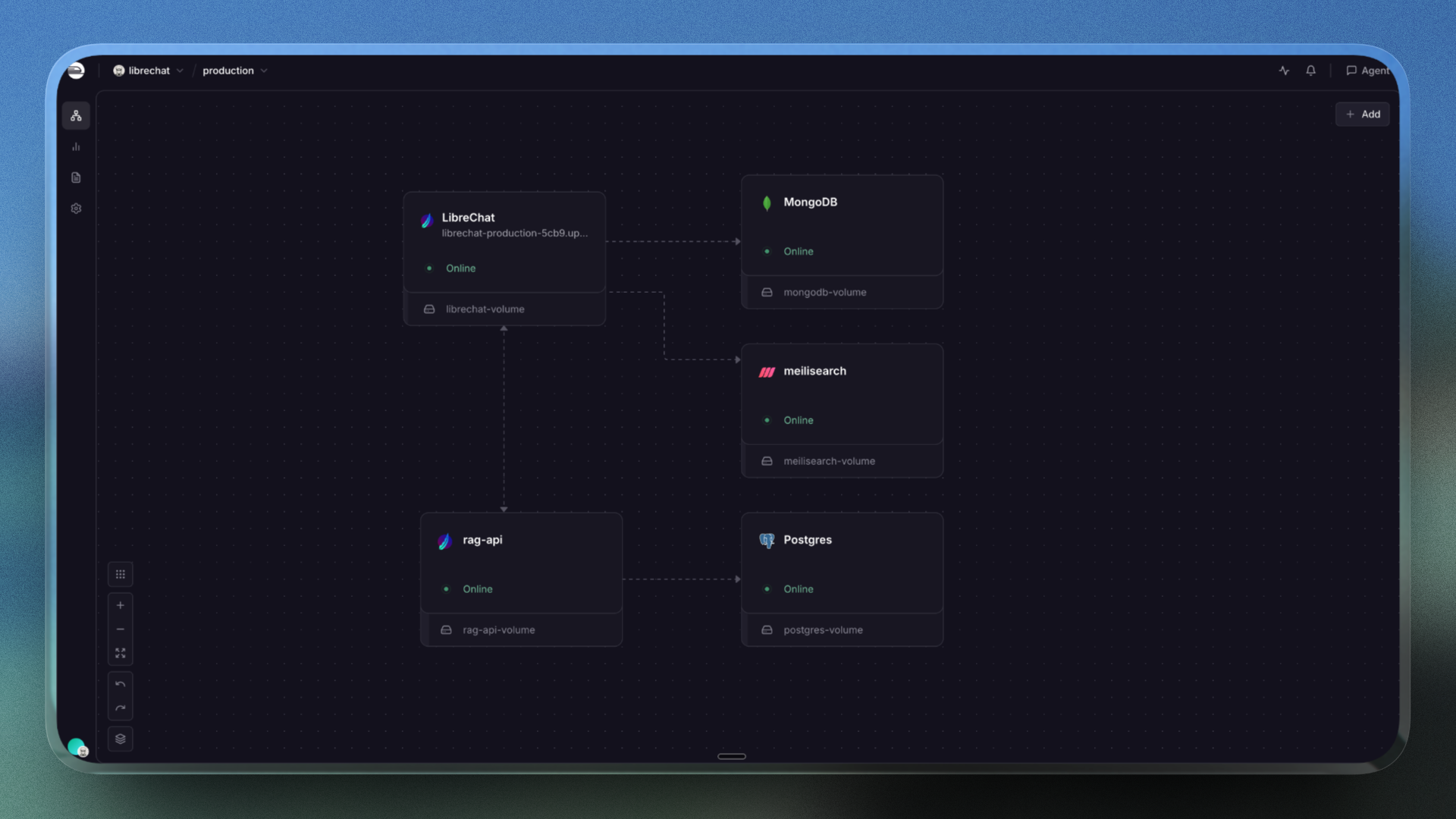
Getting Started with LibreChat on Railway
Open the generated Railway domain once the deploy goes green. There are no default credentials: the app opens on /register, and the first account created becomes the administrator. Create it immediately, then set ALLOW_REGISTRATION=false to close sign-ups; the route then returns 403 Registration is not allowed. No provider key ships with the template, so the composer first reads "Please select an Agent"; that is the expected bring-your-own-key state, not a failed deploy. Add a provider variable below, pick a model and send a message. To confirm persistence, save a Prompts entry, redeploy, and check it survives.
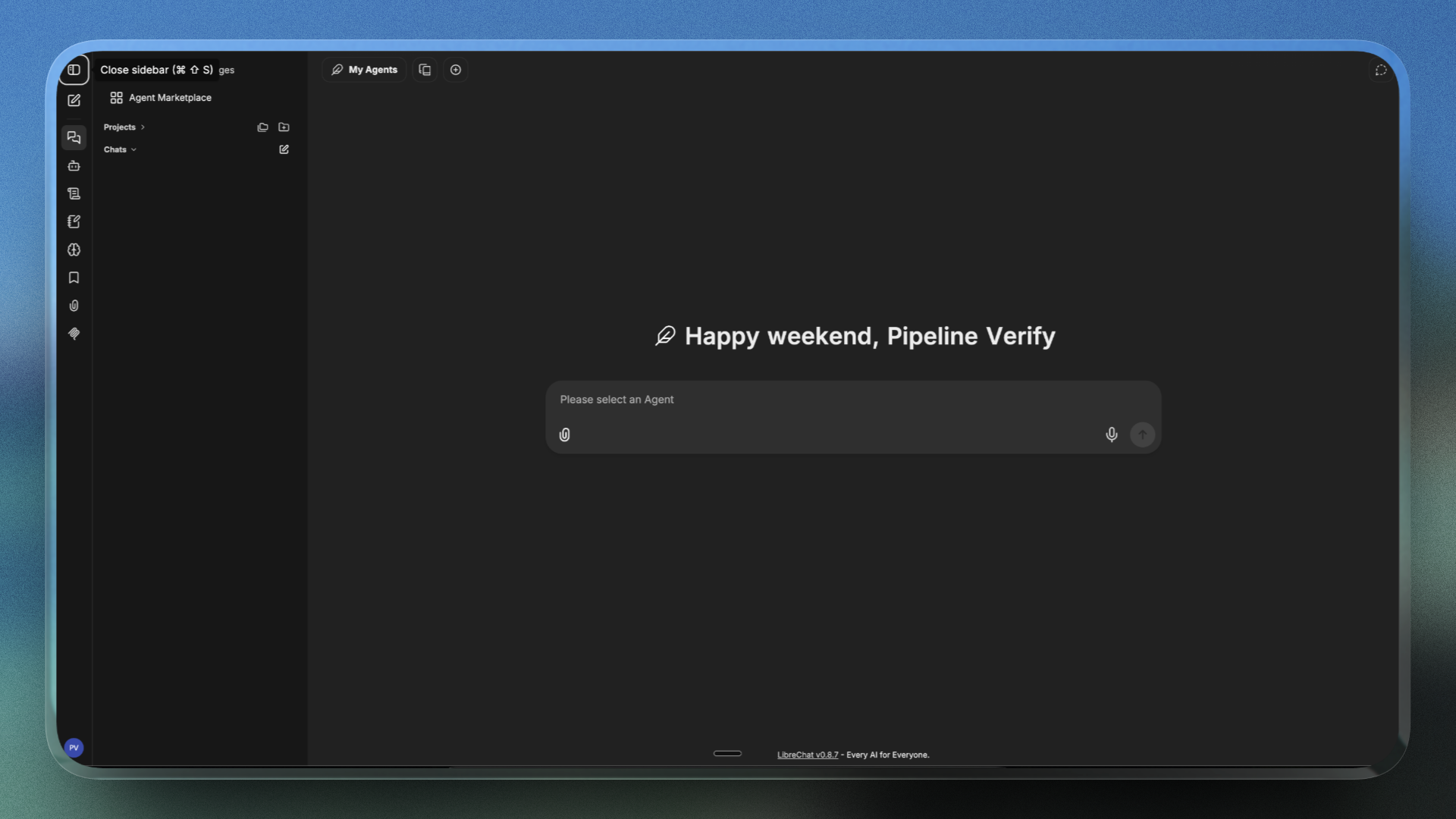
Bring Your Own Keys: Connecting AI Providers to LibreChat
The template ships with no provider credentials. Add whichever you hold to the librechat service:
OPENAI_API_KEY=sk-...
ANTHROPIC_API_KEY=sk-ant-...
OPENROUTER_KEY=...
Use user_provided instead of a key and each person supplies their own in the UI. Stored keys are encrypted with CREDS_KEY and CREDS_IV before reaching MongoDB, so neither may be rotated after launch.
About Hosting LibreChat
Self-host LibreChat when chat history cannot sit in a vendor's account, or when a team needs several providers side by side without an enterprise contract.
- Every provider in one UI — OpenAI, Anthropic, Azure, Google, Bedrock, Groq, Mistral, DeepSeek, OpenRouter and Ollama, switchable mid-conversation.
- Agents, tools and artifacts — file handling, OpenAPI actions, MCP servers, a code interpreter, React/HTML/Mermaid artifacts and image generation.
- Multi-user by default — email login, OAuth2, LDAP and SAML, two-factor auth, an admin panel and encrypted per-user credentials.
Why Deploy LibreChat on Railway
Railway runs all five services as one project:
- One-click deploy of pinned official images — no
latestsurprises. - Managed MongoDB and Postgres over private networking, pgvector included.
- Volumes for images, the search index and the embedding model cache.
- Health checks and the required thread and UID settings preset.
Common Use Cases LibreChat
- A private ChatGPT for a company — one domain, managed accounts, chats in a MongoDB you own.
- Model evaluation — compare Claude, GPT and Gemini on one prompt at API rates, not per seat.
- Custom agents over internal documents — upload runbooks and wire MCP servers into agents that query your systems.
Dependencies for LibreChat
librechat—ghcr.io/danny-avila/librechat:v0.8.7: Node.js API and React client, port3080,/healthcheck, volume at/app/client/public/images.RAILWAY_RUN_UID=0is required — the image runs as non-rootnodeand never chowns the mount, so volume writes fail.MongoDB— managed MongoDB, LibreChat's only primary datastore; its URL must carry?authSource=admin.meilisearch—getmeili/meilisearch:v1.35.1, port7700, volume/meili_data: conversation search whenSEARCH=true. Keep it private; the index holds your chats.rag-api—librechat-rag-api-dev:v0.8.0, port8000, volume/app/hf-cache: LangChain and FastAPI. The non-lite image bundlessentence_transformers, soEMBEDDINGS_PROVIDER=huggingfacerunsall-MiniLM-L6-v2locally with no API key.Postgres— managed PostgreSQL vector store; it ships thevectorextension, so no pgvector image is needed.
LibreChat Environment Variables Reference
| Variable | Service | Value | What it does |
|---|---|---|---|
MONGO_URI | librechat | ${{MongoDB.MONGO_URL}}/LibreChat?authSource=admin | Datastore URL; authSource mandatory |
CREDS_KEY / CREDS_IV | librechat | generated | Encrypt stored provider keys; never rotate |
JWT_SECRET / JWT_REFRESH_SECRET | librechat | generated | Sign sessions; rotating logs everyone out |
MEILI_MAX_INDEXING_THREADS | meilisearch | 2 | Caps the indexing thread pool |
MEILI_MASTER_KEY is set once on meilisearch and referenced from librechat; rag-api references ${{librechat.JWT_SECRET}} and rejects mismatched calls.
Deployment Dependencies
LibreChat (MIT) and rag_api; docs at librechat.ai/docs.
Hardware Requirements for Self-Hosting LibreChat
| Resource | Minimum | Recommended |
|---|---|---|
| CPU | 2 vCPU across services | 4–8 vCPU across services |
| RAM | 2 GB across services | 4 GB across services |
| Storage | 1 GB per volume | 5–10 GB, plus database storage |
| Runtime | Node.js and Python, in the images | Node.js and Python, in the images |
Idle: librechat ~560 MB, rag-api ~668 MB, meilisearch ~117 MB — the resident embedding model sets the floor. Run one replica.
Self-Hosting LibreChat with Docker
The repository's Compose file brings up the API, MongoDB, Meilisearch, the RAG API and pgvector:
git clone https://github.com/danny-avila/LibreChat.git
cd LibreChat
cp .env.example .env
docker compose up -d
Generate fresh CREDS_KEY, CREDS_IV, JWT_SECRET and JWT_REFRESH_SECRET first. To run only the app against existing services:
docker run -d --name librechat -p 3080:3080 \
  -e MONGO_URI="mongodb://user:pass@host:27017/LibreChat?authSource=admin" \
  -e MEILI_HOST="http://meilisearch:7700" -e MEILI_MASTER_KEY="" -e SEARCH=true \
  -e CREDS_KEY="<32-byte hex>" -e CREDS_IV="<16-byte hex>" \
  -e JWT_SECRET="" -e JWT_REFRESH_SECRET="" \
  -v librechat-images:/app/client/public/images \
  ghcr.io/danny-avila/librechat:v0.8.7
The optional librechat.yaml is only needed for custom endpoints, S3 storage or per-model settings.
Is LibreChat Free? How Much Does It Cost to Self-Host?
LibreChat is free and MIT-licensed — no SaaS tier, no seat pricing. On Railway you pay infrastructure only: five services, managed MongoDB and Postgres, three volumes. Beyond that you pay your AI provider for the tokens you use, at API rates — point LibreChat at a self-hosted Ollama endpoint and that drops to zero.
Troubleshooting Self-Hosted LibreChat
Meilisearch crash-loops with os error 11 (Resource temporarily unavailable) → not an LMDB lock or a volume-permission fault. It is EAGAIN from pthread_create: Meilisearch sizes its indexing thread pool from the host's core count, not the container's CPU quota, so the spawn fails. Set MEILI_MAX_INDEXING_THREADS=2.
Meilisearch fails its health check while the process is up → the check probes the port Railway infers, and 7700 is not inferred. Set PORT=7700; Meilisearch itself binds via MEILI_HTTP_ADDR.
LibreChat crash-loops with Authentication failed → the Mongo URL lacks ?authSource=admin. Appending a database name makes it the driver's auth source, but the user lives in admin.
FAQ
What is LibreChat?
A free, MIT-licensed, self-hosted AI chat platform: one ChatGPT-style interface over many providers, with agents, MCP tools, a code interpreter and RAG over uploaded files.
What does this Railway template deploy?
Five services: librechat v0.8.7 with the public domain, managed MongoDB, meilisearch v1.35.1, rag-api v0.8.0 and managed Postgres.
Does this LibreChat template include an AI provider key?
No — it is bring-your-own-key. Add OPENAI_API_KEY, ANTHROPIC_API_KEY or another provider variable yourself; until then the model picker stays empty.
Why does self-hosted LibreChat need MongoDB, Meilisearch and Postgres?
MongoDB is the only primary datastore; Meilisearch indexes conversations for search; Postgres with pgvector holds embeddings, which the RAG service generates locally with no embeddings API key.
What are the default login credentials for self-hosted LibreChat?
None. The first account registered becomes the administrator, so create yours immediately, then set ALLOW_REGISTRATION=false.
Template Content
LibreChat
ghcr.io/danny-avila/librechat:v0.8.7meilisearch
getmeili/meilisearch:v1.35.1MongoDB
mongo:8.0

