
Deploy LibreTranslate | Open Source Google Translate Alternative
Self-host LibreTranslate. 30+ languages, free private with REST API
LibreTranslate
Just deployed
/home/libretranslate/.local
Deploy and Host LibreTranslate on Railway
LibreTranslate is an open-source, self-hosted machine translation API powered by the Argos Translate engine — supporting 30+ languages with no third-party API keys required. Deploy LibreTranslate on Railway to run a fully private translation service with a built-in web UI and REST API.
This Railway template pre-configures LibreTranslate with 11 popular languages (English, Spanish, French, German, Italian, Portuguese, Chinese, Japanese, Korean, Arabic, Russian), API key authentication, rate limiting, and persistent model storage via a Railway volume.
Getting Started with LibreTranslate on Railway
Once the deployment completes, the first startup takes 1-2 minutes to download language models. After that, visit your public Railway URL to access the LibreTranslate web interface. The web UI provides a clean translation box — select source and target languages, type or paste text, and get instant translations.
To use the REST API, send POST requests to /translate with a JSON body containing q (text), source (language code), and target (language code). API key authentication is enabled by default — generate keys via the /frontend/settings/api-keys endpoint or by running ltmanage keys add inside the container. The /languages endpoint returns all available language pairs.
curl -X POST https://your-app.up.railway.app/translate \
  -H "Content-Type: application/json" \
  -d '{"q":"Hello world","source":"en","target":"es","api_key":"your-key"}'
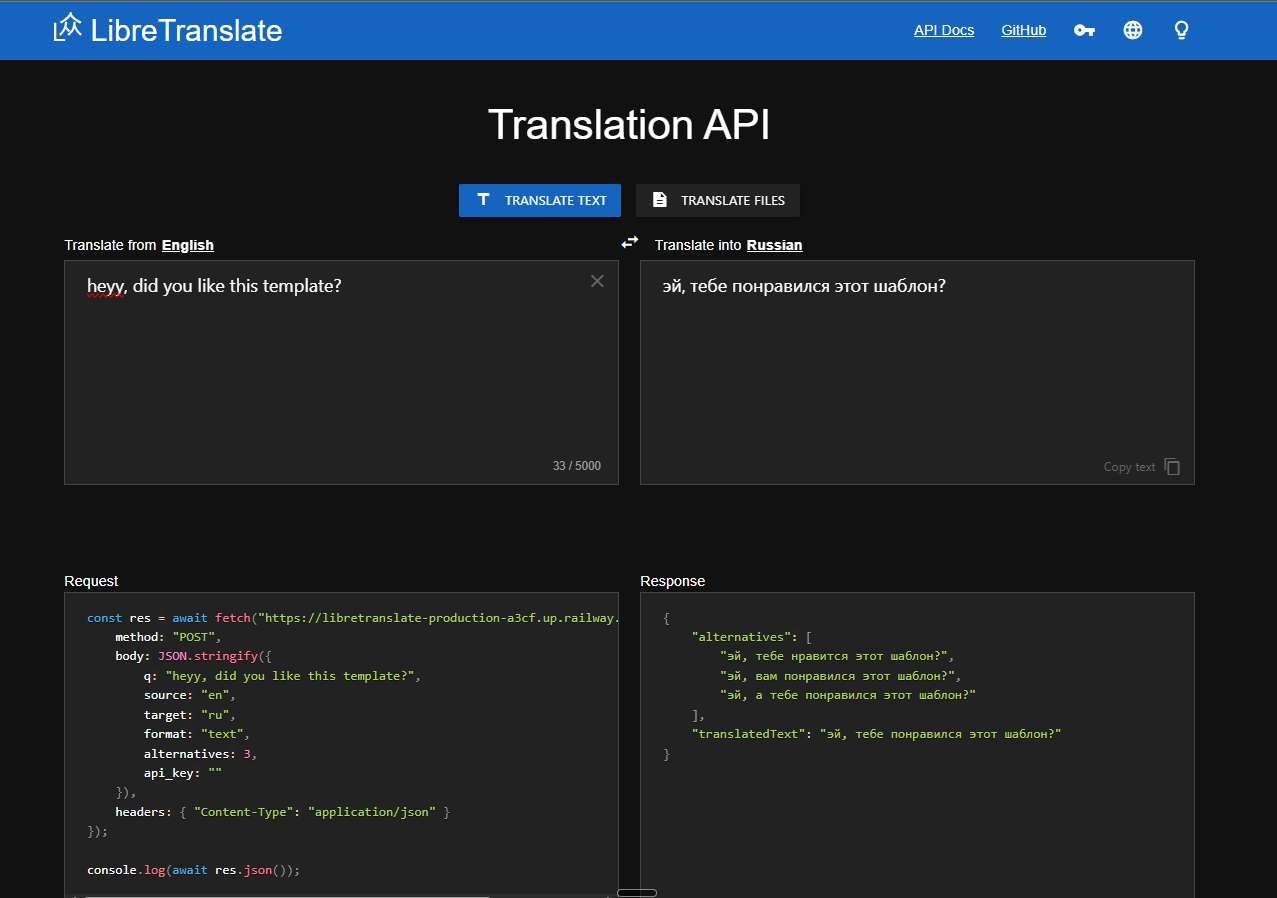
About Hosting LibreTranslate
LibreTranslate solves the problem of machine translation without depending on proprietary cloud APIs like Google Translate or DeepL. All translation happens locally — no data leaves your infrastructure.
- Privacy-first: Text never leaves your server — ideal for GDPR, HIPAA, and data sovereignty compliance
- REST API: Simple JSON-based API compatible with any language or framework
- Web UI included: Built-in translation interface for non-technical users
- File translation: Upload documents (PDF, DOCX, PPTX) for batch translation
- Language detection: Automatic source language identification
- No API costs: Unlimited translations with zero per-character billing
- Offline capable: Works without internet after models are downloaded
Why Deploy LibreTranslate on Railway
Railway simplifies self-hosting LibreTranslate with one-click deployment and persistent storage:
- Volume persistence keeps downloaded language models across restarts — no re-downloading
- Environment variables control which languages to load, rate limits, and auth settings
- Public HTTPS domain with automatic TLS — no reverse proxy configuration needed
- Memory limits prevent runaway model loading from consuming all resources
Common Use Cases for Self-Hosted LibreTranslate
- Privacy-compliant translation — Healthcare, legal, and government orgs translate sensitive documents without sending data to third-party APIs
- App localization API — Developers integrate real-time translation into chat apps, support platforms, or CMS systems via the REST endpoint
- Bulk content translation — Translate large volumes of user-generated content, product descriptions, or documentation without per-character costs
- Air-gapped environments — Deploy in networks with no internet access for military, research, or regulated industries
Dependencies for LibreTranslate on Railway
- LibreTranslate —
libretranslate/libretranslate:latest— the translation API server with web UI
No external database, cache, or worker services are required. LibreTranslate is fully self-contained — API keys use local SQLite and rate limiting uses in-memory storage.
Environment Variables Reference for LibreTranslate
| Variable | Default | Description |
|---|---|---|
LT_LOAD_ONLY | all | Comma-separated language codes to load (e.g. en,es,fr) |
LT_API_KEYS | false | Enable API key authentication |
LT_THREADS | 4 | Number of gunicorn worker processes |
LT_REQ_LIMIT | -1 | Max requests per minute per client (-1 = unlimited) |
LT_CHAR_LIMIT | -1 | Max characters per translation request |
LT_BATCH_LIMIT | -1 | Max texts per batch request |
LT_DISABLE_WEB_UI | false | Disable the web translation interface |
LT_UPDATE_MODELS | false | Check for model updates at startup |
Deployment Dependencies
- Runtime: Python 3.11 + Gunicorn WSGI server
- Docker Hub: libretranslate/libretranslate
- GitHub: LibreTranslate/LibreTranslate (~14.2k stars)
- Docs: libretranslate.com
Hardware Requirements for Self-Hosting LibreTranslate
| Resource | Minimum (3 languages) | Recommended (11 languages) |
|---|---|---|
| CPU | 1 vCPU | 2 vCPU |
| RAM | 2 GB | 4 GB |
| Storage | 1 GB | 3 GB |
| Runtime | ~60s first boot | ~90s first boot |
Loading all 30+ languages requires 8 GB+ RAM and ~10 GB storage. Use LT_LOAD_ONLY to control memory usage.
Self-Hosting LibreTranslate with Docker
Run LibreTranslate locally with a single Docker command:
docker run -ti -p 5000:5000 \
  -v lt-models:/home/libretranslate/.local \
  -e LT_LOAD_ONLY=en,es,fr \
  libretranslate/libretranslate:latest
Or use Docker Compose for a production setup:
services:
  libretranslate:
    image: libretranslate/libretranslate:latest
    ports:
      - "5000:5000"
    environment:
      - LT_LOAD_ONLY=en,es,fr,de
      - LT_API_KEYS=true
      - LT_REQ_LIMIT=60
    volumes:
      - lt-models:/home/libretranslate/.local
      - lt-db:/app/db
    restart: unless-stopped

volumes:
  lt-models:
  lt-db:
Is LibreTranslate Free to Self-Host?
LibreTranslate is free and open-source under the AGPL-3.0 license. Self-hosting is completely free with unlimited translations. The hosted API at portal.libretranslate.com offers Pro ($29/mo) and Business ($58/mo) plans for users who prefer managed infrastructure. On Railway, you only pay for compute and storage — no translation API fees.
LibreTranslate vs Google Translate API
| Feature | LibreTranslate | Google Translate API |
|---|---|---|
| Price | Free (self-hosted) | $20 per million characters |
| Languages | 30+ | 130+ |
| Privacy | Data stays on your server | Data sent to Google |
| Quality | Good (neural MT) | Excellent |
| Offline | Yes | No |
| API limit | Unlimited | Pay-per-use |
| License | AGPL-3.0 | Proprietary |
LibreTranslate trades translation quality breadth for complete data privacy and zero recurring costs. For European languages, quality is comparable; for less common pairs, Google has the edge.
FAQ
What is LibreTranslate and why should you self-host it? LibreTranslate is an open-source machine translation API that runs entirely on your own infrastructure. Self-hosting ensures that sensitive text — medical records, legal documents, internal communications — never leaves your network, making it the go-to choice for organizations with data sovereignty requirements.
What does this Railway template deploy for LibreTranslate? This template deploys a single LibreTranslate container with 11 pre-configured languages, API key authentication, rate limiting, and a Railway volume for persistent language model storage. No database or cache services are needed.
Why does LibreTranslate on Railway need a volume?
Language models (~200-300 MB per language pair) are downloaded on first startup. Without a volume at /home/libretranslate/.local, models re-download on every container restart, adding 1-2 minutes of downtime. The volume persists models across restarts.
How do I add more languages to self-hosted LibreTranslate on Railway?
Update the LT_LOAD_ONLY environment variable with additional language codes (e.g. en,es,fr,de,nl,pl). Each additional language adds ~200 MB of RAM usage. Monitor memory consumption and increase the Railway memory limit if needed.
How do I enable API key authentication in LibreTranslate on Railway?
Set LT_API_KEYS=true in the environment variables. Then exec into the container and run ltmanage keys add to generate API keys. Keys are stored in SQLite under the volume mount, so they persist across restarts.
Can LibreTranslate handle file translation on Railway?
Yes. The web UI and API support translating uploaded files (PDF, DOCX, PPTX, HTML). Set LT_DISABLE_FILES_TRANSLATION=false (the default) to enable this feature. Large files may require increasing the LT_CHAR_LIMIT value.
Template Content
LibreTranslate
libretranslate/libretranslate:latest

