
Deploy Linkwarden | Open-Source Bookmark Manager
Self Host Linkwarden. Save, archive, organize bookmarks & much more

Meilisearch
Just deployed
/meili_data

Just deployed
/var/lib/postgresql/data
Linkwarden
Just deployed
/data/data
Deploy and Host Linkwarden on Railway
Deploy Linkwarden on Railway to run a self-hosted collaborative bookmark manager with built-in webpage archiving. Linkwarden lets teams and individuals collect, organize, annotate, and fully preserve web content — capturing screenshots, PDFs, and readable text of every saved link before it disappears.
This Railway template pre-configures Linkwarden with PostgreSQL for persistent storage and Meilisearch for fast full-text search, so you can self-host Linkwarden and start bookmarking in minutes.
Getting Started with Linkwarden on Railway
Once the deploy completes, open your Railway-generated public URL. You'll land on the Linkwarden login page. Click Sign Up to create your first account — the first user registered becomes the server administrator.
After registration, you'll see the main dashboard. Create your first Collection to organize bookmarks by topic or project. Paste any URL into the "New Link" field and Linkwarden will automatically capture a screenshot, PDF, and readable text of the page. Install the browser extension for Chrome or Firefox to save links with one click from any webpage.
To lock down your instance after setup, set NEXT_PUBLIC_DISABLE_REGISTRATION=true in your Railway service variables.
About Hosting Linkwarden
Linkwarden is an open-source bookmark manager built with Next.js that goes beyond simple link saving. It archives entire webpages so your bookmarks survive even when the original content is taken down or changed.
- Webpage preservation — auto-captures screenshots, PDFs, and readable text for every saved link
- Collections & tags — organize with nested collections, sub-collections, and custom tags
- Full-text search — powered by Meilisearch for instant results across all saved content
- Team collaboration — shared collections with granular permissions for groups and projects
- Reader view — clean reading mode with highlighting and annotation support
- AI tagging — optional AI-powered automatic tag suggestions (supports OpenAI, Anthropic, Ollama)
- Browser extensions — official Chrome and Firefox extensions for one-click saving
- RSS feeds — subscribe to feeds and auto-save new articles
- 50+ SSO providers — GitHub, Google, Discord, Keycloak, Authentik, and more
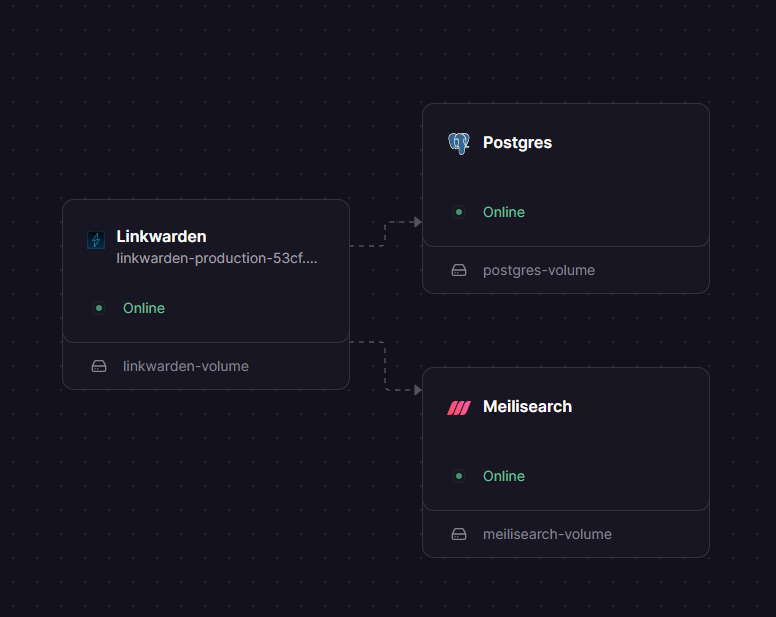
The Railway deployment runs three services: the Linkwarden Next.js application, a PostgreSQL database for link and user data, and Meilisearch for search indexing.
Why Deploy Linkwarden on Railway
- One-click deploy with PostgreSQL and Meilisearch pre-configured
- Persistent volumes for archived content and search indexes
- Automatic HTTPS with Railway's TLS termination
- Scale resources up as your bookmark collection grows
- No vendor lock-in — export your data anytime
Common Use Cases for Self-Hosted Linkwarden
- Research & academia — archive papers, articles, and references with annotations before they go offline
- Team knowledge bases — shared bookmark collections for development documentation, design resources, and project references
- Content curation — save, tag, and organize web content for writing, marketing, or content planning workflows
- Personal web archiving — preserve important webpages with full PDF and screenshot backups you control
Dependencies for Linkwarden on Railway
- Linkwarden —
ghcr.io/linkwarden/linkwarden:latest— main application (Next.js) - PostgreSQL — Railway-managed PostgreSQL 16 — primary database for users, collections, and links
- Meilisearch —
getmeili/meilisearch:v1.12.8— full-text search engine for instant link search
Environment Variables Reference for Linkwarden
| Variable | Service | Description |
|---|---|---|
NEXTAUTH_SECRET | Linkwarden | JWT signing secret for NextAuth.js sessions |
NEXTAUTH_URL | Linkwarden | Authentication callback URL |
DATABASE_URL | Linkwarden | PostgreSQL connection string |
MEILI_HOST | Linkwarden | Meilisearch internal URL for search queries |
MEILI_MASTER_KEY | Both | Shared authentication key for Meilisearch API |
STORAGE_FOLDER | Linkwarden | Directory for archived screenshots and PDFs |
NEXT_PUBLIC_DISABLE_REGISTRATION | Linkwarden | Lock registration after initial setup |
Deployment Dependencies
- Runtime: Node.js 18+ (included in Docker image)
- Docker Hub: ghcr.io/linkwarden/linkwarden
- GitHub: linkwarden/linkwarden
- Docs: docs.linkwarden.app
Hardware Requirements for Self-Hosting Linkwarden
| Resource | Minimum | Recommended |
|---|---|---|
| CPU | 1 vCPU | 2 vCPUs |
| RAM | 2 GB | 4 GB |
| Storage | 5 GB | 20 GB+ (scales with archived content) |
| Runtime | Docker 20+ | Docker 24+ with Compose v2 |
Storage requirements grow with your bookmark collection — each archived link generates a screenshot, PDF, and text extract. Offload to S3-compatible storage via SPACES_* env vars for large collections.
Self-Hosting Linkwarden with Docker Compose
Clone the repository and configure your environment:
git clone https://github.com/linkwarden/linkwarden.git
cd linkwarden
cp .env.sample .env
Edit .env with your database credentials and secrets, then start all services:
# docker-compose.yml (simplified)
services:
  linkwarden:
    image: ghcr.io/linkwarden/linkwarden:latest
    ports:
      - "3000:3000"
    env_file:
      - .env
    volumes:
      - linkwarden-data:/data/data
    depends_on:
      - postgres
      - meilisearch

  postgres:
    image: postgres:16-alpine
    volumes:
      - postgres-data:/var/lib/postgresql/data

  meilisearch:
    image: getmeili/meilisearch:v1.12.8
    volumes:
      - meili-data:/meili_data
docker compose up -d
Open http://localhost:3000 and create your first account.
How Much Does Linkwarden Cost to Self-Host?
Linkwarden is fully open-source under the AGPL-3.0 license. All features are available for free when self-hosting. The team also offers a managed cloud subscription at linkwarden.app for those who prefer not to manage infrastructure. On Railway, your only cost is the infrastructure usage — typically $5–15/month depending on storage and traffic.
Linkwarden vs Raindrop.io
| Feature | Linkwarden | Raindrop.io |
|---|---|---|
| Self-hosted | Yes | No (cloud only) |
| Open source | Yes (AGPL-3.0) | No |
| Webpage archiving | Screenshots + PDF + text | Cached copy (paid) |
| Team collaboration | Yes (free) | Yes (paid plan) |
| Full-text search | Meilisearch-powered | Built-in |
| Browser extensions | Chrome, Firefox | Chrome, Firefox, Safari |
| AI tagging | Optional (BYOK) | No |
| Pricing | Free (self-host) | Free tier / $3+/mo |
Linkwarden is the stronger choice for teams that need data ownership, full webpage preservation, and unlimited collections without subscription costs.
FAQ
What is Linkwarden and why should I self-host it? Linkwarden is an open-source collaborative bookmark manager that archives webpages as screenshots, PDFs, and readable text. Self-hosting gives you full control over your data, unlimited storage, and no subscription fees.
What does this Railway template deploy for Linkwarden? This template deploys three services: the Linkwarden Next.js application, a PostgreSQL database for storing links and user data, and Meilisearch for fast full-text search across all your saved content.
Why does the Linkwarden Railway template include Meilisearch? Meilisearch powers Linkwarden's instant search feature. Without it, you can still save and organize links, but full-text search across archived content won't be available. It runs as a lightweight internal service with its own persistent volume.
How do I enable SSO login for self-hosted Linkwarden on Railway?
Set the OAuth provider's environment variables (e.g., NEXT_PUBLIC_KEYCLOAK_ENABLED=true, KEYCLOAK_ISSUER, KEYCLOAK_CLIENT_ID, KEYCLOAK_CLIENT_SECRET) in your Linkwarden service on Railway. Linkwarden supports 50+ OAuth providers including GitHub, Google, Keycloak, and Authentik.
Can I import bookmarks into self-hosted Linkwarden? Yes. Linkwarden supports importing bookmarks from HTML files exported by Chrome, Firefox, Pocket, Raindrop.io, and other bookmark managers. Go to Settings → Import in the Linkwarden dashboard to upload your export file.
How do I back up my Linkwarden data on Railway?
Your data lives in two places: the PostgreSQL database (connection details in DATABASE_URL) and the /data/data volume (archived files). Use pg_dump for database backups and Railway's volume snapshot feature for file backups.
Template Content
Meilisearch
getmeili/meilisearch:v1.12.8Linkwarden
ghcr.io/linkwarden/linkwarden:latest

