
Deploy LiteLLM Proxy | Open Source OpenRouter Alternative
Self Host LiteLLM. Cost tracking, gateway for 100+ LLMs, chat UI & more
DBs

Redis
Just deployed
/data

Just deployed
/var/lib/postgresql/data
Just deployed
Deploy and Host LiteLLM on Railway
LiteLLM is an open-source AI gateway that gives you a single OpenAI-compatible endpoint to call 100+ LLM providers — OpenAI, Anthropic, Azure OpenAI, Bedrock, Gemini, Groq, Cohere, Mistral, Ollama, and more. Point your existing apps at the LiteLLM proxy once, and swap providers, route across models, enforce budgets, track spend, and issue per-team virtual keys without touching app code.
This Railway template deploys a production-shaped LiteLLM stack in one click: the ghcr.io/berriai/litellm-database:main-stable proxy, a managed Postgres for persistent model/key/spend state, and a managed Redis for shared rate limits and response caching. You self-host LiteLLM on Railway with the master key, salt key, and STORE_MODEL_IN_DB=True already wired so you can add models from the Admin UI without redeploying.
Getting Started with LiteLLM on Railway
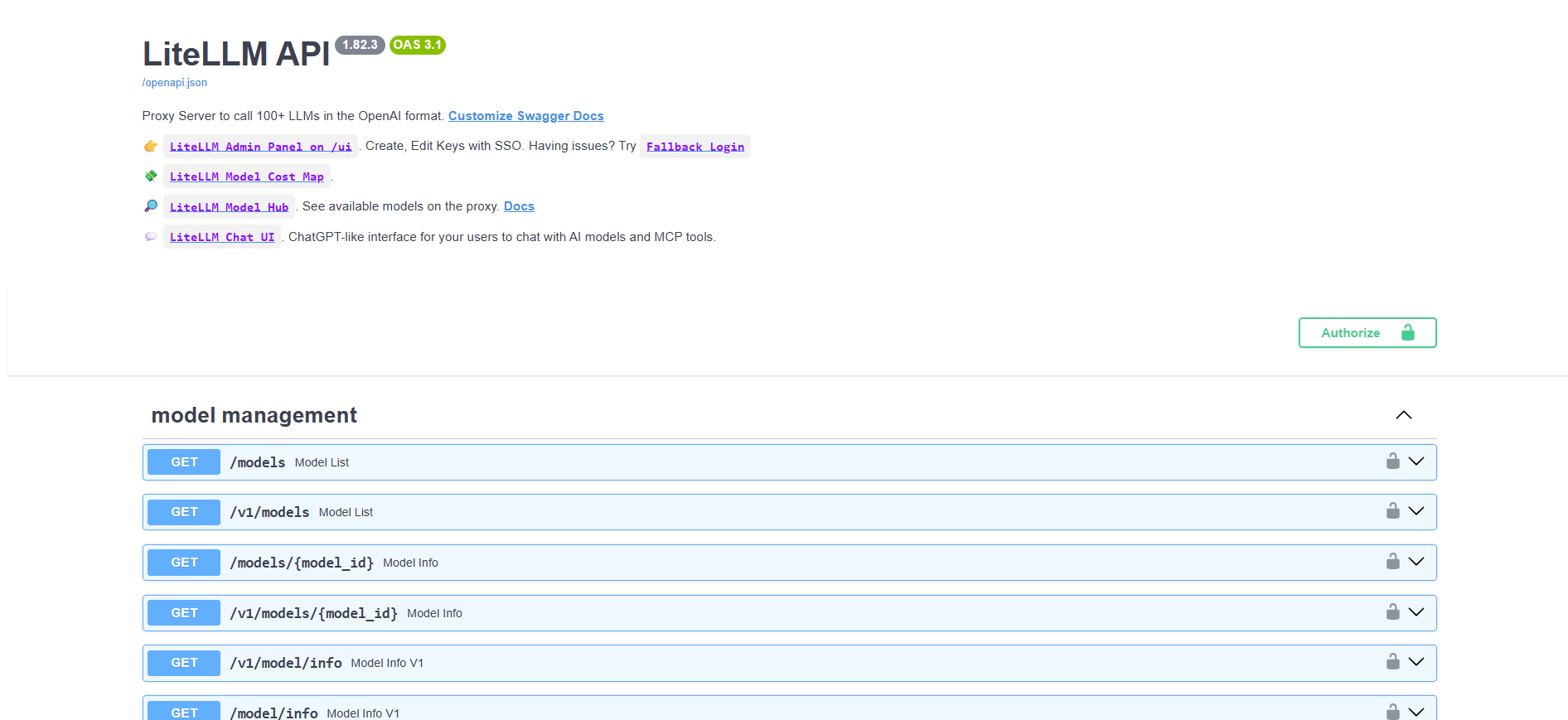
Once the deploy finishes, open your Railway-generated URL. The root / serves the LiteLLM Swagger API docs — that's normal for LiteLLM, not a misconfiguration.
- Log into the Admin UI — visit
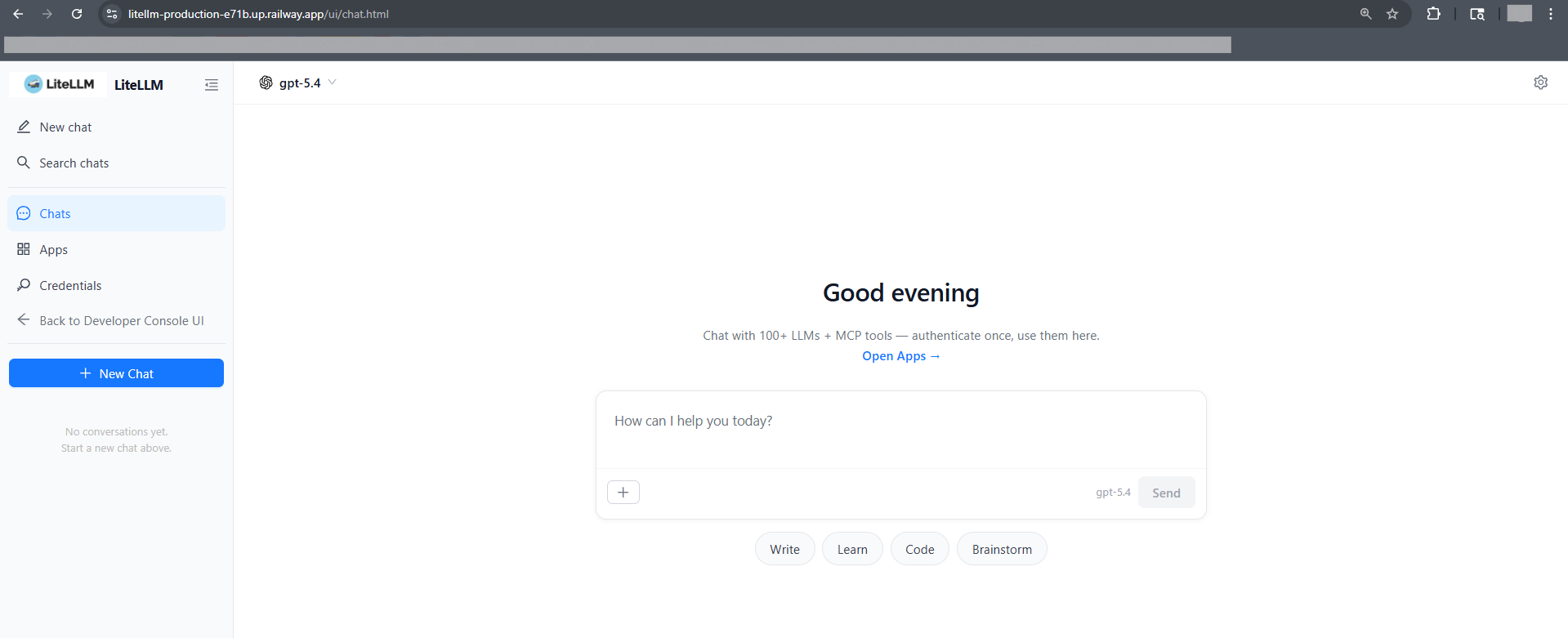
/ui/and log in with usernameadminand theLITELLM_MASTER_KEYvalue from Railway variables as the password. - Open the Chat UI — use
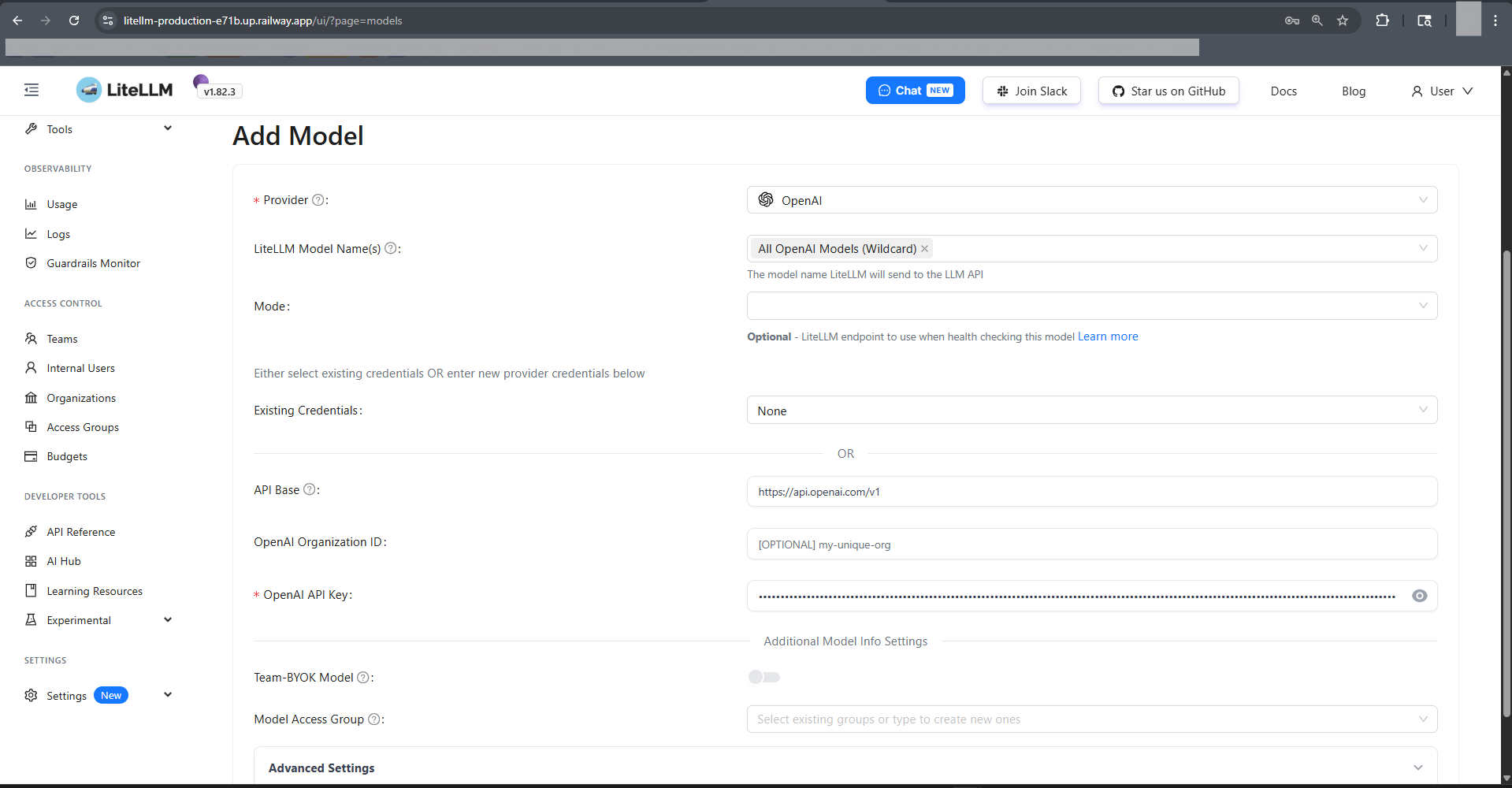
/ui/chat.htmldirectly (or click "Chat UI" in the sidebar from/ui/). A known upstream bug in LiteLLM v1.82.3 makes/ui/chat(no.html) return 404 on direct navigation — the.htmlpath always works. See BerriAI/litellm#24037. - Add your first model — go to Models → Add Model, pick a provider, paste your provider key, save. Encrypted and stored in Postgres via
LITELLM_SALT_KEY. - Create a virtual key — Keys → Create Key. Scope it to specific models, set a monthly budget, assign it to a team. Ship the key instead of raw provider keys.
About Hosting LiteLLM
LiteLLM is a drop-in OpenAI-compatible proxy. Apps keep using the OpenAI SDK; LiteLLM translates, routes, retries, and bills. It solves three things vendors won't: unified auth across providers, unified observability, and unified cost control.
Key features:
- OpenAI-format
/v1/chat/completions,/v1/embeddings,/v1/images/generationsacross all providers - Virtual keys with per-key budgets, rate limits, model allowlists, TTL
- Team/user hierarchy with aggregate spend caps
- Automatic fallbacks, retries, load balancing across deployments of the same model
- Response caching, rate-limit coordination, and budget sync via Redis
- Full request/spend logs in Postgres for audit and cost attribution
Why Deploy LiteLLM on Railway
- One-click Postgres + Redis — no separate managed services to wire up
- Private Railway networking between proxy, DB, and cache (no public DB exposure)
- HTTPS public URL out of the box — point apps at it immediately
- Scale the proxy independently from the DB when traffic grows
- Pay only for what runs — no per-token gateway markup
Common Use Cases for Self-Hosted LiteLLM
- Drop-in OpenAI proxy — replace
api.openai.comwith your Railway URL, keep every SDK and code path untouched - Multi-provider failover — route
gpt-4orequests to OpenAI with Anthropic Claude as fallback when OpenAI rate-limits you - Per-team budget enforcement — issue virtual keys to each squad with a
$500/monthcap; LiteLLM hard-stops when exceeded - Cross-team cost attribution — aggregate spend dashboards by user, team, model, and tag for accurate chargeback
How to Add Models to Self-Hosted LiteLLM
Because STORE_MODEL_IN_DB=True is set, models are managed through the Admin UI and persist in Postgres — no config.yaml redeploys needed.
Via Admin UI (recommended):
/ui/→ Models → Add Model- Choose provider (e.g.
openai,anthropic,bedrock,azure,vertex_ai,groq) - Enter
Model Name(what clients will call it, e.g.gpt-4o) andLiteLLM Model Name(provider-qualified, e.g.openai/gpt-4o) - Paste provider API key (encrypted at rest using
LITELLM_SALT_KEY) - Save. The model is live on
/v1/modelsimmediately.
Via API with master key:
curl -X POST https://your-app.up.railway.app/model/new \
  -H "Authorization: Bearer $LITELLM_MASTER_KEY" \
  -H "Content-Type: application/json" \
  -d '{
    "model_name": "gpt-4o",
    "litellm_params": {
      "model": "openai/gpt-4o",
      "api_key": "sk-proj-..."
    }
  }'
Then call it in OpenAI format from any app:
curl https://your-app.up.railway.app/v1/chat/completions \
  -H "Authorization: Bearer $LITELLM_VIRTUAL_KEY" \
  -H "Content-Type: application/json" \
  -d '{"model":"gpt-4o","messages":[{"role":"user","content":"Hello"}]}'
Dependencies for LiteLLM on Railway
litellm—ghcr.io/berriai/litellm-database:main-stable(proxy + Admin UI on port 4000)Postgres—ghcr.io/railwayapp-templates/postgres-ssl:18(model/key/team/spend store)Redis— Railway-managed Redis 7+ (rate limits, cache, budget sync)
Deployment Dependencies
- Container image:
ghcr.io/berriai/litellm-database:main-stableon - Official docs: docs.litellm.ai — proxy config, supported providers, enterprise features
- Production guide: docs.litellm.ai/docs/proxy/prod — the reference this template was tuned against
- Admin UI guide: docs.litellm.ai/docs/proxy/ui
- Supported providers: docs.litellm.ai/docs/providers — 100+ providers including OpenAI, Anthropic, Azure, Bedrock, Gemini, Groq, Cohere, Mistral, Ollama, VLLM
Environment Variables Reference
| Variable | Purpose |
|---|---|
LITELLM_MASTER_KEY | Proxy root auth token (must start with sk-). Not an OpenAI key. |
LITELLM_SALT_KEY | Encrypts provider API keys stored in Postgres. Never rotate without re-entering all provider keys. |
DATABASE_URL | Postgres connection — wired to ${{Postgres.DATABASE_URL}} |
REDIS_HOST / REDIS_PORT / REDIS_PASSWORD | Redis connection — split vars are ~80 RPS faster than redis_url |
STORE_MODEL_IN_DB | True lets Admin UI add/edit models without config.yaml |
LITELLM_MODE | PRODUCTION disables .env loading and tightens defaults |
Hardware Requirements for Self-Hosting LiteLLM
| Resource | Minimum | Recommended |
|---|---|---|
| CPU | 1 vCPU | 2-4 vCPU |
| RAM | 1 GB | 2-4 GB |
| Postgres Storage | 1 GB | 10 GB (logs grow with request volume) |
| Redis Memory | 128 MB | 512 MB |
| Runtime | Python 3.13 | — |
Traffic above ~100 req/s benefits from a second replica and a larger Redis.
Self-Hosting LiteLLM with Docker
The template mirrors the upstream docker-compose.yml. Outside Railway:
docker run -d --name litellm \
  -p 4000:4000 \
  -e DATABASE_URL='postgresql://user:pass@host:5432/litellm' \
  -e LITELLM_MASTER_KEY='sk-...' \
  -e LITELLM_SALT_KEY='...' \
  -e STORE_MODEL_IN_DB=True \
  ghcr.io/berriai/litellm-database:main-stable
How Much Does LiteLLM Cost to Self-Host?
LiteLLM is MIT-licensed and free. A paid Enterprise tier adds SSO (Okta/Azure AD), audit logs, JWT auth, and premium support starting at $250/mo, but the open-source build deployed here covers the full proxy, Admin UI, virtual keys, budgets, and spend tracking. On Railway you pay only for container/DB/Redis usage — typically a few dollars a month at low volume.
FAQ
What is LiteLLM and why self-host it on Railway? LiteLLM is an open-source AI gateway that unifies 100+ LLM providers behind one OpenAI-compatible API. Self-hosting on Railway keeps your request logs, provider API keys, and spend data in infrastructure you control — no third party in the request path.
What does this Railway template deploy?
Three services: the LiteLLM proxy (ghcr.io/berriai/litellm-database:main-stable), a managed Postgres, and a managed Redis. All wired together with private networking, master key, salt key, and DB-backed model storage pre-configured.
Why does this template include Postgres and Redis? Postgres persists virtual keys, team/user records, added models, provider keys (encrypted), and spend logs across restarts. Redis coordinates rate limits and budgets across replicas and caches identical prompts — LiteLLM's production docs recommend both.
Is LITELLM_MASTER_KEY the same as my OpenAI API key?
No. LITELLM_MASTER_KEY is LiteLLM's own root auth token — it authenticates clients calling your proxy. Your OpenAI/Anthropic/Bedrock provider keys are separate; you add them per-model via the Admin UI.
How do I add OpenAI or Anthropic to self-hosted LiteLLM?
Open /ui/ → Models → Add Model. Pick the provider, set the public model name clients will use, paste the provider API key, save. The key is encrypted with LITELLM_SALT_KEY and stored in Postgres.
Why does /ui/chat return 404?
Known upstream bug in LiteLLM v1.82.3 — Next.js static export missing chat/index.html. Use /ui/chat.html directly, or navigate from /ui/ via the sidebar (client-side routing works).
Can I use self-hosted LiteLLM as a drop-in for api.openai.com?
Yes. Point your OpenAI SDK's base_url at your Railway URL and use a LiteLLM virtual key as the api_key. Every OpenAI-format endpoint (chat, embeddings, images, audio) is supported.
Template Content


