Deploy LocalAI
Run open-source AI models on your own server through one API

nats
Just deployed
localai
Just deployed
/data
worker
Just deployed
/data

Just deployed
/var/lib/postgresql/data
localai-storage
Bucket
Just deployed
Deploy and Host LocalAI on Railway
LocalAI is a drop-in replacement for the OpenAI API that runs open-weight models on hardware you control. It speaks the OpenAI, Anthropic and Ollama wire formats, so an app written against openai or @ai-sdk keeps working after one base-URL change — and it covers more than chat: embeddings, reranking, speech-to-text, text-to-speech and image generation sit behind the same endpoint. Teams reach for it when prompts contain data that must not leave their infrastructure, when per-token pricing stops making sense, or to pin a model version a provider is free to retire.
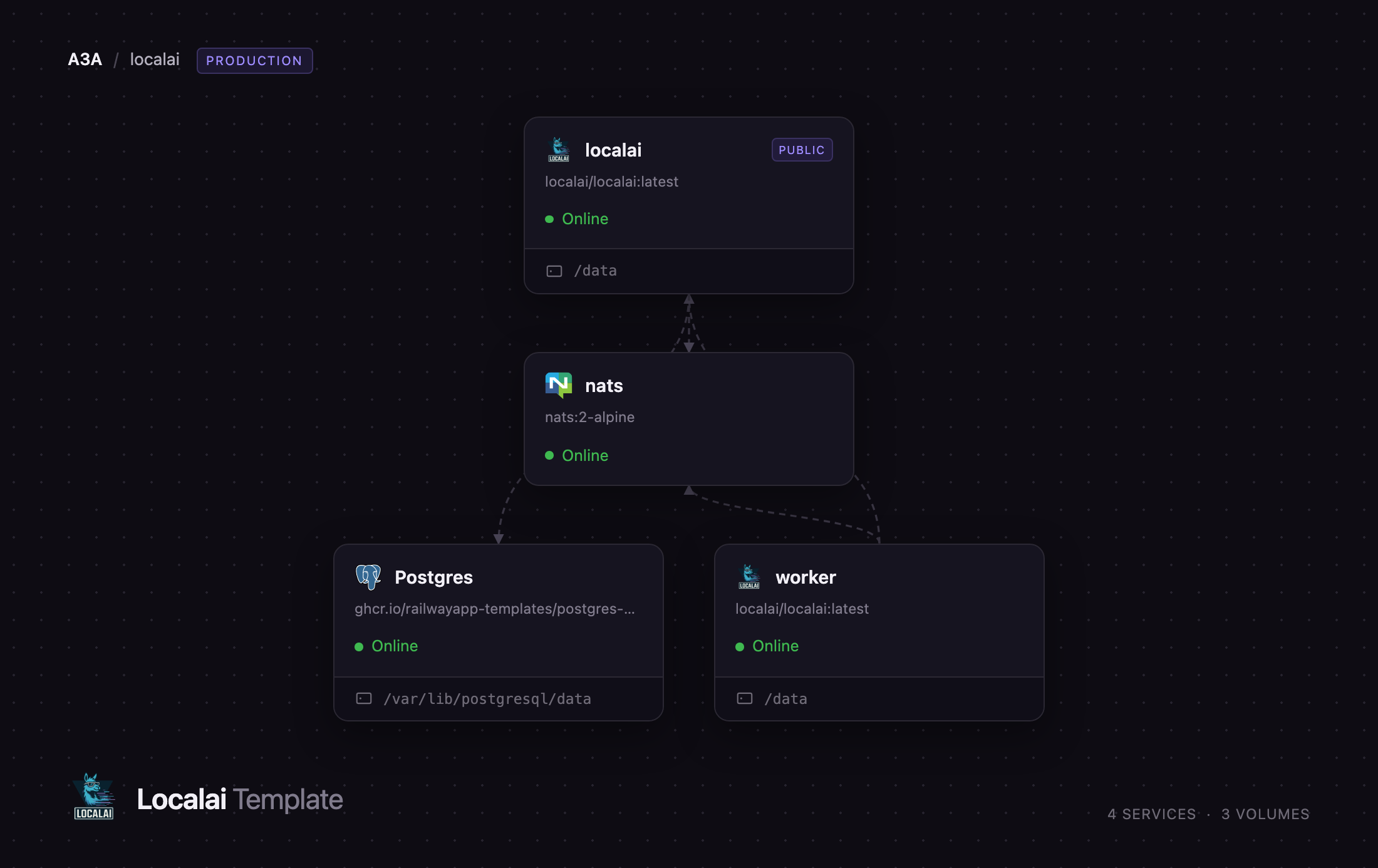
Deploy LocalAI on Railway and you get the project's own distributed topology rather than a single container. The localai service is the public API and web interface: it authenticates callers, holds the model catalogue and runs the SmartRouter that places each request. The worker service self-registers with the frontend, then downloads whichever inference engine a request needs and loads the model. nats carries control-plane events between the two, and managed PostgreSQL holds accounts, API keys, the node registry and the job store. Adding capacity means adding a worker service, not resizing one box.
Getting Started with LocalAI on Railway
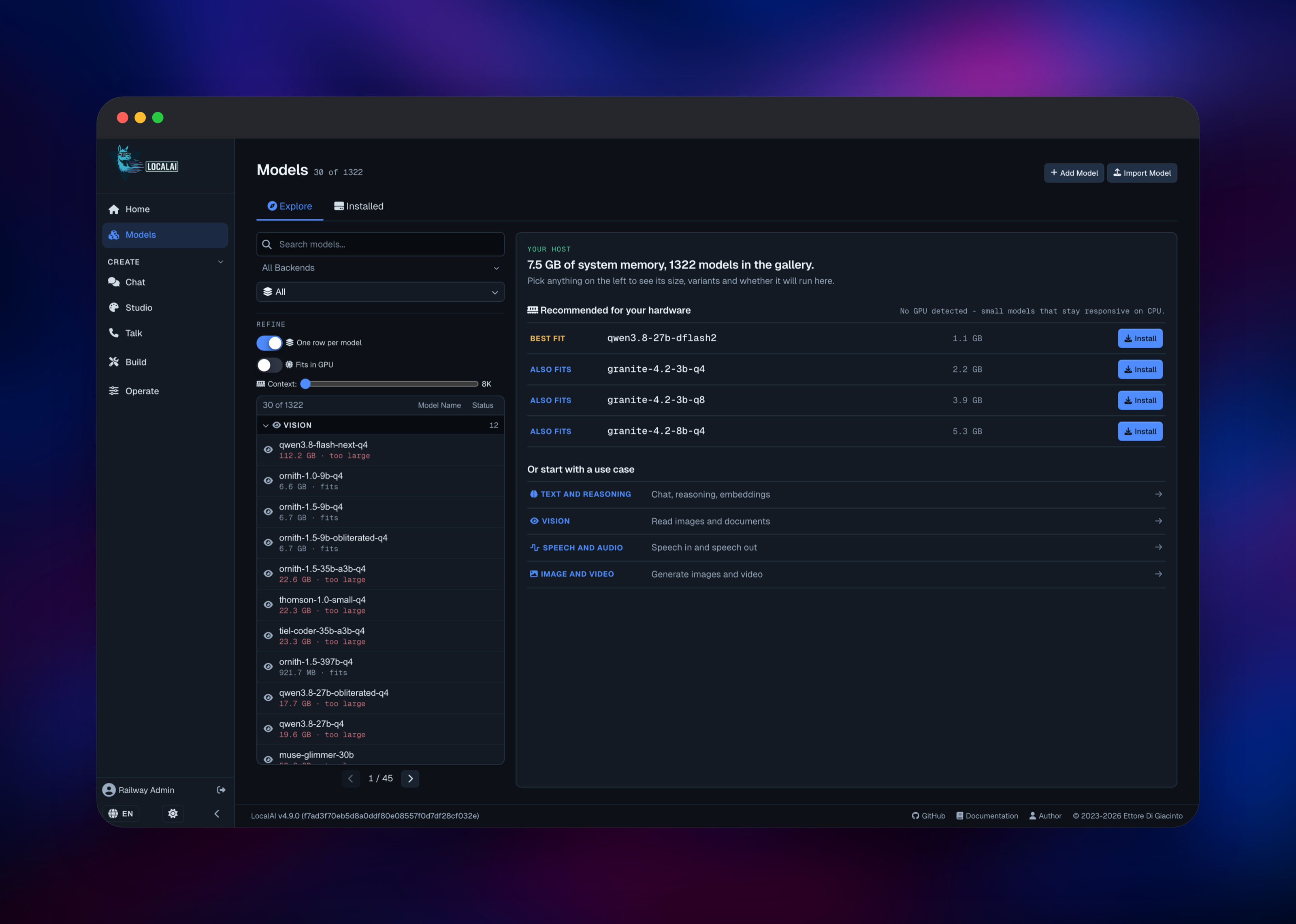
Open the public URL as soon as the deployment goes green. Authentication is on and the database is empty, so LocalAI serves a Create your admin account form — the first account created becomes the administrator, so claim it immediately. After signing in, click Browse Model Gallery; it reads the memory available to your services and labels every entry fits or too large. Pick something small first — qwen3-0.6b installs in under a minute — and press Install.
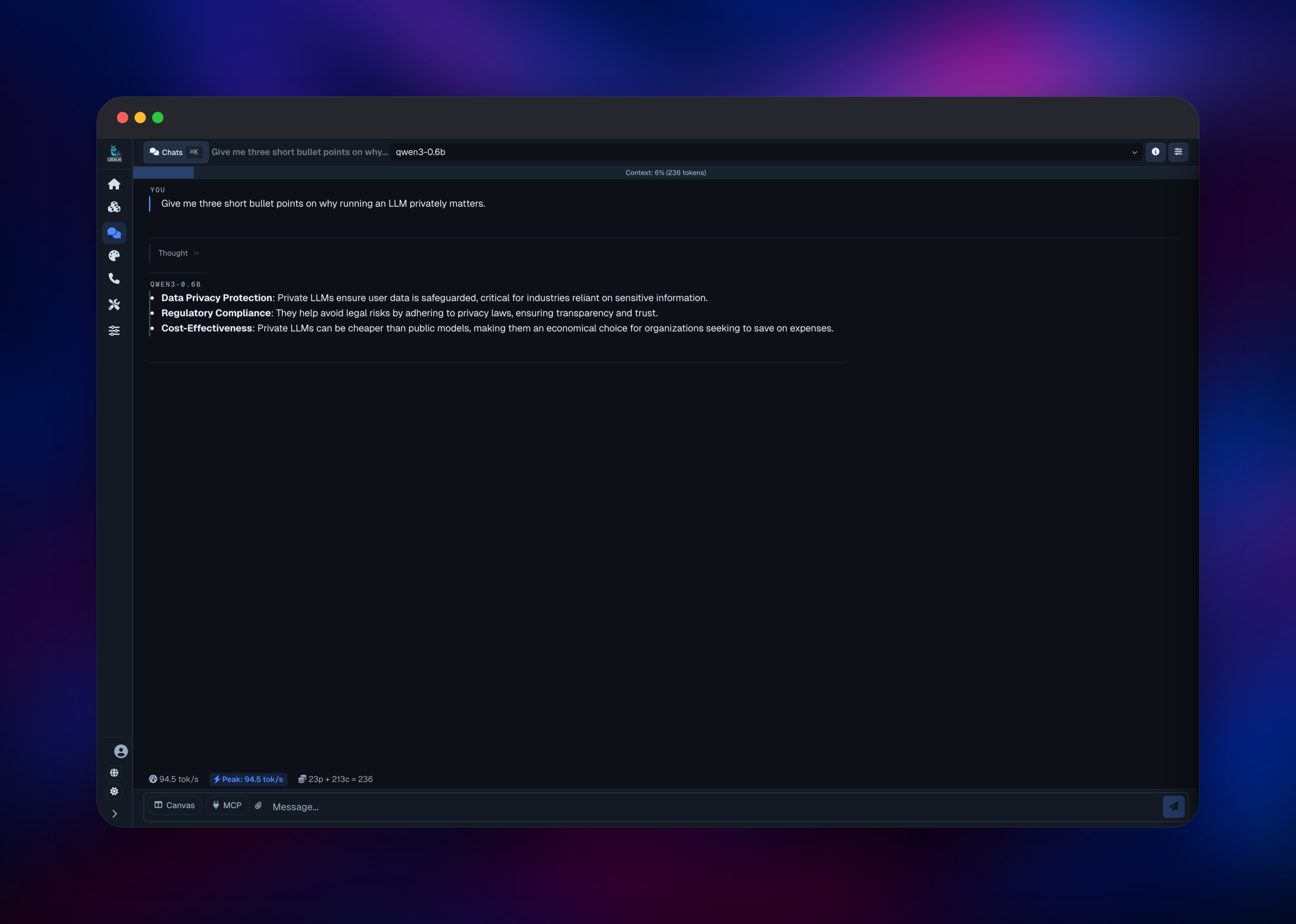
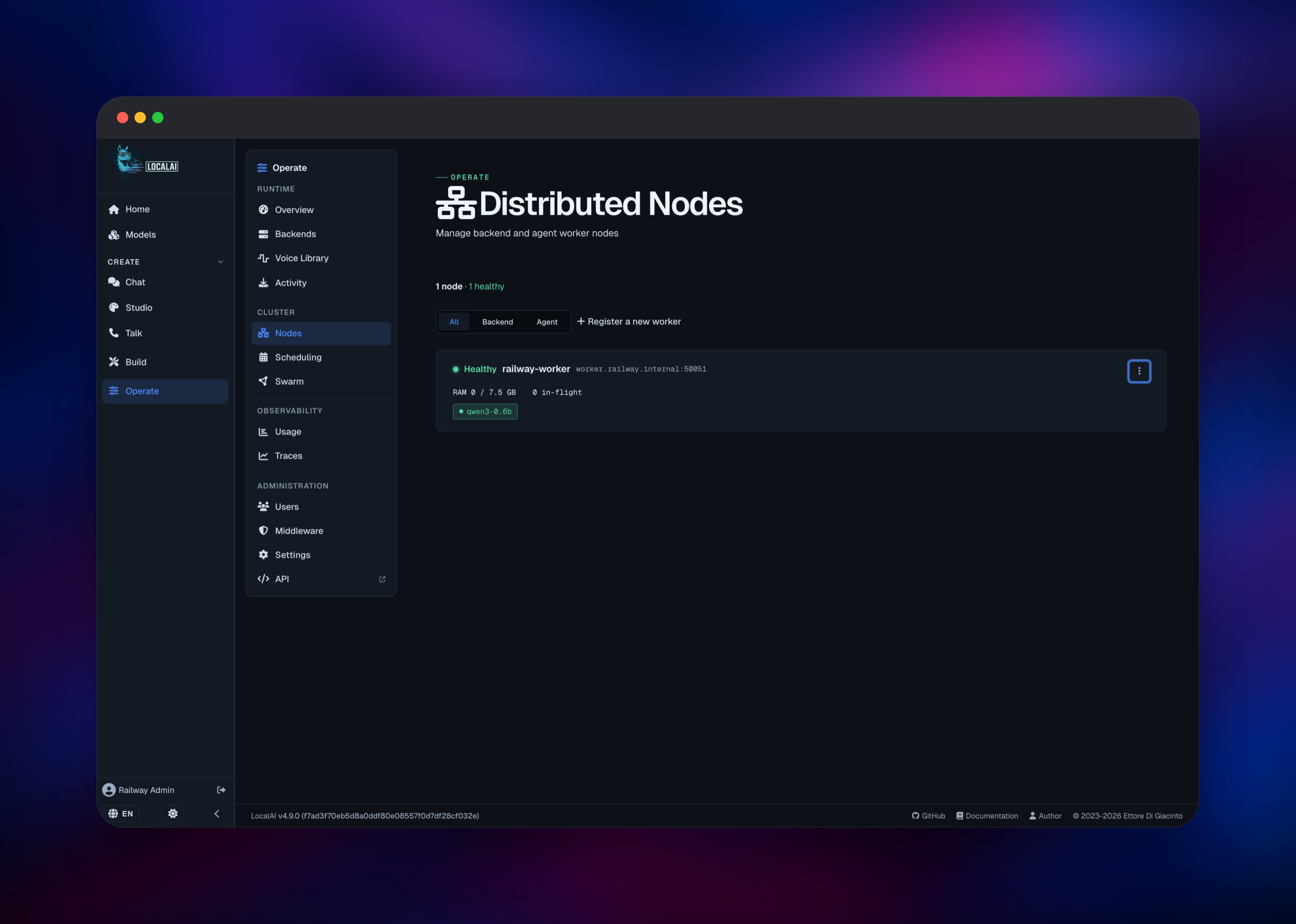
The first chat request then takes longer than later ones: the image ships no inference engine, so the router installs one on the worker, copies the model files across and loads the weights. Watch Operate → Distributed Nodes while that happens — the worker should show Healthy with the model listed underneath. Then open Chat and check the tokens-per-second counter under the reply. To call it from code, generate a key under Operate → Users, or use the template's LOCALAI_API_KEY, and point any OpenAI client at https://your-domain.up.railway.app/v1.
About Hosting LocalAI
LocalAI wraps inference engines — llama.cpp, vLLM, diffusers, whisper.cpp and others — behind one HTTP surface and one model catalogue. Nothing is compiled in: engines are pulled as backends only when a model needs them, which is why the base image is a few hundred megabytes.
Key features:
- OpenAI-, Anthropic- and Ollama-compatible endpoints, with streaming, function calling and structured output
- A 1,300-model gallery plus installs from Hugging Face, Ollama or any OCI registry
- Text, embeddings, reranking, transcription, speech synthesis and image generation from one server
- A web interface with chat, a model manager, agents, usage stats and tracing
- Scale-out through worker nodes with idle-first scheduling and LRU eviction
The frontend never runs a model itself. It stores state in PostgreSQL, publishes backend-install and file-staging events over NATS, and forwards each call to whichever worker holds the model — or to an idle one, which stages the files over HTTP.
Why Deploy LocalAI on Railway
Railway removes the infrastructure work self-hosting an inference stack usually involves.
- PostgreSQL, NATS, the API frontend and a worker node deploy together, already wired
- Private networking keeps the worker, bus and database off the public internet
- Volumes retain downloaded models and engines across redeploys
- Add worker services to scale inference without touching the frontend
- Usage-based billing, so an idle deployment costs little
Common Use Cases for Self-Hosted LocalAI
- An internal chat assistant over documents that cannot be sent to a third-party API
- Embeddings for a retrieval pipeline at fixed cost instead of per-token pricing
- An offline or air-gapped inference option for an existing OpenAI application
- Batch transcription or summarisation where throughput beats latency
Dependencies for LocalAI
localai/localai:latest— the API frontend and web interface: SmartRouter, model catalogue, auth and the OpenAI-compatible endpoints on port 8080.localai/localai:latest(worker role) — the same image started with theworkersubcommand. Installs backends on demand, one process per loaded model.nats:2-alpine— the control-plane bus for backend-install and file-staging events. Core publish/subscribe only, so it needs no persistence.- PostgreSQL — accounts, sessions, API keys, the worker registry, model-load jobs and agent state. Distributed mode requires it; SQLite is rejected.
Environment Variables Reference
| Variable | Service | Purpose |
|---|---|---|
LOCALAI_API_KEY | localai | Bearer token for API clients |
LOCALAI_AUTH_DATABASE_URL | localai | PostgreSQL for auth and cluster state |
LOCALAI_REGISTRATION_MODE | localai | approval, invite or open signups |
LOCALAI_ADMIN_EMAIL | localai | Address auto-promoted to administrator |
LOCALAI_REGISTRATION_TOKEN | both | Token a worker presents to join |
LOCALAI_THREADS | both | CPU threads per inference process |
LOCALAI_CONTEXT_SIZE | both | Default context window |
LOCALAI_ADVERTISE_ADDR | worker | Private address the frontend dials |
LOCALAI_WATCHDOG_IDLE_TIMEOUT | localai | How long an idle model stays loaded |
Deployment Dependencies
- Source: github.com/mudler/LocalAI
- Images: hub.docker.com/r/localai/localai
- Docs: localai.io
Hardware Requirements for Self-Hosting LocalAI
Sizing is driven by the model, not by LocalAI. A quantised 0.5–1B model runs comfortably in the defaults below; a 7B model at 4-bit needs about 6 GB of memory on the worker and similar disk on both services.
| Resource | Minimum | Recommended |
|---|---|---|
| CPU | 2 vCPU per service | 8 vCPU on the worker |
| RAM | 2 GB frontend, 4 GB worker | 4 GB frontend, 8–16 GB worker |
| Storage | 5 GB volume per service | 20 GB+ for multiple or larger models |
| Runtime | Linux container, x86-64 AVX2 | AVX-512 or a GPU-enabled image |
Self-Hosting LocalAI with Docker
The quickest way to try LocalAI outside Railway is one container:
docker run -p 8080:8080 --name local-ai \
  -v localai-models:/models \
  -v localai-backends:/backends \
  localai/localai:latest
Any OpenAI client then works against it. The following is a plain HTTP request to the chat endpoint:
curl http://localhost:8080/v1/chat/completions \
  -H "Content-Type: application/json" \
  -H "Authorization: Bearer $LOCALAI_API_KEY" \
  -d '{"model":"qwen3-0.6b","messages":[{"role":"user","content":"Hello"}]}'
Distributed mode adds PostgreSQL and NATS and starts nodes with local-ai worker --register-to --nats-url . The project ships a docker-compose.distributed.yaml mirroring it.
Is LocalAI Free to Self-Host?
LocalAI is open source under the MIT licence, with no paid tier, seat limits or feature gates — every backend and endpoint is in the free build. There is no vendor account to create and no key to buy, so the only cost is the compute you run it on. On Railway you pay for the four services and their volumes.
FAQ
What is LocalAI? An open-source inference server exposing OpenAI-compatible APIs for open-weight models on your own hardware. It handles chat, embeddings, reranking, transcription, speech and image generation from one endpoint, with no external API calls.
What does this Railway template deploy? Four services: a public LocalAI API and web interface, a private worker node that runs the models, a NATS bus for control-plane events, and managed PostgreSQL. The frontend and worker each get a volume.
Why does this template need PostgreSQL and NATS? Distributed mode keeps accounts, API keys, the worker registry and model-load jobs in PostgreSQL so every frontend replica sees the same state, and will not start against SQLite. NATS delivers backend-install and file-staging events to workers in real time.
Why is the first request to a new model so slow? The image ships no inference engine. The first time you request a model, the router installs the matching backend on a worker, transfers the files and loads the weights. Later requests reuse the loaded model and answer immediately.
How do I connect an existing OpenAI application to self-hosted LocalAI?
Set the base URL to https://your-domain.up.railway.app/v1 and the key to your LOCALAI_API_KEY, then use a model name from the Models page. Unauthenticated requests get a 401.
How do I add more inference capacity?
Duplicate the worker service, give it a unique LOCALAI_NODE_NAME plus LOCALAI_ADVERTISE_ADDR and LOCALAI_ADVERTISE_HTTP_ADDR for its private hostname, and keep the same registration token. It registers itself and the router schedules to it.
Template Content


