
Deploy MindsDB
Query engine that runs SQL and AI across all your data sources
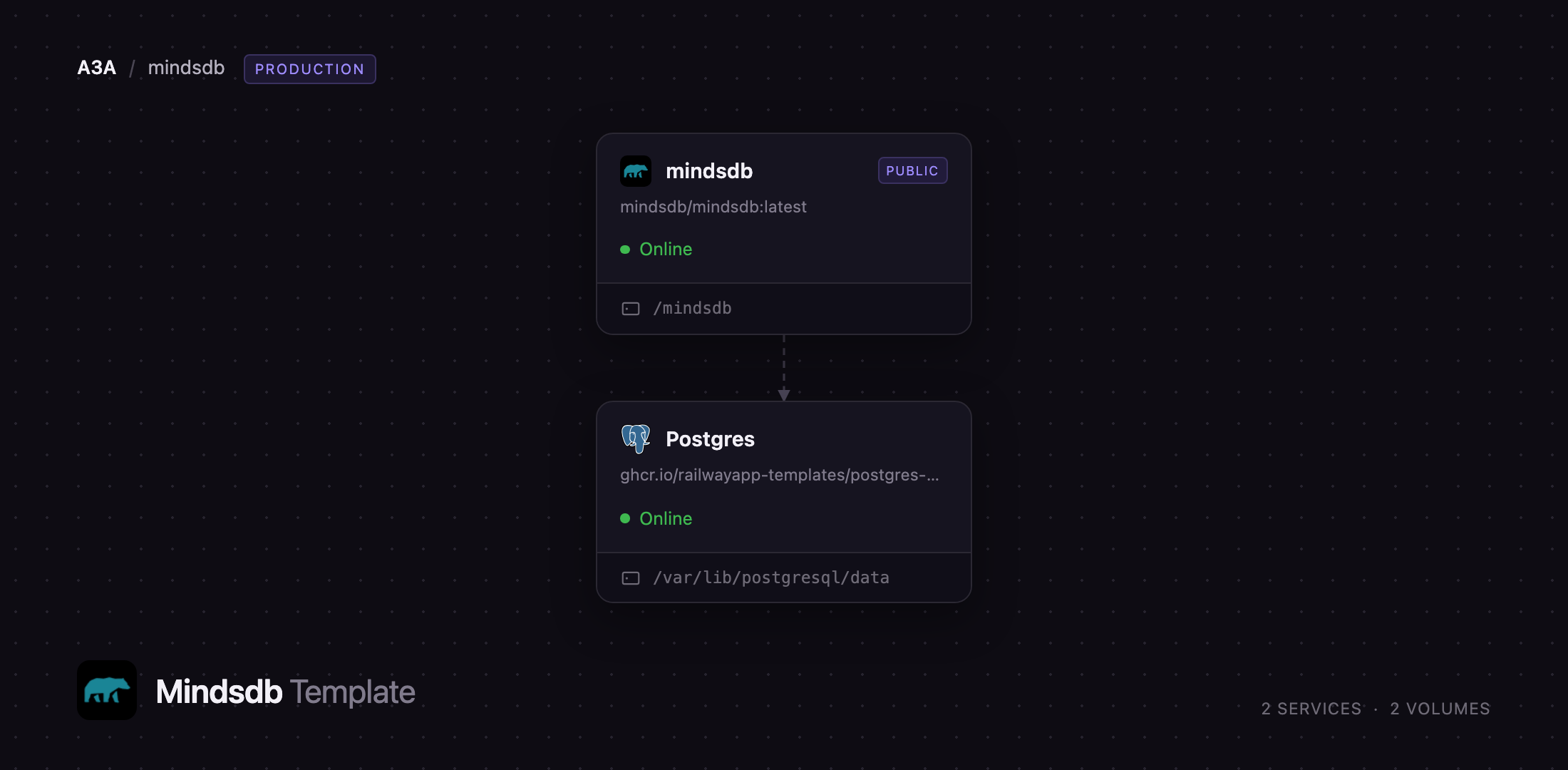
mindsdb
Just deployed
/mindsdb

Just deployed
/var/lib/postgresql/data
Deploy and Host MindsDB on Railway
MindsDB is an open-source AI query engine that puts one SQL interface in front of every database, warehouse, SaaS application and file your team already uses. Rather than copying Postgres tables, Salesforce objects and S3 files into a warehouse, you connect each source once and query across all of them in one statement. It also turns those connections into something an LLM can use: knowledge bases give semantic search over text, agents answer questions in plain English, and a built-in MCP server exposes the whole thing to Claude, Cursor and other Model Context Protocol clients — which is how teams keep AI answers grounded in live data.
This template lets you deploy MindsDB on Railway with the storage it needs for real work. The mindsdb service runs the official mindsdb/mindsdb image and serves the Studio editor, the REST API and the MCP and A2A endpoints on one public domain. A Postgres service holds the catalogue — projects, datasources, jobs, agents and query history — and doubles as the pgvector store behind knowledge bases, so nothing important lives in a replaceable container. A volume keeps uploaded files and model artifacts, and a TCP proxy publishes the MySQL wire protocol so Tableau, Metabase or DBeaver can connect to it as a database.
Getting Started with MindsDB on Railway
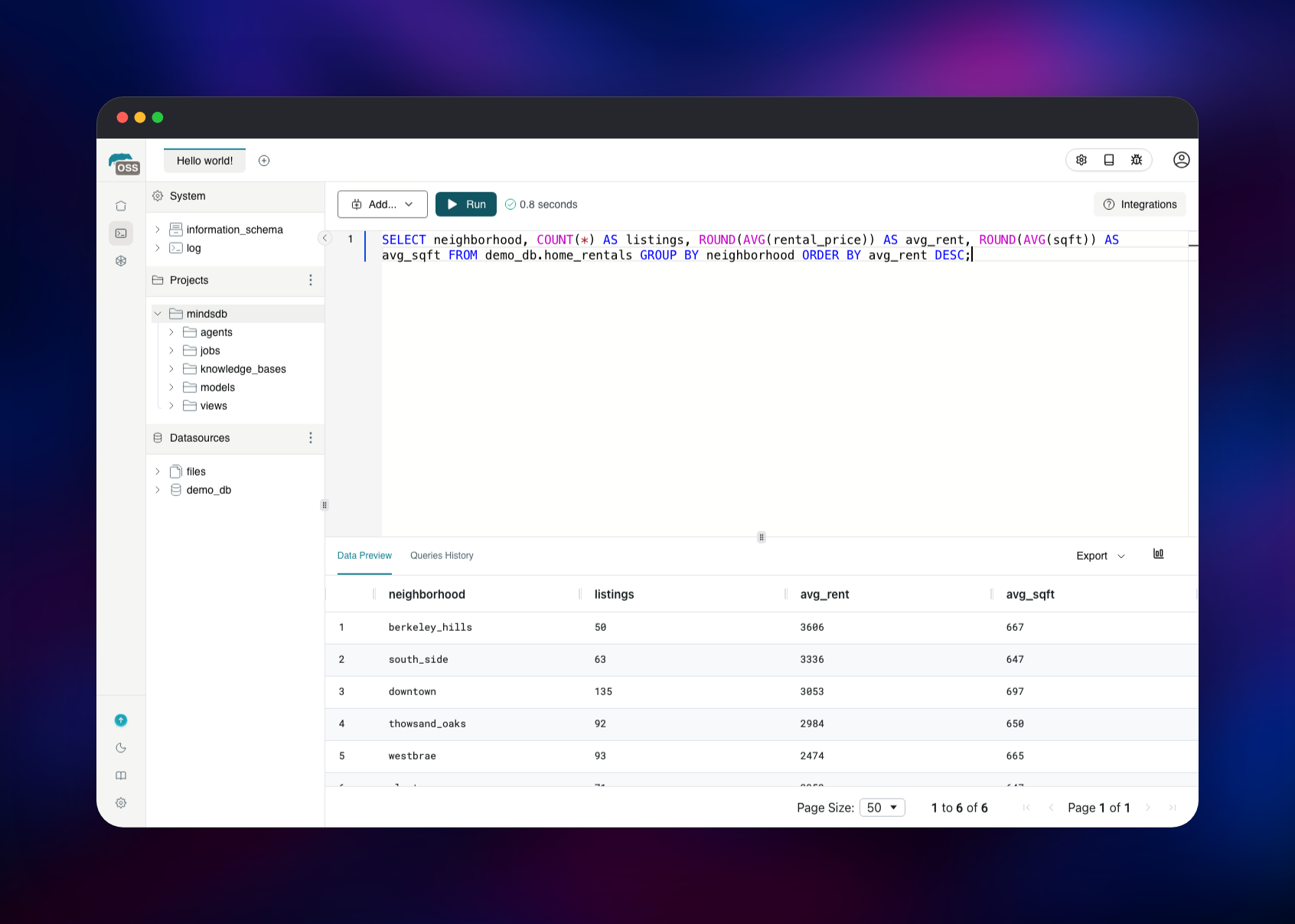
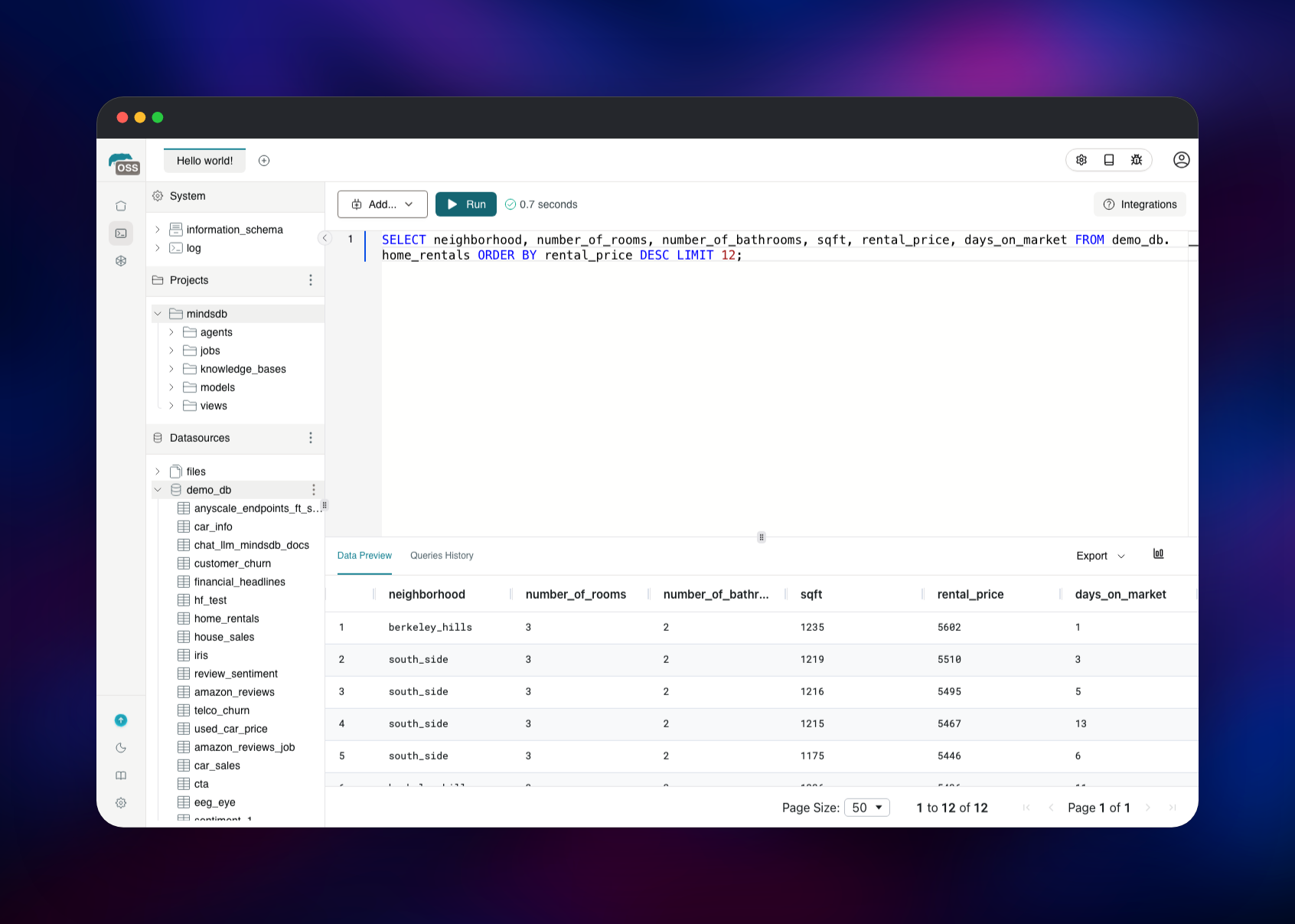
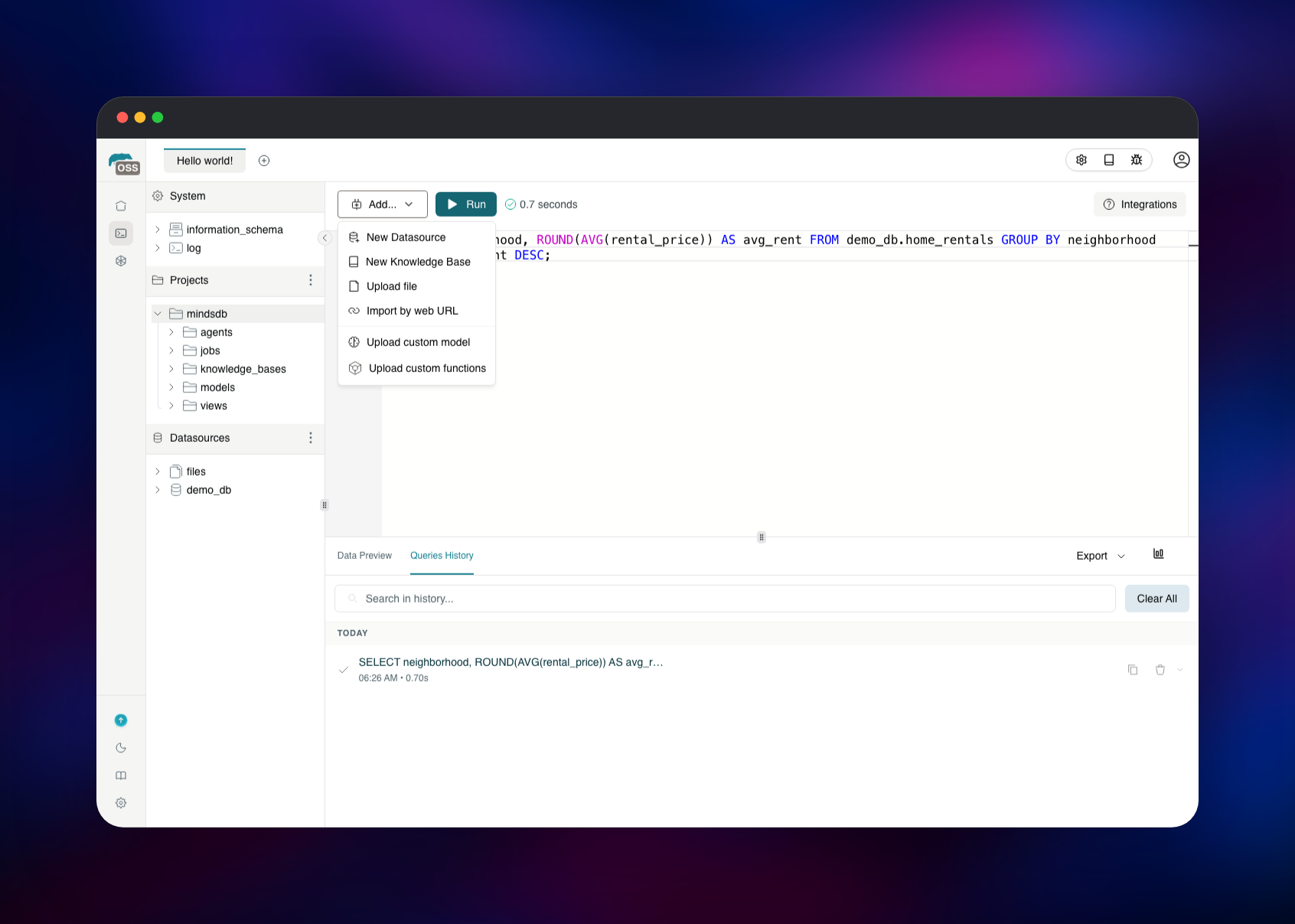
Set MINDSDB_USERNAME and MINDSDB_PASSWORD before you deploy — they are the only credentials MindsDB has, and they gate the Studio, REST API, MCP endpoint and MySQL port together. Open the public URL and sign in. On the first visit the Studio asks you to accept MindsDB's terms, then to choose between the Developer Experience and BI & Analytics layouts; the former gives you the SQL editor, where everything below happens. Connect a source with CREATE DATABASE and it appears in the Datasources tree with its tables underneath. Run a SELECT against one to confirm the connection — a result grid and timing badge appear below the editor, and the statement is kept in Queries History. Add... creates knowledge bases, uploads files or imports a dataset by URL. From an AI client, point at https://your-domain.up.railway.app/mcp/ with the same credentials; from a BI tool, use the MySQL proxy on the service's Settings page. Anything needing an LLM — agents, embeddings, charts — takes a key in MINDSDB_DEFAULT_LLM_API_KEY.
About Hosting MindsDB
MindsDB solves the problem of answers that are stale the moment they are computed: a federated engine reads from the source at query time, so a dashboard or an agent sees the row as it is now. Self-hosting matters more here than for most tools, because the credentials you give MindsDB are the credentials to your production databases.
Key capabilities:
- 200+ integrations — Postgres, MySQL, MongoDB, Snowflake, BigQuery, Salesforce, HubSpot, Slack, S3, Drive
- Federated SQL — join a warehouse table to a SaaS object in one statement, no ETL step
- Knowledge bases — chunk, embed and semantically search text, backed by pgvector
- Agents and jobs — plain-English questions over your data, plus scheduled queries
- MCP and A2A servers — expose data to Claude, Cursor and other agent clients
- MySQL wire protocol — existing BI and SQL tooling connects, no adapter
The two services split cleanly. mindsdb parses SQL, plans the federation and calls each source. Postgres is the durable half, holding the catalogue and the vector tables behind every knowledge base, so redeploying the app never loses your configuration.
Why Deploy MindsDB on Railway
Railway removes the setup work self-hosting an AI data layer usually involves:
- Postgres with pgvector is provisioned, wired and backed up for you
- Volume, health check and public domain are configured before first boot
- The MySQL wire protocol is published through a TCP proxy
- Private networking keeps the database off the public internet
- One click redeploys the whole stack on upgrade
Common Use Cases for Self-Hosted MindsDB
- Conversational analytics — let a team ask questions in plain English against live production data
- Grounded AI features — a knowledge base over tickets, docs or contracts so a chatbot cites real records
- Cross-system reporting — join CRM opportunities to warehouse revenue in one query, no nightly sync
- Agent tooling — give Claude or Cursor a governed MCP endpoint under a single credential
Dependencies for MindsDB on Railway
- mindsdb —
mindsdb/mindsdb:latest, serving HTTP on 47334 and the MySQL protocol on 47335 - Postgres — Railway's managed Postgres 18, the catalogue and the pgvector knowledge-base store
- Volume — mounted at
/mindsdb, holding uploaded files and model artifacts
The catalogue database is not optional: projects, datasources, agents, jobs and query history live there. The volume is separate — file uploads and custom models go to disk, not Postgres.
Environment Variables Reference
| Variable | Purpose |
|---|---|
MINDSDB_USERNAME | Username for Studio, REST, MCP and MySQL |
MINDSDB_PASSWORD | Password for all four surfaces; required |
MINDSDB_DB_CON | Catalogue database connection string |
KB_PGVECTOR_URL | pgvector store for knowledge bases |
MINDSDB_STORAGE_DIR | Data directory on the volume |
MINDSDB_DEFAULT_LLM_API_KEY | Provider key for agents and embeddings |
Deployment Dependencies
- Source repository: https://github.com/mindsdb/data-vault
- Docker image: https://hub.docker.com/r/mindsdb/mindsdb
- Documentation: https://docs.mindsdb.com
- Runtime: Python 3.10, with the
agents,kbandpgvectorextras built in
Hardware Requirements for Self-Hosting MindsDB
| Resource | Minimum | Recommended |
|---|---|---|
| CPU | 1 vCPU | 2–4 vCPU |
| RAM | 2 GB | 4–8 GB |
| Storage | 5 GB volume | 10 GB+ with heavy file uploads |
| Database | Postgres 14+ with pgvector | Managed Postgres 18 |
Federated queries execute in the MindsDB process, so memory scales with the result sets you pull, not the size of the source tables. Knowledge base ingestion is the heaviest workload.
Self-Hosting MindsDB with Docker
The published image runs standalone on SQLite, which is fine for a first look:
docker run -p 47334:47334 -p 47335:47335 mindsdb/mindsdb
For anything you keep, point it at Postgres and enable authentication. This docker-compose.yml is equivalent to what the template deploys:
services:
  mindsdb:
    image: mindsdb/mindsdb:latest
    ports: ["47334:47334", "47335:47335"]
    environment:
      MINDSDB_DB_CON: postgresql://postgres:pass@db:5432/mindsdb
      KB_PGVECTOR_URL: postgresql://postgres:pass@db:5432/mindsdb
      MINDSDB_STORAGE_DIR: /mindsdb/var
      MINDSDB_USERNAME: mindsdb
      MINDSDB_PASSWORD: change-me
    volumes: ["mindsdb:/mindsdb"]
  db:
    image: pgvector/pgvector:pg17
    environment: { POSTGRES_PASSWORD: pass, POSTGRES_DB: mindsdb }
volumes: { mindsdb: {} }
MindsDB creates the vector extension itself the first time a knowledge base is written, so the database needs no preparation.
How Much Does MindsDB Cost to Self-Host?
The MindsDB query engine is free and open source under the Elastic License 2.0, which permits self-hosting for your own use. There is no seat count, no query cap and no feature gate on the integrations, so running it on Railway costs infrastructure only — the app container, Postgres and the volume.
FAQ
What is MindsDB?
MindsDB is an open-source AI query engine. It connects to databases, warehouses, SaaS applications and files, queries all of them with SQL, builds semantic knowledge bases over unstructured text, and exposes the result to AI agents over MCP.
What does this Railway template deploy?
Two services: MindsDB on a public domain and a managed Postgres instance. MindsDB gets a volume, a health check and a TCP proxy for its MySQL wire protocol.
Why does the template include a Postgres database?
MindsDB defaults to a SQLite file for its catalogue, which is fragile in a container replaced on every deploy. Postgres keeps projects, datasources, agents and jobs durable, and also backs pgvector knowledge bases.
How do I connect a data source to self-hosted MindsDB?
Run a CREATE DATABASE statement in the SQL editor with the engine name and connection parameters — for example CREATE DATABASE crm WITH ENGINE = "postgres", PARAMETERS = {"host": "...", "user": "...", "password": "..."}. The source then appears in the Datasources tree and its tables are queryable.
Do I need an OpenAI or Anthropic key to use MindsDB?
Not for federated SQL, which works with no LLM at all. Agents, knowledge base embeddings and the chart generator need a provider key; set MINDSDB_DEFAULT_LLM_API_KEY or pass credentials in the statement that creates the model.
How do I use MindsDB as an MCP server?
The MCP endpoint is served at /mcp/ on the same public domain as the Studio. Point your client there and authenticate with MINDSDB_USERNAME and MINDSDB_PASSWORD; it can then list datasources and run queries as tools.
Template Content


