
Deploy Nextcloud — Self-Hosted Google Drive Alternative
Self-host Nextcloud: files, calendars, contacts & Office. No per-seat fees.

Just deployed
/var/lib/postgresql/data
Nextcloud
Just deployed
/var/www/html
Bucket
Bucket
Just deployed
Deploy and Host Nextcloud on Railway
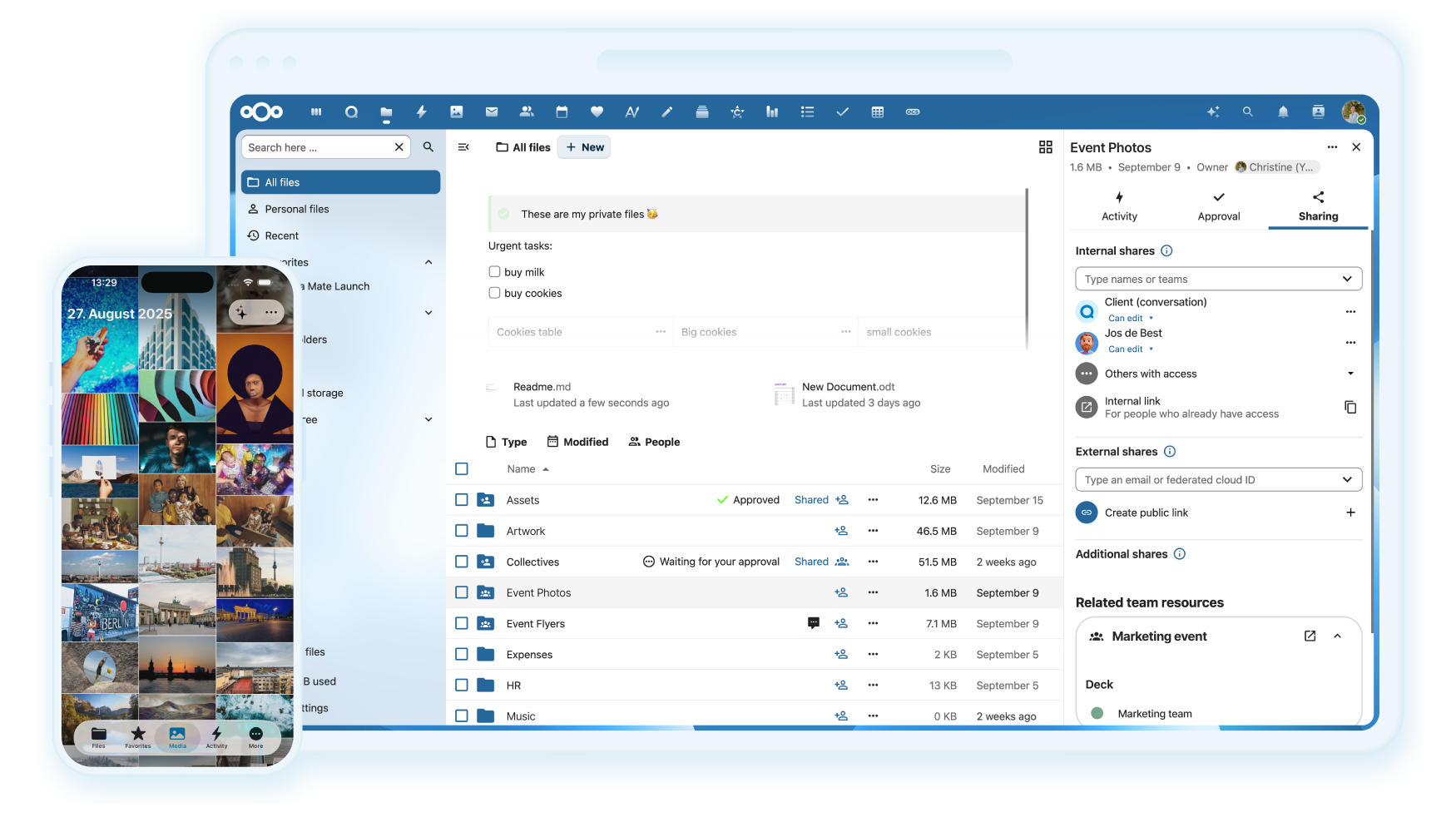
Nextcloud is the leading open-source content-collaboration platform — a self-hosted alternative
to Google Drive, Dropbox, and Microsoft 365. File sync and sharing, calendars, contacts, Talk
video calls, and collaborative Office editing, all under your control with no third-party cloud
holding your data. This template deploys the official nextcloud:apache image with a managed
PostgreSQL database and Redis for file locking and session caching, pre-wired over Railway's
private network.
Google Workspace and Dropbox Business bill per user every month. Nextcloud self-hosted has no per-seat license — you pay flat Railway compute and own your files, calendars, and contacts. Best fit for teams with data-sovereignty needs or a growing per-seat bill.
What This Template Deploys
| Service | Purpose |
|---|---|
| Nextcloud (Apache + PHP) | The core platform — files, calendars, contacts, apps, and admin, on port 80 |
| PostgreSQL 16 | Stores users, file metadata, shares, and app config |
| Redis | Distributed file locking and PHP session cache — without it, concurrent file access can corrupt data |
All three services connect over Railway's private network with secrets auto-generated on deploy. Only Nextcloud is exposed publicly. Redis is not optional — it prevents file corruption under concurrent access, so this template includes it by default.
About Hosting Nextcloud
Nextcloud is a full content-collaboration suite, and running it in production means coordinating the app server, a database, Redis for locking, file storage, and a public HTTPS endpoint. Self-managing on a VPS means provisioning Postgres and Redis separately, wiring them together, generating secrets, and maintaining SSL. This template does that wiring on Railway automatically.
Sizing reality — read before deploying: Nextcloud is resource-heavy. For 10–50 users, 2 GB RAM / 2 vCPUs is the practical minimum, 4 GB recommended. Budget accordingly — this is a heavier, higher-cost deployment than a single-service app. Files live on the volume; for large sets, use external S3-compatible object storage rather than growing the volume.
Typical cost: ~$20–40/month on Railway depending on RAM and storage. Google Workspace is ~$6/user/month and Dropbox Business ~$12/user/month — Nextcloud pays off with enough seats, a data-sovereignty need, or a desire to own your file layer.
Deploy in Under 5 Minutes
- Click Deploy on Railway — Nextcloud, PostgreSQL, and Redis build automatically (~4–5 min)
- Database and Redis are wired automatically; secrets are auto-generated
- Set
NEXTCLOUD_ADMIN_USERandNEXTCLOUD_ADMIN_PASSWORDin the Variables tab - Open your Railway URL, sign in, and check Settings → Administration → Overview for all-green
- Install apps (Calendar, Contacts, Talk, Office) from the App Store and add users
No reverse proxy setup. No manual Postgres/Redis wiring. No SSL config.
Common Use Cases
- Self-hosted alternative to Google Drive and Dropbox — file sync, sharing, and versioning on infrastructure you own, with no per-seat monthly bill
- Data-sovereignty and GDPR compliance — keep client data, healthcare records, or legal material on a server in a jurisdiction you control, a hard requirement Google Workspace can't meet
- Calendar and contact sync (CalDAV/CardDAV) — self-hosted calendars and contacts that sync across all devices without handing your schedule to a third party
- Team file collaboration with Office — edit documents together in the browser with Nextcloud Office (Collabora) and keep the files on your own storage
- Private video calls with Talk — self-hosted, end-to-end encrypted video and chat as an alternative to Zoom or Google Meet for sensitive conversations
- File layer for a self-hosted stack — slot Nextcloud in alongside your own SSO, mail, and task tools as the shared file and calendar backbone
Configuration
| Variable | Required | Description |
|---|---|---|
NEXTCLOUD_ADMIN_USER | ✅ Required | Initial admin username |
NEXTCLOUD_ADMIN_PASSWORD | ✅ Required | Initial admin password — set a strong value before deploying |
POSTGRES_HOST / POSTGRES_DB / POSTGRES_USER / POSTGRES_PASSWORD | ✅ Auto-injected | PostgreSQL connection via Railway reference variables |
REDIS_HOST | ✅ Auto-injected | Redis host for file locking and session cache |
NEXTCLOUD_TRUSTED_DOMAINS | ✅ Required | Set to your Railway public domain, or Nextcloud rejects requests |
OBJECTSTORE_S3_* | Optional | Configure external S3 object storage for scalable file storage |
PORT | Pre-set | 80 — Nextcloud's default |
Set
NEXTCLOUD_TRUSTED_DOMAINSto your Railway domain — Nextcloud refuses connections from untrusted hosts, and a missing value causes an "untrusted domain" error on first load. For large file sets, configureOBJECTSTORE_S3_*for external storage rather than growing the volume.
Nextcloud vs. Alternatives
| Nextcloud (Railway) | Google Workspace | Dropbox Business | FileBrowser (lightweight) | |
|---|---|---|---|---|
| Monthly cost | ~$20–40 flat | $6/user | $12/user | ~$5 flat |
| Per-seat fees | ✅ None | ❌ Yes | ❌ Yes | ✅ None |
| Self-hosted / own data | ✅ Yes | ❌ Google cloud | ❌ Dropbox cloud | ✅ Yes |
| Calendars + contacts | ✅ CalDAV/CardDAV | ✅ Yes | ❌ No | ❌ No |
| Office + video (Talk) | ✅ Built-in apps | ✅ Yes | ⚠️ Add-ons | ❌ No |
| Resource footprint | ❌ Heavy (2–4 GB) | N/A | N/A | ✅ Tiny |
| Best for | Teams, compliance | Small teams | Small teams | Simple file access |
| Open source | ✅ AGPL | ❌ No | ❌ No | ✅ Apache-2.0 |
Dependencies for Nextcloud Hosting
- Railway account — allocate 2–4 GB RAM (~$20–40/month) plus storage for user files
- Sufficient volume or external S3-compatible object storage for your file working set
- Optional: an SMTP relay (Resend/Brevo) for email notifications and share links
Deployment Dependencies
- Nextcloud Docker Image — the official
nextcloud:apacheimage - Nextcloud Documentation — administration and app guides
- Railway Storage Buckets — S3-compatible file storage
Implementation Details
This template runs nextcloud:apache with PostgreSQL 16 (users, metadata, shares) and Redis
(file locking, sessions, caching) over Railway's private network. Redis is essential — without it,
concurrent file access can corrupt data — so it's wired in by default. Only Nextcloud is public.
Set NEXTCLOUD_TRUSTED_DOMAINS to your Railway domain to avoid the untrusted-domain error. Files
are stored on the volume by default; for large sets, configure OBJECTSTORE_S3_* for S3 object
storage, which scales better than a growing volume. Size RAM to your user count (2 GB min, 4 GB).
Frequently Asked Questions
How much does Nextcloud cost to run on Railway versus Google Workspace? Roughly $20–40/month flat on Railway depending on RAM and storage, versus $6/user/month for Google Workspace or $12/user/month for Dropbox Business. Nextcloud pays off once you have enough seats, a data-sovereignty requirement, or want to own your file layer — for a handful of users who just need a shared drive, a managed service is often simpler and cheaper.
Why does it need Redis? Redis handles distributed file locking and PHP session caching. Without it, concurrent file access by multiple users can corrupt files. This template includes Redis by default so your instance is safe under real multi-user load from the start.
How much RAM do I actually need? For a small team of 10–50 users, 2 GB RAM and 2 vCPUs is the practical minimum, with 4 GB recommended for comfortable performance. Nextcloud is a full collaboration suite, so it's heavier than a single-purpose app — size Railway's memory to your user count and scale up as you grow.
Where are my files stored, and do they survive redeploys?
User files are stored on the attached Railway volume by default, and metadata in PostgreSQL — both
persist across redeploys. For large file sets, configure external S3-compatible object storage
(OBJECTSTORE_S3_*) so storage scales independently of the container.
Can I add calendars, contacts, and video calls? Yes. Install Calendar and Contacts (CalDAV/CardDAV) for device sync, Talk for encrypted video calls, and Nextcloud Office (Collabora) for collaborative editing — all free from the App Store after deploy.
I get an "untrusted domain" error — how do I fix it?
Set NEXTCLOUD_TRUSTED_DOMAINS to your Railway public domain. Nextcloud rejects requests from hosts
not in its trusted list as a security measure, so it must include the exact domain you access it from.
Is Nextcloud right for a small team? It depends. With data-sovereignty needs, a growing per-seat bill, or a genuine want for self-hosted collaboration, yes. If a five-person team just wants "a shared drive that works," Google Workspace or Dropbox is often simpler and cheaper — Nextcloud's strength is control and features, not being the lightest option.
Why Deploy and Host Nextcloud on Railway?
Railway is a singular platform to deploy your infrastructure stack. Railway will host your infrastructure so you don't have to deal with configuration, while allowing you to vertically and horizontally scale it.
By deploying Nextcloud on Railway, you get a self-hosted Google Drive alternative — file sync, calendars, contacts, Office, and Talk — backed by PostgreSQL and Redis with no per-seat fees and full ownership of your data, on managed infrastructure that handles the networking and secrets for you.
Template Content
Nextcloud
nextcloudNEXTCLOUD_ADMIN_USER
Username for the initial Nextcloud admin account
NEXTCLOUD_ADMIN_PASSWORD
Password for the initial Nextcloud admin account
Bucket
Bucket


