
Deploy Obsidian LiveSync CouchDB
Sync Obsidian notes across devices with your own CouchDB server.
Just deployed
/opt/couchdb/data
Deploy and Host Obsidian LiveSync on Railway
Self-hosted LiveSync is the most popular community sync plugin for Obsidian, with 12,000+ GitHub stars. It keeps your vault in sync across desktop and mobile in near real time, with optional end-to-end encryption. It needs a CouchDB server, and this template gives you one on Railway, already configured for the plugin, with HTTPS and your notes on a persistent volume. Official Obsidian Sync costs $4–5/month per user. Your own LiveSync server costs about $2–4/month, and your notes never leave infrastructure you control.
What This Template Deploys
| Service | Purpose |
|---|---|
| couchdb | Apache CouchDB 3.5 on port 5984 with a public HTTPS domain, preconfigured to pass LiveSync's server checks. |
| Vault database | obsidiannotes, created automatically on first boot and ready for the plugin to use. |
| Persistent Volume | Mounted at /opt/couchdb/data. Every note, attachment and revision survives redeploys. |
It's one service running the official CouchDB image. A small wrapper renders CouchDB's config from environment variables, creates the database once CouchDB is up, and runs a health check that only passes when an authenticated request to CouchDB succeeds.
About Hosting Obsidian LiveSync
LiveSync doesn't use a normal file server. It talks to CouchDB, which needs a specific configuration: every request authenticated, CORS opened for the Obsidian desktop and mobile apps, large request and document limits for attachments, and the right auth challenge header. Upstream ships this as a config file plus a helper container that runs after CouchDB starts. Neither works on most PaaS hosts, which is where most self-hosting attempts get stuck.
This template does all of that at boot. On Railway you get automatic HTTPS (which Obsidian mobile requires), a generated admin password, and a database that's ready for the plugin's setup wizard. The CPU scheduler is pinned to the container's real quota, so CouchDB doesn't over-allocate threads on shared hardware.
Change settings through Railway variables, not Fauxton. Config edits made in CouchDB's Fauxton UI live inside the container and are lost when it's recreated. Set the matching Railway variable instead; it's re-applied on every deploy.
Typical cost: ~$2–4/month on Railway for a personal vault. Obsidian Sync is $4/month billed yearly or $5 monthly per user. Railway also lets you share one server between several vaults or family members, each with its own database.
Deploy Obsidian LiveSync in Under 5 Minutes
- Click Deploy on Railway. CouchDB starts and creates the
obsidiannotesdatabase (about 1–2 minutes). - Copy
COUCHDB_USERandCOUCHDB_PASSWORDfrom the service's Variables tab, and note your Railway URL. - In Obsidian, install the Self-hosted LiveSync community plugin.
- In the plugin's setup, enter the server URL (
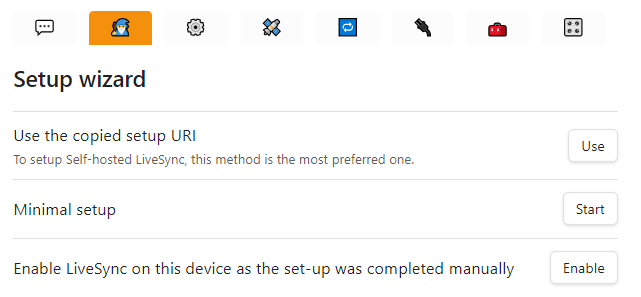
https://your-app.up.railway.app), username, password and databaseobsidiannotes, then run Check server requirements. Everything should pass. - Set an end-to-end encryption passphrase, sync, then repeat on your phone and other computers, or share a Setup URI from the first device.
No CouchDB config files. No helper containers. No monthly sync subscription.
Common Use Cases
- Obsidian Sync alternative. Real-time sync between desktop and mobile for the cost of a small server.
- iPhone and Android sync without iCloud. One sync method that works on every platform.
- Encrypted notes. Turn on end-to-end encryption so the server only stores ciphertext.
- Several vaults on one server. Give each vault its own database on the same CouchDB.
- Family or team vaults. Share a vault with people you trust, each device syncing in real time.
- Version history. CouchDB keeps revisions, and the plugin can restore older versions of a note.
- Sync for large vaults. Attachments and big notes work thanks to the raised size limits.
Configuration
| Variable | Required | Description |
|---|---|---|
COUCHDB_USER | ✅ Set | admin. The username Obsidian uses to connect. |
COUCHDB_PASSWORD | 🔐 Auto-generated | Admin password, also entered in the LiveSync plugin. |
COUCHDB_SECRET | 🔐 Auto-generated | Signs session cookies. Keep it stable, or sessions are invalidated on redeploy. |
COUCHDB_DATABASE | ✅ Set | obsidiannotes, the vault database created at boot. |
COUCHDB_CORS_ORIGINS | ✅ Set | app://obsidian.md, capacitor://localhost and http://localhost: the Obsidian desktop and mobile apps. |
PORT | ✅ Set | 8080, used only by the internal health check. Never give it a public domain. |
The wrapper also supports COUCHDB_LOG_LEVEL (warning by default; debug for troubleshooting), COUCHDB_MAX_DOCUMENT_SIZE (50 MB), COUCHDB_MAX_HTTP_REQUEST_SIZE (4 GB) and COUCHDB_CLUSTER_Q (shards for new databases). Add them as variables if you need to change them.
Moving from Obsidian Sync or iCloud? Pick one device with the complete, up-to-date vault, turn off the old sync method there, and set up LiveSync on that device first so it uploads everything. Then set up the other devices from its Setup URI, starting each one as a fresh, empty vault. This avoids two sync systems fighting over the same files and creating duplicates.
Want a second vault? Create another database in Fauxton at /_utils (databases persist on the volume), then point the second vault's plugin at that database name.
Obsidian LiveSync on Railway vs. Alternatives
| LiveSync on Railway | Obsidian Sync | Syncthing | iCloud Drive | |
|---|---|---|---|---|
| Monthly cost | ~$2–4 usage | $4 yearly, $5 monthly | Free | Included with iCloud storage |
| Self-hosted | ✅ Yes | ❌ No | ✅ Peer-to-peer | ❌ No |
| Real-time sync | ✅ Yes | ✅ Yes | ⚠️ Both devices online | ⚠️ Delayed, can conflict |
| iOS and Android | ✅ Both | ✅ Both | ⚠️ No official iOS app | ❌ Apple only |
| End-to-end encryption | ✅ Optional passphrase | ✅ Yes | ✅ In transit | ⚠️ Advanced Data Protection |
| Always-on server copy | ✅ Yes | ✅ Yes | ❌ No | ✅ Yes |
| License | ✅ MIT plugin, Apache-2.0 CouchDB | ❌ Proprietary | ✅ MPL-2.0 | ❌ Proprietary |
Dependencies for Obsidian LiveSync Hosting
- Railway account. The Hobby plan ($5/month including $5 of usage) covers personal vaults.
- Obsidian on each device, with the Self-hosted LiveSync community plugin installed.
- Optional: a custom domain for a tidier server URL.
Deployment Dependencies
- Self-hosted LiveSync on GitHub: plugin source and setup guides
- Apache CouchDB Documentation: server reference
- Obsidian: the note-taking app
- Railway Volumes Documentation: persistence
Implementation Details
The official couchdb:3.5 image runs unchanged. At boot, the entrypoint writes CouchDB's ini from environment variables, starts CouchDB, waits until it answers, then sets up the single-node cluster and creates the vault database in the background. The Railway domain targets CouchDB's port 5984 directly. A separate tiny responder on PORT serves the health check, because CouchDB's own /_up route can't be used as a Railway health path.
All data is on the volume. For extra safety, keep a local copy of your vault too: LiveSync syncs everywhere, so it isn't a backup on its own.
Frequently Asked Questions
What is Obsidian LiveSync, and why self-host it? It's a community plugin that syncs your Obsidian vault in real time through a CouchDB server. Self-hosting replaces the Obsidian Sync subscription and keeps notes on your own server.
How much does it cost compared to Obsidian Sync? About $2–4/month on Railway for a personal vault. Obsidian Sync is $4/month per user billed yearly, or $5 monthly.
Why does "Check server requirements" fail in the plugin?
Check that the URL starts with https:// and has no trailing path, and that the username, password and database name match the Railway variables. This server already has the CORS and auth settings the plugin checks for.
Do I lose notes when Railway redeploys?
No. CouchDB data lives on the volume at /opt/couchdb/data, so redeploys and restarts keep every note and revision.
Does it work on iPhone and Android? Yes. The plugin works in Obsidian mobile, and the server allows the mobile app's origin. Set up the first device, then copy its Setup URI to the others.
Can the server read my notes? Not if you turn on end-to-end encryption with a passphrase in the plugin. CouchDB then only stores encrypted data. Keep the passphrase safe: without it, notes can't be recovered.
Why Deploy and Host Obsidian LiveSync on Railway?
Railway is a singular platform to deploy your infrastructure stack. Railway will host your infrastructure so you don't have to deal with configuration, while allowing you to vertically and horizontally scale it.
By deploying Obsidian LiveSync on Railway, you get your own real-time sync server for every device, preconfigured for the plugin and encrypted if you choose, for a couple of dollars a month.
Template Content


