
Deploy JupyterLab | Use Open Source Models in Notebooks Directly
[Jun '26] Host any LLM Model using Ollama & Use in Jupyter Notebooks
Jupyter
Just deployed
/home/jovyan/work

Ollama
Just deployed
/root/.ollama
Deploy and Host Ollama + Jupyter Lab | Run Local LLMs from Jupyter on Railway
Ollama + Jupyter Lab lets you run local large language models (LLMs) and interact with them directly from Jupyter notebooks. This template deploys Ollama as a model server and JupyterLab as a notebook environment, connected via private networking and backed by persistent storage.
⚡ Quick Usage Cheat Sheet (Important)
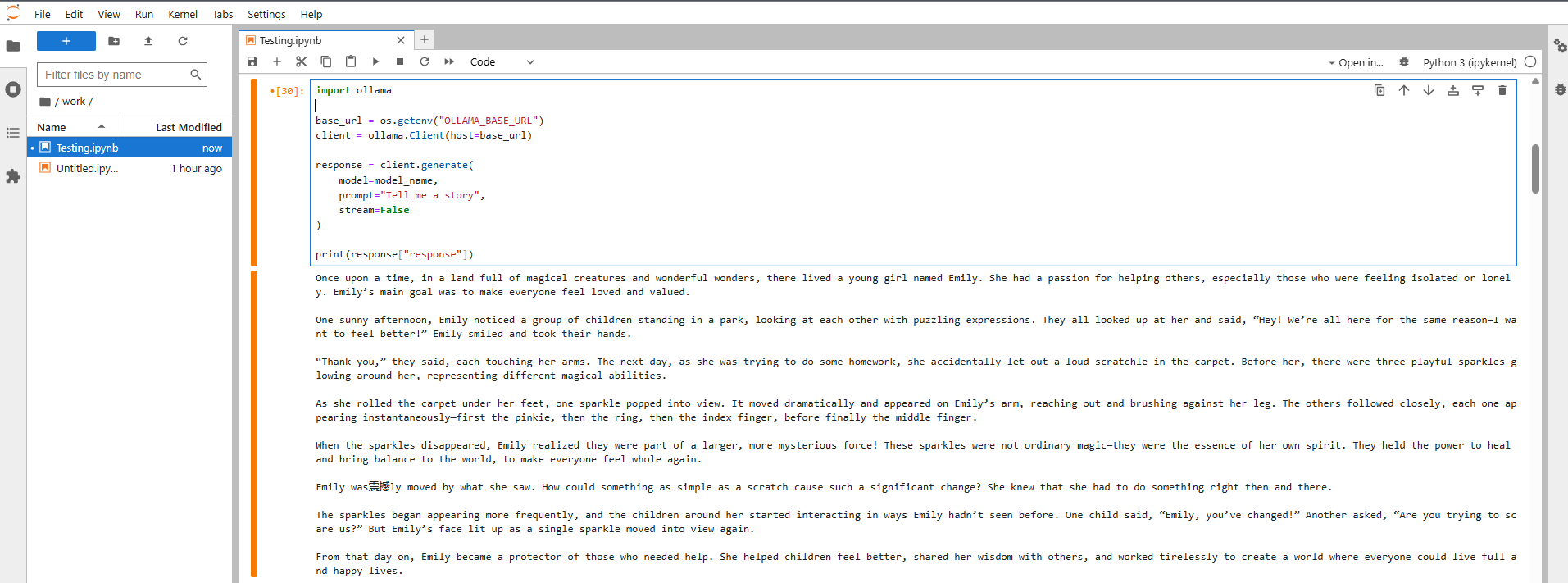
Your Ollama server talks to Jupyter through a private connection. Here's how to use it:
import os
base_url = os.getenv("OLLAMA_BASE_URL")
📋 See what models you have
# Using requests
requests.get(f"{base_url}/api/tags").json()

# Using ollama library
client = ollama.Client(host=base_url)
client.list()
⬇️ Download a new model
# Using requests
requests.post(f"{base_url}/api/pull", json={"name": "qwen2.5:0.5b"})

# Using ollama library
client.pull("qwen2.5:0.5b")
💬 Chat with your AI model
# Using requests
response = requests.post(
    f"{base_url}/api/generate",
    json={"model": "qwen2.5:0.5b", "prompt": "Hello", "stream": False}
).json()["response"]

# Using ollama library
response = client.generate(model="qwen2.5:0.5b", prompt="Hello", stream=False)["response"]
🗑️ Remove a model you don't need
# Using requests
requests.delete(f"{base_url}/api/delete", json={"name": "qwen2.5:0.5b"})

# Using ollama library
client.delete("qwen2.5:0.5b")
🎯 About Hosting Ollama + Jupyter Lab | Run Local LLMs from Jupyter
This setup gives you two connected services:
Ollama Server - Downloads and runs open-source AI models locally
JupyterLab - Your interactive coding environment for notebooks
They talk to each other through Railway's private network, so your AI models stay completely private. Everything is saved to persistent storage, meaning your notebooks and downloaded models stick around even when you redeploy.
Perfect for learning, experimenting, and building AI apps without relying on paid API services.
##💡 Common Use Cases
- 🧪 Test and compare different open-source AI models
- ✍️ Fine-tune your prompts and experiment with responses
- 🔒 Work with AI models completely offline and private
- 📊 Build AI prototypes and proof-of-concepts
- 🎓 Learn how language models work hands-on
- 🛠️ Develop AI applications without API costs
Dependencies for Ollama + Jupyter Lab | Run Local LLMs from Jupyter Hosting
- Railway for deployment and private networking
- Ollama for running local LLM models
- JupyterLab for interactive notebooks
- Python 3 with
requestsorollamalibrary
📚 Deployment Dependencies
- Ollama documentation: https://ollama.com
- Ollama model library: https://ollama.com/library
- JupyterLab: https://jupyter.org
🔍 Implementation Details
- Ollama pulls models on startup using the
OLLAMA_DEFAULT_MODELSenvironment variable. - Jupyter connects to Ollama using
OLLAMA_BASE_URL, injected automatically via Railway. - Models and notebooks are stored on separate persistent volumes to avoid data loss.
- All model inference happens inside the Ollama service; Jupyter only sends requests.
⚙️ Customize Your Setup
You can control everything through environment variables—no code changes needed.
Jupyter Settings
OLLAMA_BASE_URL 🔗
The private URL Jupyter uses to talk to Ollama. Keep this as-is for everything to work.
EXTRA_PIP_PACKAGES 📦
Add extra Python libraries you need (like pandas, langchain, or transformers). They'll install automatically at startup.
JUPYTER_PASSWORD 🔐
Protects your JupyterLab interface. Set this to something secure.
Ollama Settings
OLLAMA_DEFAULT_MODELS 🤖
List the AI models you want downloaded automatically when Ollama starts. Just separate them with commas:
deepseek-r1:1.5b,qwen2.5:0.5b,llama3:8b
This way you control which AI models are ready to use without running any commands or notebooks manually.
OLLAMA_ORIGINS ✅
Already configured to allow access from Jupyter.
❓ Common Questions
Do I need an API key from OpenAI or Anthropic?
Nope! Everything runs locally on your own infrastructure. No external API needed.
Will I lose my notebooks when I redeploy?
No way. Just save your work in the /work directory and it'll stick around through redeployments.
Do AI models re-download every time?
Nope. Once downloaded, they're stored permanently until you delete them.
Can I switch to different AI models later?
Absolutely. Download new ones from your notebook or update OLLAMA_DEFAULT_MODELS and redeploy.
Can I make Ollama publicly accessible?
By default it's private (more secure), but you can configure it for public access if needed. Reach out if you need help with this.
🆚 Ollama vs Other Options
🏠 Ollama (This Setup)
- Run AI models on your own infrastructure
- Super simple setup and model management
- No external dependencies or API costs
- Great for learning and development
☁️ Cloud AI APIs (OpenAI, Claude, etc.)
- No setup required
- Pay per use
- Your data goes to their servers
⚙️ Custom Model Servers (vLLM, TGI)
- Maximum control and performance
- Complex setup and maintenance
- Best for large production systems
Ollama hits the sweet spot for local AI development, learning, and controlled experiments—especially when paired with JupyterLab.
Why Deploy Ollama + Jupyter Lab | Run Local LLMs from Jupyter on Railway?
Railway is a singular platform to deploy your infrastructure stack. Railway will host your infrastructure so you don't have to deal with configuration, while allowing you to vertically and horizontally scale it.
By deploying Ollama + Jupyter Lab | Run Local LLMs from Jupyter on Railway, you are one step closer to supporting a complete full-stack application with minimal burden. Host your servers, databases, AI agents, and more on Railway.
Template Content
Jupyter
jupyter/all-spark-notebookOllama
ollama/ollama

