
Deploy OpenList
Deploy and Host OpenList on Railway — file manager with WebDAV
openlist
Just deployed
/opt/openlist/data

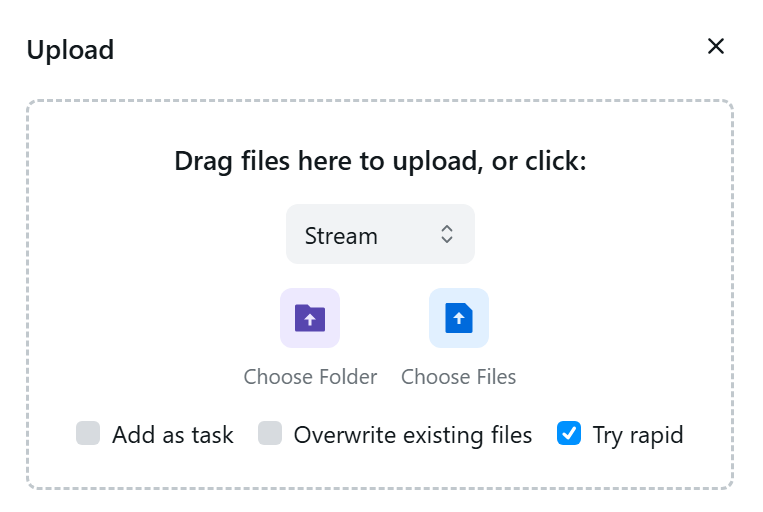
OpenList's upload dialog — upstream screenshot from the OpenList project documentation (OpenList-Docs, public/img/config/side/upload-modal-en.png), showing Stream upload, folder/file pickers, and task options. The live file-browser UI was verified rendering during end-to-end testing of this template's own deployment.
Deploy and Host
OpenList is a self-hosted file list and file manager: one web interface in front of local disk, S3 buckets, SFTP and SMB shares, WebDAV servers, and dozens of cloud drives. It is the community-run AGPL-3.0 fork of AList, actively developed after AList's mid-2025 sale. One-click deploy creates a single OpenList service with a persistent volume and no companion database: users, storages, and settings live in an embedded SQLite file on the volume. After deploy, sign in as admin with the generated password from your project's variables; the Files Local storage is pre-created on the volume, so the first upload works with no storage setup. The built-in guest account ships disabled, so anonymous visitors see nothing.
About Hosting
Hosting OpenList on Railway keeps your files on your own volume and your own storage accounts instead of a third-party file host. The deployment is a single always-on Go service: the wrapper maps Railway's injected PORT onto OpenList's HTTP port on every boot, runs as root so the root-owned Railway volume is writable (the stock image refuses to start otherwise — the reason both existing marketplace OpenList templates sit at 0% health), seeds the admin account exactly once per volume from the generated password, and pre-creates the Files storage. The only deploy-form field is the generated admin password.
Why Deploy
- Browse many backends from one UI: local disk, S3, SFTP, SMB, WebDAV, Google Drive, OneDrive, Dropbox, and dozens more, each mounted at a path you choose.
- WebDAV server at
/davwith the same login — mount your files in Finder, Explorer, or any WebDAV client. - Local files on the volume: upload straight into the pre-created
Filesstorage, no cloud account needed. - Previews in the browser for images, video, audio, and text, plus password-protected paths per folder.
- No database service to run: one always-on Go service with an embedded SQLite file on a persistent volume.
- Self-hosted data: your files stay on your Railway volume and your own storage accounts.
Common Use Cases
- A single front door for scattered storage: one bucket, one Drive account, and local files behind one login.
- Family or team file sharing over WebDAV without handing out cloud-drive credentials.
- A private upload drop on the volume for files you want off third-party hosts.
- Browse a cloud drive from a phone or a second machine through the web UI instead of vendor apps.
Dependencies for
- A single OpenList service (Go, embedded SQLite, no companion service).
- One persistent volume mounted at
/opt/openlist/data(config.json,data.db, and thefiles/local storage root). - Environment variables (condensed reference — full documentation in the repo README):
| Variable | Default | Description |
|---|---|---|
ADMIN_PASSWORD | generated | Password for the admin account; seeded exactly once per volume on first boot. |
PORT | Railway-injected | OpenList's HTTP port, mapped by the wrapper on every boot (upstream default 5244). |
| WebDAV | /dav | Built-in WebDAV server on the same port, same login. |
| S3 / FTP / SFTP servers | off | Upstream defaults; Railway's public edge is HTTP-only, so they stay off here. |
| Offline download | not included | Needs aria2, which the standard upstream image does not bundle. |
Deployment Dependencies
- Plan tier: works on Railway's entry tiers; a single always-on service with a persistent volume.
- RAM needs: light — one Go service, typically well under 256 MB at rest, no companion database or cache service.
Template Content
openlist
INAPP-Mobile/openlist

