
Deploy Paperclip (w/ CloudCLI)
Scheduled AI agent jobs with run history, plus Claude Code in any browser.
Paperclip

Paperclip
Just deployed
/paperclip

Just deployed
/var/lib/postgresql/data

CloudCLI
Just deployed
/home/node
Deploy and Host Paperclip (w/ CloudCLI) on Railway
Claude on a schedule, for any recurring task, with every run on record. Tell Claude in plain words what should happen and when: it writes the job's instructions into your git repo, schedules the job in Paperclip and tests it once. From then on Paperclip runs it on time and keeps every run, with its result, what Claude did and what it used. Claude Code in your browser comes with it, on your own Claude subscription.

About Hosting Paperclip (w/ CloudCLI)
Paperclip with a private Postgres, and CloudCLI with Claude Code, Codex, git and the GitHub CLI, behind one login. A setup page connects your Claude and GitHub accounts once, for both apps. Your own Claude account (Pro or Max) signs in through Claude Code's official sign-in, and the token stays on your server.
Predictable by design
Not an agent left to roam: every job is a schedule plus written instructions that Claude follows.
- Instructions you can read. Each job's instructions are a skill file in your git repo; every change is a commit you can review or revert.
- Nothing runs on its own. Only scheduled jobs run, one task per run: the agent does it, closes it and stops.
- Every run on record. Status, result, full transcript, model and tokens, in Paperclip.
- Stops instead of guessing. A run that can't finish, say for a missing login, marks its task blocked with the reason.
- Bounded. In the chat, Claude asks before anything beyond the jobs script, file edits and basic git and GitHub commands. In a run, the Runner is instructed to do what the job's skill says, nothing more.
- Yours. Your server, your login, your Claude account, your repo.
Not only for code
Git keeps the jobs' instructions and their history; it doesn't limit what jobs do. A job can be anything Claude Code can do from a server: summarize a web page or an API, check that your site answers, build a report from data files, draft a weekly update. A job that needs a service's key gets it from the Runner's Secrets & variables page in Paperclip.
User manual: from deploy to your first job
Screenshots from a fresh deploy, with a demo repo: a coffee shop's website with three open issues.
1. Deploy
1. Press Deploy Now.

2. On Paperclip, press Configure and type your email and a password (8 to 128 characters): your login for both apps, and the whole form. Press Save Config.

3. Press Deploy. The first start takes a few minutes.

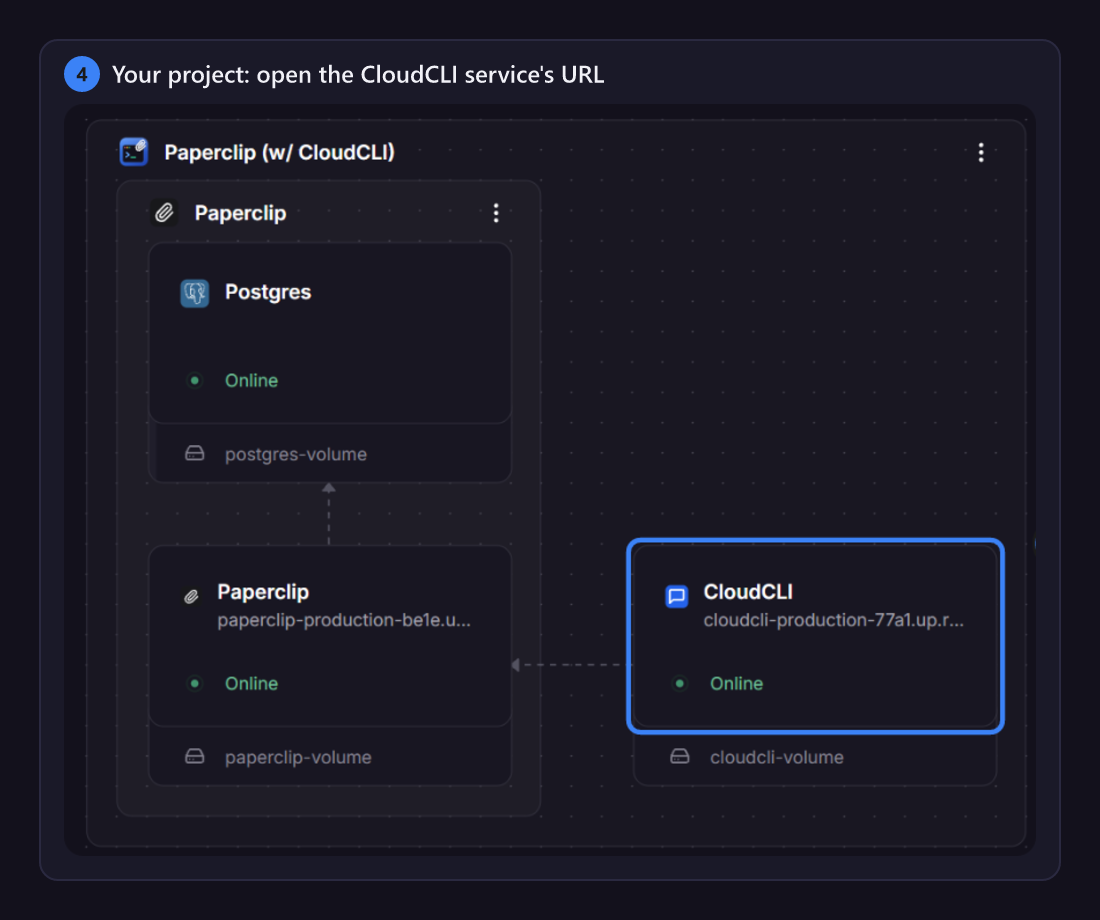
4. Once all three are online, open the CloudCLI service's URL.
2. Connect your accounts
CloudCLI opens its setup page until you finish it; redo any step later at /setup.
5. Sign in with the email and password from the deploy form.

6. Claude: press Start. The page runs Claude Code's own claude setup-token on your server and shows its link. Open it, sign in to Claude, approve, then paste the code it shows and press Submit.

7. Connected: CloudCLI and Paperclip's Runner both use it, with no redeploy.

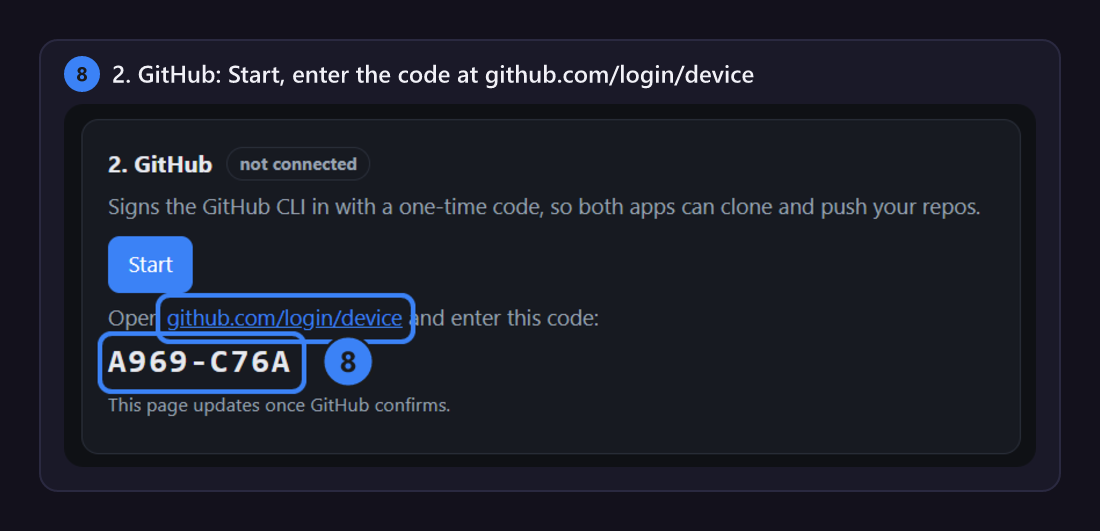
8. GitHub: press Start, enter the code at github.com/login/device and authorize. Both apps can then use your repos, private ones included.
9. Your repo: choose the one for your jobs and press Use this repo.

10. The repo is cloned for both apps, and the time zone comes from your browser. Press Finish and open CloudCLI at the bottom.

3. Ask Claude for a job
11. CloudCLI opens a chat in your repo. New Session starts another.
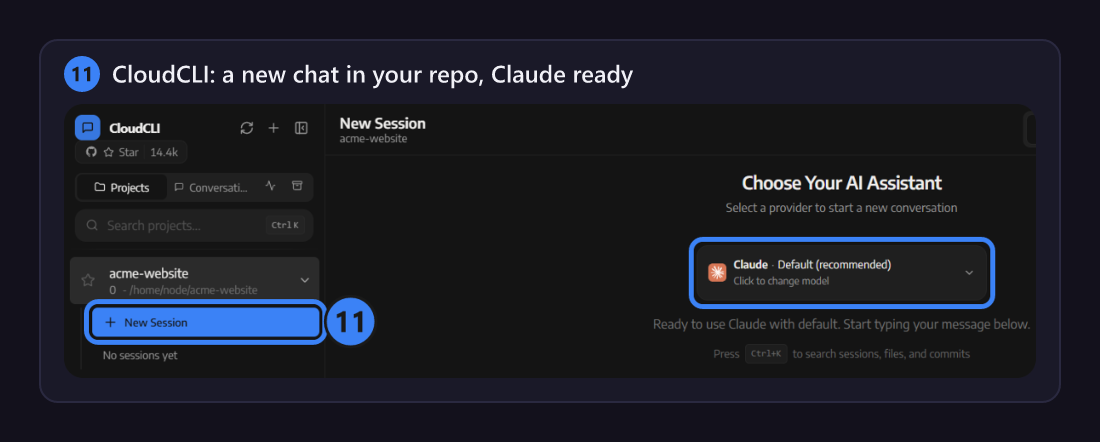
12. Not sure where to start? Say hi: Claude explains how jobs work and suggests some for your repo.

13. Ask for a job in plain words, with when it should run. Claude writes its instructions as a skill in your repo (here .claude/skills/open-issues-digest/SKILL.md), pushes it and schedules the job in Paperclip.

14. Claude runs it once as a test and reports the result, with links to Paperclip.

4. Follow and change your jobs
Open the Paperclip service's URL, with the same login.
15. Routines: each job's schedule, next and last runs, and an on/off switch.

16. Each run is a task, where the Runner posts its result.

17. Agents, Runner, Runs: every run's status, model, tokens, duration and full transcript.

18. To change a job, ask Claude: a new time or instructions, pause, resume, run now, or show the last log.

Good to know
- Jobs are skills in your repo. Paperclip holds when and which skill; the skill says what to do. Edit it with Claude or by hand and push: the Runner pulls before every run.
- Cost. Each run is a Claude Code session on your subscription. The Runner uses Sonnet: the digest above took about 86,000 tokens, mostly cached, in 12 seconds. Change the model on the Runner's page.
- Shared memory. A
.claude/memory/folder in your repo becomes Claude's memory in both apps. - A blocked job usually lacks a login; its task says which. Redo that step at
/setup. - New password: change
ADMIN_PASSWORDon Paperclip, then redeploy Paperclip and CloudCLI. - Without the setup page: set
GH_TOKEN,REPO_URLandCLAUDE_CODE_OAUTH_TOKENon both services.
Common Use Cases
- Daily or weekly reports from web pages, APIs or data files, written by Claude
- Checks on a schedule: a site that should answer, prices or listings to watch, links that break
- Repo upkeep: issue triage, dependency checks, release notes
- Claude Code sessions from any browser or your phone, on your own server
Dependencies for Paperclip (w/ CloudCLI) Hosting
- Paperclip
- CloudCLI
- Postgres
Deployment Dependencies
Implementation Details
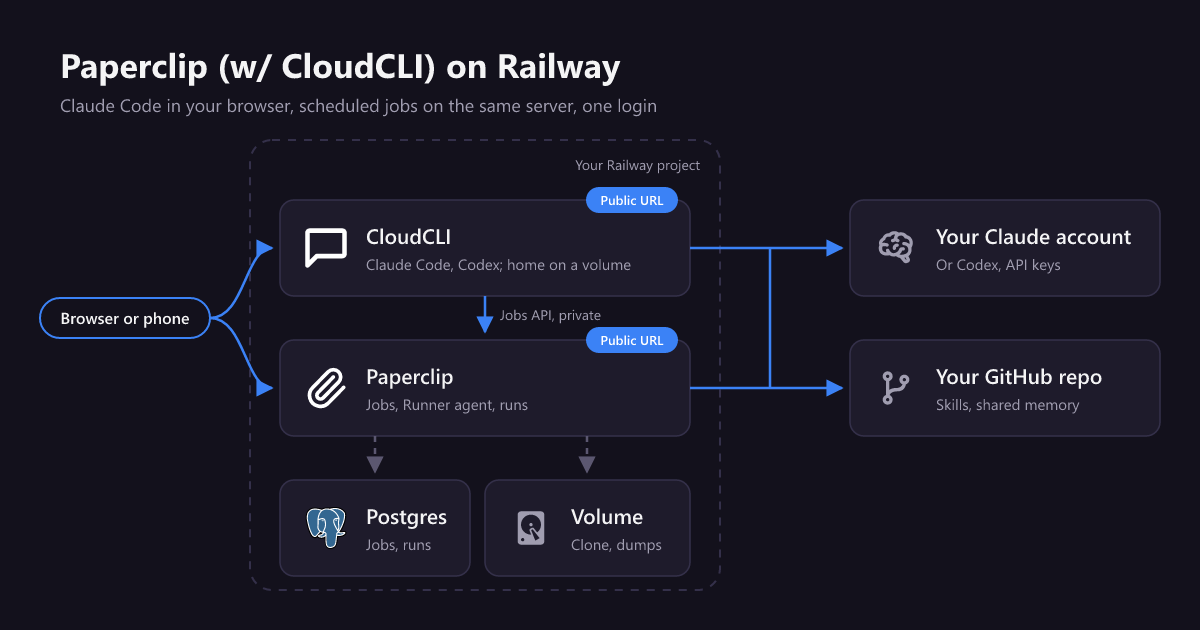
Needs Hobby or above (about 1.4 GB of memory at idle). Paperclip dumps its database hourly to its volume; also turn on Railway backups for the three volumes, and keep PAPERCLIP_SECRETS_MASTER_KEY, which encrypts Paperclip's secrets.
Why Deploy Paperclip (w/ CloudCLI) on Railway?
Railway is a singular platform to deploy your infrastructure stack. Railway will host your infrastructure so you don't have to deal with configuration, while allowing you to vertically and horizontally scale it.
By deploying Paperclip (w/ CloudCLI) on Railway, you are one step closer to supporting a complete full-stack application with minimal burden. Host your servers, databases, AI agents, and more on Railway.
Updated 2026-11-01: user manual from a fresh install; the deploy form is only the login; Paperclip 2026.1023.0 and CloudCLI 1.37.7.
Template Content
ADMIN_EMAIL
Your email. With the password below, it is your login for both Paperclip and CloudCLI.
ADMIN_PASSWORD
Your password for both apps, 8 to 128 characters. To change it later, change it here and redeploy Paperclip, then CloudCLI: every browser is signed out.
CloudCLI
node:22-bookworm

