
Deploy Papra
Document archive that makes scans and PDFs searchable by their text

mailpit
Just deployed
/data
Just deployed
/app/app-data
papra-documents
Bucket
Just deployed
Deploy and Host Papra on Railway
Papra is a minimalistic document management and archiving platform — a digital shelf for paperwork you want to keep but never think about again. Receipts, warranties, contracts, scanned letters: you drop the file in, Papra pulls the text out of it, and months later you find it by typing a word from inside the page rather than recalling what you named the file. It is open source under AGPL-3.0, for households, freelancers and small teams who want a searchable archive without handing their documents to a filing service.
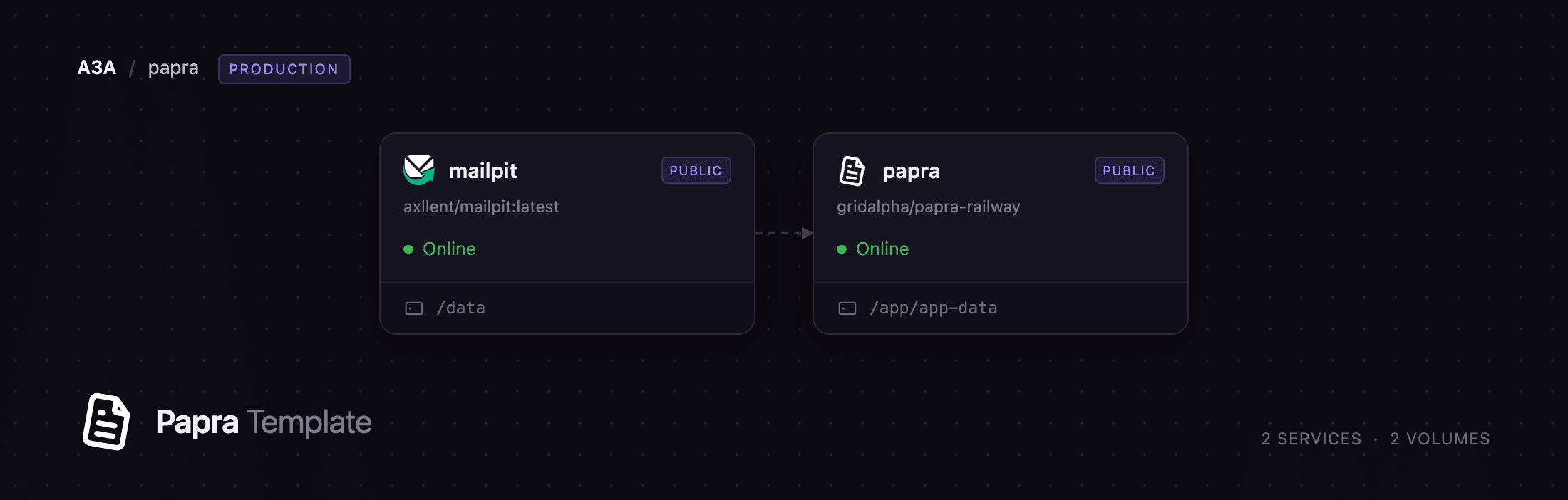
Self-host Papra on Railway and this template pre-configures it all: the papra service running the API and web client from one container, a papra-documents bucket holding every uploaded file, a volume carrying the SQLite database and its full-text index, and a mailpit service so invitations and password resets go somewhere you can read. Documents are written to the bucket encrypted and streamed back through the app, never through public storage URLs, so nothing is reachable without a session.
Getting Started with Papra on Railway
Set PAPRA_ADMIN_EMAIL and PAPRA_ADMIN_PASSWORD when you deploy. The container creates that account on a loopback address before binding the public port, so no stranger can claim the first account — which in Papra is the one that becomes administrator. Sign-up ships closed for the same reason.
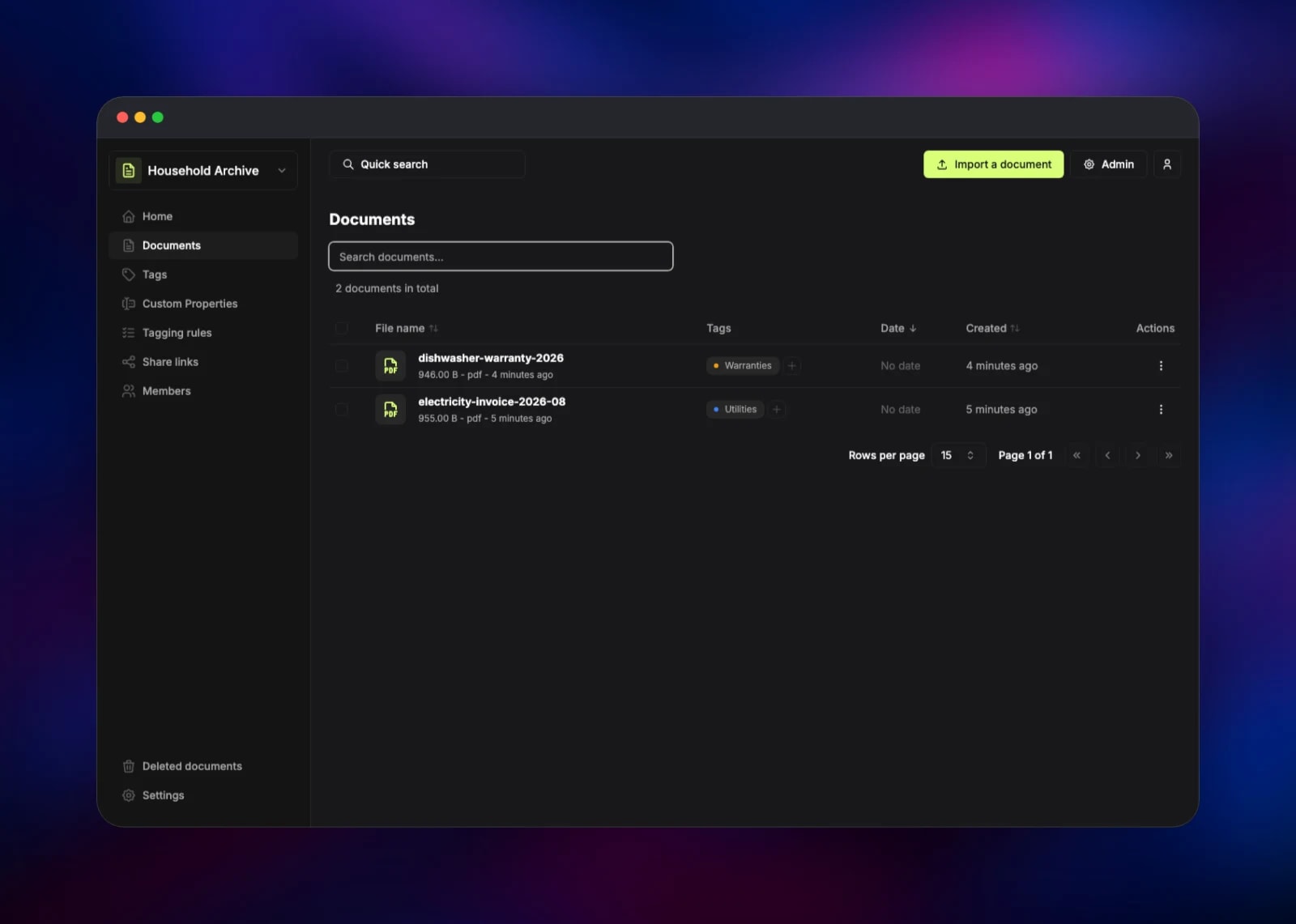
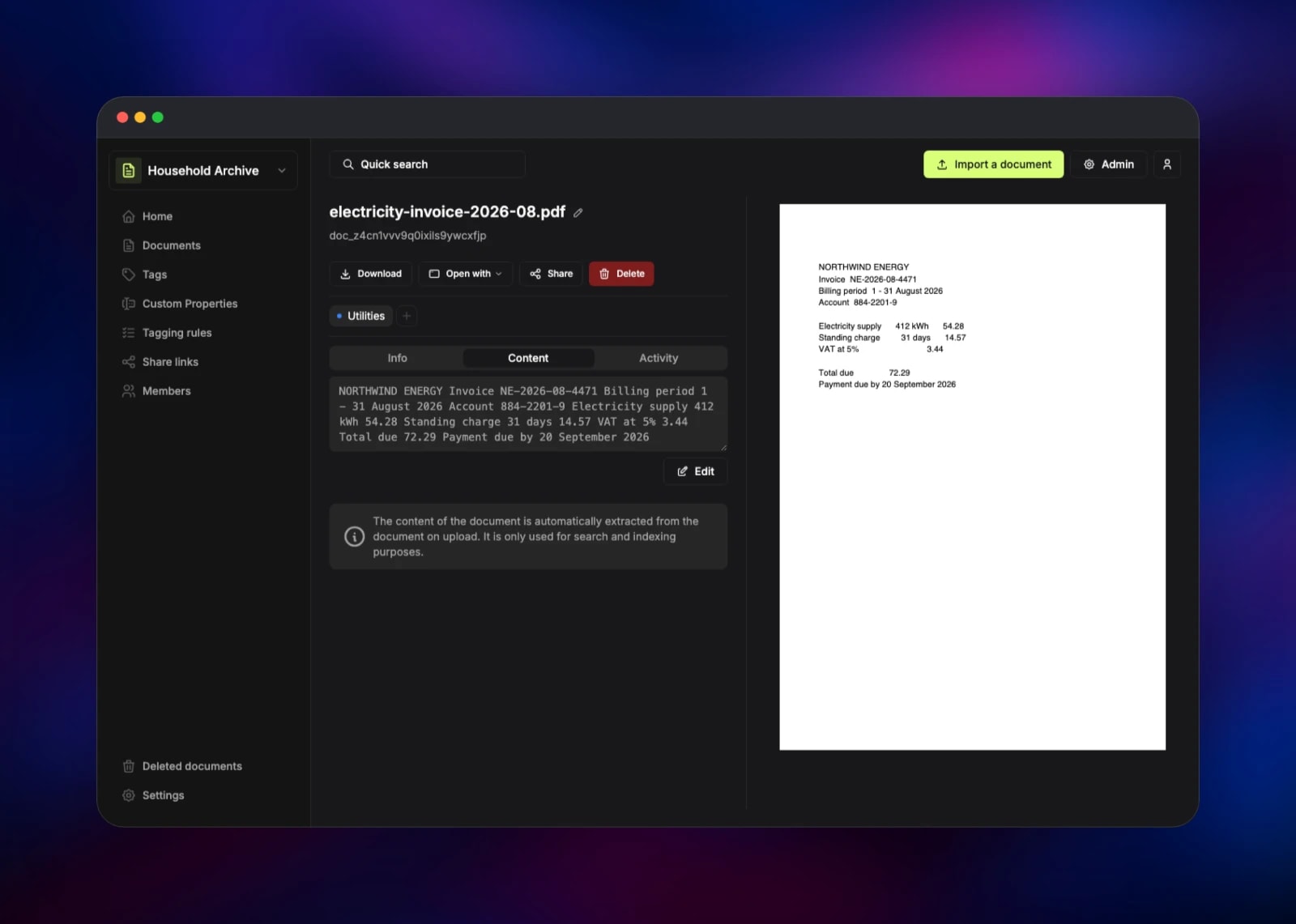
Open the deployed URL and sign in. Papra asks you to create an organization first: it holds your documents, and you can have several to keep personal and work paperwork apart. From its home page, drag a PDF or image onto the drop zone, or use Select files. It appears in Documents within seconds, and opening it shows a preview beside a Content tab holding the extracted text.
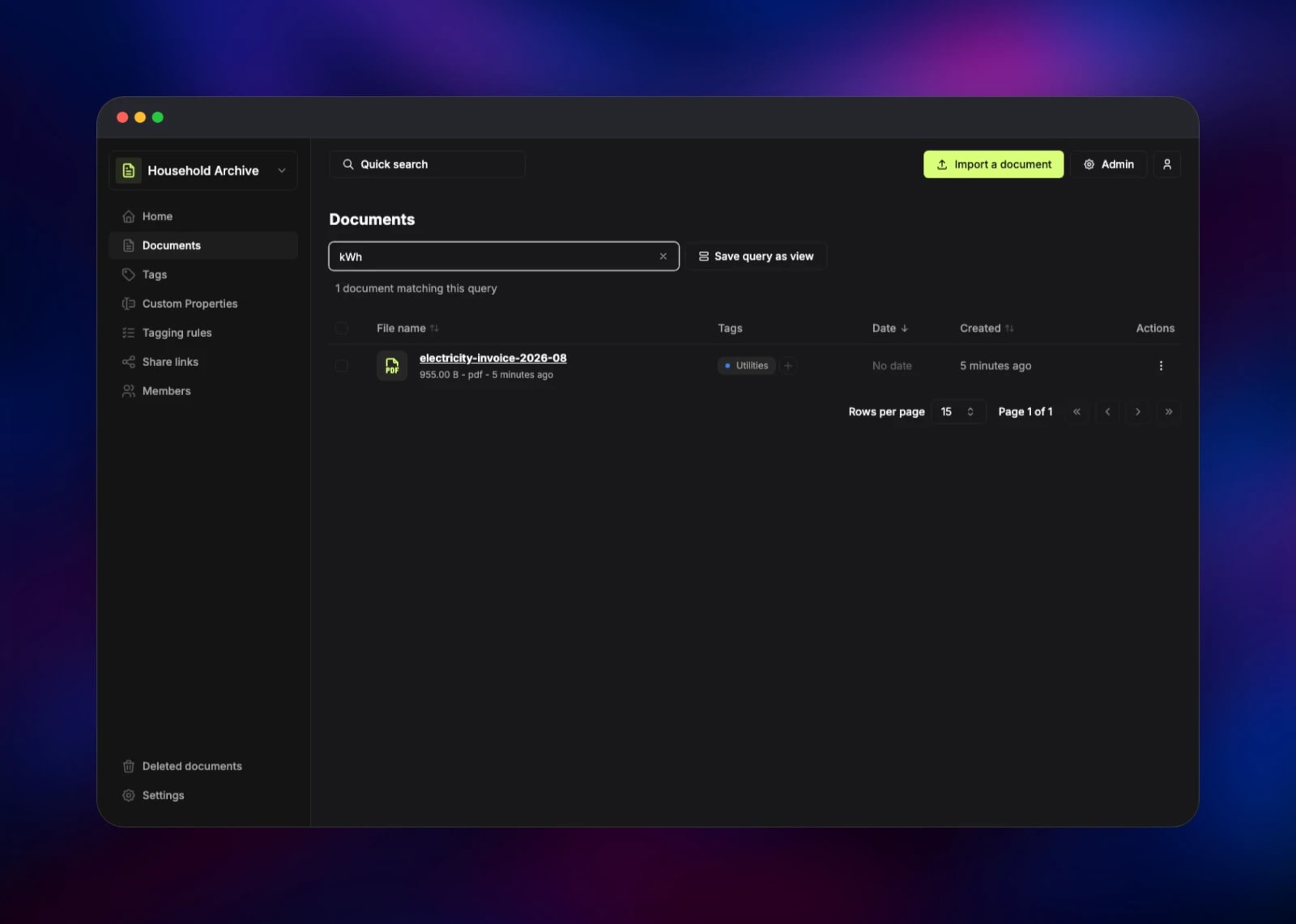
That text is the point: in Documents, type a word that exists only inside the file — an invoice number, a supplier name, a serial — and it comes back. Add tags, then use Tagging rules to tag future uploads automatically when their content matches. To confirm mail works, invite someone under Members and read the message in the Mailpit inbox.
About Hosting Papra
Papra is deliberately small. There is no workflow designer, no sign-off chain, no taxonomy to build before you file your first receipt. You upload documents, Papra makes them findable, and it stays out of the way — which fits the job most document managers over-serve: a household or a two-person business that would rather run one container than administer an enterprise ECM.
Key features:
- Full-text search across document content, not just file names, via SQLite FTS5
- Automatic text extraction from PDFs, images and scans, with Tesseract OCR as the fallback
- Organizations so several people share one archive, with invitations and roles
- Tags and tagging rules that classify new uploads from their content
- Email and folder ingestion, so a scanner or forwarded message files itself
- API, SDK, webhooks and a CLI, so the archive is programmable
papra serves the web client, the REST API and the background task worker from one process, keeping its database on a volume. papra-documents is the bucket every uploaded file is written to, keeping the volume small and letting the archive grow. mailpit is a capture-only SMTP server on the private network, holding what Papra sends until you point the template at a real relay.
Why Deploy Papra on Railway
Railway removes the parts of self-hosting that have nothing to do with documents.
- One click provisions the app, the bucket, the mail service and both volumes
- TLS and a public domain are issued automatically, with no reverse proxy
- Managed object storage means the archive is not bounded by disk size
- Private networking keeps SMTP and storage credentials off the internet
- Redeploying pulls the newest release without touching your data
Common Use Cases for Self-Hosted Papra
- Household paperwork — warranties, manuals, policies and tax documents in one searchable place, shared through an organization
- Freelance records — contracts, invoices and receipts tagged automatically by rules, so year-end accounting is a search, not an excavation
- A document backend for your own software — the API, SDK and webhooks make Papra the storage and search layer behind an internal tool
Dependencies for Papra
- Papra — gridalpha/papra-railway, a one-layer image over the official
ghcr.io/papra-hq/papra:latestrootless build (papra-hq/papra) - Mailpit —
axllent/mailpit:latest, the SMTP endpoint Papra sends to - Object storage — a Railway-managed S3-compatible bucket for document files
- Volumes — one for Papra's database and search index, one for Mailpit's message store
Environment Variables Reference
| Variable | Purpose |
|---|---|
PAPRA_ADMIN_EMAIL | Address of the administrator account created on first boot |
PAPRA_ADMIN_PASSWORD | Its password, at least 8 characters |
AUTH_SECRET | Session signing secret; 32+ characters and stable |
DOCUMENT_STORAGE_DRIVER | s3 for the bucket, filesystem for the volume |
DOCUMENT_STORAGE_ENCRYPTION_IS_ENABLED | Encrypts documents at rest in the bucket |
DOCUMENT_STORAGE_DOCUMENT_KEY_ENCRYPTION_KEYS | Wraps each document's key — lose it, lose the documents |
DOCUMENTS_OCR_LANGUAGES | Tesseract language codes, e.g. eng,fra |
SMTP_HOST / SMTP_PORT | Mail endpoint; repoint at a real relay |
Deployment Dependencies
- Source: github.com/papra-hq/papra
- Image:
ghcr.io/papra-hq/papra, mirrored ascorentinth/papra - Docs: docs.papra.app, and its configuration reference
Hardware Requirements for Self-Hosting Papra
| Resource | Minimum | Recommended |
|---|---|---|
| CPU | 1 vCPU | 2 vCPU |
| RAM | 512 MB | 2 GB |
| Storage | 1 GB volume | 5 GB volume + object storage |
| Runtime | Node.js 22+ | Node.js 26, as in the image |
Papra itself is light; OCR is the expensive part, spiking CPU and memory for a few seconds per scanned page, so give it the second core if you plan to bulk-import a filing cabinet. Files live in object storage, so the volume only holds the database and its index.
Self-Hosting Papra with Docker
Papra needs one container and one secret. As a shell command:
docker run -d --name papra --restart unless-stopped \
  -e APP_BASE_URL=http://localhost:1221 \
  -e AUTH_SECRET="$(openssl rand -hex 48)" \
  -p 1221:1221 \
  -v "$(pwd)/papra-data:/app/app-data" \
  --user "$(id -u):$(id -g)" \
  ghcr.io/papra-hq/papra:latest
latest is the rootless build; latest-root runs as root where volume permissions need it. For S3-compatible storage instead of local disk, add:
DOCUMENT_STORAGE_DRIVER=s3
DOCUMENT_STORAGE_S3_BUCKET_NAME=papra
DOCUMENT_STORAGE_S3_ENDPOINT=https://your-endpoint
DOCUMENT_STORAGE_S3_ACCESS_KEY_ID=...
DOCUMENT_STORAGE_S3_SECRET_ACCESS_KEY=...
DOCUMENT_STORAGE_S3_FORCE_PATH_STYLE=true
Is Papra Free to Self-Host?
Papra is open source under AGPL-3.0 and free to run, with no licence key, seat count or feature gate between the self-hosted build and the hosted one. On Railway you pay only for what the services consume, and storage on what you actually store.
FAQ
What is Papra?
Papra is an open-source document management and archiving platform. You upload documents, it extracts their text so they are searchable, and organizes them with tags, rules and custom properties inside organizations you control.
What does this Railway template deploy?
The Papra application with a volume for its database, a managed object-storage bucket for the document files, and a Mailpit service receiving the invitations and password resets Papra sends.
Why does the template include object storage instead of just a volume?
Document files grow without limit and volumes are fixed, so writing them to the bucket lets the archive outgrow the disk you provisioned on day one. Set DOCUMENT_STORAGE_DRIVER=filesystem to keep everything on the volume.
How do I get an admin account in self-hosted Papra?
Supply PAPRA_ADMIN_EMAIL and PAPRA_ADMIN_PASSWORD at deploy time; the account exists before the app accepts its first public request. Papra otherwise promotes whoever registers first, which is why sign-up ships disabled here.
How do I let other people register on my Papra instance?
Set AUTH_IS_REGISTRATION_ENABLED to true. For a small group, inviting people from an organization's Members page is safer — sign-up stays closed and they still get in. Mailpit only captures those invitations; point SMTP_HOST, SMTP_PORT, SMTP_USER and SMTP_PASSWORD at a real relay to send them.
Does Papra do OCR on scanned documents?
Yes. PDFs with a text layer are read directly; scans and images go through Tesseract, controlled by DOCUMENTS_OCR_LANGUAGES. Either way the result lands in the document's content and is searchable.
Template Content


