
Deploy PgAdmin 4 | Open Source PostgreSQL GUI on Railway
Self Host PgAdmin. Web UI, SQL editor, ERD, Backup, Monitoring
PgAdmin
Just deployed
/var/lib/pgadmin

Deploy and Host pgAdmin 4 on Railway
pgAdmin 4 is the leading open source administration and development platform for PostgreSQL — a fully web-based GUI that lets you manage databases, run queries, inspect schemas, monitor server activity, and much more, all from a browser.
Self-hosting pgAdmin gives your team a shared, always-on database management interface without installing anything locally. This Railway template deploys dpage/pgadmin4:latest with all required environment variables pre-configured, so you can run pgAdmin on Railway with a single click and connect it to any PostgreSQL instance — including Railway-hosted Postgres services via private networking.
Getting Started with pgAdmin 4 on Railway
Once the Railway deployment is live, navigate to the public URL assigned to your service. You'll be presented with the pgAdmin login screen — sign in with the PGADMIN_DEFAULT_EMAIL and PGADMIN_DEFAULT_PASSWORD you configured. From the dashboard, click Add New Server, give it a name, then switch to the Connection tab. Enter the hostname (use the Railway private hostname for a co-deployed Postgres service, e.g. postgres.railway.internal), port 5432, and your database credentials. Save the connection and you'll have full GUI access to your PostgreSQL database.
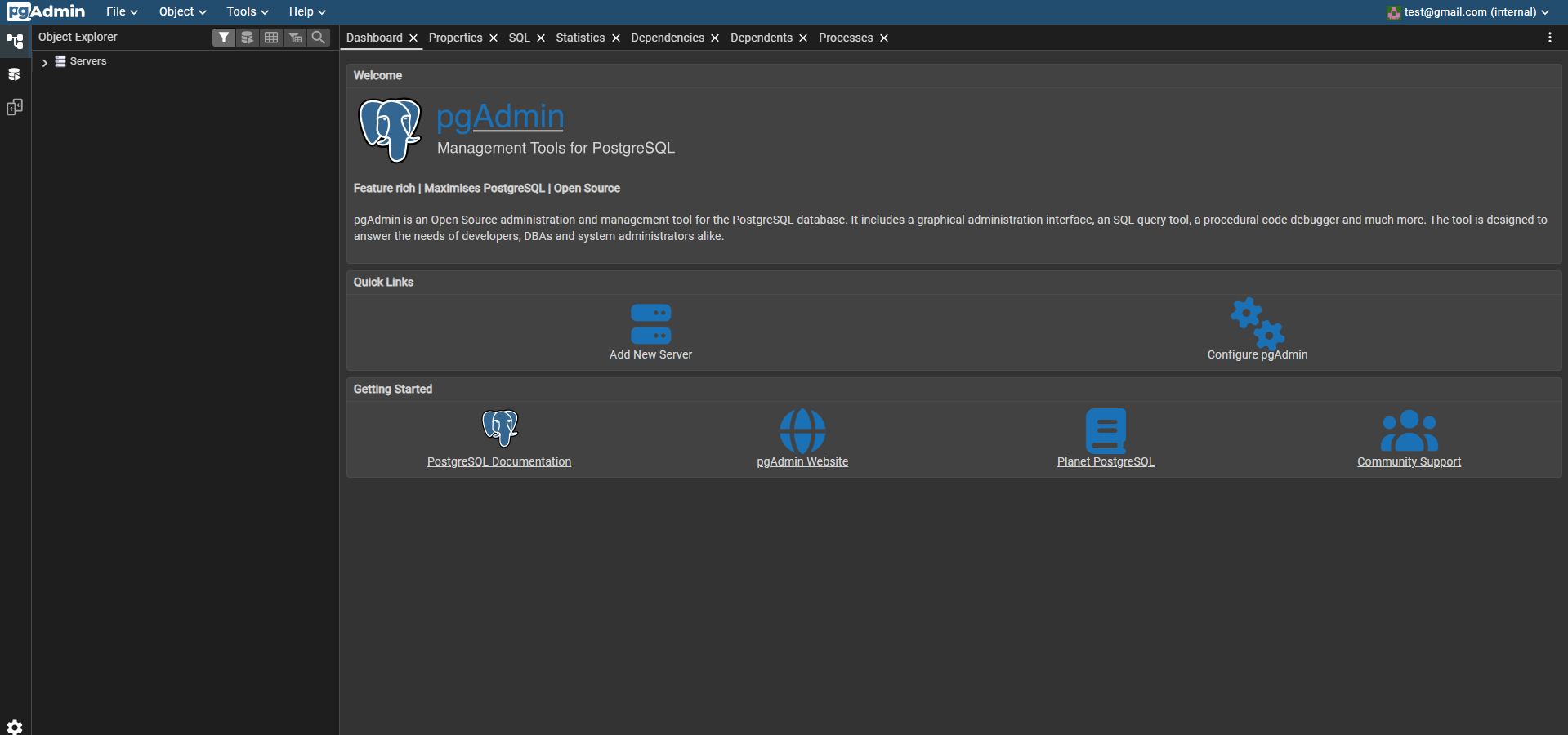
About Hosting pgAdmin 4
pgAdmin 4 is a complete rewrite of the original pgAdmin desktop client, rebuilt as a Python/Flask web application with a ReactJS frontend. It is the official management tool maintained by the PostgreSQL community and supports PostgreSQL 9.2 and above.
Key features:
- Query Tool — full-featured SQL editor with syntax highlighting, auto-complete, query history, and EXPLAIN visualizer
- Schema Browser — hierarchical tree view of databases, schemas, tables, views, functions, roles, and extensions
- ERD Tool — auto-generates entity-relationship diagrams from existing schemas
- Backup & Restore — GUI-driven
pg_dump/pg_restorewith format and compression options - Server Monitoring — real-time dashboards for active sessions, locks, and transaction throughput
- pgAgent — optional job scheduling engine for automating maintenance tasks
- Multi-server management — connect to and manage multiple PostgreSQL servers from a single interface
Why Deploy pgAdmin 4 on Railway
Railway handles the infrastructure so you can focus on your databases:
- No Docker config, volume management, or reverse proxy setup required
- Persistent admin session storage out of the box
- One-click redeploys whenever a new
dpage/pgadmin4image is released - Managed TLS and custom domains via Railway's built-in proxy
- Private networking to Railway Postgres services — no public port exposure needed
- Environment variable management through the Railway dashboard
Common Use Cases
- Team database management — give your whole engineering team a shared pgAdmin instance connected to a staging or production Postgres service, without everyone needing local installs or VPN credentials
- Schema design and migration review — use the ERD tool and query diff features during sprint planning or code review
- Database monitoring — keep the Railway-hosted pgAdmin open on a secondary monitor for a live view of active queries, locks, and vacuum status
- Ad-hoc data exploration — run one-off analytical queries or data corrections during incidents without connecting a local SQL client
Dependencies for pgAdmin 4
- pgAdmin 4 —
dpage/pgadmin4:latest(Docker Hub, GitHub)
No database is bundled in this template — pgAdmin is a management client only. Connect it to an existing Railway Postgres service or any external PostgreSQL instance.
Environment Variables Reference
| Variable | Description | Required |
|---|---|---|
PGADMIN_DEFAULT_EMAIL | Login email for the pgAdmin admin account | ✅ Yes |
PGADMIN_DEFAULT_PASSWORD | Password for the pgAdmin admin account | ✅ Yes |
PORT | Port pgAdmin listens on inside the container (default: 80) | Optional |
RAILWAY_RUN_UID | Set to 0 to run as root — required on Railway due to filesystem permission constraints | ✅ Yes |
Deployment Dependencies
- Runtime: Python 3.9+ (bundled in container)
- Docker image:
dpage/pgadmin4:latest - Docker Hub: https://hub.docker.com/r/dpage/pgadmin4/
- GitHub: https://github.com/pgadmin-org/pgadmin4
- Official docs: https://www.pgadmin.org/docs/pgadmin4/latest/container_deployment.html
Minimum Hardware Requirements for pgAdmin 4
| Resource | Minimum | Recommended |
|---|---|---|
| CPU | 0.5 vCPU | 1 vCPU |
| RAM | 256 MB | 512 MB |
| Storage | 200 MB (image) | 500 MB (with logs/config) |
| Python | 3.9+ | 3.11+ |
pgAdmin itself is lightweight. RAM usage scales with the number of active connections and open query tabs. For teams with multiple simultaneous users, 512 MB or more is advisable.
pgAdmin 4 vs DBeaver vs TablePlus
| Feature | pgAdmin 4 | DBeaver CE | TablePlus |
|---|---|---|---|
| Open source | ✅ Yes | ✅ Yes | ❌ No |
| Self-hostable (web) | ✅ Yes | ❌ Desktop only | ❌ Desktop only |
| PostgreSQL-specific features | ✅ Deep (ERD, pgAgent, EXPLAIN) | Partial | Partial |
| Multi-database support | ❌ PostgreSQL only | ✅ 80+ databases | ✅ Multiple |
| Pricing | Free | Free (EE is paid) | Free tier + paid |
| ER diagrams | ✅ Built-in | ✅ EE only | ❌ |
pgAdmin is the right choice when PostgreSQL is your primary database and you want a web-accessible shared interface — DBeaver wins for multi-database environments, TablePlus for a fast native desktop experience.
Self-Hosting pgAdmin 4
Docker (quickest):
docker run -d \
  --name pgadmin \
  -p 5050:80 \
  -e PGADMIN_DEFAULT_EMAIL=admin@example.com \
  -e PGADMIN_DEFAULT_PASSWORD=supersecret \
  dpage/pgadmin4:latest
Visit http://localhost:5050 to access the interface.
Docker Compose (with Postgres):
services:
  postgres:
    image: postgres:16-alpine
    environment:
      POSTGRES_PASSWORD: pgpass
    volumes:
      - pgdata:/var/lib/postgresql/data

  pgadmin:
    image: dpage/pgadmin4:latest
    ports:
      - "5050:80"
    environment:
      PGADMIN_DEFAULT_EMAIL: admin@example.com
      PGADMIN_DEFAULT_PASSWORD: supersecret
    depends_on:
      - postgres

volumes:
  pgdata:
Inside pgAdmin, connect to the Postgres container using hostname postgres, port 5432.
Is pgAdmin 4 Free?
pgAdmin is fully free and open source, released under the PostgreSQL Licence (similar to BSD/MIT). There are no paid tiers, enterprise editions, or usage limits. The only cost of running it on Railway is your infrastructure — compute and any egress. The Docker image (dpage/pgadmin4) is maintained by the pgAdmin project and updated regularly alongside PostgreSQL releases.
FAQ
What is pgAdmin 4? pgAdmin 4 is the official open source GUI for PostgreSQL. It runs as a web application and lets you manage databases, write and execute SQL, inspect schemas, visualize query plans, and monitor server performance — all from a browser.
What does this Railway template deploy?
It deploys a single dpage/pgadmin4:latest container with the admin email, password, and port pre-configured. No Postgres instance is bundled — pgAdmin is a client tool that connects to an existing PostgreSQL server. Add a Railway Postgres service to the same project and connect using its private hostname.
Why is RAILWAY_RUN_UID=0 needed?
Railway's container filesystem requires root permissions for pgAdmin to write its SQLite config database and session files. Without this, pgAdmin will fail to start with permission-denied errors.
Can I connect pgAdmin to a Railway Postgres service?
Yes. In Railway, add a Postgres service to the same project. In pgAdmin's server connection dialog, use the private hostname (e.g. postgres.railway.internal) and port 5432. Private networking is available within the same Railway environment at no extra cost.
Is pgAdmin safe to expose publicly?
pgAdmin is protected by the login credentials you set via PGADMIN_DEFAULT_EMAIL and PGADMIN_DEFAULT_PASSWORD. Railway provides TLS termination automatically. For production, use a strong password and consider restricting access with a Railway private network or IP allowlist if your plan supports it.
Does pgAdmin support PostgreSQL 16 and 17?
Yes. pgAdmin 4 supports PostgreSQL 9.2 through the latest release. The dpage/pgadmin4:latest image is updated alongside each PostgreSQL version and includes bundled pg_dump, pg_restore, and psql binaries for versions 13 through 17.
Template Content
PgAdmin
dpage/pgadmin4:latestPGADMIN_DEFAULT_EMAIL
Default admin login email
PGADMIN_DEFAULT_PASSWORD
Default admin login password


