
Deploy Plane | Jira and Linear Alternative on Railway
Self Host Plane. AI-native project management with issues, sprints & triage
DBs

Just deployed
/var/lib/postgresql/data

MinIO
Just deployed
/data

Redis
Just deployed
/data

Just deployed

Just deployed
Deploy and Host Plane on Railway
Deploy Plane on Railway to get a fully self-hosted, open-source project management platform running in minutes. Self-host Plane as an alternative to Jira, Linear, Monday, or ClickUp — with full control over your data and zero per-seat licensing costs.
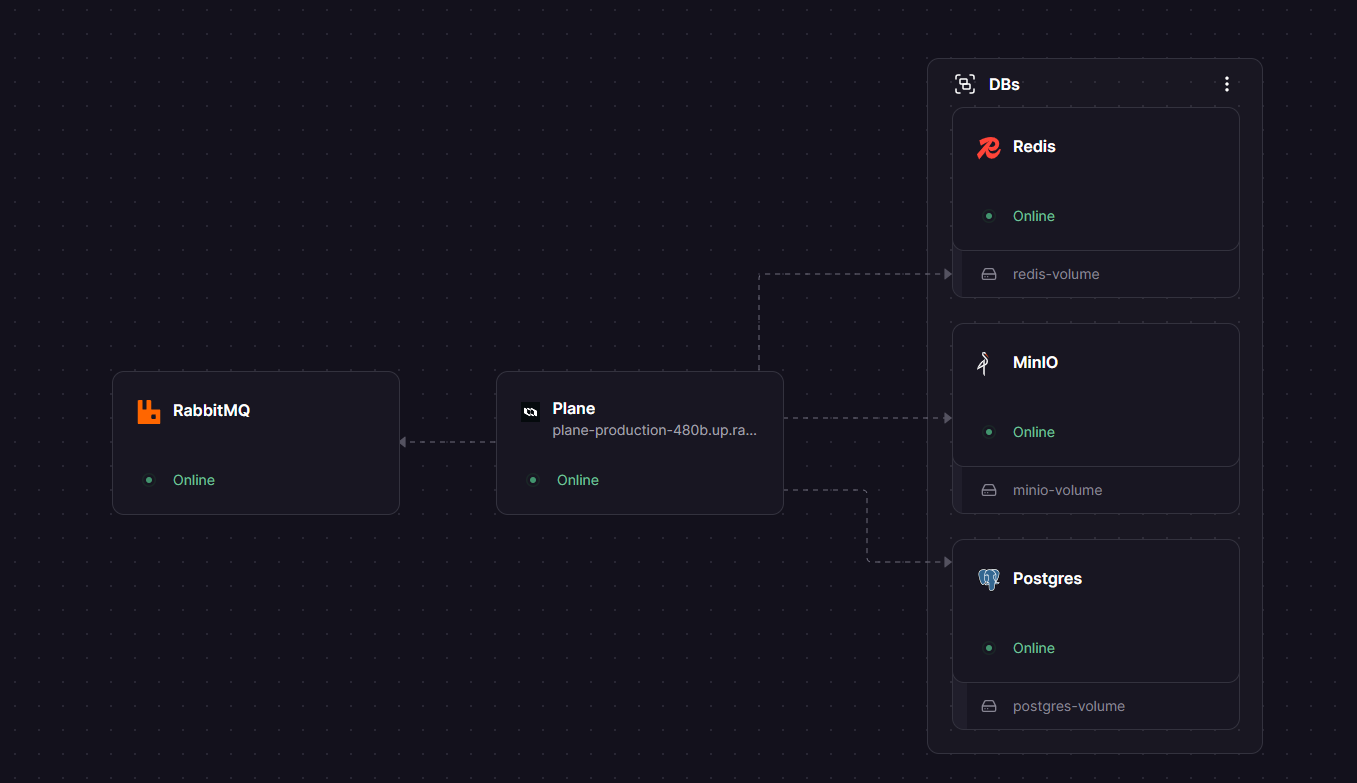
This Railway template deploys the Plane All-In-One (AIO) container alongside PostgreSQL for data storage, Redis for caching, RabbitMQ for background job queues, and MinIO for S3-compatible file storage. Everything is pre-wired so the stack starts working immediately.
Getting Started with Plane on Railway
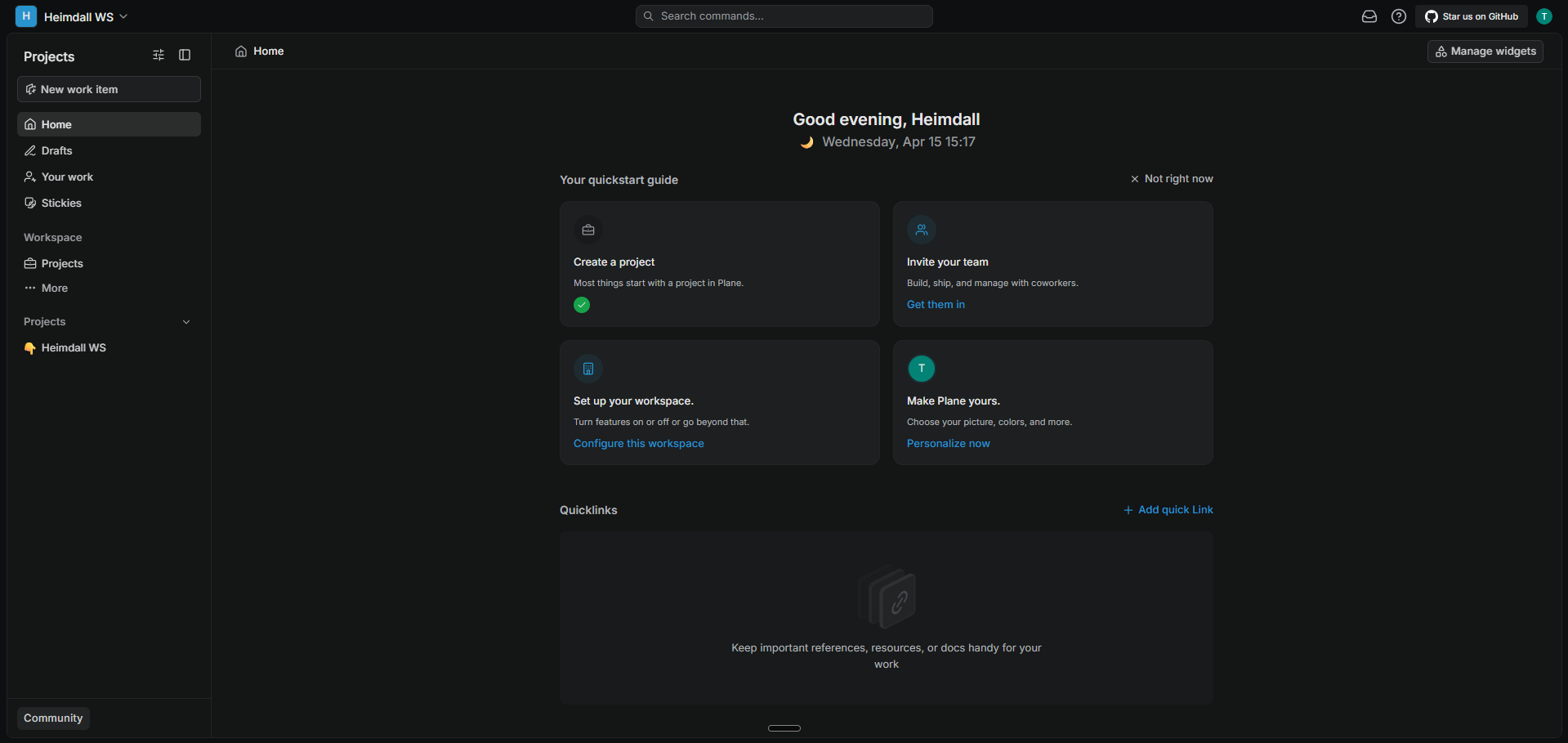
Once the deployment is live, open your Plane URL and you'll see the first-time setup wizard (at /god-mode/, make sure to have the slash at last). Create your workspace by entering a name and inviting team members via email. Then create your admin account with an email and password.
After setup, create your first project from the sidebar. Plane supports five layout views for work items — List, Board (Kanban), Spreadsheet, Gantt, and Calendar. Create work items (issues), organize them into Cycles (sprints) or Modules, and use Pages to document your team's knowledge. The REST API is available at /api/ for programmatic access.
About Hosting Plane
Plane is an AI-native project management platform with 47,800+ GitHub stars, licensed under AGPL v3.0. It combines three products in one workspace: Projects, Wiki, and AI.
- Work Items — track tasks, bugs, features, and stories with rich text, file uploads, and sub-items
- Cycles — time-boxed sprints with burn-down charts for sustainable progress tracking
- Modules — group related work items across projects for complex initiatives
- Pages — built-in wiki and documentation with AI assistance
- Views — five layout options (List, Board, Spreadsheet, Gantt, Calendar) with saved filters
- Intake — triage incoming requests before they become tracked work items
- Integrations — GitHub, GitLab, Slack, Sentry; import from Jira, Linear, Asana, ClickUp, Monday
The AIO architecture bundles all Plane services (web frontend, API, worker, beat scheduler, live server, space, admin, and Caddy proxy) into a single container managed by supervisord.
Why Deploy Plane on Railway
- One-click deploy with pre-configured PostgreSQL, Redis, RabbitMQ, and MinIO
- No per-seat pricing — unlimited users on your self-hosted instance
- Full data ownership with private networking between services
- Automatic SSL and custom domain support
- Scale resources independently per service
Common Use Cases for Self-Hosted Plane
- Engineering teams replacing Jira or Linear with an open-source, keyboard-centric alternative
- Product teams managing roadmaps, sprints, and feature requests in a single platform
- Design agencies tracking client projects with board and timeline views
- Organizations requiring data sovereignty or air-gapped deployment for compliance
Dependencies for Plane on Railway
- Plane AIO —
makeplane/plane-aio-community:stable— all-in-one container with web, API, workers, and proxy - PostgreSQL —
ghcr.io/railwayapp-templates/postgres-ssl:18— primary data store - Redis —
redis:8.2.1— caching and session management - RabbitMQ —
rabbitmq:3.13.6-management-alpine— background job queue (Celery) - MinIO —
minio/minio:latest— S3-compatible object storage for file uploads
Environment Variables Reference for Plane on Railway
| Variable | Service | Purpose |
|---|---|---|
DATABASE_URL | Plane | PostgreSQL connection string |
REDIS_URL | Plane | Redis connection string |
AMQP_URL | Plane | RabbitMQ connection string |
DOMAIN_NAME | Plane | Public domain for the instance |
SECRET_KEY | Plane | Django secret key for sessions |
AWS_S3_ENDPOINT_URL | Plane | MinIO endpoint for file storage |
AWS_S3_BUCKET_NAME | Plane | S3 bucket name for uploads |
GUNICORN_WORKERS | Plane | API worker count (1 for Railway) |
Deployment Dependencies
- Runtime: Python 3.12 + Node.js 22 (bundled in AIO image)
- GitHub: github.com/makeplane/plane
- Docker Hub: makeplane/plane-aio-community
- Docs: developers.plane.so
Hardware Requirements for Self-Hosting Plane
| Resource | Minimum | Recommended |
|---|---|---|
| CPU | 2 vCPUs | 4 vCPUs |
| RAM | 4 GB | 8 GB |
| Storage | 10 GB | 20 GB+ |
| Architecture | x64 or ARM64 | x64 |
Self-Hosting Plane with Docker
Clone the repository and use the official Docker setup:
git clone https://github.com/makeplane/plane.git
cd plane
./setup.sh
docker compose -f docker-compose.yml up -d
Or run the AIO container directly with external services:
docker run -d \
  -e DOMAIN_NAME=plane.example.com \
  -e DATABASE_URL=postgresql://user:pass@db:5432/plane \
  -e REDIS_URL=redis://redis:6379 \
  -e AMQP_URL=amqp://plane:pass@rabbitmq:5672/plane \
  -e AWS_REGION=us-east-1 \
  -e AWS_ACCESS_KEY_ID=minioadmin \
  -e AWS_SECRET_ACCESS_KEY=miniosecret \
  -e AWS_S3_BUCKET_NAME=uploads \
  -e AWS_S3_ENDPOINT_URL=http://minio:9000 \
  -p 80:80 \
  makeplane/plane-aio-community:stable
How Much Does Plane Cost to Self-Host?
Plane Community Edition is completely free and open-source under the AGPL v3.0 license with no user limits. Self-hosting on Railway means you only pay for infrastructure — typically $5–15/month depending on usage. The commercial cloud edition starts at $7/seat/month, but the self-hosted community edition has feature parity for core project management.
FAQ
What is Plane and why should you self-host it? Plane is an open-source project management platform with 47,800+ GitHub stars. Self-hosting gives you full data ownership, no per-seat fees, and the ability to run behind your firewall or in an air-gapped environment.
What does this Railway template deploy for Plane? This template deploys five services: the Plane AIO container (web, API, workers, proxy), PostgreSQL for data, Redis for caching, RabbitMQ for background job processing, and MinIO for S3-compatible file storage.
Why does Plane need RabbitMQ and Redis on Railway? Redis handles caching and session data for fast response times. RabbitMQ powers Celery-based background workers that process async tasks like email notifications, webhook deliveries, and data imports.
Can I import my Jira or Linear projects into self-hosted Plane? Yes. Plane has built-in importers for Jira, Linear, Asana, ClickUp, and Monday. Access them from your project settings after deployment.
How do I enable GitHub or GitLab integration in self-hosted Plane on Railway? Navigate to your workspace settings and configure the GitHub or GitLab integration. You'll need to create an OAuth app on GitHub/GitLab and provide the client ID and secret in Plane's integration settings.
How do I back up my self-hosted Plane data on Railway?
Your primary data lives in PostgreSQL. Use Railway's database backup features or run pg_dump against your Postgres service. File uploads are stored in MinIO — back up the MinIO volume for complete data protection.
Template Content


