
Deploy RabbitMQ
Highly available AMQP message broker with per-message acks and routing
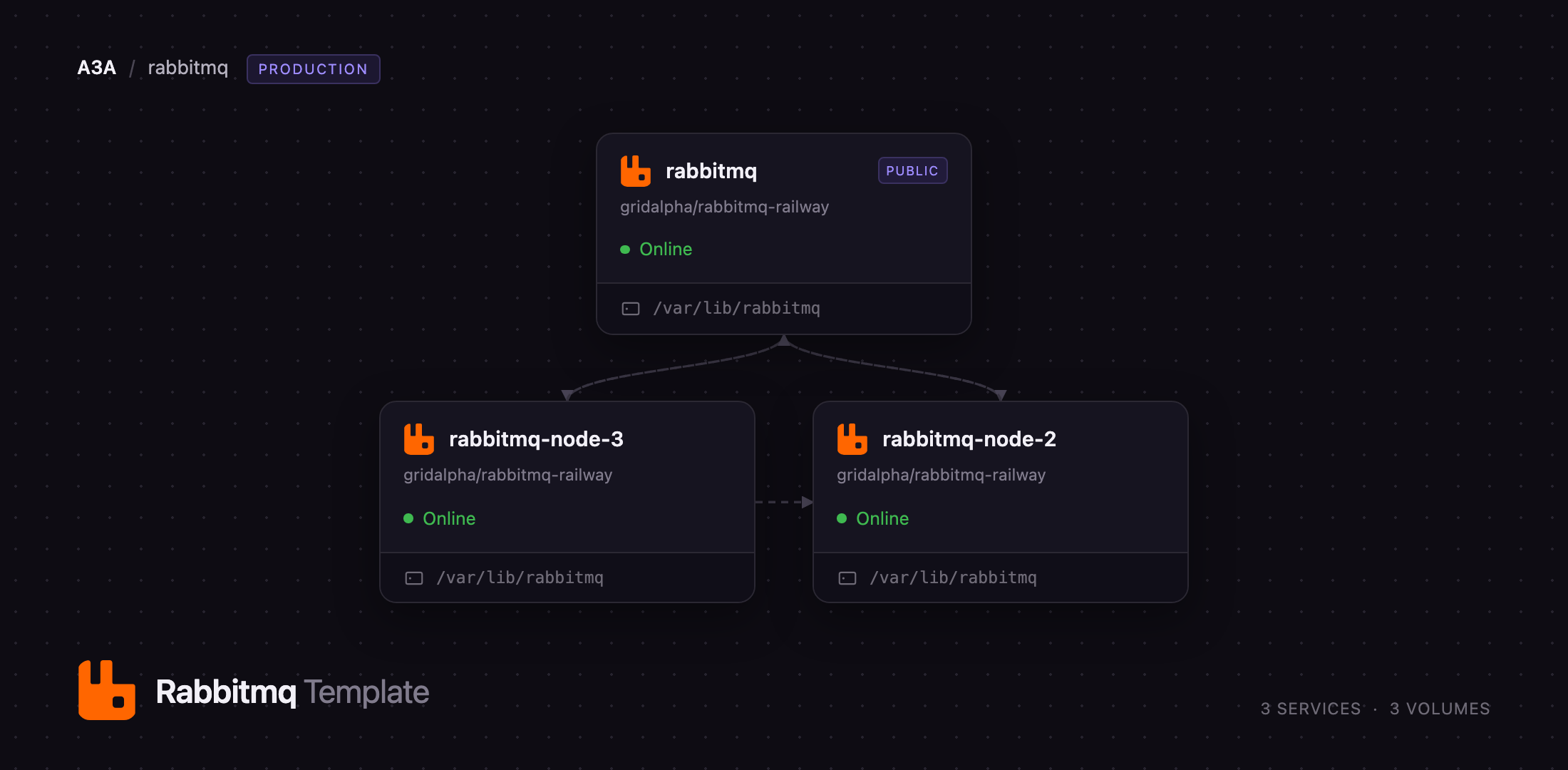
rabbitmq-node-3
Just deployed
/var/lib/rabbitmq
rabbitmq-node-2
Just deployed
/var/lib/rabbitmq
rabbitmq
Just deployed
/var/lib/rabbitmq
Deploy and Host RabbitMQ on Railway
RabbitMQ is the message broker most teams reach for when one service needs to hand work to another without waiting for it. It speaks AMQP 0-9-1 and AMQP 1.0 natively, plus MQTT and STOMP through plugins, and has been the default job queue behind Celery, Spring AMQP, MassTransit and NestJS microservices for over a decade. Publishers write to an exchange, RabbitMQ routes each message into queues by binding rules, and consumers acknowledge messages one at a time — so a worker that crashes mid-job returns that job to the queue instead of losing it. That, plus routing richer than a topic name, is why it stays the better fit for task dispatch even where an event log wins on throughput.
Deploy RabbitMQ on Railway as a three-node cluster rather than a single container. The template provisions rabbitmq, rabbitmq-node-2 and rabbitmq-node-3 from the same image, each with its own volume at /var/lib/rabbitmq, joined into one cluster over Railway's private network. Queues declared without an explicit type become quorum queues, replicated over Raft across all three nodes, so a node can be lost or redeployed without dropping an unacknowledged message. Only the first node is public: the management UI on port 15672 gets an HTTPS domain and a TCP proxy publishes AMQP on 5672. Erlang distribution, epmd, the metrics endpoint and the other two nodes stay private.
Getting Started with RabbitMQ on Railway
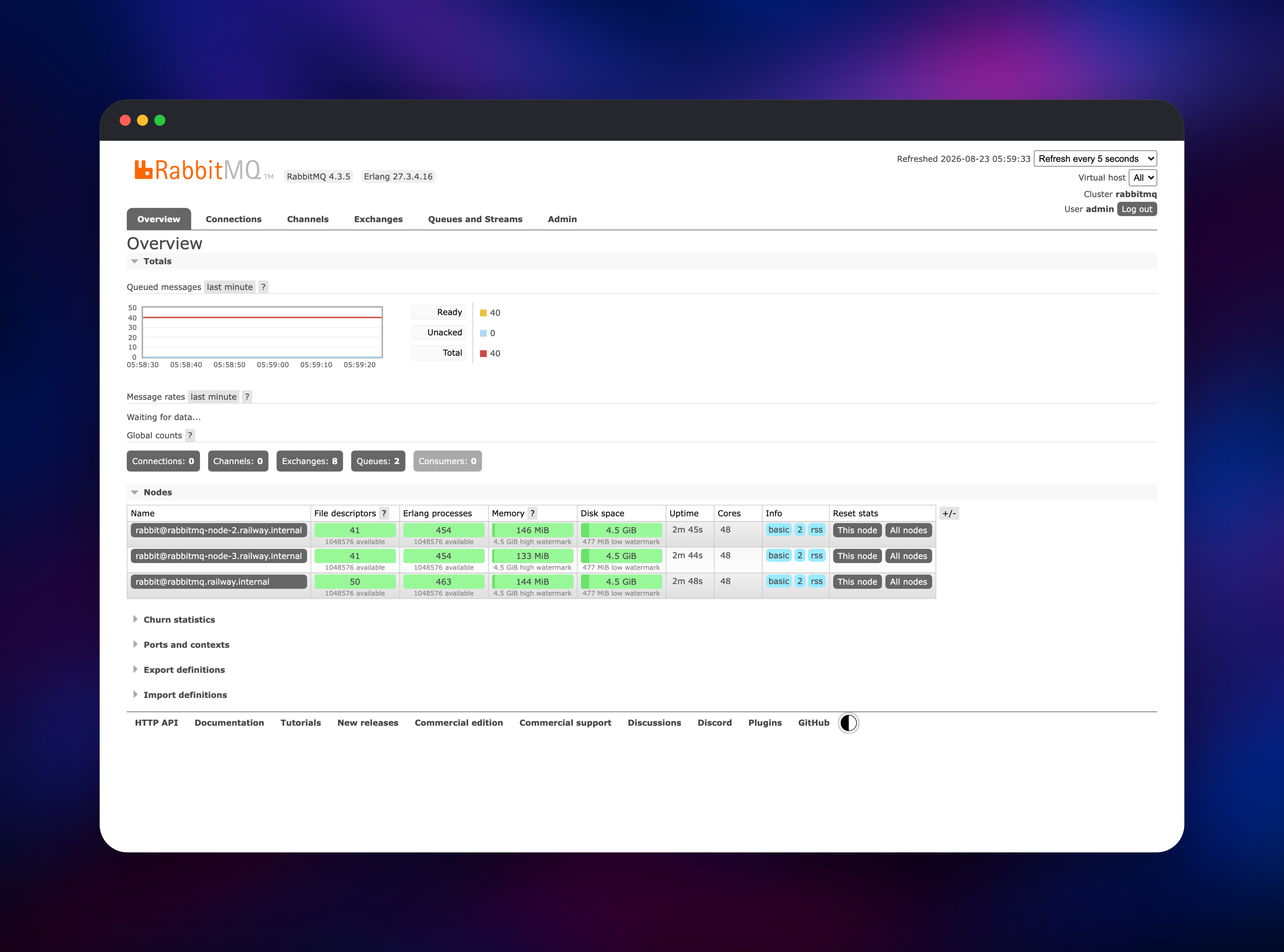
Open the public URL of the rabbitmq service and you land on the management UI login page. Sign in with RABBITMQ_DEFAULT_USER (admin by default) and the password generated for RABBITMQ_DEFAULT_PASS, both readable from that service's Variables tab. There is no guest account — it is deleted at boot, since the official image would otherwise leave it reachable from every network. Check the Overview tab first: the Nodes table should list three nodes, all green, on the same version. If only one appears, give the others a minute.
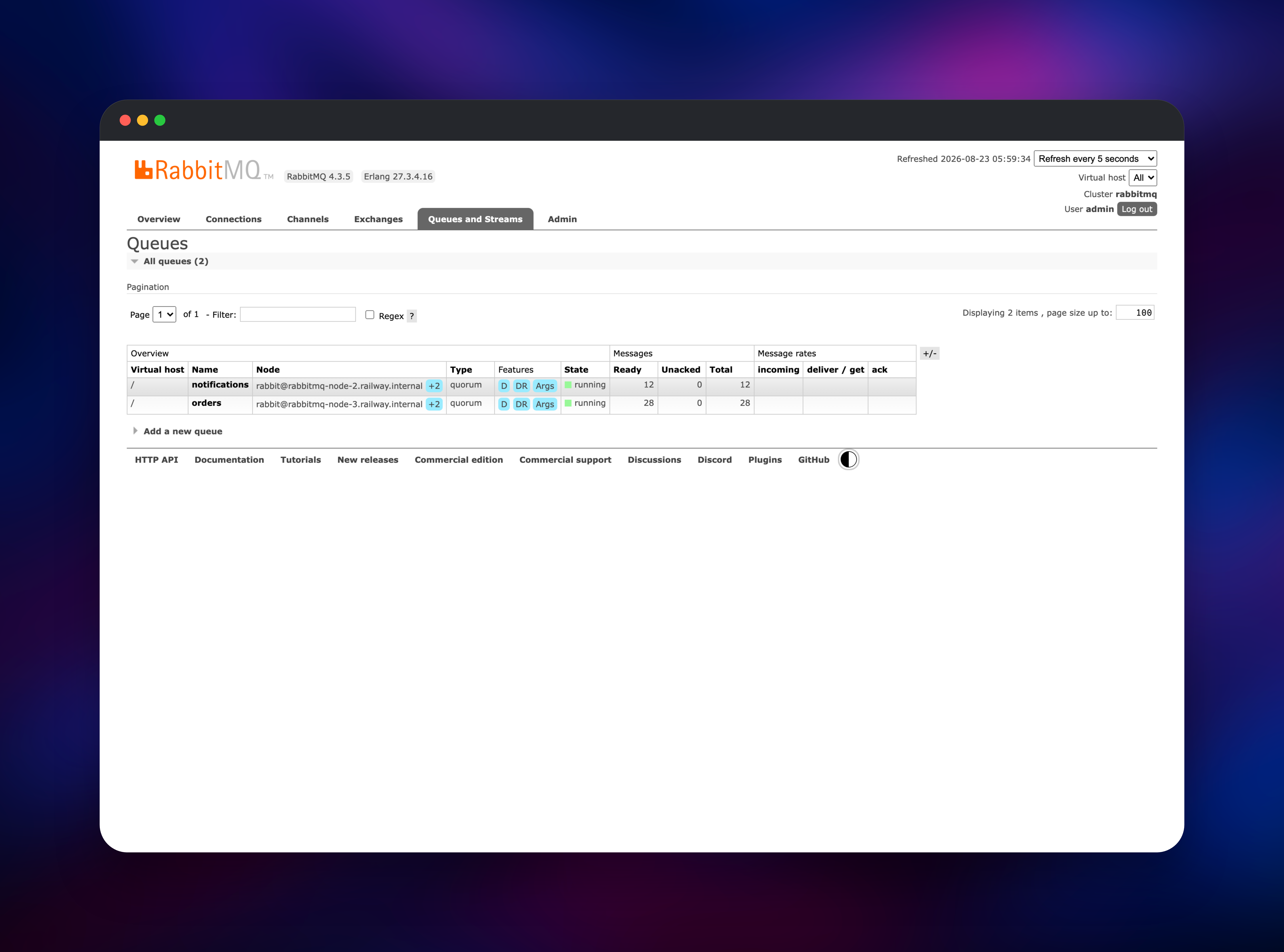
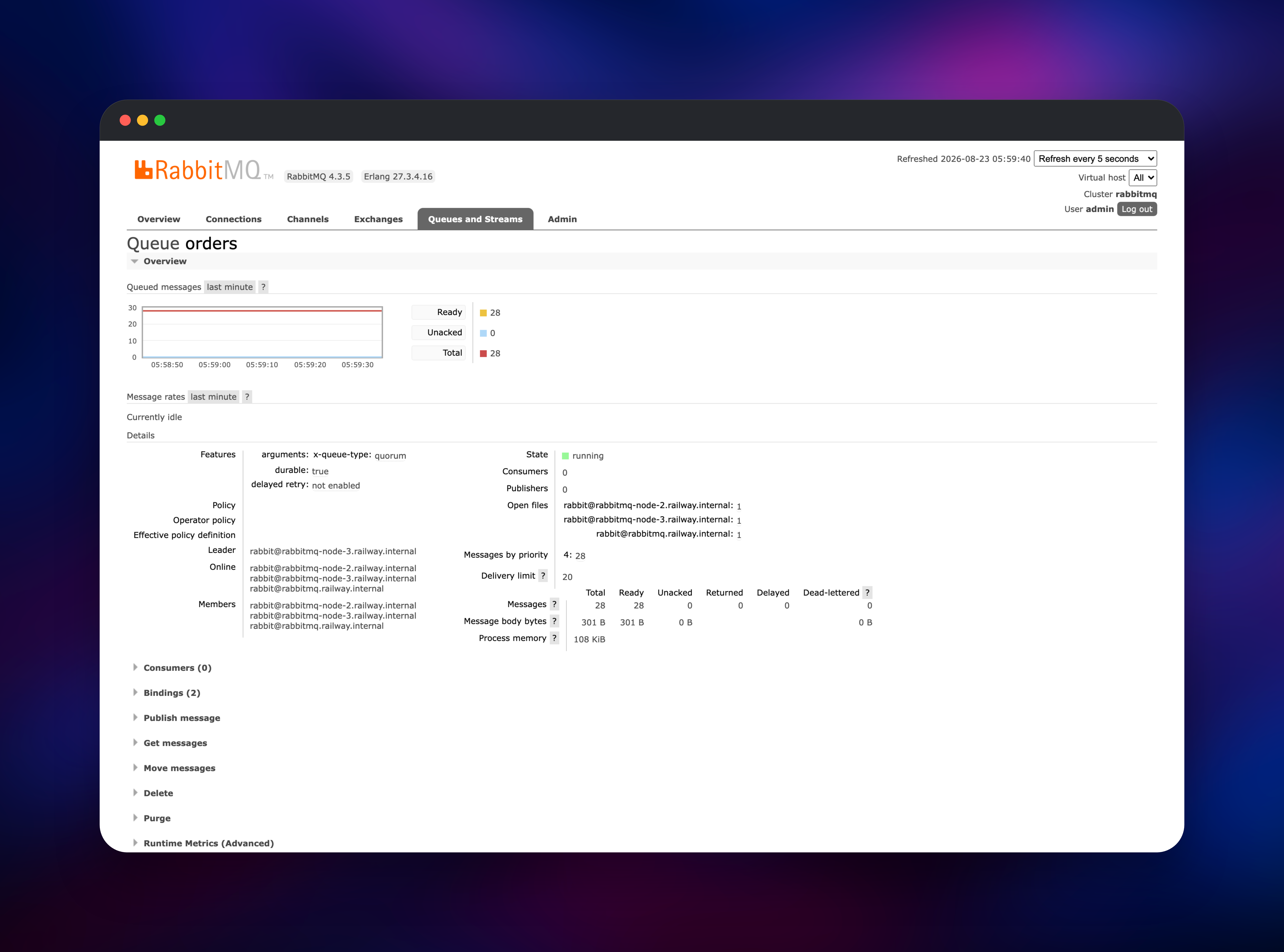
Then create something. Under Queues and Streams → Add a new queue, name it orders, leave the type as quorum, and use Publish message then Get messages to send and read a test payload; the queue detail page lists its members, and a quorum queue shows all three node names. Point your application at amqp://user:password@rabbitmq.railway.internal:5672/ from any service in the same project, or at the TCP proxy host and port on the rabbitmq service from anywhere else. Change the administrator password under Admin → Users — the variable is read only while a node's database is empty, so your change survives every redeploy.
About Hosting RabbitMQ
RabbitMQ is an open-source broker written in Erlang under the Mozilla Public License 2.0. Teams self-host it for the delivery guarantees of a managed queue without per-message billing, for protocols a cloud queue does not offer, or to keep message data in their own infrastructure. It is a stateful clustered service, so hosting it well means giving each node durable storage and a stable identity.
- Per-message acknowledgements, redelivery and delivery limits
- Direct, topic, fanout and headers exchanges for precise routing
- Quorum queues with Raft replication; streams for replayable logs
- Dead-letter exchanges, message TTL, priorities and delayed retry
- Publisher confirms and consumer prefetch for back-pressure
- Management UI, full HTTP API and a Prometheus metrics endpoint
- Virtual hosts, users and topic permissions for tenant isolation
Each service runs a complete broker; there is no coordinator and any node can serve clients. The first forms the cluster on a fresh deploy and carries the public surfaces; the other two are peers that give quorum queues a majority when one node goes down.
Why Deploy RabbitMQ on Railway
Railway removes the parts of running a broker that are not about messaging.
- Three nodes, three volumes and private networking in one click
- Automatic HTTPS on the management UI, plus a TCP proxy for AMQP clients
- Other services reach the broker privately by hostname
- Scaling without touching an Erlang config file
- Per-node logs, CPU and memory beside your applications
Common Use Cases for Self-Hosted RabbitMQ
- Background job processing — hand slow work such as PDF rendering or report generation to workers so requests return immediately.
- Microservice choreography — publish domain events to a topic exchange and let each service bind the routing keys it needs.
- Rate-limited outbound work — buffer email, SMS and webhook deliveries so a third party's limits shape the consumer, not your requests.
- Retry and dead-letter handling — bound a failing job's attempts and route the survivors somewhere you can inspect.
Dependencies for RabbitMQ on Railway
- rabbitmq — the first node, built from gridalpha/rabbitmq-railway on the official
rabbitmq:4-managementimage. Carries the management UI and AMQP TCP proxy. - rabbitmq-node-2, rabbitmq-node-3 — identical private peers, the majority that lets quorum queues tolerate a node failure.
- Three volumes at
/var/lib/rabbitmq. A Railway volume attaches to exactly one service, which is why each node is its own service, not a replica count.
Environment Variables Reference
| Variable | Default | Purpose |
|---|---|---|
RABBITMQ_DEFAULT_USER | admin | First administrator on an empty node |
RABBITMQ_DEFAULT_PASS | generated | Password for that administrator |
RABBITMQ_ERLANG_COOKIE_VALUE | generated | Shared secret every node must match |
RABBITMQ_CLUSTER_NODES | all three | Comma-separated peer list |
RABBITMQ_DEFAULT_QUEUE_TYPE | quorum | Type used when a client picks none |
RABBITMQ_MEMORY_HIGH_WATERMARK | 0.6 | Memory share before publishers block |
RABBITMQ_DISK_FREE_LIMIT | 500MB | Free volume space before publishers block |
Deployment Dependencies
- Source:
- Upstream:
- Image:
- Docs:
Hardware Requirements for Self-Hosting RabbitMQ
Sized per node; the template runs three. Erlang/OTP 27 ships in the image.
| Resource | Minimum | Recommended |
|---|---|---|
| CPU | 0.5 vCPU | 2 vCPU |
| RAM | 512 MB | 2 GB |
| Storage | 1 GB volume | 5 GB volume or more |
Memory is what matters: RabbitMQ holds unacknowledged messages in memory and blocks publishers once usage crosses the high watermark, so a deep backlog needs headroom, not just disk.
Self-Hosting RabbitMQ
The quickest way to try RabbitMQ locally is the official image with the management plugin, which serves the UI on port 15672:
docker run -d --name rabbitmq \
  -p 5672:5672 -p 15672:15672 \
  -e RABBITMQ_DEFAULT_USER=admin \
  -e RABBITMQ_DEFAULT_PASS=change-me \
  -v rabbitmq-data:/var/lib/rabbitmq \
  rabbitmq:4-management
To build the image this template deploys, clone the repository and build its Dockerfile:
git clone https://github.com/gridalpha/rabbitmq-railway
cd rabbitmq-railway
docker build -t rabbitmq-railway .
How Much Does RabbitMQ Cost to Self-Host?
RabbitMQ is free and open source under the MPL 2.0, with no seat count or message quota. A commercial edition with long-term support exists from Broadcom, but the open-source build is fully featured — quorum queues, streams, clustering and the management UI are all included. On Railway you pay only for the compute, memory and volume storage the three nodes use.
FAQ
What is RabbitMQ? An open-source message broker that accepts messages from publishers, routes them into queues by binding rules, and delivers them with per-message acknowledgement. It speaks AMQP 0-9-1 and 1.0, plus MQTT and STOMP through plugins.
What does this Railway template deploy? Three RabbitMQ 4 nodes in one cluster, each with its own volume, plus a public management UI on the first node and a TCP proxy for external AMQP clients. Quorum queues are the default type.
Why does it run three nodes instead of one? Quorum queues replicate over Raft and need a majority online to accept writes. Three is the smallest cluster that keeps a queue available while one node restarts.
How do I connect my application to self-hosted RabbitMQ on Railway?
From another service in the same project use amqp://user:password@rabbitmq.railway.internal:5672/; private networking resolves that hostname. From outside Railway, use the host and port shown under the TCP proxy on the rabbitmq service.
Can I change the default queue type or the admin password?
Yes. Set RABBITMQ_DEFAULT_QUEUE_TYPE to classic or stream, and change the password under Admin → Users — that persists, because the variable is read only while a node's database is empty.
How do I monitor a self-hosted RabbitMQ cluster?
Every node serves Prometheus metrics on port 15692 at /metrics with no credentials, alongside the management UI's charts and the HTTP API under /api.
Template Content
rabbitmq-node-3
gridalpha/rabbitmq-railwayrabbitmq-node-2
gridalpha/rabbitmq-railwayrabbitmq
gridalpha/rabbitmq-railway