
Deploy RustFS | Open-Source MinIO Alternative on Railway
Self Host RustFS. S3-compatible object storage with web console
RustFS
Just deployed
/data
Deploy and Host RustFS on Railway
Deploy RustFS on Railway to get a high-performance, S3-compatible object storage server running in minutes. RustFS is an open-source storage system written in Rust that delivers 2.3x faster performance than MinIO for small object payloads, making it ideal for AI/ML pipelines, data lakes, and media storage backends.
Self-host RustFS on Railway with this template, which pre-configures the RustFS server with persistent volume storage, a web-based admin console, S3 API access, and secure auto-generated credentials — ready to accept uploads via any S3-compatible client.
Getting Started with RustFS on Railway
After deploying, open your Railway-provided URL and append /rustfs/console/ to access the RustFS web console. Log in using the access key and secret key from your Railway environment variables. From the console, create your first storage bucket by clicking Create Bucket, then configure access policies and lifecycle rules. Upload files directly through the console UI, or connect any S3-compatible client by pointing it at your Railway public URL with port 9000 as the endpoint. Use the AWS CLI with aws s3 --endpoint-url https://your-domain.up.railway.app to interact programmatically.

About Hosting RustFS
RustFS is an Apache 2.0 licensed, S3-compatible distributed object storage system built entirely in Rust. It solves the problem of needing fast, self-hosted object storage without the AGPL licensing restrictions of MinIO.
- S3-compatible API — works with any AWS SDK (boto3, aws-sdk-js, aws-sdk-rust), AWS CLI, rclone, and restic
- Web admin console — browser-based bucket management, user administration, and file browsing
- Multi-part uploads — handles large files with chunked parallel uploads
- Presigned URLs — generate temporary download/upload links for secure sharing
- Event notifications — webhook, MQTT, and NATS notification support for bucket events
- Lifecycle management — automated object expiration and storage tiering rules
- AWS Signature v2/v4 — full authentication compatibility with existing S3 tooling
- OIDC/SSO support — integrate with external identity providers for console access
Why Deploy RustFS on Railway
One-click deployment with persistent storage and automatic HTTPS:
- Pre-configured volume at
/datafor durable object storage - Auto-generated access credentials — no default passwords
- Web console accessible immediately at
/rustfs/console/ - S3 API endpoint ready for any compatible client or SDK
- Apache 2.0 license — no AGPL restrictions for commercial use
- Scales with Railway's infrastructure — no server management
Common Use Cases for Self-Hosted RustFS
- AI/ML data pipeline storage — store training datasets, model checkpoints, and RAG corpora with superior small-object performance
- S3-compatible development environment — drop-in replacement for AWS S3 during local development and CI/CD testing
- Media and backup storage — backend for Nextcloud, Immich, restic, or rclone with lifecycle management
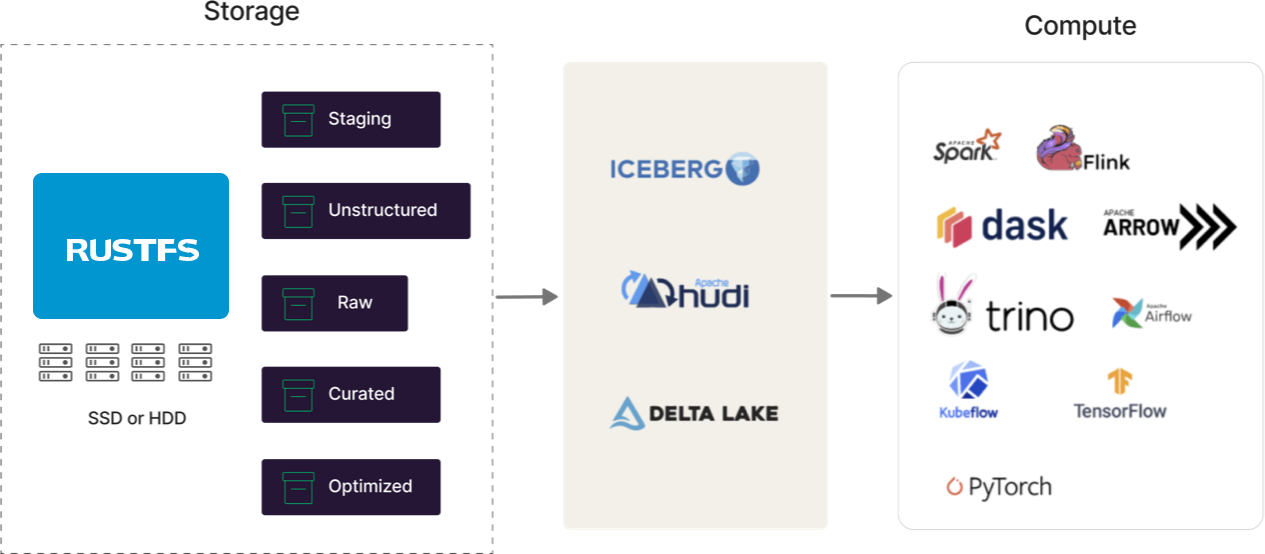
- Data lake backend — serve as the S3 storage layer for Spark, Trino, and other analytics query engines
Dependencies for RustFS on Railway
This template deploys a single service:
- RustFS —
rustfs/rustfs:latest(S3 API server + web console)
No external databases are required. RustFS stores all metadata alongside object data on disk.
Environment Variables Reference for RustFS
| Variable | Description | Example |
|---|---|---|
RUSTFS_ACCESS_KEY | Root access key for S3 API authentication | Auto-generated secret |
RUSTFS_SECRET_KEY | Root secret key for S3 API authentication | Auto-generated secret |
RUSTFS_VOLUMES | Storage volume path | /data |
RUSTFS_CONSOLE_ENABLE | Enable web admin console | true |
RUSTFS_CORS_ALLOWED_ORIGINS | CORS origins for S3 API | * |
RUSTFS_OBS_LOGGER_LEVEL | Log verbosity level | info |
Deployment Dependencies
- Runtime: Rust binary (statically linked, no runtime dependencies)
- Docker Hub: rustfs/rustfs
- GitHub: rustfs/rustfs (26.7k+ stars, Apache 2.0)
- Docs: RustFS GitHub Wiki
Hardware Requirements for Self-Hosting RustFS
| Resource | Minimum | Recommended |
|---|---|---|
| CPU | 2 cores | 4+ cores |
| RAM | 4 GB | 8 GB |
| Storage | 10 GB | 50+ GB (depends on data volume) |
| Runtime | Docker or bare metal Linux | Docker with persistent volume |
Self-Hosting RustFS with Docker
Pull and run RustFS with Docker:
docker run -d \
  --name rustfs \
  -p 9000:9000 \
  -p 9001:9001 \
  -v $(pwd)/data:/data \
  -e "RUSTFS_ACCESS_KEY=your-access-key" \
  -e "RUSTFS_SECRET_KEY=your-secret-key" \
  -e "RUSTFS_VOLUMES=/data" \
  -e "RUSTFS_CONSOLE_ENABLE=true" \
  -e "RUSTFS_CONSOLE_ADDRESS=0.0.0.0:9001" \
  rustfs/rustfs:latest
Or use Docker Compose:
version: "3.9"
services:
  rustfs:
    image: rustfs/rustfs:latest
    ports:
      - "9000:9000"
      - "9001:9001"
    environment:
      - RUSTFS_VOLUMES=/data
      - RUSTFS_ADDRESS=0.0.0.0:9000
      - RUSTFS_CONSOLE_ADDRESS=0.0.0.0:9001
      - RUSTFS_CONSOLE_ENABLE=true
      - RUSTFS_ACCESS_KEY=changeme
      - RUSTFS_SECRET_KEY=changeme-secret
    volumes:
      - rustfs_data:/data
    restart: unless-stopped

volumes:
  rustfs_data:
Access the S3 API at http://localhost:9000 and the web console at http://localhost:9001/rustfs/console/.
RustFS vs MinIO — Which S3-Compatible Storage to Self-Host?
| Feature | RustFS | MinIO |
|---|---|---|
| License | Apache 2.0 | AGPLv3 |
| Language | Rust | Go |
| 4KB object performance | 2.3x faster | Baseline |
| Large object performance | Comparable | Slightly faster |
| Production maturity | Alpha | Battle-tested |
| Web console | Yes | Yes |
| S3 compatibility | Full | Full |
RustFS offers a permissive Apache 2.0 license and superior small-object performance, making it attractive for commercial deployments and AI/ML workloads. MinIO has a longer track record but its AGPL license requires source disclosure for network services.
How Much Does RustFS Cost to Self-Host?
RustFS is completely free and open source under the Apache 2.0 license. There are no paid tiers, enterprise editions, or feature gates. The only cost is infrastructure — on Railway, you pay only for the compute and storage resources your RustFS instance uses. The Apache 2.0 license allows unrestricted commercial use without copyleft obligations.
FAQ
What is RustFS and why self-host it on Railway? RustFS is an open-source, S3-compatible object storage server written in Rust. Self-hosting on Railway gives you full control over your data with automatic HTTPS, persistent storage, and no vendor lock-in to cloud storage providers like AWS S3.
What does this Railway template deploy for RustFS?
This template deploys a single RustFS service with a persistent volume at /data, auto-generated access credentials, a web admin console, and an S3-compatible API endpoint — all behind Railway's HTTPS edge proxy.
Why does the RustFS template need a persistent volume?
RustFS stores all uploaded objects and their metadata directly on disk. Without a persistent volume, all stored data would be lost on every redeploy. The volume at /data ensures your buckets and objects survive container restarts.
How do I connect AWS CLI to self-hosted RustFS on Railway?
Configure the AWS CLI with your RustFS credentials and endpoint: aws configure with your access/secret keys, then use aws s3 ls --endpoint-url https://your-rustfs-domain.up.railway.app to list buckets. Any S3 SDK works the same way — just change the endpoint URL.
Can I use RustFS as a drop-in replacement for MinIO?
Yes. RustFS implements the same S3-compatible API as MinIO. Applications using MinIO's S3 endpoint can switch to RustFS by changing the endpoint URL and credentials. RustFS also uses a similar environment variable naming pattern (RUSTFS_ instead of MINIO_).
Is RustFS ready for production use? RustFS is currently in alpha (v1.0.0-alpha). The project explicitly notes it is not yet recommended for production environments. For non-critical workloads, development environments, and evaluation purposes, it works well on Railway with full S3 API compatibility.
Template Content
RustFS
rustfs/rustfs:latest

