
Deploy SeaweedFS
Distributed storage system with an S3-compatible API

Just deployed
/var/lib/postgresql/data
Just deployed
/data
master
Just deployed
/data
worker
Just deployed
/data
Just deployed
volume2
Just deployed
/data
volume1
Just deployed
/data
Just deployed
Deploy and Host SeaweedFS on Railway
SeaweedFS is a distributed storage system that speaks the S3 API, built around one idea: a file lookup should cost a single disk seek no matter how many billions of files you store. Metadata lives in a filer, the bytes in volume servers, so adding capacity means adding a volume server rather than rebalancing a cluster. Teams reach for it when they need durable object storage they control — uploads, backups, media libraries — without paying per gigabyte or running Ceph.
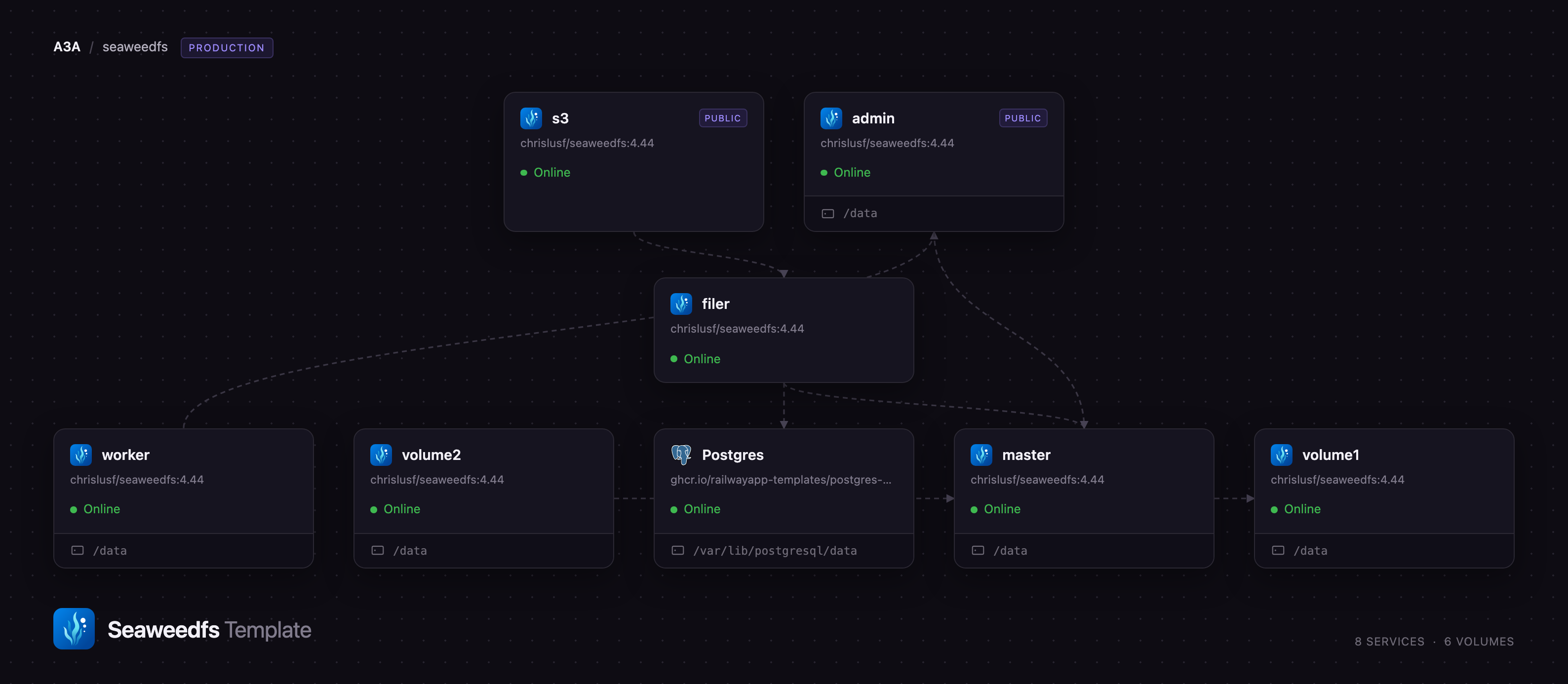
Deploy SeaweedFS on Railway and you get the full production topology, not one all-in-one container: a master that allocates volumes, two volume servers storing every object twice, a filer keeping the namespace in PostgreSQL, an s3 gateway serving the authenticated S3 API on a public URL, a weed admin console, and a maintenance worker. Writes reach the S3 gateway, which asks the filer where to put the data; the filer asks the master for a volume, and the bytes land on both volume servers before the request returns.
Getting Started with SeaweedFS on Railway
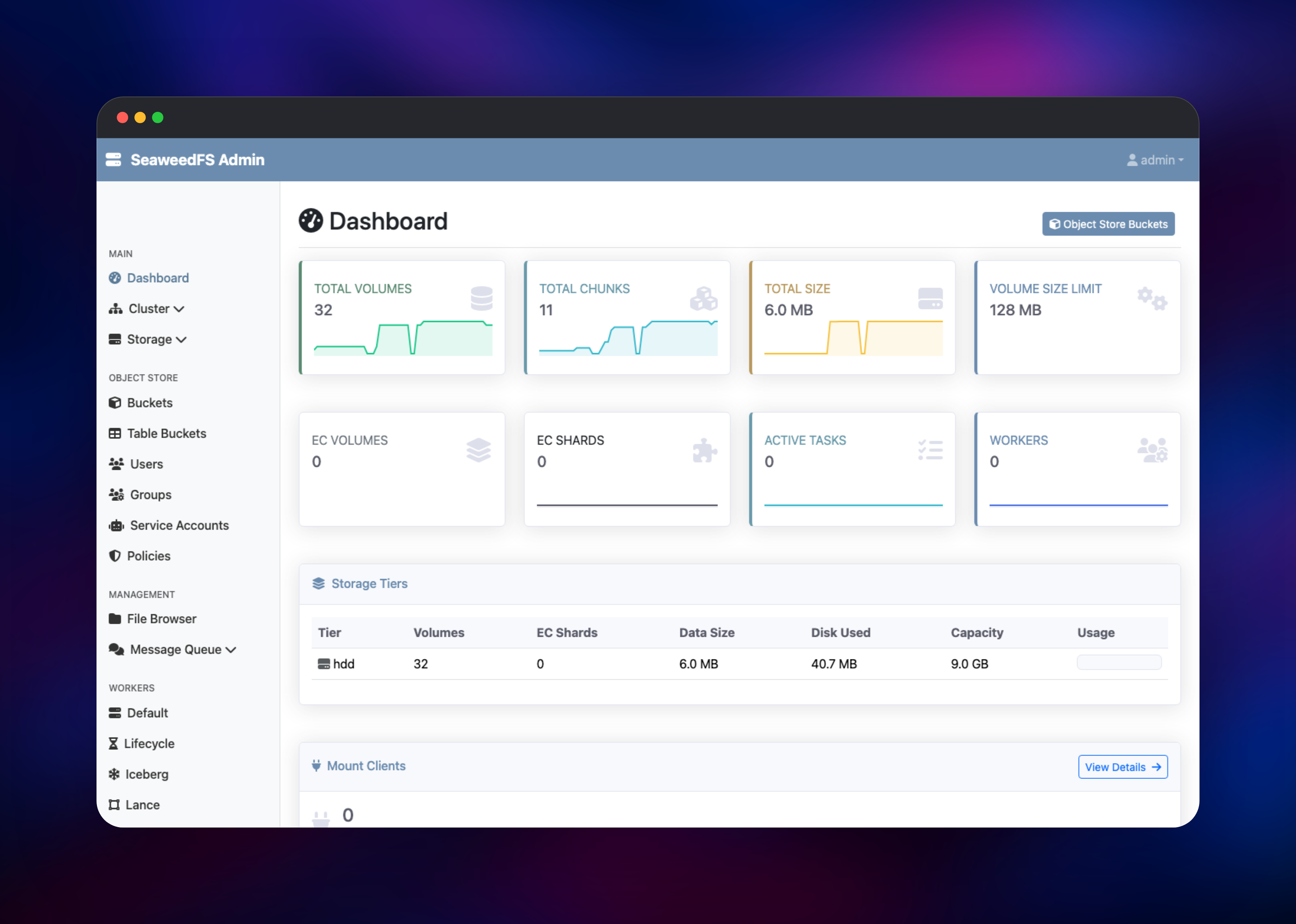
Two services get public URLs. The admin service is the web console: sign in as admin with the password generated into SEAWEED_ADMIN_PASSWORD at deploy time — there is no signup flow and no default password to change. The s3 service is the API endpoint and has no browser UI; point an S3 client at it with the AWS_ACCESS_KEY_ID and AWS_SECRET_ACCESS_KEY generated there.
To confirm it works, create a bucket and put an object in it with the AWS CLI:
aws --endpoint-url https://your-s3-service.up.railway.app s3 mb s3://media-library
aws --endpoint-url https://your-s3-service.up.railway.app s3 cp ./photo.jpg s3://media-library/photo.jpg
aws --endpoint-url https://your-s3-service.up.railway.app s3 ls s3://media-library
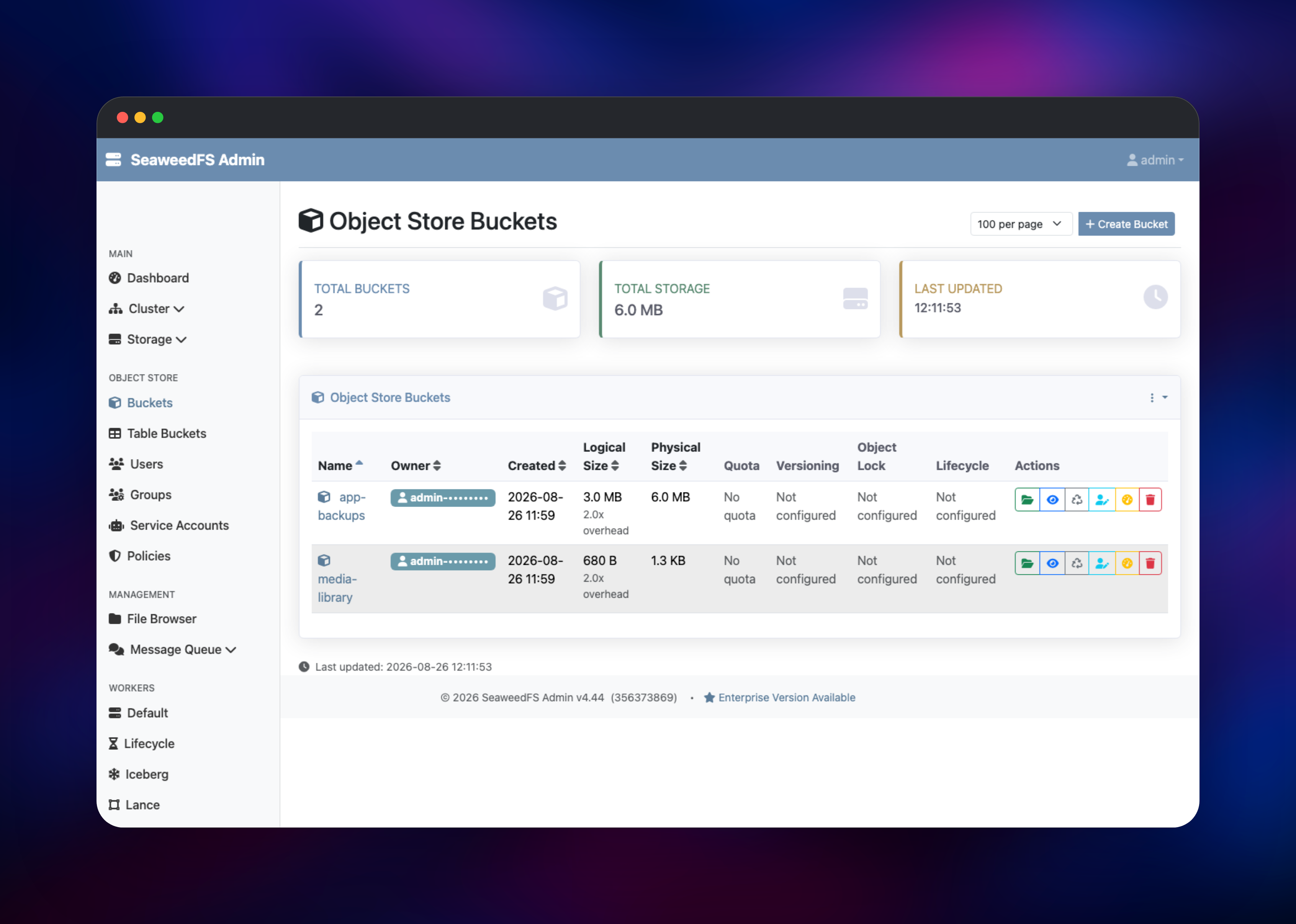
Then open the admin console at Object Store → Buckets: media-library should show a physical size roughly twice its logical size, which is replication working. The File Browser under Management shows the same object in the filer's namespace — proof the S3 gateway and the file system are two views of one store. An anonymous request to the endpoint returns 403 AccessDenied, so it is safe to hand to an application straight away.
About Hosting SeaweedFS
SeaweedFS solves the small-file problem. Most object stores keep a metadata record per object in a general-purpose database and pay for it on every read; SeaweedFS groups objects into large volume files with a compact in-memory index mapping a file id to an offset. That gives O(1) disk access at ten thousand objects or ten billion, which is why it sits behind image services, CDN origins and backup targets.
Key capabilities:
- S3 API with SigV4 auth, multipart uploads, ranged reads and per-bucket isolation
- Replication as a three-digit code for copies across data centres, racks and nodes
- A filer presenting a POSIX-style namespace over the same data
- Erasure coding, background vacuuming and rebalancing driven by maintenance workers
- Iceberg REST catalog and Lance namespace endpoints for analytics
- Apache 2.0 licensed, with over a decade of active development
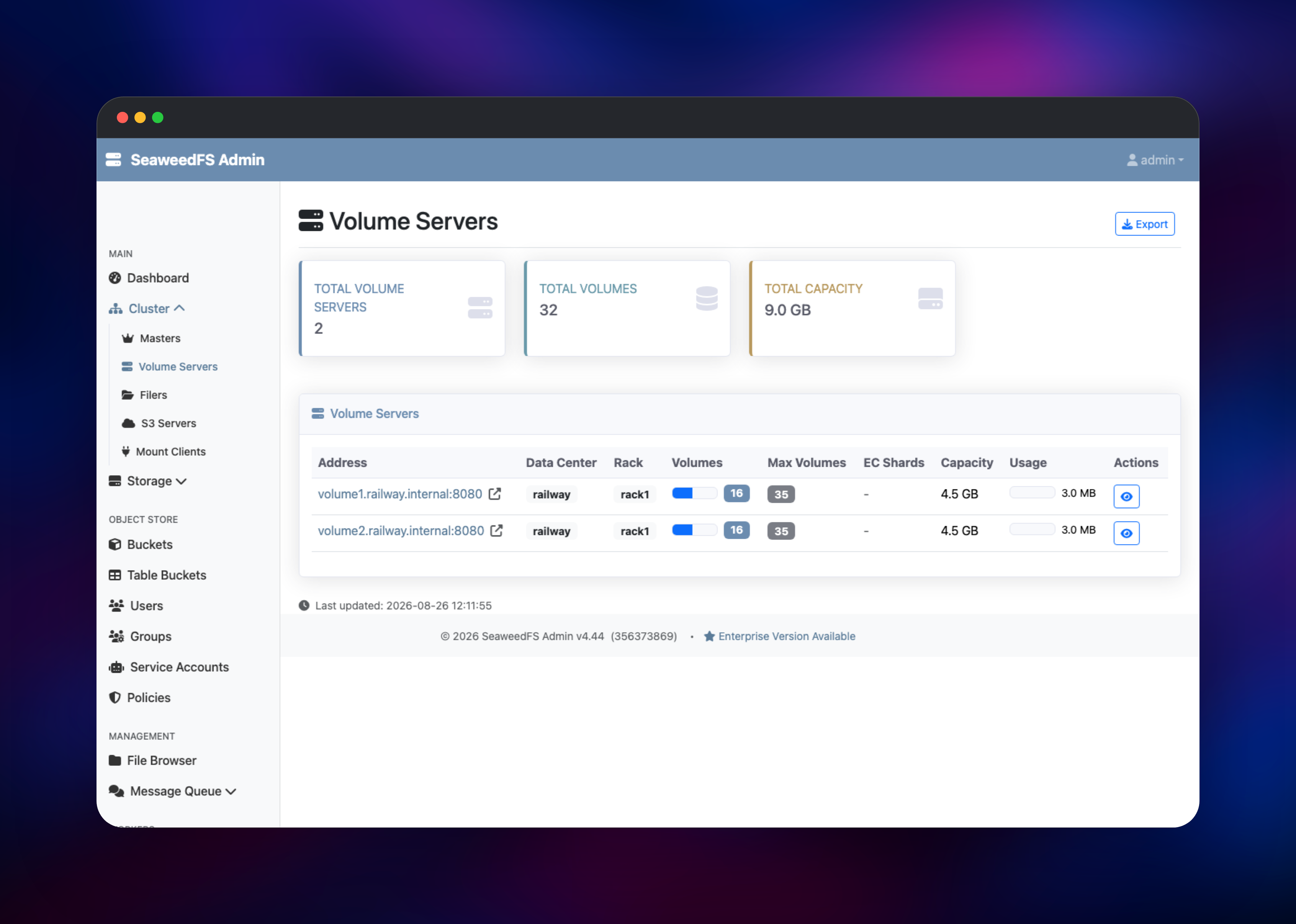
Each role is its own Railway service. master tracks the volume servers, allocates volumes and holds raft leadership. volume1 and volume2 are the data plane, both in one rack so the default 001 policy puts a second copy of every volume on the other node. filer owns the directory tree and object metadata in PostgreSQL. s3 turns S3 requests into filer operations. admin is the console and the gRPC endpoint worker connects to.
Why Deploy SeaweedFS on Railway
Railway removes the cluster plumbing that makes SeaweedFS hard to start.
- Every role is its own service, with private networking already wired up
- Persistent volumes on the master, both volume servers, the admin and the worker
- PostgreSQL for filer metadata provisioned and connected automatically
- Managed HTTPS on the S3 endpoint and the admin console
- Credentials generated at deploy time, so nothing ships with a default password
- Grow a volume server's disk from the dashboard without touching configuration
Common Use Cases
- Application object storage — uploads, avatars and attachments for any app that speaks S3
- Backup target — restic, Kopia, pgBackRest and Velero write to an S3 endpoint, and replication survives losing a node
- Media and CDN origin — ranged reads and multipart uploads suit video and image libraries
- Analytics storage — the built-in Iceberg REST catalog lets query engines read tables directly
Dependencies for SeaweedFS
Every role runs the same image, chrislusf/seaweedfs:4.44, with a different subcommand: master coordinates on 9333, volume1 and volume2 store data on 8080, filer serves the namespace on 8888, s3 the S3 API on 8333, admin the console on 23646, and worker runs maintenance. Postgres (postgres-ssl:18) holds filer metadata.
The version is pinned because SeaweedFS owns an on-disk volume format, and all seven services must run the same build.
Environment Variables Reference
| Variable | Service | Purpose |
|---|---|---|
AWS_ACCESS_KEY_ID | s3 | S3 access key; its presence is what enables authentication |
AWS_SECRET_ACCESS_KEY | s3 | S3 secret key |
S3_EXTERNAL_URL | s3 | Public URL used to verify request signatures |
SEAWEED_ADMIN_PASSWORD | admin | Console password; empty disables authentication |
SEAWEEDFS_REPLICATION | master | Replication code, 001 by default |
SEAWEEDFS_VOLUME_SIZE_LIMIT_MB | master | Maximum size of one volume file |
Deployment Dependencies
- Source and docs: github.com/seaweedfs/seaweedfs, wiki
- Image: chrislusf/seaweedfs
Hardware Requirements for Self-Hosting SeaweedFS
| Resource | Minimum | Recommended |
|---|---|---|
| CPU | 2 vCPU across the cluster | 4+ vCPU |
| RAM | 1 GB total | 4 GB+, mostly volume server indexes |
| Storage | 5 GB per volume server | Your data, doubled for replication |
| Runtime | Go binary | Container with a persistent volume |
Volume servers hold their file index in memory, so RAM scales with object count, not size. And 001 replication stores everything twice: 50 GB of objects needs 100 GB of disk.
Self-Hosting SeaweedFS
The quickest local trial is the single binary — weed server runs the master, a volume server, the filer and the S3 gateway in one process:
docker run -p 9333:9333 -p 8080:8080 -p 8888:8888 -p 8333:8333 \
  -v /data:/data chrislusf/seaweedfs:4.44 server -s3 -dir=/data
A real cluster splits the roles apart, as this template does — one command each:
weed master -ip=master -port=9333 -defaultReplication=001
weed volume -ip=volume1 -port=8080 -master=master:9333 -dir=/data -max=0
weed filer  -ip=filer  -port=8888 -master=master:9333
weed s3     -port=8333 -filer=filer:8888
Set AWS_ACCESS_KEY_ID and AWS_SECRET_ACCESS_KEY on the gateway. Without them it accepts any key pair — the one thing to get right before exposing it.
Is SeaweedFS Free to Self-Host?
SeaweedFS is open source under Apache 2.0, with no paid tier, seat limits or feature gates in the build deployed here. An enterprise edition exists, but everything in this template — S3, replication, erasure coding, filer and admin console — is in the free build. On Railway you pay only for compute, memory and volume storage, so cost scales with data kept, not a per-gigabyte rate.
FAQ
What is SeaweedFS? An open-source distributed storage system providing an S3-compatible object store and a POSIX-style file system over the same data, built for very large numbers of small files.
What does this Railway template deploy? Seven SeaweedFS services — master, two volume servers, filer, S3 gateway, admin console and worker — plus PostgreSQL for filer metadata. Only the gateway and console are public.
Why does the template include PostgreSQL? The filer must store the directory tree and object metadata somewhere. Its default is an embedded key-value store on local disk, which ties the filer to one machine and one volume. PostgreSQL keeps that metadata in a managed database, so the filer stays stateless.
Why are there two volume servers instead of one?
Replication needs somewhere to put the second copy. The default 001 policy stores each volume on two nodes in one rack, so losing one does not lose data. Set SEAWEEDFS_REPLICATION to 000 to run a single node instead.
How do I connect my application to self-hosted SeaweedFS?
Point any S3 SDK at the S3 service's public URL with the generated key and secret. Most SDKs need endpoint_url set and path-style addressing enabled; any region string works.
Is SeaweedFS a good MinIO alternative? It is currently the most common replacement. MinIO's community edition stopped receiving development and security patches in early 2026, while SeaweedFS stays actively maintained under Apache 2.0 and covers the same S3 surface.
Template Content


