
Deploy GrowthBook | Open Source LaunchDarkly Alternative on Railway
Self Host GrowthBook: Feature Flags, A/B Testing & Analytics
GrowthBook
Just deployed
/usr/local/src/app/packages/back-end/uploads

MongoDB
Just deployed
/data/db
Deploy and Host GrowthBook
GrowthBook is an open-source feature flagging, A/B testing, and product analytics platform — the self-hosted alternative to LaunchDarkly and Statsig used by teams who want full data control and warehouse-native experimentation without per-seat pricing surprises.
Deploy GrowthBook on Railway with this template and you get the full stack pre-wired.
The app bundles a NextJS front-end, an ExpressJS API, and a Python stats engine into a single Docker image. This template handles the multi-service orchestration so you can self-host GrowthBook on Railway in minutes, not hours.
⚠️IMP: Railway-Specific Setup: Two Domains for One Service
GrowthBook exposes two ports from a single container: port 3000 (the UI) and port 3100 (the API). Railway allows multiple public domains per service, but the UI only shows a single "Generate Domain" button — clicking it once disables the button before a second domain can be generated.
The workaround: click "Generate Domain" multiple times in rapid succession before the UI disables the button. This is a UI guard only — the Railway platform fully supports multiple domains per service (and it can also be done via the Railway API).
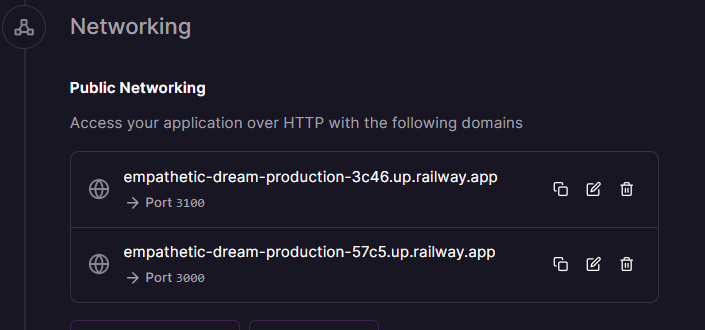
Once you have two domains:
- Set one domain's port to
3000→ copy the URL → paste asAPP_ORIGINin the env variable of GrowthBook - Set the other domain's port to
3100→ copy the URL → paste asAPI_HOST - Redeploy GrowthBook to pick up the updated variables
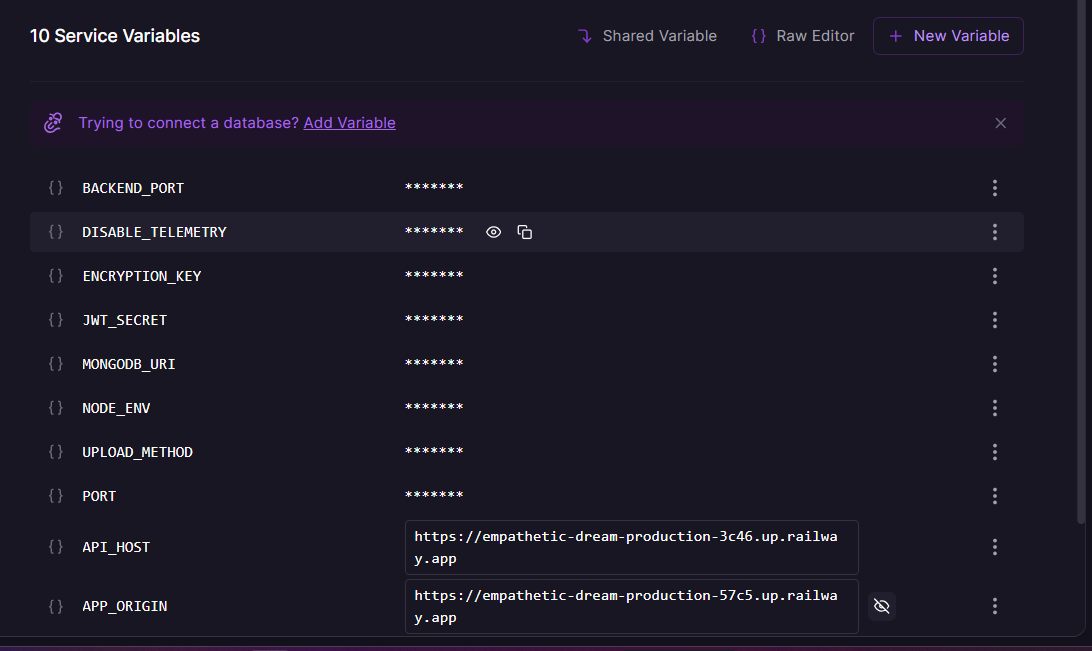
Both domains must share the same root domain for auth cookies to work. Railway's *.up.railway.app subdomains satisfy this automatically.
Getting Started with GrowthBook on Railway
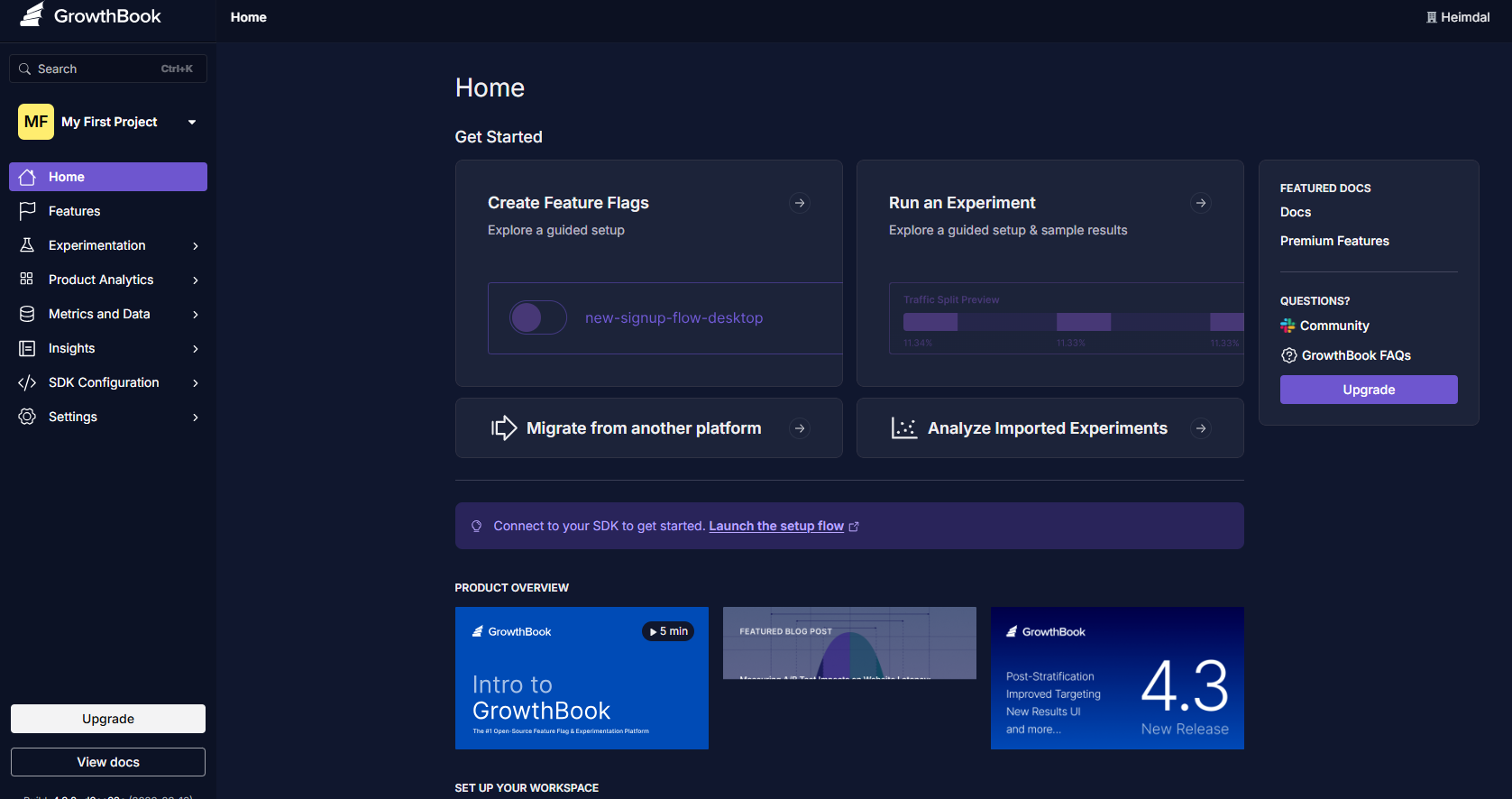
Once the template is deployed and both domains are configured, open your APP_ORIGIN URL in a browser. GrowthBook will prompt you to create your first admin account — fill in your name, email, and password to complete registration.
From there, connect a data source (BigQuery, Snowflake, Postgres, Redshift, and others are supported), define your metrics using SQL, and create your first feature flag or experiment. The GrowthBook SDK (available for React, Node, Python, Go, iOS, Android, and 20+ others) connects to your API_HOST URL for flag evaluation.
About Hosting GrowthBook
GrowthBook is a warehouse-native experimentation platform. Unlike tools that store your event data on their servers, GrowthBook queries your existing data warehouse directly — your data stays where it already lives. It was built for teams that run serious experiments and want statistical rigour (CUPED, Sequential testing, Bayesian analysis, Bandits, SRM checks) without building an in-house platform.
Key features:
- Feature flags with advanced targeting, gradual rollouts, and percentage-based splits
- A/B testing with a world-class stats engine — CUPED, Sequential, Bayesian, Bandit support
- Warehouse-native: queries BigQuery, Snowflake, Redshift, Databricks, Postgres, and more
- 24+ SDKs — React, Node, Python, Go, iOS, Android, PHP, Ruby, and more
- Visual editor for no-code experiment setup
- OpenFeature-compatible for vendor-neutral flag evaluation
Why Deploy GrowthBook on Railway
One-click deploy with zero Docker or volume config to write yourself. Railway handles:
- Private networking between GrowthBook and MongoDB out of the box
- Auto-generated secrets for
JWT_SECRETandENCRYPTION_KEYon first deploy - Persistent volumes for both MongoDB data and GrowthBook uploads
- Managed TLS and custom domain support
- Vertical scaling if your experiment workload grows
Common Use Cases
- Replacing LaunchDarkly or Statsig — teams migrating off expensive per-seat or per-MAU SaaS pricing to a self-hosted stack with no flag evaluation fees
- Warehouse-native experimentation — data science teams who already have Snowflake or BigQuery and want to run A/B tests against their existing event tables without copying data to a third-party platform
- Progressive feature rollouts — engineering teams doing canary releases, percentage rollouts, and kill-switch flags across web, mobile, and backend services simultaneously
- B2B SaaS experimentation — teams using hash-based bucketing on
company_idto ensure all users within a tenant see the same flag state during a rollout
Dependencies for GrowthBook
- GrowthBook —
growthbook/growthbook:latest(Docker Hub · GitHub) - MongoDB —
mongo:latest(Docker Hub) — stores feature flags, experiment metadata, user credentials, and cached results
Environment Variables Reference
| Variable | Description | Required |
|---|---|---|
APP_ORIGIN | Public URL for port 3000 (UI). Set after generating Railway domain. | ✅ |
API_HOST | Public URL for port 3100 (API). Set after generating Railway domain. | ✅ |
Deployment Dependencies
- Docker Hub: https://hub.docker.com/r/growthbook/growthbook
- Docs: https://docs.growthbook.io/self-host
- Env Variables: https://docs.growthbook.io/self-host/env#domains-and-ports
GrowthBook vs LaunchDarkly vs Unleash
| GrowthBook | LaunchDarkly | Unleash | |
|---|---|---|---|
| Open source | ✅ MIT core | ❌ Proprietary | ✅ Open source |
| Self-hostable | ✅ | ❌ SaaS only | ✅ |
| A/B testing / stats engine | ✅ Built-in (CUPED, Sequential, Bayesian) | ✅ Add-on | ❌ Pro/Enterprise only |
| Warehouse-native queries | ✅ | ❌ | ❌ |
| Pricing (cloud) | Free up to 3 seats, $20/seat/month Pro | From $10/seat/month | Free self-host, $75/seat/month Enterprise |
| Flag evaluation | Local SDK (offline-capable) | Streaming (network-dependent) | Local SDK |
GrowthBook is the strongest choice when experimentation and warehouse-native data integration are primary requirements. LaunchDarkly wins for large enterprises needing streaming updates and deep enterprise workflow integrations. Unleash leads for teams that want pure feature flag management with strong role-based access controls.
Minimum Hardware Requirements for GrowthBook
| Resource | Minimum | Recommended |
|---|---|---|
| CPU | 1 vCPU | 2 vCPU |
| RAM | 1 GB | 2–4 GB |
| Storage (MongoDB volume) | 5 GB | 20+ GB |
| Storage (uploads volume) | 1 GB | 5 GB |
| Node.js | 20.x (bundled) | 20.x |
GrowthBook's Python stats engine runs in-process and adds memory overhead during experiment analysis — allow headroom if running large experiments. MongoDB will grow with experiment result cache size.
Self-Hosting GrowthBook
To self-host GrowthBook outside Railway, use the official Docker Compose setup:
# docker-compose.yml
services:
  mongo:
    image: mongo:latest
    environment:
      - MONGO_INITDB_ROOT_USERNAME=root
      - MONGO_INITDB_ROOT_PASSWORD=password
    volumes:
      - mongodata:/data/db

  growthbook:
    image: growthbook/growthbook:latest
    ports:
      - "3000:3000"
      - "3100:3100"
    depends_on:
      - mongo
    environment:
      - MONGODB_URI=mongodb://root:password@mongo:27017/growthbook?authSource=admin
      - JWT_SECRET=your-random-secret
      - ENCRYPTION_KEY=your-random-key
      - NODE_ENV=production
      - APP_ORIGIN=http://localhost:3000
      - API_HOST=http://localhost:3100
    volumes:
      - uploads:/usr/local/src/app/packages/back-end/uploads

volumes:
  uploads:
  mongodata:
docker compose up -d
# UI available at http://localhost:3000
# API available at http://localhost:3100
Is GrowthBook Free?
GrowthBook is open-source (MIT license for the core) and free to self-host with unlimited seats. On Railway, you pay only for the infrastructure (compute + storage) — there are no GrowthBook licensing fees for the self-hosted version.
GrowthBook Cloud is also free for up to 3 users, then $20/seat/month for the Pro plan (which adds flag scheduling, advanced permissions, and the visual editor). An Enterprise plan adds SSO, audit logs, and higher request limits — pricing on request. Self-hosted Enterprise features can be unlocked with a LICENSE_KEY.
FAQ
What is GrowthBook? GrowthBook is an open-source platform for feature flagging, A/B testing, and product experimentation. It lets engineering and product teams release features safely, run controlled experiments, and measure impact using their existing data warehouse — without sending event data to a third-party SaaS.
Why does this template include MongoDB? GrowthBook requires MongoDB (or a MongoDB-compatible database like AWS DocumentDB or MongoDB Atlas) to store feature flag definitions, experiment metadata, user accounts, and cached results. Without it, GrowthBook cannot start.
Why do I need to configure two Railway domains?
GrowthBook exposes two separate ports from one container: the UI (3000) and API (3100). Both must be publicly reachable, and APP_ORIGIN/API_HOST must be set correctly for auth cookies and SDK connections to work. See the setup note at the top of this page for the workaround.
Does GrowthBook support my data warehouse? GrowthBook supports BigQuery, Snowflake, Redshift, Databricks, Postgres, MySQL, ClickHouse, Athena, PrestoDB, Mixpanel, and Google Analytics as data sources.
Template Content
GrowthBook
growthbook/growthbook:latestAPP_ORIGIN
Intentionally empty. For now set to ${{RAILWAY_PUBLIC_DOMAIN}}, but ⚠️ you won't be able to access the UI without setting this up correctly — read the overview after deployment for steps: https://railway.com/deploy/self-host-growthbook
MongoDB
mongo:8.0