
Deploy SFTPGo
File transfer server offering SFTP, WebDAV and a browser file manager

Just deployed
/var/lib/postgresql/data

Just deployed
sftpgo
Just deployed
/srv/sftpgo
Deploy and Host SFTPGo on Railway
SFTPGo is an open-source file transfer server that puts SFTP, WebDAV, an HTTP API and a browser file manager in front of one set of storage. Rather than handing a contractor a shell account, you create a file transfer user with its own quota, permissions and IP restrictions, reaching the same files over whichever protocol suits. It is written in Go, under AGPL-3.0, at drakkan/sftpgo.
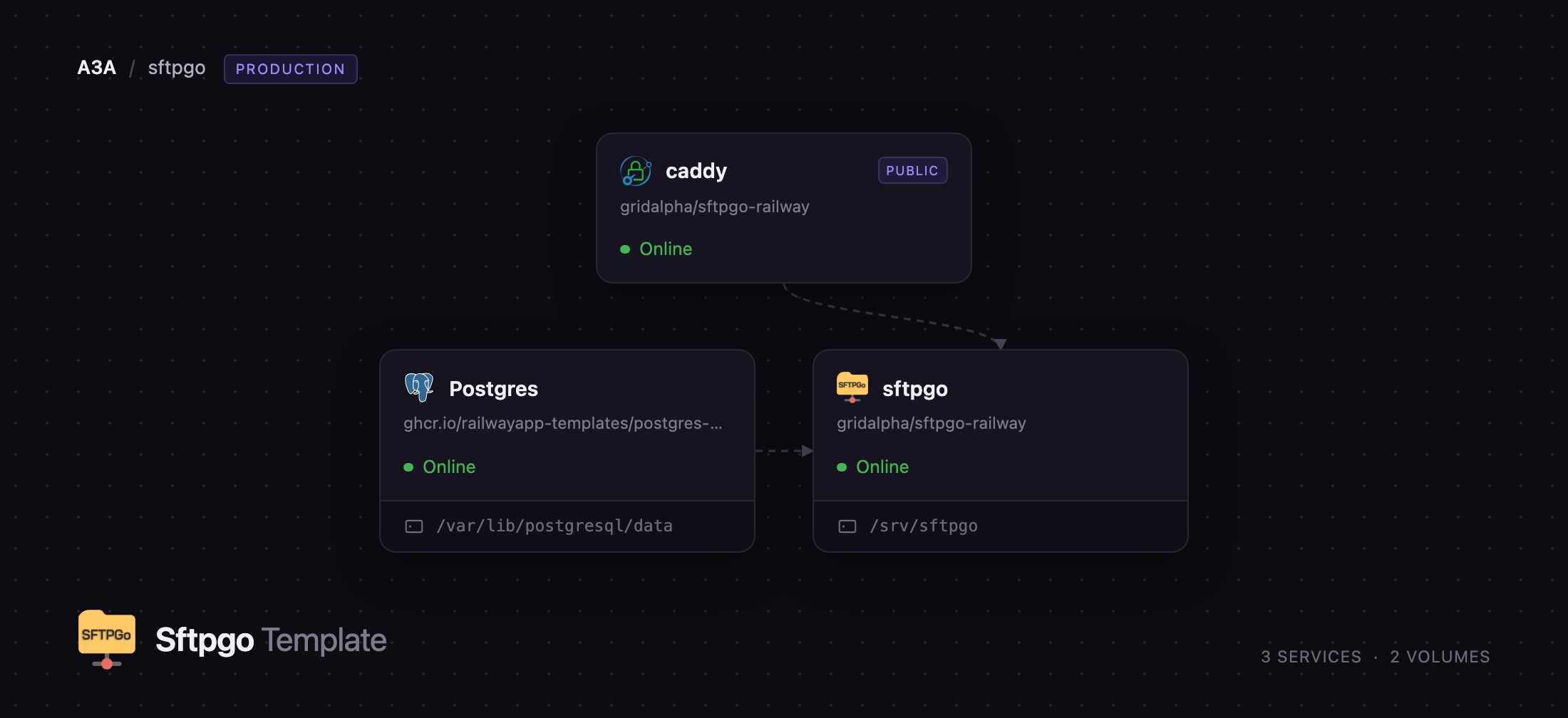
Deploy SFTPGo on Railway and the awkward parts of self-hosting it are already wired up. Accounts, groups, shares and ban records live in a managed Postgres database rather than a SQLite file. The sftpgo service holds the server, with a volume for user home directories, SSH host keys and backups. A caddy gateway owns the public HTTPS domain and routes /dav to the WebDAV listener and everything else to the web interface and REST API, since one domain must serve both. A TCP proxy publishes the SSH listener, so you get a real SFTP endpoint, not just a web UI.
Getting Started with SFTPGo on Railway
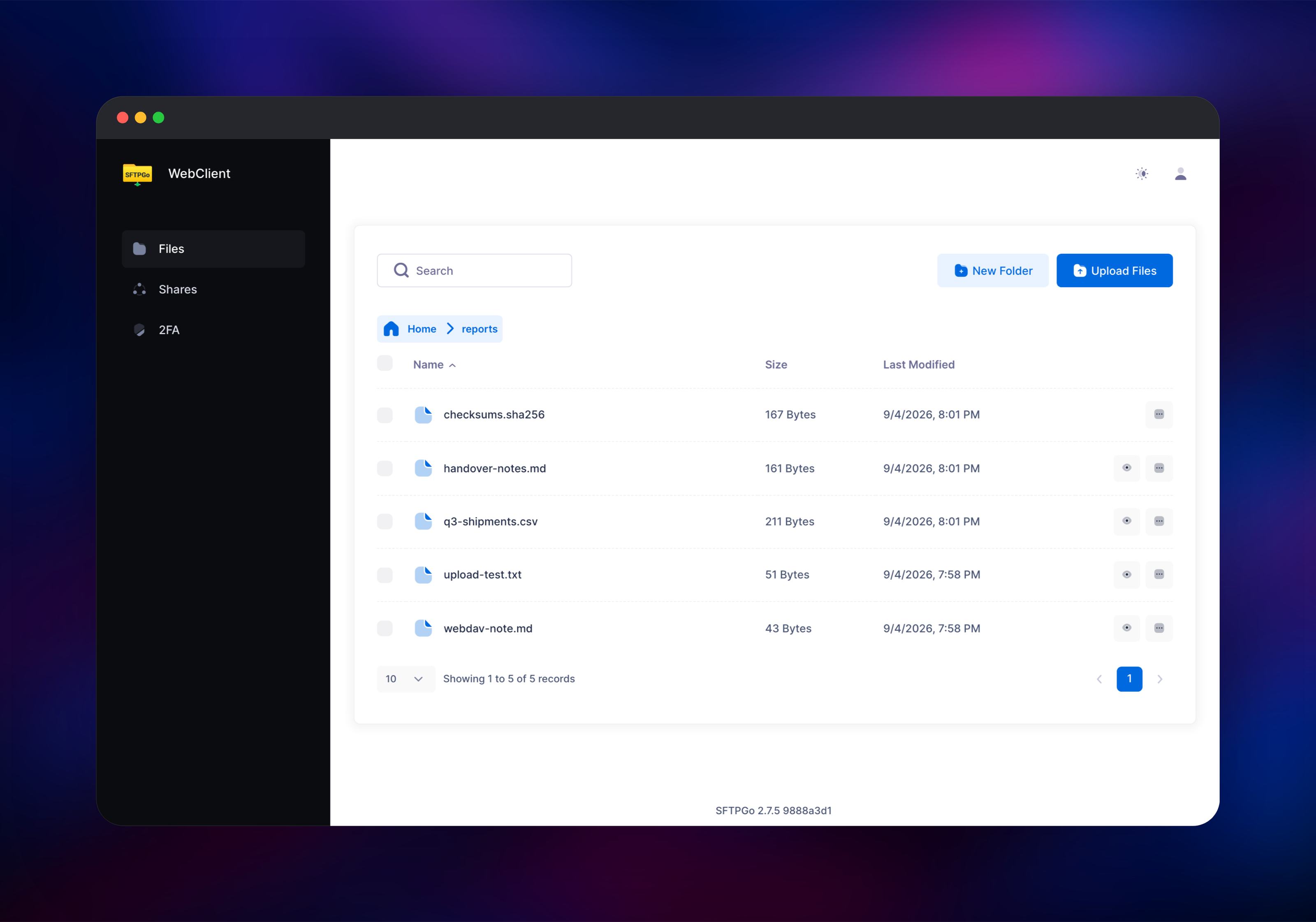
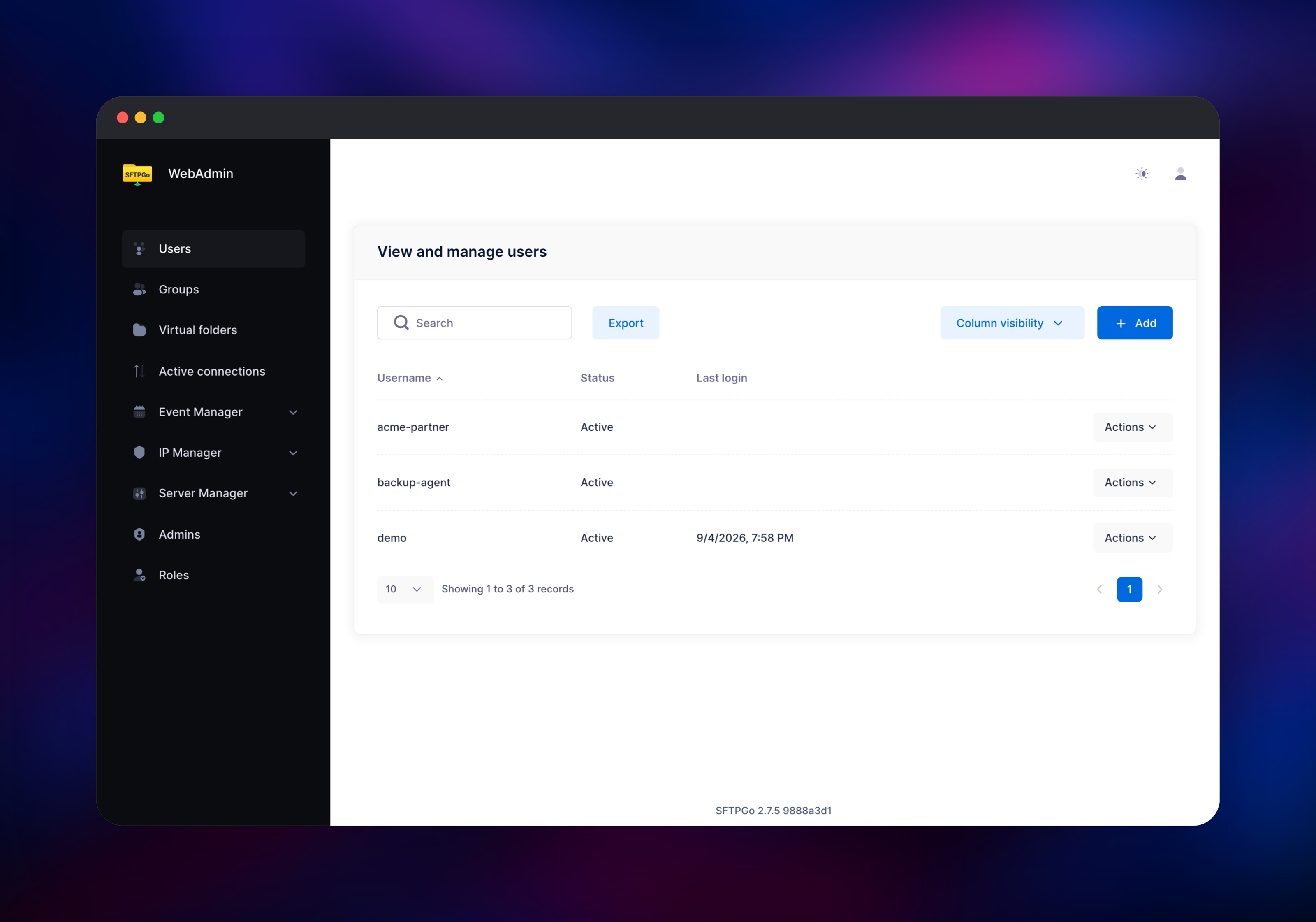
Set SFTPGO_DEFAULT_ADMIN_USERNAME and SFTPGO_DEFAULT_ADMIN_PASSWORD when you deploy — they create the first administrator while the account table is empty and are ignored afterwards, so a password you later change in the UI survives. Open the generated domain, sign in at /web/admin/login, then use Users → Add: pick a username and password and leave the home directory blank so it is created on the volume. That account can sign in at /web/client/login, mount https:///dav/ in Finder, Windows Explorer or any WebDAV client, and connect over SFTP.
For SFTP, open the sftpgo service, copy the host and port under its TCP proxy, and run sftp -P @. Upload a file that way and refresh the web client: the same file appears, confirming the volume, the database and all three protocols work together. Server Manager → Status lists the active listeners and host keys.
About Hosting SFTPGo
Self-host SFTPGo when several parties exchange files with you and none should get a shell, a cloud console or each other's data. Every account is virtual — it lives in the database, not /etc/passwd — which makes quotas, expiry dates and permissions easy to hand out and take away.
- SFTP, SCP, WebDAV and an HTTP file manager over one storage backend
- Per-user and per-directory permissions, quotas, bandwidth caps and IP filters
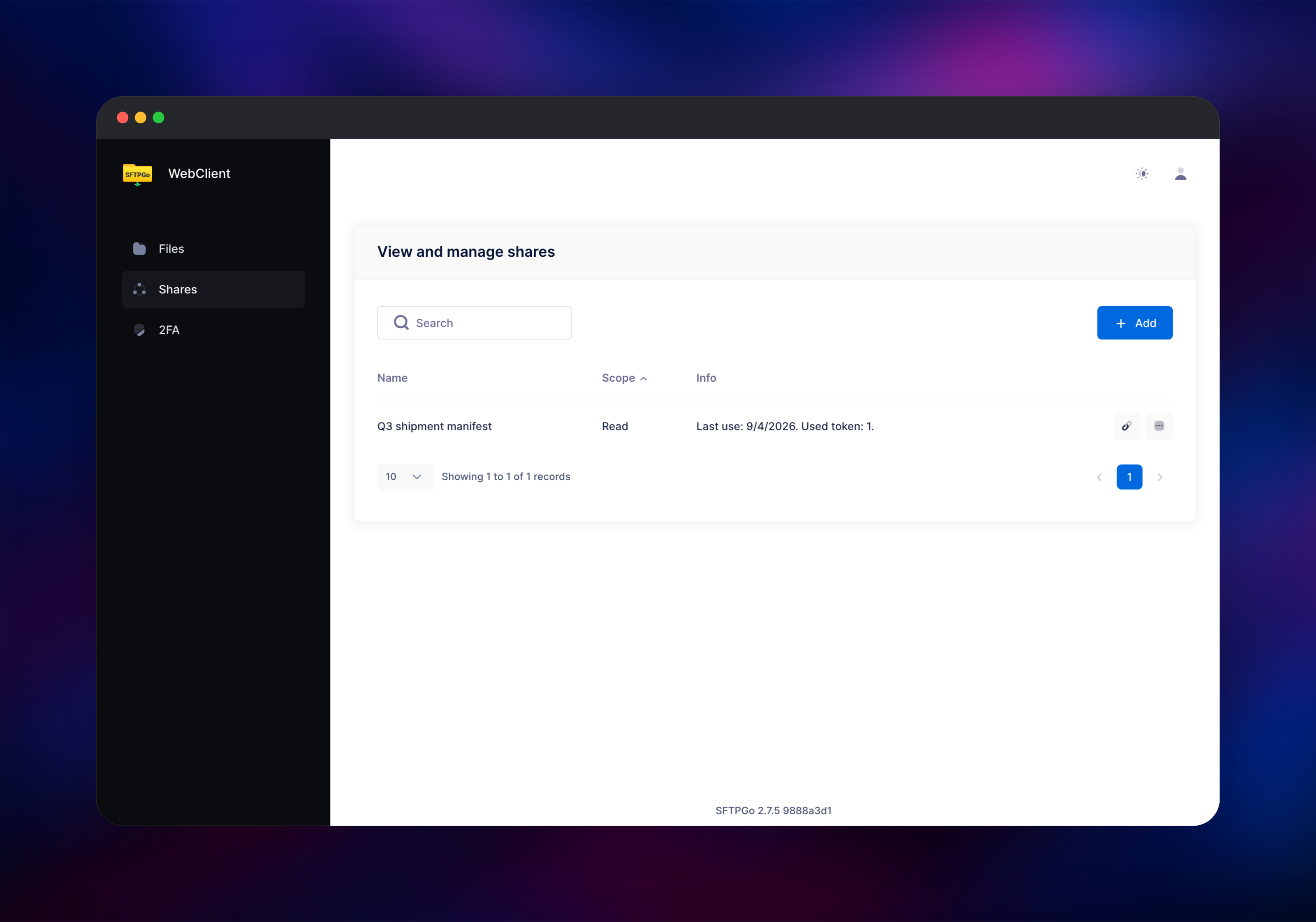
- Public share links, with optional password and expiry, for non-account holders
- Two-factor auth, SSH keys and OpenID Connect for the web UIs
- An event manager running actions on upload, download, delete or a schedule
- Storage beyond local disk: S3-compatible, Google Cloud Storage, Azure Blob, SFTP
- A REST API for creating accounts and shares from your code
Here sftpgo keeps only files on its volume; every account, share and setting is in Postgres over the private network. caddy stores nothing — it exists because the edge routes by hostname, and WebDAV needs its own path prefix.
Why Deploy SFTPGo on Railway
One deploy gives a working multi-protocol file server instead of an afternoon of daemon configuration.
- Postgres, the volume, the TCP proxy and the gateway provisioned and connected
- A managed HTTPS domain, certificates handled for you
- Private networking between the server and its database
- SSH host keys generated once onto the volume, so clients never see a change
- Redeploys straight from the source repository
Common Use Cases
- Client and partner file exchange — an account per organisation with a quota, download-only rights and an SFTP endpoint their tooling already speaks
- Backup and log drop targets — jobs upload over SFTP with key auth, and the event manager calls a webhook on arrival
- Replacing shell accounts for transfers — retire per-user Linux accounts on a jump host in favour of virtual users with no shell
- A browser file store for a small team — WebDAV mounts on the desktop, the web client on the road, share links for outsiders
Dependencies for SFTPGo
- sftpgo — built from gridalpha/sftpgo-railway on the official
ghcr.io/drakkan/sftpgoimage, volume at/srv/sftpgo - Postgres — Railway's managed
postgres-ssl:18; accounts, groups, shares and ban records - caddy —
caddy:2-alpine, the public gateway, from the same repository
Environment Variables Reference
| Variable | Description | Required |
|---|---|---|
SFTPGO_DEFAULT_ADMIN_USERNAME | Username of the first administrator | Yes |
SFTPGO_DEFAULT_ADMIN_PASSWORD | Password for that administrator | Yes |
SFTPGO_HTTPD__SIGNING_PASSPHRASE | Signs session, CSRF and share tokens; never change it | Yes |
SFTPGO_KMS__SECRETS__MASTER_KEY | Encrypts secrets in the database; cannot be changed later | Yes |
SFTPGO_COMMON__DEFENDER__ENABLED | Brute-force protection on web logins | No |
SFTPGO_COMMON__MAX_PER_HOST_CONNECTIONS | Concurrent connections per client | No |
SFTPGO_LOG_LEVEL | info, debug, warn or error | No |
Deployment Dependencies
- Source: github.com/gridalpha/sftpgo-railway
- Upstream: github.com/drakkan/sftpgo · docs at docs.sftpgo.com
- Runtime: one Go binary; PostgreSQL 12+ for the data provider
Server Requirements to Self-Host SFTPGo
| Resource | Minimum | Recommended |
|---|---|---|
| CPU | 1 vCPU | 2 vCPU |
| RAM | 256 MB | 1 GB |
| Storage | Enough for files | Sized to your data |
| Database | PostgreSQL 12+ | PostgreSQL 16+ |
SFTPGo is frugal — tens of megabytes at rest, memory growing per concurrent transfer rather than per account. Storage is what to plan around: volumes start at 5 GB and grow from the dashboard, and a user who outgrows one can move to S3-compatible object storage.
How to Self-Host SFTPGo Yourself
The published image runs as UID 1000 and needs a writable data directory. A minimal run on the bundled SQLite provider:
docker run -d --name sftpgo \
  -p 8080:8080 -p 2022:2022 \
  -v sftpgo-data:/srv/sftpgo \
  -e SFTPGO_DATA_PROVIDER__CREATE_DEFAULT_ADMIN=1 \
  -e SFTPGO_DEFAULT_ADMIN_USERNAME=admin \
  -e SFTPGO_DEFAULT_ADMIN_PASSWORD=change-me \
  ghcr.io/drakkan/sftpgo:latest
For more than that, move the data provider to PostgreSQL and pin the host keys to persistent paths so restarts do not regenerate them:
docker run -d --name sftpgo \
  -p 8080:8080 -p 2022:2022 -p 10080:10080 \
  -v sftpgo-data:/srv/sftpgo \
  -e SFTPGO_DATA_PROVIDER__DRIVER=postgresql \
  -e SFTPGO_DATA_PROVIDER__HOST=postgres \
  -e SFTPGO_DATA_PROVIDER__NAME=sftpgo \
  -e SFTPGO_DATA_PROVIDER__USERNAME=sftpgo \
  -e SFTPGO_DATA_PROVIDER__PASSWORD=secret \
  -e SFTPGO_SFTPD__HOST_KEYS=/srv/sftpgo/keys/id_ed25519 \
  -e SFTPGO_WEBDAVD__BINDINGS__0__PORT=10080 \
  ghcr.io/drakkan/sftpgo:latest
Is SFTPGo Free?
The server deployed here is free and open source under AGPL-3.0 — no seat limits, no feature flags, no account to register. On Railway you pay only for the compute, volume and bandwidth used. A separate SFTPGo Enterprise edition sells clustering, compliance tooling and support, alongside a hosted SaaS plan; neither is needed here.
FAQ
What is SFTPGo? An open-source file transfer server written in Go. It serves one set of storage over SFTP, SCP, WebDAV and HTTP, with virtual accounts, quotas, share links and a REST API, keeping files on local disk or S3-compatible object storage.
What does this Railway template deploy? Three services: SFTPGo with a volume and a TCP proxy for SFTP, managed Postgres for its accounts and settings, and a Caddy gateway serving the web interface and WebDAV on one HTTPS domain.
Why does the template include a Postgres database? SFTPGo can run on SQLite, but that puts every account, share and permission in a file on the container's volume, where it is harder to back up. Postgres keeps that state outside the application container, as upstream recommends.
How do I connect over SFTP after deploying?
Copy the host and port from the sftpgo service's TCP proxy and run sftp -P @. Password and SSH public key auth both work; add a key under Users → Edit → Public keys.
Can I use FTP or FTPS with this template? No. FTP's passive mode needs a range of inbound ports and a way to advertise the public port back to the client, neither of which the platform offers. SFTP and WebDAV cover the same ground, encrypted.
How do I store files in S3 instead of on the volume? Storage is set per account, not globally. Edit a user, switch the filesystem to AWS S3 and fill in the bucket, endpoint and credentials; other accounts are unaffected.
Is self-hosted SFTPGo ready for production use? Yes. Keep the signing passphrase and KMS master key unchanged, back up Postgres, and note that a service with a volume runs as one instance — scale vertically rather than adding replicas.
Template Content


