
Deploy Stirling-PDF | Open Source PDF Toolkit
Self-host Stirling-PDF. Private PDF processing, split, merge, OCR & more
Stirling-PDF
Just deployed
/configs
Deploy and Host Stirling-PDF on Railway
Stirling-PDF is a self-hosted, web-based PDF manipulation toolkit with 50+ tools — merge, split, rotate, OCR, sign, redact, compress, and convert to and from Office formats — all running locally with no third-party uploads. Self-host Stirling-PDF on Railway to keep sensitive PDFs inside your own infrastructure while replacing paid services like Adobe Acrobat online and ILovePDF.
This Railway template deploys the official stirlingtools/stirling-pdf:latest-fat image with login enabled, a persistent volume mounted at /configs (so user accounts and settings survive redeploys), reverse-proxy headers configured for Railway's TLS-terminating edge, and sensible production defaults.
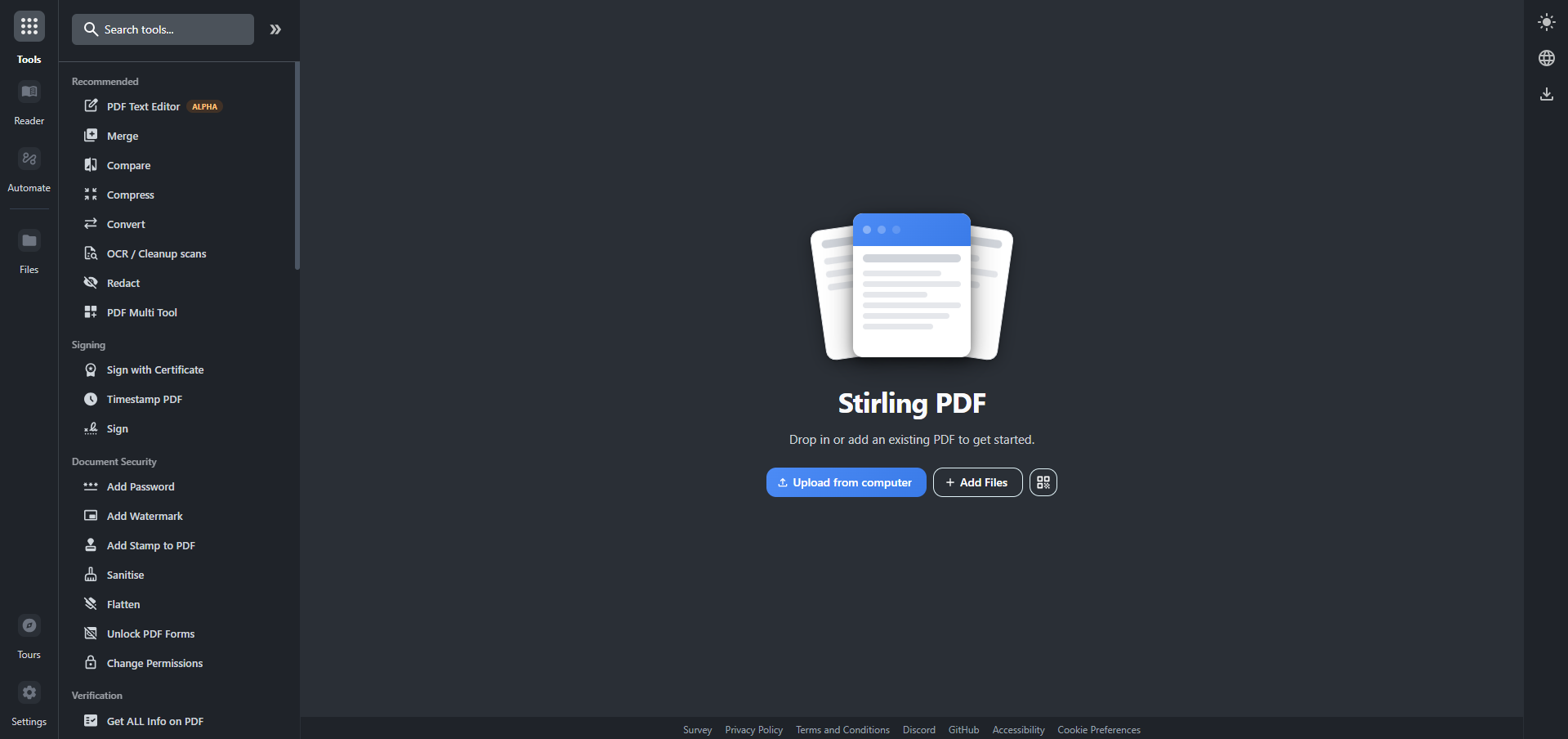
Getting Started with Stirling-PDF on Railway
After Railway finishes the first deploy (~3 minutes — Spring Boot + LibreOffice take ~90 seconds to warm up), open your generated public URL. You'll be redirected to the login screen. Log in with the username admin and the password Railway generated for SECURITY_INITIALLOGIN_PASSWORD — copy it from the Variables tab. Stirling-PDF will prompt you to set a new password on first login. Once inside, you can drop a PDF on the home page and pick any of the 50+ tools, create additional users from the Account → Admin panel, or hit /swagger-ui/index.html for the REST API.
About Hosting Stirling-PDF
Stirling-PDF is an open-source Spring Boot application that wraps LibreOffice, Tesseract OCR, qpdf, Ghostscript, OCRmyPDF, and Calibre into a single web UI. It runs locally — every PDF you upload is processed inside your Railway container and never leaves the box.
Key features:
- 50+ PDF tools — merge, split, rotate, crop, watermark, redact, sign, compress, repair
- Optical Character Recognition (OCR) with multi-language Tesseract data files
- Office format conversions (DOCX, XLSX, PPTX, ODT) via embedded LibreOffice
- Pipelines: chain multiple operations into reusable workflows
- Built-in user accounts, role-based access, and an API-key system for programmatic use
- REST API documented via Swagger UI
Why Deploy Stirling-PDF on Railway
Railway gives you a one-click way to put a private PDF toolkit behind HTTPS:
- One-click deploy — no Docker, Dockerfile, or compose knowledge needed
- Auto-generated HTTPS domain with TLS termination at the edge
- Persistent volume so user accounts and settings survive redeploys
- Logs, metrics, and the Stirling-PDF
/actuatorPrometheus endpoint visible from the dashboard - Vertical autoscaling — bump RAM to 6 GB or 8 GB if LibreOffice OOMs on heavy DOCX→PDF jobs
Common Use Cases for Self-Hosted Stirling-PDF
- Internal tool for redacting PII from contracts, invoices, and onboarding paperwork
- Replacing paid SaaS like SmallPDF/ILovePDF with a private equivalent for compliance-sensitive teams
- Batch-OCR pipelines for scanned receipts, archives, or research papers
- Programmatic PDF processing in CI/CD via the REST API +
SECURITY_CUSTOMGLOBALAPIKEY
Dependencies for Stirling-PDF
stirlingtools/stirling-pdf:latest-fat— Stirling-PDF Java app + LibreOffice + Calibre + Tesseract- Railway-managed volume mounted at
/configs(settings, embedded H2 user database, AOT cache)
Environment Variables Reference
| Variable | Purpose |
|---|---|
DOCKER_ENABLE_SECURITY | Enables login/security features at runtime (must be true for prod) |
SECURITY_ENABLELOGIN | Forces login screen for all users |
SECURITY_INITIALLOGIN_USERNAME | Initial admin username (default admin) |
SECURITY_INITIALLOGIN_PASSWORD | Initial admin password — must be ASCII-only |
SECURITY_CUSTOMGLOBALAPIKEY | Optional global API key for programmatic access |
SERVER_FORWARDHEADERSSTRATEGY | NATIVE — required behind Railway's TLS-terminating proxy |
SYSTEM_GOOGLEVISIBILITY | Set false to keep the deployment out of search engines |
SYSTEM_MAXFILESIZE | Max upload size in MB |
LANGS | Comma-separated UI language codes |
JAVA_CUSTOM_OPTS | JVM tuning — cap heap via -Xmx3g so LibreOffice has memory headroom |
RAILWAY_RUN_UID | 0 to run as root so the image can write to Railway's root-owned volume |
Deployment Dependencies
- Runtime: JVM 21, LibreOffice, Calibre, Tesseract OCR
- GitHub: https://github.com/Stirling-Tools/Stirling-PDF
- Docker Hub: https://hub.docker.com/r/stirlingtools/stirling-pdf
- Docs: https://docs.stirlingpdf.com
Hardware Requirements for Self-Hosting Stirling-PDF
| Resource | Minimum | Recommended |
|---|---|---|
| CPU | 1 vCPU | 2+ vCPU |
| RAM | 2 GB | 4 GB (6 GB if heavy DOCX→PDF) |
| Storage | 1 GB | 5 GB volume (room for OCR data + uploads) |
| Runtime | JRE 21 | JRE 21 |
Self-Hosting Stirling-PDF
The simplest local run uses the same image as this Railway template:
docker run -d \
  -p 8080:8080 \
  -e DOCKER_ENABLE_SECURITY=true \
  -e SECURITY_ENABLELOGIN=true \
  -e SECURITY_INITIALLOGIN_USERNAME=admin \
  -e SECURITY_INITIALLOGIN_PASSWORD=changeme \
  -v stirling-configs:/configs \
  --name stirling-pdf \
  stirlingtools/stirling-pdf:latest-fat
For local development from source you can clone the upstream repo and run with Gradle:
git clone https://github.com/Stirling-Tools/Stirling-PDF.git
cd Stirling-PDF
./gradlew bootRun -PbuildWithFrontend=true
The official docker-compose recipes — including the auth-flow test compose docker-compose-latest-fat-security.yml — live under docker/embedded/compose/ in the same repo and are the canonical reference for production setups.
How Much Does Stirling-PDF Cost to Self-Host?
Stirling-PDF is open-source under the MIT licence — there is no licence fee, no premium tier, and no telemetry. Self-hosting on Railway costs you only the underlying compute and storage: a 4 GB / 1 vCPU service plus a small volume comfortably fits inside Railway's Hobby plan for individual use, with room to scale up if you process large DOCX-to-PDF batches. There are no Stirling-PDF feature gates — every tool is available in the OSS image.
FAQ
What is Stirling-PDF and why self-host it? Stirling-PDF is an open-source web app that wraps LibreOffice, Tesseract, and qpdf into a single UI providing 50+ PDF operations. Self-hosting keeps every uploaded document inside your own infrastructure — important for legal, healthcare, finance, and any team that can't send PDFs to a third-party SaaS.
What does this Railway template deploy? A single service running stirlingtools/stirling-pdf:latest-fat with login enabled, a persistent volume mounted at /configs, reverse-proxy headers configured for Railway's edge, and a starter set of production-safe environment variables.
Why does Stirling-PDF need a volume on Railway? The /configs directory holds the embedded H2 user database, custom settings, and the AOT cache. Without a persistent volume mounted there, every redeploy wipes user accounts and you'd have to log in with the seed credentials each time.
How do I enable the REST API in self-hosted Stirling-PDF on Railway? Set the SECURITY_CUSTOMGLOBALAPIKEY environment variable (the template seeds one for you). Then call any endpoint with the X-API-Key header set to that value — full reference at /swagger-ui/index.html on your deployment.
Why does Stirling-PDF take 90 seconds to start on Railway? Spring Boot warms its bean graph and the embedded LibreOffice unoserver initializes its conversion pool on first boot. Railway's healthcheck is configured to wait 5 minutes before flagging the service unhealthy, so this is normal.
Can Stirling-PDF do OCR for languages other than English? Yes — drop additional Tesseract .traineddata files into the /usr/share/tessdata directory and add their codes to the LANGS environment variable. To persist them across redeploys you'd need the Strategy D wrapper variant of this template (single-volume symlink to /data/tessdata).
Is the default Stirling-PDF admin password safe? No — the upstream image ships with admin/stirling. This template overrides it with a fresh ${{secret(32)}} so you should never see the default. Always rotate the password from the UI on first login anyway.
Template Content
Stirling-PDF
stirlingtools/stirling-pdf:latest-fatSECURITY_INITIALLOGIN_PASSWORD
Initial admin password (ASCII only)
SECURITY_INITIALLOGIN_USERNAME
Initial admin username


