
Deploy Teable on Railway | Open-Source Airtable Alternative
Self-Host Teable. No-Code Data Management. AI-Powered Spreadsheet
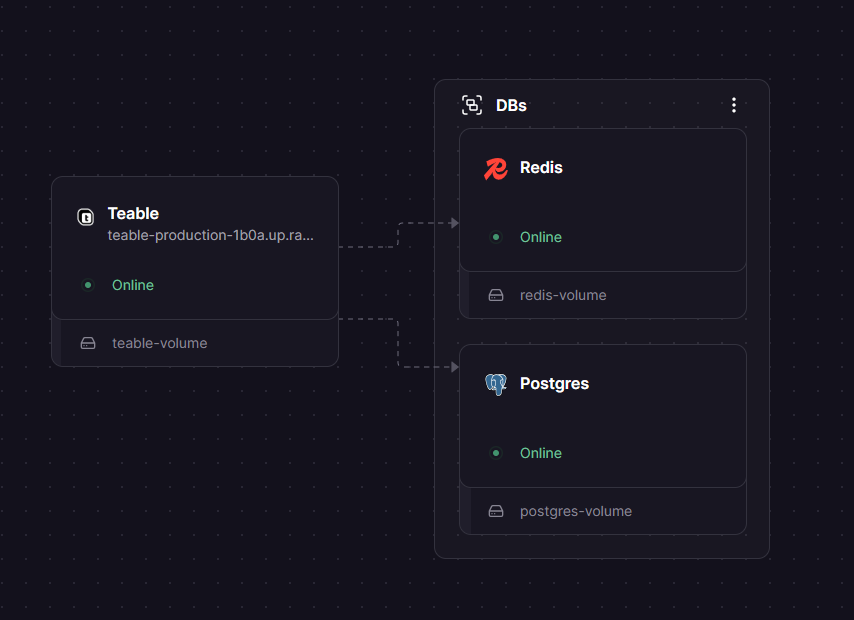
DBs

Redis
Just deployed
/data

Just deployed
/var/lib/postgresql/data

Teable
Just deployed
/app/.assets
Deploy and Host Teable on Railway

Deploy Teable on Railway to get a production-ready, no-code database platform built natively on PostgreSQL. Self-host Teable as a powerful open-source Airtable alternative with real-time collaboration, AI-powered fields, and unlimited rows — all without vendor lock-in.
This Railway template pre-configures Teable (ghcr.io/teableio/teable:latest) with a managed PostgreSQL database for persistent storage, Redis for caching and real-time performance, and a volume for file attachments. One click gets you a fully functional spreadsheet-database hybrid with API access.
Getting Started with Teable on Railway
After deployment completes, open your Railway-generated public URL. Teable redirects to the signup page where you create the first admin account — no default credentials needed. Register with your email and password, then create your first workspace and base.
From there, create a new table (Grid view by default) and start adding fields: text, number, date, single/multi-select, attachments, links to other tables, and AI-powered fields. Switch between Grid, Kanban, Calendar, Gallery, and Form views without duplicating data. Invite team members with granular permissions (owner, editor, viewer) and start collaborating in real time.

About Hosting Teable on Railway
Teable is a next-generation no-code database that gives teams a spreadsheet-like interface backed by a full PostgreSQL database. Unlike Airtable, every workspace runs on real Postgres — so there are no row limits, no query slowdowns at scale, and full SQL compatibility when you need it.
Key features of self-hosted Teable:
- AI database agent — describe what you need in plain English and Teable auto-creates tables, relationships, and workflows
- Multiple views — Grid, Kanban, Calendar, Gallery, and Form views included on every plan
- Real-time collaboration — multiple users editing simultaneously with live cursor tracking
- Built-in automation — trigger-based workflows for reminders, data validation, and record updates
- REST API — full CRUD API for every table, compatible with any integration tool
- Plugin system — extend functionality with custom React plugins connected directly to your data
- Self-hosted privacy — AGPL-licensed, your data stays on your infrastructure
The architecture runs as a monolithic Node.js service (NestJS backend + Next.js frontend) connected to PostgreSQL for data and Redis for caching.
Why Deploy Teable on Railway
Railway makes self-hosting Teable effortless:
- Managed PostgreSQL and Redis provisioned automatically — no manual database setup
- Persistent volume for file attachments survives redeployments
- Private networking between services — database never exposed to the internet
- Auto-generated HTTPS domain with zero SSL configuration
- Scale vertically with one slider when your team grows
Common Use Cases for Self-Hosted Teable
- CRM and sales pipeline — track leads, deals, and customer interactions with Kanban views, AI-powered lead scoring, and automated follow-up reminders
- Project management — organize tasks across teams with linked tables, Calendar views for deadlines, and real-time status dashboards
- Content operations — manage editorial calendars, batch-generate content with AI fields, and coordinate publishing workflows across writers and editors
- Product catalog and inventory — build a structured database with Gallery views for visual browsing, attachment fields for product images, and API access for e-commerce integration
Dependencies for Teable on Railway
- Teable —
ghcr.io/teableio/teable:latest— main application (NestJS + Next.js) - PostgreSQL — Railway managed
postgres:15— primary data store - Redis — Railway managed
redis:7— caching and real-time performance
Deployment Dependencies
- Runtime: Node.js (bundled in Docker image)
- GitHub: teableio/teable — 21.1k stars
- Docker Hub: teableio/teable
- Docs: help.teable.ai
Hardware Requirements for Self-Hosting Teable
| Resource | Minimum | Recommended |
|---|---|---|
| CPU | 2 cores | 4 cores |
| RAM | 4 GB | 8 GB |
| Storage | 40 GB | 100 GB+ |
| Runtime | Docker 20+ | Docker 24+ |
On Railway, the default container size handles small-to-medium teams (up to 50 users). Scale up via the Railway dashboard as usage grows.
Self-Hosting Teable with Docker
Pull and run Teable with Docker Compose for a local or VPS deployment:
version: "3.9"
services:
  teable:
    image: ghcr.io/teableio/teable:latest
    ports:
      - "3000:3000"
    environment:
      - PRISMA_DATABASE_URL=postgresql://teable:changeme@teable-db:5432/teable
      - SECRET_KEY=your-secret-key-min-8-chars
      - PUBLIC_ORIGIN=http://localhost:3000
      - BACKEND_CACHE_PROVIDER=redis
      - BACKEND_CACHE_REDIS_URI=redis://default:changeme@teable-cache:6379/0
    volumes:
      - teable-data:/app/.assets
    depends_on:
      - teable-db
      - teable-cache

  teable-db:
    image: postgres:15.4
    environment:
      - POSTGRES_DB=teable
      - POSTGRES_USER=teable
      - POSTGRES_PASSWORD=changeme
    volumes:
      - teable-db:/var/lib/postgresql/data

  teable-cache:
    image: redis:7.2.4
    command: redis-server --requirepass changeme --appendonly yes
    volumes:
      - teable-cache:/data

volumes:
  teable-data:
  teable-db:
  teable-cache:
Start the stack:
docker compose up -d
Open http://localhost:3000 to create your admin account and first workspace.
How Much Does Teable Cost to Self-Host?
Teable Community Edition is free and open-source under the AGPL-3.0 license. Self-hosting gives you unlimited rows, unlimited storage, and all core views (Grid, Kanban, Calendar, Gallery, Form) at zero software cost. You only pay for infrastructure — roughly $5–$15/month on Railway depending on usage.
Teable Enterprise Edition adds AI features (AI fields, AI agent, AI chat), authority matrix, advanced automation, and priority support through paid plans. See Teable pricing for current tiers.
Teable vs NocoDB on Railway
| Feature | Teable | NocoDB |
|---|---|---|
| Database engine | Native PostgreSQL | MySQL, PostgreSQL, SQLite |
| AI-powered fields | Yes (EE) | No |
| Real-time collaboration | Yes | Yes |
| Row limits (self-hosted) | Unlimited | Unlimited |
| Views | Grid, Kanban, Calendar, Gallery, Form | Grid, Kanban, Gallery, Form |
| Automation | Built-in triggers | Webhooks only |
| License | AGPL-3.0 | AGPL-3.0 |
Teable is the stronger choice for teams that want native Postgres performance, AI-powered data enrichment, and built-in automation. NocoDB offers broader database engine support and a lighter footprint.
FAQ
What is Teable and why self-host it on Railway? Teable is an open-source, no-code database platform built on PostgreSQL — often described as a next-gen Airtable alternative. Self-hosting on Railway gives you full data ownership, unlimited rows, and zero per-seat software fees while Railway handles infrastructure (SSL, networking, backups).
What does this Railway template deploy for Teable?
The template deploys three services: the Teable application container (ghcr.io/teableio/teable:latest) on port 3000, a managed PostgreSQL 15 database for persistent storage, and a managed Redis instance for caching. A volume is attached at /app/.assets for file uploads.
Why does Teable need PostgreSQL and Redis on Railway? PostgreSQL is Teable's primary data store — every table, field, record, and workspace lives in Postgres. Redis provides caching for real-time collaboration features, session management, and query performance. Both are required for Teable to function.
How do I connect Teable to external tools like n8n or Metabase?
Teable exposes a full REST API for every table. Use the API token (generated in Settings > Access Tokens) to connect n8n workflows, Metabase dashboards, or any HTTP-capable integration tool. Since Teable runs on real Postgres, you can also connect BI tools directly to the database using the DATABASE_PUBLIC_URL from your Railway Postgres service.
Can I migrate from Airtable to self-hosted Teable? Teable supports CSV import for individual tables. Export your Airtable bases as CSV files, then import them into Teable tables. Field types (single select, multi-select, dates, attachments) need manual re-mapping after import, but the core data transfers cleanly.
How do I enable S3 or MinIO storage instead of local files in Teable?
Set BACKEND_STORAGE_PROVIDER=minio (or s3) and add the corresponding credentials (BACKEND_STORAGE_MINIO_ENDPOINT, BACKEND_STORAGE_MINIO_ACCESS_KEY, BACKEND_STORAGE_MINIO_SECRET_KEY). This moves file attachments from the local volume to object storage for better durability and scaling.
Template Content


