Rotate Database Credentials on Railway
How to regenerate a Railway database password and update the services that use it, including how to limit downtime on standalone databases.
 James MurdzaUpdated 3 min read
TL;DR
- Regenerate database credentials with Railway.
- Regenerate only updates services that get the password through a reference variable, so replace pasted copies first.
- Avoid editing the password variable or running
ALTER USERdirectly.
A database password is a credential, and rotating it means replacing it with a new one so the old one is no longer valid. On Railway, you rotate a database password in a single step. For how variable changes, deploys, and healthchecks work on Railway, see Rotate environment variables on Railway without downtime.
How to rotate Railway database credentials
Regenerating a database password in Railway rotates it in a single step. Railway changes the password inside the database and updates the password variable and anything that references it, such as the database URL. For the full walkthrough for your database, see Rotate PostgreSQL credentials, Rotate MySQL credentials, Rotate Redis credentials, or Rotate MongoDB credentials.
Before you regenerate
Regenerate only updates services that get the password through a reference variable. Replace any pasted copy of the password or connection string with a reference:
- PostgreSQL:
${{ Postgres.DATABASE_URL }} - MySQL:
${{ MySQL.MYSQL_URL }} - Redis:
${{ Redis.REDIS_URL }} - MongoDB:
${{ MongoDB.MONGO_URL }}
Use the name of your own database service in place of Postgres, MySQL, Redis, or MongoDB. Services in other projects and applications outside Railway can’t use references, so you’ll update those by hand afterward.
Regenerate the password
When you’re ready, regenerate the password:
- Open your database service.
- Go to the Database tab and open Config.
- In the Connection section, click Regenerate:
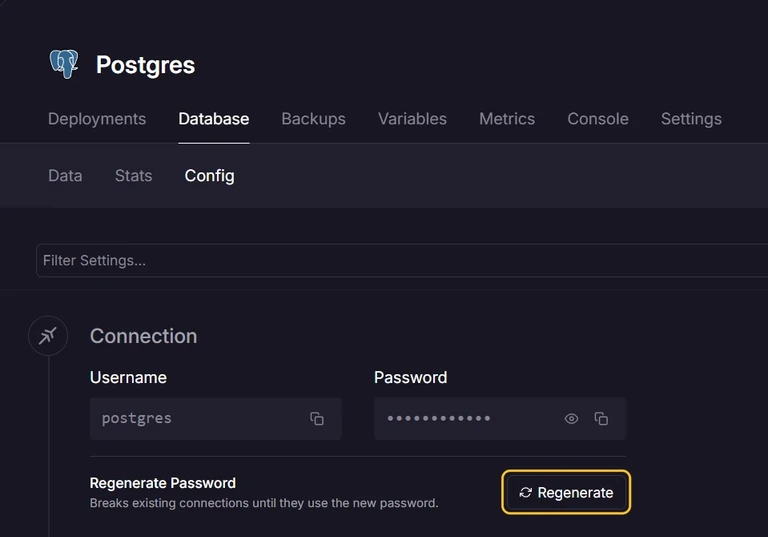
On a standalone database, Regenerate restarts the database and drops all connections. Services that use the old password can’t reconnect until Railway redeploys them, so there will be some downtime. A high availability cluster doesn’t restart, because its members adopt the new password and keep serving connections. In either case, Railway then redeploys the running services that reference the password through Railway variables.
After you regenerate
Finish the rotation:
- Railway redeploys services that reference the password automatically. If a redeploy fails, check the service’s deploy logs and redeploy it manually.
- Update the password by hand in pasted copies, services in other projects, and apps outside Railway, then redeploy the ones in your project. Until you do, they fail with an authentication error.
- Check each service’s deploy logs for authentication errors. To confirm nothing still uses the old password and to end open sessions, use the guide for your database.
Avoid editing the password directly
Avoid editing the password variable or running ALTER USER (or the equivalent for your database). Neither change updates the other, so they fall out of sync and cause connections to fail. See Using the Database View.
Zero-downtime option for standalone databases
If you can’t accept the downtime caused by a database restart, you can rotate manually with a second database user: Create the new user, update the database service’s variables to use it, redeploy your services, verify, then drop the old user. This avoids redeploying the database.
Make sure the database service’s user and password variables (POSTGRES_USER and POSTGRES_PASSWORD for PostgreSQL), as well as DATABASE_URL, are updated to the new user. This lets a later Regenerate or databasePasswordReset rotate the correct user.
FAQ
Will rotating DATABASE_URL break services that reference it?
Regenerate redeploys any service that uses a reference variable, such as ${{ Postgres.DATABASE_URL }}, with the new password. Pasted copies aren’t updated, so they fail until you change them by hand.
How do I know the old credential is no longer in use?
Check the database for a “last used” date. Your database’s rotation guide shows how to list open sessions. Then check your deploy logs for authentication errors, such as password authentication failed in PostgreSQL.
Can I roll back if the new credential fails?
A database password regenerated in Railway can’t be rolled back, because the old password stops working.
Summary
Replace pasted copies of the password with reference variables so every service picks up the change when you regenerate it. Downtime can’t always be avoided: regenerating a standalone database’s password, and databases with volumes, have no overlap period. In these cases, rotate during low-traffic periods and deploy right after changing the credential to keep the gap as short as possible, or use the zero-downtime option above.
See also: