Rotate Environment Variables on Railway Without Downtime
How to change variables and rotate credentials on Railway without downtime, including healthchecks, deployment overlap, and shared variables.
 James MurdzaUpdated 5 min read
TL;DR
- A changed variable takes effect on Railway after the service is redeployed.
- To avoid downtime, issue the new credential, add it to your variables, deploy, verify that it works, and then revoke the old one.
- Use shared variables for a single credential that is used by several services.
A credential is a secret that proves who you are to another system, such as an API key or a database password. Rotating a credential means replacing it with a new one and revoking the old one, so the old one is no longer valid.
If a running service still uses a revoked credential, it will go down. To avoid this, use an overlap window: a period when both the old and new credentials are valid. This gives you time to move every service onto the new credential before you revoke the old one.
Railway stores a service's credentials as variables, which your code reads as environment variables. For how to store them in the first place, see Managing Secrets on Railway. If you were asked to rotate credentials, start with the preliminary report and the changelog entry.
This article covers the mechanics that apply to every credential on Railway: how variable changes are applied, the order of steps that avoids downtime, and how to keep a redeploy from dropping traffic. For provider-specific steps, see Rotate third-party API keys on Railway. For databases, see Rotate database credentials on Railway.
How to change a variable on Railway
Railway applies variable changes only when you deploy. Adding, updating, or removing a variable creates a staged change that you can review and apply by deploying the affected services. See Staged Changes.
You can update variables using the service's Variables tab or the CLI:
railway variable set API_KEY=new_key --skip-deploys
The --skip-deploys flag lets you stage the change without immediately triggering a deployment.
You can then apply the staged changes by clicking Deploy or running:
railway redeploy --service backend
How to avoid downtime when rotating a credential
Use the following ordered steps to keep the old credential valid until the new deployment is running and verified:
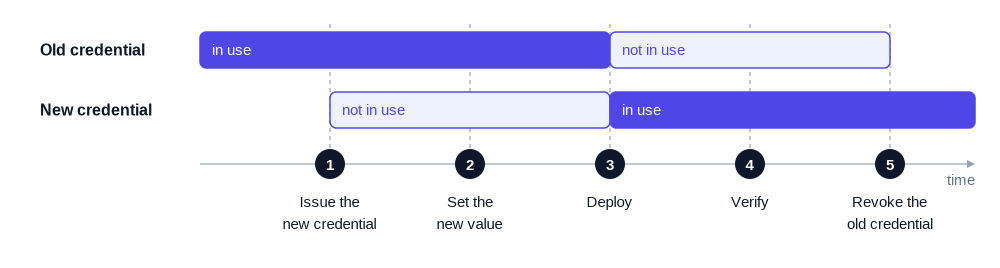
- Issue the new credential where it comes from, such as the provider's dashboard or the database. Both credentials are now valid.
- Set the new value. Update the variable in the service’s Variables tab, or run railway variable set
API_KEY=new_key --skip-deploys. - Deploy. Click Deploy on the staged changes, or run
railway redeploy --servicebackend if you set the variable from the CLI. - Verify. Check the deploy logs and confirm that requests using the credential succeed from the new deployment.
- Revoke the old credential where it came from, only after the new deployment is active and verified.
Don't revoke the old credential before step 5. Services that are still running keep using it until a new deployment replaces them, so their requests fail in the meantime.
How to prevent the redeploy from dropping traffic
Changing a credential requires a redeploy, which can interrupt traffic temporarily. To avoid downtime, configure the new deployment correctly.
Configure a healthcheck
A healthcheck is an endpoint Railway checks before sending traffic to a new deployment. Railway keeps checking it until it receives a successful response (any 2xx status). Only then does Railway make the new deployment active and the old one inactive. Without a healthcheck, Railway may send traffic to the new deployment before it is ready to handle requests. See Healthchecks.
Your healthcheck should verify that the new credential works. If the endpoint checks a database connection, a deployment with a bad DATABASE_URL fails its healthcheck and the old deployment keeps serving. Railway runs a healthcheck only when a deployment starts, so a healthcheck can't flag a service you forgot to redeploy.
Configure deployment overlap and draining
By default, Railway keeps the current deployment running until the new deployment is live, then stops the old one. Two service variables let you control how long the old deployment remains available during a rollout:
RAILWAY_DEPLOYMENT_OVERLAP_SECONDSkeeps the previous deployment active for a window after the new one goes live.RAILWAY_DEPLOYMENT_DRAINING_SECONDSsets how long the old deployment has to finish in-flight requests after Railway tells it to shut down, before it is stopped by force.
A service with an attached volume can't run two deployments at once, so redeploying one always has a small window of downtime. This includes a database with a volume attached.
See Deployment Teardown.
How to rotate credentials used by multiple services
When several services use the same credential, they can be configured in Railway as a shared variable. A shared variable is created in Project Settings and shared with the services that need it. Sharing it creates a reference variable in each of those services, for example: API_KEY=${{ shared.API_KEY }}
Shared variables can be rotated with a single edit: Change the shared variable in Project Settings, then deploy the staged changes once to move every service that references it onto the new credential. Shared variables are set per environment, so repeat the change in each environment that uses the credential. See Reference variables.
FAQ
Does rotating a variable restart my service?
Only when you deploy. In the dashboard, a change stays staged until you deploy it. From the CLI, railway variable set deploys immediately unless you add --skip-deploys.
Do I need to rotate sealed variables differently?
No, except for how you edit them. The Raw Editor can’t change a sealed variable, so use its 3-dot menu. Then deploy and verify as usual.
Can I roll back if the new credential fails?
Yes, as long as the old credential is still valid. A rollback restores the earlier deployment’s image and variables, including the old credential, so revoke the old one last.
Summary
To avoid downtime, keep the old credential valid until every service is running on the new one. Use shared variables to update a credential used by several services in a single edit, and replace pasted copies with reference variables so every service picks up the change. Add a healthcheck that tests the new credential, so Railway only switches traffic to a deployment that works.
See also: