
Deploy Matomo | Open-Source Privacy First Google Analytics Alternative
Self Host Matomo. Web analytics, GDPR compliant with full data ownership
Matomo
Just deployed
/var/www/html

MySQL
Just deployed
/var/lib/mysql
Deploy and Host Matomo on Railway

Deploy Matomo on Railway to run your own privacy-first web analytics platform with full data ownership. Self-host Matomo with a pre-configured MySQL database, persistent volume storage for plugins and configuration, and automatic HTTPS — no server management required.
This template deploys two services: the Matomo application (official Apache image with PHP 8.4) and a MySQL database for storing analytics data, visitor logs, and site configuration.
Getting Started with Matomo on Railway
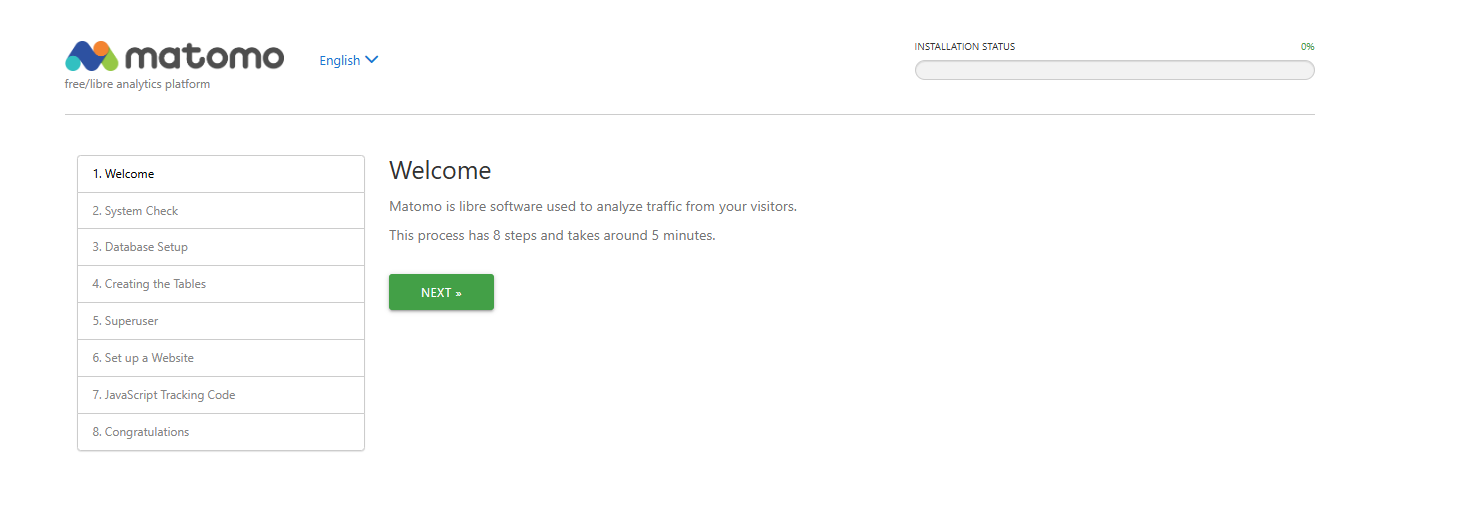
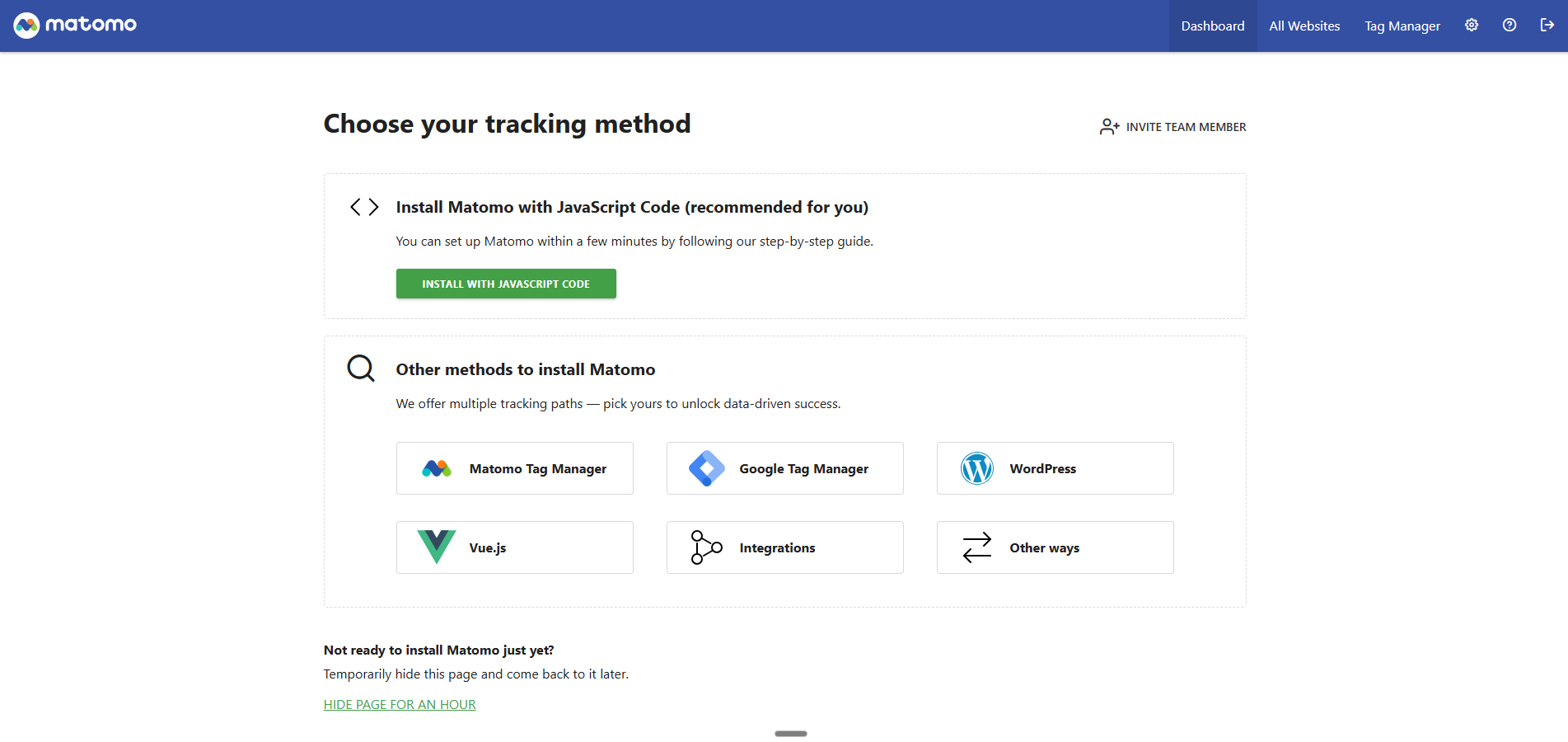
After deployment completes, open your Matomo URL to begin the installation wizard. The database connection is pre-configured via environment variables — the wizard will detect it automatically. Create your super user account with a strong password, then add your first website by entering its name and URL. Copy the JavaScript tracking code from the setup wizard and paste it into your website's `` tag. Visit your tracked website to generate initial data, then return to the Matomo dashboard to see real-time visitor analytics.
About Hosting Matomo Analytics
Matomo is the leading open-source web analytics platform, used by over 1 million websites in 190 countries. Originally released as Piwik in 2007, it provides a complete alternative to Google Analytics while keeping all visitor data on your own infrastructure.
- 100% data ownership — analytics data never leaves your server
- GDPR and CCPA compliant — approved by France's CNIL for cookieless tracking without consent banners
- Real-time analytics — live visitor maps, real-time visitor log, and live widget dashboards
- E-commerce tracking — orders, revenue, abandoned carts, and product performance out of the box
- Custom dimensions and events — track any user interaction with flexible event taxonomy
- Heatmaps and session recording — visual behavior analysis (premium plugin)
- Tag manager — built-in tag management system, no third-party scripts needed
- REST API — over 100 API methods for custom reporting, data export, and integrations
Why Deploy Matomo on Railway
- Own your analytics data — no third-party access or data sampling
- GDPR-compliant by design — avoid legal risk from US-hosted analytics
- Replace Google Analytics without losing feature parity
- Plugin ecosystem with 100+ community and premium extensions
- One-click deploy with managed MySQL and automatic HTTPS
Common Use Cases for Self-Hosted Matomo
- Privacy-compliant website analytics — track visitors without cookies or consent banners using Matomo's cookieless tracking mode, meeting GDPR/CCPA requirements
- E-commerce conversion tracking — monitor product views, cart additions, purchases, and revenue across WooCommerce, Shopify, or custom storefronts
- Multi-site analytics dashboard — centralize analytics for dozens of websites, blogs, and apps under a single self-hosted Matomo instance
- Marketing campaign attribution — track UTM parameters, referral sources, and campaign ROI with full-resolution data (no sampling)
Dependencies for Matomo on Railway
- Matomo —
matomo:latest(official Docker Hub image, Apache variant with PHP 8.4) - MySQL — Railway-managed MySQL database for analytics storage
Environment Variables Reference for Matomo
| Variable | Description | Example |
|---|---|---|
MATOMO_DATABASE_HOST | MySQL server hostname | ${{MySQL.MYSQLHOST}} |
MATOMO_DATABASE_ADAPTER | Database driver | mysql |
MATOMO_DATABASE_USERNAME | Database user | ${{MySQL.MYSQLUSER}} |
MATOMO_DATABASE_PASSWORD | Database password | ${{MySQL.MYSQLPASSWORD}} |
MATOMO_DATABASE_DBNAME | Database name | ${{MySQL.MYSQLDATABASE}} |
MATOMO_DATABASE_TABLES_PREFIX | Table name prefix | matomo_ |
PHP_MEMORY_LIMIT | PHP memory allocation | 256M |
PORT | Apache listening port | 80 |
Deployment Dependencies
- Runtime: PHP 8.4 with Apache 2.4
- Docker Hub: matomo
- GitHub: matomo-org/matomo
- Docs: matomo.org/docs
Hardware Requirements for Self-Hosting Matomo
| Resource | Minimum | Recommended |
|---|---|---|
| CPU | 1 vCPU | 2 vCPU |
| RAM | 512 MB | 2 GB |
| Storage | 1 GB | 10 GB+ (scales with traffic) |
| Runtime | PHP 8.1+ / Apache or Nginx | PHP 8.4 / Apache 2.4 |
Storage needs grow with tracked pageviews. At ~100k pageviews/month, expect roughly 1 GB/year of database growth. Archive cron jobs and report pre-processing help manage database size at scale.
Self-Hosting Matomo with Docker
Pull and run the official Matomo Docker image with a linked MySQL database:
docker run -d \
  --name matomo \
  -p 8080:80 \
  -e MATOMO_DATABASE_HOST=db \
  -e MATOMO_DATABASE_ADAPTER=mysql \
  -e MATOMO_DATABASE_USERNAME=matomo \
  -e MATOMO_DATABASE_PASSWORD=secure_password \
  -e MATOMO_DATABASE_DBNAME=matomo \
  -v matomo_data:/var/www/html \
  matomo:latest
Or use Docker Compose for a complete self-hosted Matomo stack:
services:
  db:
    image: mariadb:lts
    environment:
      MARIADB_DATABASE: matomo
      MARIADB_USER: matomo
      MARIADB_PASSWORD: secure_password
      MARIADB_ROOT_PASSWORD: root_password
    volumes:
      - db_data:/var/lib/mysql

  matomo:
    image: matomo:latest
    ports:
      - "8080:80"
    environment:
      MATOMO_DATABASE_HOST: db
      MATOMO_DATABASE_ADAPTER: mysql
      MATOMO_DATABASE_USERNAME: matomo
      MATOMO_DATABASE_PASSWORD: secure_password
      MATOMO_DATABASE_DBNAME: matomo
    volumes:
      - matomo_data:/var/www/html
    depends_on:
      - db

volumes:
  db_data:
  matomo_data:
How Much Does Matomo Cost to Self-Host?
Matomo's core platform is free and open-source under the GPL-3.0 license. Self-hosting means you pay only for infrastructure — on Railway, this typically costs $5-10/month for the app instance plus the managed MySQL database. Premium plugins (heatmaps, session recording, funnels, A/B testing) are available separately. Matomo Cloud, the hosted alternative, starts at EUR 19/month for 50,000 hits.
Matomo vs Google Analytics
| Feature | Matomo | Google Analytics (GA4) |
|---|---|---|
| Data ownership | 100% self-hosted | Google-hosted |
| GDPR compliance | Built-in, CNIL-approved | Requires consent, legally contested in EU |
| Data sampling | No sampling, 100% accurate | Sampled on free tier |
| Cookieless tracking | Yes, built-in | No |
| Open source | Yes (GPL-3.0) | No |
| Price | Free (self-hosted) | Free |
| Real-time reporting | Yes | Yes |
| E-commerce tracking | Yes | Yes |
Matomo is the stronger choice for organizations that need GDPR compliance, unsampled data, and full data sovereignty. Google Analytics offers deeper integration with Google Ads and a larger ecosystem of third-party connectors.
FAQ
What is Matomo and why self-host it on Railway? Matomo is an open-source web analytics platform that tracks website visitors, conversions, and campaigns. Self-hosting on Railway gives you full ownership of your analytics data, GDPR compliance without consent banners, and no data sampling — with managed infrastructure and automatic HTTPS.
What does this Railway template deploy for Matomo? This template deploys two services: the Matomo application running on the official Apache/PHP Docker image, and a managed MySQL database. The database connection is pre-configured via environment variables, and a persistent volume stores Matomo's configuration, plugins, and uploaded files.
Why does Matomo need a MySQL database on Railway? Matomo stores all visitor data, reports, site configuration, and user accounts in a relational database. MySQL (or MariaDB) is required — Matomo does not support SQLite or PostgreSQL for production use. The Railway-managed MySQL service handles backups, persistence, and connection pooling automatically.
How do I add the Matomo tracking code to my website? After completing the installation wizard, go to Administration > Tracking Code. Copy the JavaScript snippet and paste it before the closing `` tag on every page you want to track. Alternatively, use the Matomo Tag Manager or a CMS plugin (WordPress, Drupal, Joomla) for automatic injection.
Can I migrate from Google Analytics to self-hosted Matomo? Yes. Matomo provides a Google Analytics Importer plugin that imports historical GA data including visits, pageviews, conversions, and e-commerce transactions. After import, you can run both platforms in parallel during a transition period, then remove the GA tracking code once you've verified data accuracy.
How do I set up automated report archiving in Matomo on Railway?
For sites with significant traffic, enable the archive cron by adding a Railway Cron service that runs php /var/www/html/console core:archive on a schedule. This pre-processes reports so dashboard loading stays fast. For smaller sites (under 50k pageviews/month), browser-triggered archiving works fine out of the box.
Template Content
Matomo
matomo:latestMySQL
mysql:9.4